DDR3 damaged

Qdos

WYSIWYG
Guru
Gold Member
VIP
Local time
2:23 AM
Messages
3,255
Location
3rd Rock from the Sun
I recently removed a matched pair of OCZ DDR3 4Gb modules from my system, and sold them to a friend. It was shipped safely in it's original packaging, with oodles of padding, and arrived without signs of damage.

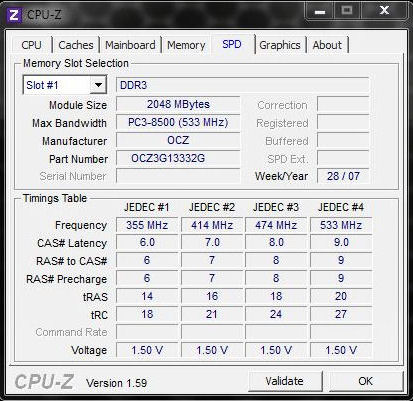
They're 1,066Mhz RAM modules, and all four strips reported exactly as shown below in the screenshot before shipping them off. I have anti-static rubber matting for workshop bench tops and the floor area, and use a ground connection on the chassis whenever working on internal components.

These units run happily at 1.333Mhz on a Gigabyte board in fact, and have been stable for over two years at that frequency, with no system freezes, data corruption, or BSOD's.
kQ85y.jpg


Safely received by my friend, her teenage son then installed them to a base level Asus mainboard in which they are specifically listed as compatible. But he did so without any precautions against ESD shocks and did not upgrade his board BIOS before fitting them (his BIOS was something like three revisions old as compared to the most recent edition).

His system would not boot with both sticks installed. He's running W7 x86 Ultimate Edition.

With one stick installed it would boot. However the timings and frequency the board, and I'm assured at default BIOS values, showed were not as per the screenshot above.

I got his mother to test the RAM in another board, and the module which would not boot on her sons Asus board did boot on her ASRock X48 Turbo board (although she did not run memory diagnostics or test it thoroughly).

Advising they return it to me I replaced it in the Gigabyte board it had come out of and ran it at 1,066Mhz and standard timings, but got several freezes and then a handful of BSOD's in the space of a few hours.

The dump files show the errors were due to the memory.

I removed the offending stick. Everything ran perfectly, all timings were identical and as per OCZ specifications.

I reinserted the offending module and ran Windows memory diagnostics at the harshest level for four cycles, taking some five plus hours. Multiple errors arose.

The three decent sticks were removed. I then manually set the suspect RAM timings to OCZ defaults in the BIOS. The board would not boot.

Allowing the BIOS to automatically set and optimize the RAM settings with solely the suspect module in place resulted in a successful boot, and I got the second screenshot below. You will notice the timings are askew and the RAM frequency is off key. The system freezes and is unstable.

7PZ7s.jpg


Could anyone speculate what has happened to the module behaving as per these readings?

I believe that her son may have tried running it on an Asus BIOS which was written without compatibility for these OCZ modules, and that he could have over-volted the RAM, or that static electricity damaged it when it was fitted.

OCZ no longer make these units. If I were to RMA anything it must now be returned to a service centre in Europe, at my expense. The warranty only covers defects in manufacturing. Does anyone know what OCZ are likely to say, or whether they could determine why the RAM suddenly failed when fitted to a different board?

If RMA'd is it likely that OCZ reject it under warranty? Has anyone had any experience of the standards of customer service OCZ provide?

Any advice appreciated. For the moment everything's running stable with 6Gb of RAM onboard.
 

My Computer

Computer Manufacturer/Model Number
Custom built machine
OS
W7 x64
CPU
Intel Q9300 2.5Ghz Quad LGA775 (Would like Q9650)
Motherboard
Gigabyte GA-EP45T-UD3R (F6 Bios)
Memory
4Gb OCZ Gold 1,333Mhz
Graphics Card(s)
Palit HD4850 O/C Sonic 512Mb DDR3, Dual DViD's
Sound Card
Azalia to twin Samson 50w Studio Monitors
Monitor(s) Displays
Twin Dell (E-IPS) U2311H 23.6" Screens
Screen Resolution
1920 x 1080 @ 60Hz
Hard Drives
Crucial M4 SSD, archives on twin Western Digital Caviar Black WD2002FAEX, 2TB, 7200rpm HDD's, Samsung Ritemaster CD/DVD Burner...
PSU
OCZ 600w
Case
Lian-Li PC8 acoustifoamed' aluminium tower
Cooling
Scythe 140mm Zipang
Keyboard
Cherry PS/2 custom model
Mouse
Lenovo USB laser "Thinkpad" Mouse
Internet Speed
ADSL2+ @14Mbps downstream & Cat6 Gigabit Ethernet
Antivirus
NOD32
Browser
Opera
Other Info
Silicon Dust HD Homerun Dual FTA (Ethernet) TV Tuners, Dray Tek Vigor 2850Vn router and 8x HP Gigabit Switch. Lian-Li CR26 Card Reader, Canon MF4430 iSensys laser printer/scanner.
have you tryed setting the timming and voltage yourself ? also is there any reason you used slot 3 and not 1?
try setting the timming to ( 9.0 - 9 - 9 - 20 - 27 ) and voltage (1.50) and see what happens. if that don't do it try bumping up the voltage just a little bit and try it again...

scrooge
 

My Computer

Computer Manufacturer/Model Number
home build
OS
win 7 ( 64 bit)
CPU
Intel Core i7-870 Lynnfield 2.93GHz 8MB L3 Cache LGA 1156 95
Motherboard
ASUS P7P55 LX LGA 1156
Memory
G.SKILL Sniper Series 16GB (4 x 4GB) 240-Pin DDR3 SDRAM
Graphics Card(s)
ATI Radeon HD6800 Series
Sound Card
hdmi
Monitor(s) Displays
42" lg 3d tv
Screen Resolution
1920 x 1080
Hard Drives
1 ssd pci-e revodrive
4 seagate 1.5 tb
PSU
Rosewill BRONZE Series RBR1000-M 1000W Continuous@40°C, 80Pl
Case
CoolMaster 922
Cooling
CORSAIR CWCH60 Hydro Series H60 High Performance Liquid CPU
Keyboard
logtech
Mouse
logitect
Internet Speed
5 mbit
A problem that many folks make is not to kill the power going to the board by pulling out the AC cord (or flipping the switch off on the back of the P/S if it has one) and then hitting the case power button to drain any remaining charge off the capacitors. MB, even when turned off still have power going through them and removing/installing memory without draining this power can damage the memory.
 

My Computer

Computer Manufacturer/Model Number
Home build
OS
Windows 7 Pro x64
CPU
AMD FX 4100 4 Core 3.6GHz AM3+
Motherboard
ASROCK 970 Extreme3
Memory
16GB G.Skill RipjawsX
Graphics Card(s)
Radeon 6850
Sound Card
ASUS Xonar D1
Monitor(s) Displays
ASUS 23" LCD
Hard Drives
SSD 120GB
WD 750GB Black series
WD 640GB Black series
PSU
700W
Case
Antec 100
Cooling
Hyper 212 Plus
Internet Speed
50MB
I have only ever updated my or a bios once in my many years of building and repairing computers, and that was only to allow my mobo to accept a core 2 quad cpu.
If it aint broke don't fix it!

I highly doubt the bios would be to blame, and to my knowledge no motherboard at default spec would have a ram voltage at such a different level to that of another board, within the same family of ram (ddr3) and voltage ranges are vast as it is.

Static electricity... I'm a sceptic. Yes when I was really young I had the anti static bracelet and made sure I was grounded to at least 2 sources. But no matter how hard I've tried I can't make components die! Even scuffing around with rubber shoes till I actually transfer a static bolt to components lol.

Compatibility issue gets my vote. Some things just don't go together!

Sent from my BlackBerry 9900 using Tapatalk
 

My Computer

Computer type
PC/Desktop
Computer Manufacturer/Model Number
Built by badgers!!!
OS
Windows 7 Ultimate x64, & Mac OS X 10.9.2
CPU
Intel Core i5 2500k
Motherboard
Asus P8z68 LE
Memory
Corsair Vengence 8gb 1866mhz
Graphics Card(s)
Nvidia GTX 770 OC
Monitor(s) Displays
2x ASUS LED 22" IPS
Screen Resolution
3840x1080
Hard Drives
240GB Crucial M500 SSD
120gb Corsair Force 3 SSD
1TB Western Digital
PSU
Corsair HX650w Modular
Case
Corsair Air 540
Cooling
Corsair H60 Push/Pull
Keyboard
Corsair K70/ Logitech G27 wheel
Mouse
Saitek R.A.T 9
Internet Speed
Too slow!
Other Info
AMD fusion E350N Home server-Windows Home Server 2011 (also made by badgers!)
2011 Macbook 2.4ghz Core2Duo, 4gb ddr3, 120gb Ocz Vertex SSD
have you tryed setting the timming and voltage yourself ? also is there any reason you used slot 3 and not 1?
try setting the timming to ( 9.0 - 9 - 9 - 20 - 27 ) and voltage (1.50) and see what happens. if that don't do it try bumping up the voltage just a little bit and try it again...

I've not dared to increase the voltage, but I did force in the correct timings in the Gigabyte board BIOS. When I did this the board would not boot. This was attempted with the one RAM strip in situ, in slots one through to three before I gave up.

The RAM had previously just been working fine at the right timings and at a standard setting of 1.5v. It's possible to push it to 1.65v but I'm reluctant to do that because it could exacerbate any damage. I tried it in various slots, just so happened one of the screenshots was taken of it when it was in slot three.

A problem that many folks make is not to kill the power going to the board by pulling out the AC cord (or flipping the switch off on the back of the P/S if it has one) and then hitting the case power button to drain any remaining charge off the capacitors. MB, even when turned off still have power going through them and removing/installing memory without draining this power can damage the memory.

I too suspect the power issue, at installation, is a significant factor.

There may be no way to definitively tell what happened to it; at least with the diagnostic tools at my disposal, and with the OCZ heatshields it's tough to tell visibly if anything had fried (and removing them to look could cause damage of course, as well as knocking any warranty in the head!)

Thank you both for your replies :)

Does anyone else have actual experience of OCZ's RMA policy in relation to memory?
 

My Computer

Computer Manufacturer/Model Number
Custom built machine
OS
W7 x64
CPU
Intel Q9300 2.5Ghz Quad LGA775 (Would like Q9650)
Motherboard
Gigabyte GA-EP45T-UD3R (F6 Bios)
Memory
4Gb OCZ Gold 1,333Mhz
Graphics Card(s)
Palit HD4850 O/C Sonic 512Mb DDR3, Dual DViD's
Sound Card
Azalia to twin Samson 50w Studio Monitors
Monitor(s) Displays
Twin Dell (E-IPS) U2311H 23.6" Screens
Screen Resolution
1920 x 1080 @ 60Hz
Hard Drives
Crucial M4 SSD, archives on twin Western Digital Caviar Black WD2002FAEX, 2TB, 7200rpm HDD's, Samsung Ritemaster CD/DVD Burner...
PSU
OCZ 600w
Case
Lian-Li PC8 acoustifoamed' aluminium tower
Cooling
Scythe 140mm Zipang
Keyboard
Cherry PS/2 custom model
Mouse
Lenovo USB laser "Thinkpad" Mouse
Internet Speed
ADSL2+ @14Mbps downstream & Cat6 Gigabit Ethernet
Antivirus
NOD32
Browser
Opera
Other Info
Silicon Dust HD Homerun Dual FTA (Ethernet) TV Tuners, Dray Tek Vigor 2850Vn router and 8x HP Gigabit Switch. Lian-Li CR26 Card Reader, Canon MF4430 iSensys laser printer/scanner.
Yeah I have, limited is an understatment! I had some of there ddr2 gold plated things back in the day, and had a couple go bad.
I got no where. It was basically my fault so I was told. But then I contacted ebuyer who I got them off and I had a carrier at my door the next day, it was collected and I was refunded :)
 

My Computer

Computer type
PC/Desktop
Computer Manufacturer/Model Number
Built by badgers!!!
OS
Windows 7 Ultimate x64, & Mac OS X 10.9.2
CPU
Intel Core i5 2500k
Motherboard
Asus P8z68 LE
Memory
Corsair Vengence 8gb 1866mhz
Graphics Card(s)
Nvidia GTX 770 OC
Monitor(s) Displays
2x ASUS LED 22" IPS
Screen Resolution
3840x1080
Hard Drives
240GB Crucial M500 SSD
120gb Corsair Force 3 SSD
1TB Western Digital
PSU
Corsair HX650w Modular
Case
Corsair Air 540
Cooling
Corsair H60 Push/Pull
Keyboard
Corsair K70/ Logitech G27 wheel
Mouse
Saitek R.A.T 9
Internet Speed
Too slow!
Other Info
AMD fusion E350N Home server-Windows Home Server 2011 (also made by badgers!)
2011 Macbook 2.4ghz Core2Duo, 4gb ddr3, 120gb Ocz Vertex SSD
I have only ever updated my or a bios once in my many years of building and repairing computers, and that was only to allow my mobo to accept a core 2 quad cpu.
If it aint broke don't fix it!

I highly doubt the bios would be to blame, and to my knowledge no motherboard at default spec would have a ram voltage at such a different level to that of another board, within the same family of ram (ddr3) and voltage ranges are vast as it is.

Static electricity... I'm a sceptic. Yes when I was really young I had the anti static bracelet and made sure I was grounded to at least 2 sources. But no matter how hard I've tried I can't make components die! Even scuffing around with rubber shoes till I actually transfer a static bolt to components lol.

Compatibility issue gets my vote. Some things just don't go together!

--

Yeah I have, limited is an understatment! I had some of there ddr2 gold plated things back in the day, and had a couple go bad.
I got no where. It was basically my fault so I was told. But then I contacted ebuyer who I got them off and I had a carrier at my door the next day, it was collected and I was refunded :)

Thanks for the RMA input in particular. These strips also came from ebuyer originally oddly enough! It'd be worth asking if I can RMA them to ebuyer I guess, however the invoice was raised in late 2008, so I have some doubt about that now being acceptable to the store!

The budget Asus board these were going into had around six BIOS updates in as many months; and was a new build. It came as a package deal evidently, with a G620 (crippled i5) Intel CPU and basic 2Gb single Kingston RAM strip.

Apparently it was working fine, even though the BIOS loaded was some 2/3 revisions behind the latest.

I suspect the board may support a bus clock speed of 1,333Mhz. However the CPU does not support more than 1,066Mhz.

Unfortunately I wasn't present when it was fitted, but I do not believe the PSU capacitors were drained, and I've no idea whether the BIOS settings were correct.

I suggested a BIOS update after the buyer reported non-boot; in case the memory compatibility list was based on a particular level of board BIOS, and because there had been so many releases in a short time scale. Suffice to say this proved not to solve the problem.

On the ESD front I've known static electricity to kill both sound and ethernet chips on the edge of motherboards, and have sometimes suspected it might have played a role in damage to other components. In my experience it does seem to be linked to people, rather than hardware, simply because some folk do seem to have ESD issues more than Joe Average might!

As far as I'm concerned the strip cannot be trusted and what I actually get left from the situation is a single piece of 2Gb DDR3 which I could perhaps sell to someone with a mini HTPC style board.

I've asked the buyer to consider carefully what further costs could arise in sending it back to OCZ in Europe, versus the likelihood of an RMA claim being rejected.
 

My Computer

Computer Manufacturer/Model Number
Custom built machine
OS
W7 x64
CPU
Intel Q9300 2.5Ghz Quad LGA775 (Would like Q9650)
Motherboard
Gigabyte GA-EP45T-UD3R (F6 Bios)
Memory
4Gb OCZ Gold 1,333Mhz
Graphics Card(s)
Palit HD4850 O/C Sonic 512Mb DDR3, Dual DViD's
Sound Card
Azalia to twin Samson 50w Studio Monitors
Monitor(s) Displays
Twin Dell (E-IPS) U2311H 23.6" Screens
Screen Resolution
1920 x 1080 @ 60Hz
Hard Drives
Crucial M4 SSD, archives on twin Western Digital Caviar Black WD2002FAEX, 2TB, 7200rpm HDD's, Samsung Ritemaster CD/DVD Burner...
PSU
OCZ 600w
Case
Lian-Li PC8 acoustifoamed' aluminium tower
Cooling
Scythe 140mm Zipang
Keyboard
Cherry PS/2 custom model
Mouse
Lenovo USB laser "Thinkpad" Mouse
Internet Speed
ADSL2+ @14Mbps downstream & Cat6 Gigabit Ethernet
Antivirus
NOD32
Browser
Opera
Other Info
Silicon Dust HD Homerun Dual FTA (Ethernet) TV Tuners, Dray Tek Vigor 2850Vn router and 8x HP Gigabit Switch. Lian-Li CR26 Card Reader, Canon MF4430 iSensys laser printer/scanner.
...
Does anyone else have actual experience of OCZ's RMA policy in relation to memory?
Yes, not good at all, unless you push very hard. Their hope & intent is that you'll get frustrated & go away. It took 2 months to get a check fo $5, after sending back the defective flash memory, product card & proof of purchase from approved vendor.

I will never buy another OCZ product again & recommend no one else does either. I will continue to give them bad reviews as long as they adhere to their policy of bad customer support & warranty. Their waranty marginally meets the letter of the law without meeting the intent of the law & they will continue to do what they do until we, the customers, no longer purchase their products & they finally go out of business & the executives disappear from the scene.
 

My Computer

Computer type
PC/Desktop
Computer Manufacturer/Model Number
Dell Inspiron 660
OS
Windows 7 Home Premium 64bit
CPU
Intel Core i3-3240
Motherboard
Dell 084J0R
Memory
8GB DDR3 SDRAM
Graphics Card(s)
EVGA GeForce GT 620
Sound Card
Intel Panther Point PCH High Definition Audio
Monitor(s) Displays
Acer G205HV
Screen Resolution
1600 x 900
Hard Drives
Sandisk SSD 64GB SDSSDP064G
Seagate HDD 1TB ST1000DM003-1CH162
PSU
Dell 300W
Case
Dell Inspiron
Keyboard
Logitech Wireless K320/B350
Mouse
Microsoft
Internet Speed
25Mbps/4Mbps
Antivirus
Avast
Browser
Mozilla Firefox
Only ocz product I have is one of my ssd's, but I'd stick with corsair normally as my others are great.

Thing is, RAM is so cheap these days its almost pointless to try and get repaired or RMA'd I just put an extra 2gb of ram in my server, cost me £8 lol
 

My Computer

Computer type
PC/Desktop
Computer Manufacturer/Model Number
Built by badgers!!!
OS
Windows 7 Ultimate x64, & Mac OS X 10.9.2
CPU
Intel Core i5 2500k
Motherboard
Asus P8z68 LE
Memory
Corsair Vengence 8gb 1866mhz
Graphics Card(s)
Nvidia GTX 770 OC
Monitor(s) Displays
2x ASUS LED 22" IPS
Screen Resolution
3840x1080
Hard Drives
240GB Crucial M500 SSD
120gb Corsair Force 3 SSD
1TB Western Digital
PSU
Corsair HX650w Modular
Case
Corsair Air 540
Cooling
Corsair H60 Push/Pull
Keyboard
Corsair K70/ Logitech G27 wheel
Mouse
Saitek R.A.T 9
Internet Speed
Too slow!
Other Info
AMD fusion E350N Home server-Windows Home Server 2011 (also made by badgers!)
2011 Macbook 2.4ghz Core2Duo, 4gb ddr3, 120gb Ocz Vertex SSD
...Thing is, RAM is so cheap these days its almost pointless to try and get repaired or RMA'd...
That's exactly what they are hoping you will do and that is your right, but not in your best future interest. I say, if the have a warranty, hold them to it. The reason being, if you don't, they have no incentive to produce a quality product. This is why all electronics is now junk, the customers don't hold the manufacturer's accountable.

I'm not trying to 'dis you in particular, just think about what I'm saying. I've been dealing with electronics (designed computers of all kinds) all my life and have seen a drastic decline in quality in recent years. It will only get worse until customers say, "no more".
 

My Computer

Computer type
PC/Desktop
Computer Manufacturer/Model Number
Dell Inspiron 660
OS
Windows 7 Home Premium 64bit
CPU
Intel Core i3-3240
Motherboard
Dell 084J0R
Memory
8GB DDR3 SDRAM
Graphics Card(s)
EVGA GeForce GT 620
Sound Card
Intel Panther Point PCH High Definition Audio
Monitor(s) Displays
Acer G205HV
Screen Resolution
1600 x 900
Hard Drives
Sandisk SSD 64GB SDSSDP064G
Seagate HDD 1TB ST1000DM003-1CH162
PSU
Dell 300W
Case
Dell Inspiron
Keyboard
Logitech Wireless K320/B350
Mouse
Microsoft
Internet Speed
25Mbps/4Mbps
Antivirus
Avast
Browser
Mozilla Firefox
No I completely agree with you. But I've grown up in the throw away society. I'd rather buy and replace something than be without it while its repaired. Then I'd consider the repair and sell it or keep it as spare.

Ocz wouldn't benefit if op changed brands, but then again the people who made it would as most probably come out the same factory lol.
 

My Computer

Computer type
PC/Desktop
Computer Manufacturer/Model Number
Built by badgers!!!
OS
Windows 7 Ultimate x64, & Mac OS X 10.9.2
CPU
Intel Core i5 2500k
Motherboard
Asus P8z68 LE
Memory
Corsair Vengence 8gb 1866mhz
Graphics Card(s)
Nvidia GTX 770 OC
Monitor(s) Displays
2x ASUS LED 22" IPS
Screen Resolution
3840x1080
Hard Drives
240GB Crucial M500 SSD
120gb Corsair Force 3 SSD
1TB Western Digital
PSU
Corsair HX650w Modular
Case
Corsair Air 540
Cooling
Corsair H60 Push/Pull
Keyboard
Corsair K70/ Logitech G27 wheel
Mouse
Saitek R.A.T 9
Internet Speed
Too slow!
Other Info
AMD fusion E350N Home server-Windows Home Server 2011 (also made by badgers!)
2011 Macbook 2.4ghz Core2Duo, 4gb ddr3, 120gb Ocz Vertex SSD
What really gets my goat is that the original cost of the RAM was very high, and it shouldn't "go bad" within this timespan.

Et1Ap.jpg


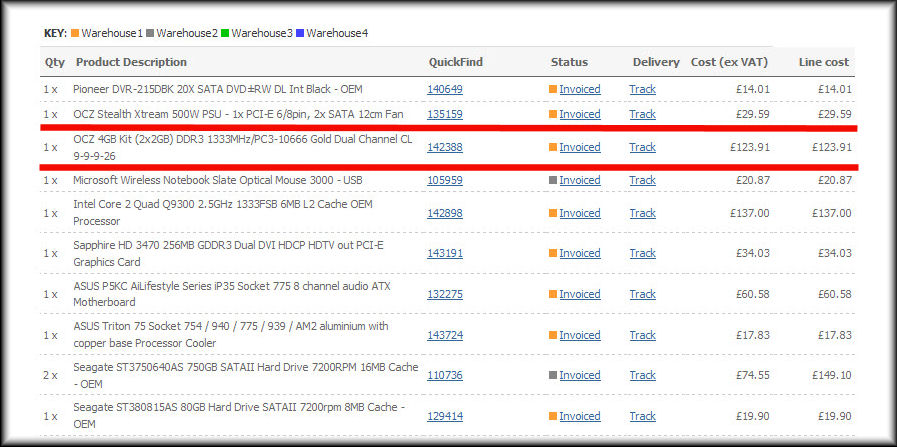
The 8Gb cost was virtually £248 inc VAT when DDR3 was the latest thing :cry:

Seemingly there's not much chance of getting any joy from OCZ on the issue as I can' argue with them if they say it's down to abusive or neglectful fitting.
 

My Computer

Computer Manufacturer/Model Number
Custom built machine
OS
W7 x64
CPU
Intel Q9300 2.5Ghz Quad LGA775 (Would like Q9650)
Motherboard
Gigabyte GA-EP45T-UD3R (F6 Bios)
Memory
4Gb OCZ Gold 1,333Mhz
Graphics Card(s)
Palit HD4850 O/C Sonic 512Mb DDR3, Dual DViD's
Sound Card
Azalia to twin Samson 50w Studio Monitors
Monitor(s) Displays
Twin Dell (E-IPS) U2311H 23.6" Screens
Screen Resolution
1920 x 1080 @ 60Hz
Hard Drives
Crucial M4 SSD, archives on twin Western Digital Caviar Black WD2002FAEX, 2TB, 7200rpm HDD's, Samsung Ritemaster CD/DVD Burner...
PSU
OCZ 600w
Case
Lian-Li PC8 acoustifoamed' aluminium tower
Cooling
Scythe 140mm Zipang
Keyboard
Cherry PS/2 custom model
Mouse
Lenovo USB laser "Thinkpad" Mouse
Internet Speed
ADSL2+ @14Mbps downstream & Cat6 Gigabit Ethernet
Antivirus
NOD32
Browser
Opera
Other Info
Silicon Dust HD Homerun Dual FTA (Ethernet) TV Tuners, Dray Tek Vigor 2850Vn router and 8x HP Gigabit Switch. Lian-Li CR26 Card Reader, Canon MF4430 iSensys laser printer/scanner.
I would send them back mentioning what was done but not that it was by a 3rd party, your buyer. I think the RAM is lifetime warranty? If there is no visible physical damage they can't honestly say it was an installation issue nor, as far as I know, test it for being over volted.
NOTE: I am very tenacious when it comes to getting warranty service that I deserve.
 

My Computer

Computer type
PC/Desktop
Computer Manufacturer/Model Number
Home Built Desktop By DataTech
OS
Windows 7 Ultimate X64 SP1
CPU
Intel i5-2550K, Differing ~4.4-4.8GHz No built in GPU
Motherboard
ASUS P8Z68-V PRO/GEN3
Memory
16GB G.Skill Sniper 1866MHz @ 2133MHz 2x8GB
Graphics Card(s)
ASUS GTX650TIB-DC2OC-2GD5, (650TI Boost)
Sound Card
Onboard Realtek 5-1
Monitor(s) Displays
Samsung P2570HD
Screen Resolution
1920x1080
Hard Drives
Samsung 840 Pro 256GB SSD for OS, 500GB Seagate Constellation (Enterprise drive) for Data
PSU
Corsair HX650W
Case
Inwin Dragon Rider
Cooling
Hyper 212 EVO w/two Noctua fans, push-pull, @1300 RPM
Keyboard
E-Z Eyes, bright yellow keys with large characters
Mouse
steelseries SENSEI Laser Pro Gaming
Internet Speed
48-51Mbs Mbs down, 11 Mbs up Xfinity Cable
Antivirus
Norton Internet Security 2013
Browser
IE 10, Opera, Pale Moon if needed
Other Info
4 case fans, LG BluRay-RE, ASUS DVD-RW, Mr. Fusion power supply, 1.21 gigawatts.
I've given my buyer, a friend, the option of a residual value refund, or I have offered to return the RAM to OCZ as long as they're happy to foot shipping costs (which could be incurred both ways).

Quite honestly the second hand value of it isn't enormous, at around a third of the original cost. If there are also further postage costs, especially insured signed for international services, it's going to begin pushing the reality envelope in terms of how much it costs to even attempt to have it resolved.

I can't knock OCZ, the product's worked flawlessly for me. Ironically it's not even on my own motherboards list of supported modules, yet when transferred to a board which was listed as compatible, the crap hits the fan...

I've no experience of their warranty service, but there's some opinion on this thread that 'it is not that great!'
 

My Computer

Computer Manufacturer/Model Number
Custom built machine
OS
W7 x64
CPU
Intel Q9300 2.5Ghz Quad LGA775 (Would like Q9650)
Motherboard
Gigabyte GA-EP45T-UD3R (F6 Bios)
Memory
4Gb OCZ Gold 1,333Mhz
Graphics Card(s)
Palit HD4850 O/C Sonic 512Mb DDR3, Dual DViD's
Sound Card
Azalia to twin Samson 50w Studio Monitors
Monitor(s) Displays
Twin Dell (E-IPS) U2311H 23.6" Screens
Screen Resolution
1920 x 1080 @ 60Hz
Hard Drives
Crucial M4 SSD, archives on twin Western Digital Caviar Black WD2002FAEX, 2TB, 7200rpm HDD's, Samsung Ritemaster CD/DVD Burner...
PSU
OCZ 600w
Case
Lian-Li PC8 acoustifoamed' aluminium tower
Cooling
Scythe 140mm Zipang
Keyboard
Cherry PS/2 custom model
Mouse
Lenovo USB laser "Thinkpad" Mouse
Internet Speed
ADSL2+ @14Mbps downstream & Cat6 Gigabit Ethernet
Antivirus
NOD32
Browser
Opera
Other Info
Silicon Dust HD Homerun Dual FTA (Ethernet) TV Tuners, Dray Tek Vigor 2850Vn router and 8x HP Gigabit Switch. Lian-Li CR26 Card Reader, Canon MF4430 iSensys laser printer/scanner.
You will have to pay shipping to them, they should pay for the return trip. That's how nice companies work.
If I may put in a plug for GSkill RAM, ti works as advertized and their support via email or phone is top-notch and they have some techs on their support forums.
Disclaimer, I make nothing from GSkill for saying this, just my opinion based on experiemce.
 

My Computer

Computer type
PC/Desktop
Computer Manufacturer/Model Number
Home Built Desktop By DataTech
OS
Windows 7 Ultimate X64 SP1
CPU
Intel i5-2550K, Differing ~4.4-4.8GHz No built in GPU
Motherboard
ASUS P8Z68-V PRO/GEN3
Memory
16GB G.Skill Sniper 1866MHz @ 2133MHz 2x8GB
Graphics Card(s)
ASUS GTX650TIB-DC2OC-2GD5, (650TI Boost)
Sound Card
Onboard Realtek 5-1
Monitor(s) Displays
Samsung P2570HD
Screen Resolution
1920x1080
Hard Drives
Samsung 840 Pro 256GB SSD for OS, 500GB Seagate Constellation (Enterprise drive) for Data
PSU
Corsair HX650W
Case
Inwin Dragon Rider
Cooling
Hyper 212 EVO w/two Noctua fans, push-pull, @1300 RPM
Keyboard
E-Z Eyes, bright yellow keys with large characters
Mouse
steelseries SENSEI Laser Pro Gaming
Internet Speed
48-51Mbs Mbs down, 11 Mbs up Xfinity Cable
Antivirus
Norton Internet Security 2013
Browser
IE 10, Opera, Pale Moon if needed
Other Info
4 case fans, LG BluRay-RE, ASUS DVD-RW, Mr. Fusion power supply, 1.21 gigawatts.
Back
Top