Deactivating Windows?

blooglet

New member
Member
Local time
2:53 AM
Messages
26
I'm migrating from VMware to VirtualBox for my virtual Windows needs. I'm in the process of reinstalling Windows.

I got this Dutch error during install:

JcOjl.png


This translates roughly to "The product code does not match the current Windows version". I assume this is because my VMware install is relatively recent, so I can't reuse my product key in VirtualBox yet. Can I deactivate my VMware Windows install so that I can reuse the key?
 

My Computer

OS
Windows 7 Ultimate 32-bit
Make sure you're using the right key, as that message would only show up if you tried to say, use a Professional key in an Ultimate install or other similar scenarios. If the key can't be re-activated yet, it'd simply give you an activation failed message when you tried to Activate.
 

My Computer

OS
7x64 SP1
CPU
Intel 2600K
Motherboard
Intel DZ77GA-70K
Memory
8GB Samsung
Graphics Card(s)
MSI 670
Sound Card
HT Omega Striker 7.1
Monitor(s) Displays
Dell U2412M
Screen Resolution
1920x1200
Hard Drives
2x 3TB WD Green
1x 4TB Hitachi
1x Intel 330 Series 180GB SSD
PSU
Corsair HX850
Sorry but I don't think so. De-Activating windows is not an option. The only way to move a copy of windows to another environment/equipment is via microsoft and then if you had a catastrophic failure of your hard disk. MS does have a heart in these cases.

And as Stormkitty replied, you might have an incorrect key code which works on a different version that you installed.

rich
 
Last edited:

My Computer

Computer type
Laptop
Computer Manufacturer/Model Number
Toshiba Laptop Qosimo X870
OS
Windows 7 Pro x64 SP1
CPU
Intel Core I7
Motherboard
Toshiba Qosmio
Memory
16 Gigs
Graphics Card(s)
NVIDIA GeForce GTX 670M
Monitor(s) Displays
17.7" laptop
Screen Resolution
1600 x 900
Hard Drives
256 Gig SanDisk SSD for C
256 Gig Intel SSD for D
Internet Speed
50/25 FIOS
Antivirus
Vipre (all you can eat for 10 machines)
Browser
IE and FF
Other Info
I have dos 6.22, wfwg 3.11, win98, 2000 and xp VHD's available for testing. MS's Virtual PC works great.
I would assume different hardware is being seen. As a rule of thumb, a retail key can be moved as long as it is used on a single computer (real/virtual) at a time, so you should be OK if you remove the vmware bit and use the product key (you should have a retail key) on the virtualbox. In case of issues, phone activation can be used. For specifics about the virtual parts, post this question in the Virtualization sub-forum.
 

My Computer

Computer Manufacturer/Model Number
Too many to describe...
OS
Windows 7 x64 pro/ Windows 7 x86 Pro/ XP SP3 x86
Make sure you're using the right key, as that message would only show up if you tried to say, use a Professional key in an Ultimate install or other similar scenarios. If the key can't be re-activated yet, it'd simply give you an activation failed message when you tried to Activate.
I have a legitimately obtained Ultimate install disc and I wanted to use a Home Premium key, but I read somewhere that all Windows 7 install discs are the same (except for the architecture) so I figured it was fine. Are you sure?

The only way to move a copy of windows to another environment/equipment is via microsoft and then if you had a catastrophic failure of your hard disk. MS does have a heart in these cases.
So I'm stuck with VMware?

As a rule of thumb, a retail key can be moved as long as it is used on a single computer (real/virtual) at a time, so you should be OK if you remove the vmware bit and use the product key (you should have a retail key) on the virtualbox.
Wouldn't that require Microsoft to be able to detect that I deleted the VMware hard disk?
 

My Computer

OS
Windows 7 Ultimate 32-bit
Wouldn't that require Microsoft to be able to detect that I deleted the VMware hard disk?
Removal of an OS by formatting the hard disk or otherwise overwriting is a local event, theres no corresponding reset of activation data in the MS servers till you activate a new install. If your key is retail, its fine to transfer it another physical/virtual install as long as its used on only one PC at a time.

I have a legitimately obtained Ultimate install disc and I wanted to use a Home Premium key, but I read somewhere that all Windows 7 install discs are the same (except for the architecture) so I figured it was fine. Are you sure?
Product keys are edition specific so no, a home premium key cant be used to activate an Ultimate install if thats what you are trying to do. But win7 install disks are same in the sense that all disks contain all images, if you have an Ultimate disk you can turn it into a universal installer this way.

http://www.sevenforums.com/tutorials/85813-windows-7-universal-installation-disc-create.html

Then just install home premium and activate with the home premium key.
 

My Computer

Computer Manufacturer/Model Number
Too many to describe...
OS
Windows 7 x64 pro/ Windows 7 x86 Pro/ XP SP3 x86
Hello.


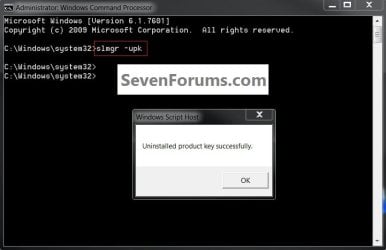
A product activation key can be deactivated in a Windows 7 OS if you like, run this command in an elevated command window and hit the <enter> key.


click to enlarge
UninstallKey.jpg
 

My Computer

Computer Manufacturer/Model Number
* BFK Customs *
OS
W 7 64-bit Ultimate
CPU
Intel Q9550 Yorkfield
Motherboard
ASUS P5Q Pro
Memory
8GB Dominator 8500C5D
Graphics Card(s)
ATI : XFX 5870
Sound Card
Realtek HD Audio 7-1
Monitor(s) Displays
1x 47" LCD HDMI & 3x 26" LCD HDMI
Screen Resolution
1920x1080P & 1920x1200
Hard Drives
1x 80GB Intel X25-M G2 SSD : 1x 500GB & 1x 640GB WD Caviar Black(s)
PSU
Corsair 620HX
Case
Cooler Master RC-690
Cooling
Tuniq Tower 120, 2x 140mm and 3x 120mm case fans
Keyboard
Microsoft 500
Mouse
Razer Diamondback 3G
Internet Speed
14 Mb/s
Other Info
1x Koutech 3Gb/s SATA HDD Hot Swap Rack

My Computer

Computer Manufacturer/Model Number
homegrown
OS
Windows 7 Pro X64 SP1
CPU
Intel Core I7-3930k
Motherboard
Asus P9X79 Pro
Memory
16 GB Gskill DDR3-2133
Graphics Card(s)
eVGA GTX680
Sound Card
Creative X-Fi Titanium
Monitor(s) Displays
As PA246Q
Screen Resolution
1920 X 1200
Hard Drives
Corsair Force GT, 120 GB
WDC 1.5TB Caviar Black
PSU
PCP&C Silencer 750 Crossfire
Case
Silverstone FT02
Cooling
Noctua NH-D14
Keyboard
cheap Logitech USB
Mouse
Microsoft Intellimouse Explorer (old optical) USB
Internet Speed
6Mb cable
Other Info
Pioneer BDR-205
Samsung SH-203B
Monsoon 5.1 speakers
Hello.


A product activation key can be deactivated in a Windows 7 OS if you like, run this command in an elevated command window and hit the <enter> key.
click to enlarge
View attachment 144039

That deactivates Windows on the machine, but doesn't do anything as regards the Microsoft activation servers. Right?

That's a good question though if it's not activated, when the OS boots it would 'show' that to the MS servers wouldn't it; I'm now curious myself?
 

My Computer

Computer Manufacturer/Model Number
* BFK Customs *
OS
W 7 64-bit Ultimate
CPU
Intel Q9550 Yorkfield
Motherboard
ASUS P5Q Pro
Memory
8GB Dominator 8500C5D
Graphics Card(s)
ATI : XFX 5870
Sound Card
Realtek HD Audio 7-1
Monitor(s) Displays
1x 47" LCD HDMI & 3x 26" LCD HDMI
Screen Resolution
1920x1080P & 1920x1200
Hard Drives
1x 80GB Intel X25-M G2 SSD : 1x 500GB & 1x 640GB WD Caviar Black(s)
PSU
Corsair 620HX
Case
Cooler Master RC-690
Cooling
Tuniq Tower 120, 2x 140mm and 3x 120mm case fans
Keyboard
Microsoft 500
Mouse
Razer Diamondback 3G
Internet Speed
14 Mb/s
Other Info
1x Koutech 3Gb/s SATA HDD Hot Swap Rack
Uninstalling the Product key is only local, to remove a Product Key being moved elsewhere so that when it connects to the internet it won't be rudely deactivated because the Key has a new hardware signature. :shock: However the installation which Product Key has been uninstalled will immediately be flagged as non-geniune unless rearmed temporarily.

To deactivate in MS activation servers the current hardware signature tied to the key needs to be overwritten with a new hardware signature which is done during activation.

This is the reason if there is an existing hardware signature tied to that Product Key the robocall asks how many computers the Product key is installed upon, to which the only acceptable answer is one. This gives the go-ahead to overwrite the previous hardware signature with the new one, and if the previous installation connects to the internet it will be deactivated.

This has been pieced together from years of experience, and comments in our Activation forum here - especially by Bill2 who is especially expert on this.
 
Thanks for the info.
 

My Computer

Computer Manufacturer/Model Number
* BFK Customs *
OS
W 7 64-bit Ultimate
CPU
Intel Q9550 Yorkfield
Motherboard
ASUS P5Q Pro
Memory
8GB Dominator 8500C5D
Graphics Card(s)
ATI : XFX 5870
Sound Card
Realtek HD Audio 7-1
Monitor(s) Displays
1x 47" LCD HDMI & 3x 26" LCD HDMI
Screen Resolution
1920x1080P & 1920x1200
Hard Drives
1x 80GB Intel X25-M G2 SSD : 1x 500GB & 1x 640GB WD Caviar Black(s)
PSU
Corsair 620HX
Case
Cooler Master RC-690
Cooling
Tuniq Tower 120, 2x 140mm and 3x 120mm case fans
Keyboard
Microsoft 500
Mouse
Razer Diamondback 3G
Internet Speed
14 Mb/s
Other Info
1x Koutech 3Gb/s SATA HDD Hot Swap Rack
Your most welcome. If I got anything incorrect, Bill2 will chime in shortly (thankfully).
 
Back
Top