
Solved dead in water please help with Raid 1 setup with UEFI

Airbander

New member
Power User
Local time
11:32 PM
Messages
83
Hi

here is the video of my issue :
http://www.youtube.com/watch?v=1m5I0O-nuF4&feature=yout...

I am not able to install OS with Raid one with 2 SSD drives 120GB each and UEFI Motherboard

=======================
Motherboard:
ASUS M5A97 Evo - AM3+ - 970 - SATA 6Gbps and USB 3.0 - ATX AMD ATX DDR3 2133 Motherboards
========================

No matter what i do nothing works

Please guys can someone advise or help

Thanks
 

My Computer My Computer

At a glance

Windows 7 Ultimate x64AMD Phenom(tm) II X4 945 Processor16.00 GB(1) LogMeIn Mirror Driver (2) NVIDIA GeForce 210
Computer type
PC/Desktop
Computer Manufacturer/Model Number
None Home built server
OS
Windows 7 Ultimate x64
CPU
AMD Phenom(tm) II X4 945 Processor
Motherboard
ASUSTeK COMPUTER INC. M5A97 EVO
Memory
16.00 GB
Graphics Card(s)
(1) LogMeIn Mirror Driver (2) NVIDIA GeForce 210
Sound Card
(1) AnvSoft Virtual Sound Device (2) NVIDIA High Definitio
Monitor(s) Displays
None as it is server
Screen Resolution
None
Hard Drives
Hitachi HDS722020ALA330 ATA Device
Samsung SSD 840 Series ATA Device OS and C Drive
ST3000DM001-9YN166 ATA Device
WDC WD20EARX-22PASB0 ATA Device
WDC WD30EZRX-00DC0B0 ATA Device
WDC WD30EZRX-00MMMB0 ATA Device
Hitachi HDS5C3020ALA632 SCSI Dis
Other Info
It my Media system and i have all my stuff in it
Obviously we are not able to see what's on the screen with the video taken at an angle and a distance.

We see nothing but problems here with RAID. What benefit did you hope to get from RAID1?

I would unplug the other HD to Clean Install Windows 7 to a single HD to avoid problems.
 
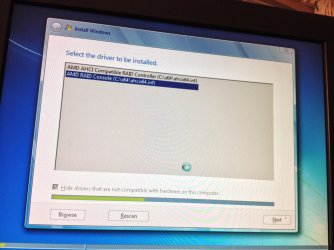
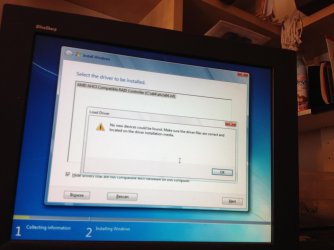
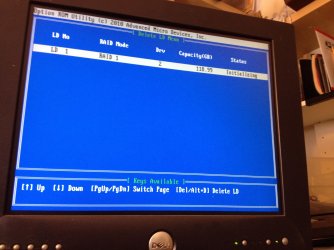
Hello The plan is to have 2 SSD in Raid 1 Mirror so if one SSD drive then i have second one but this plan is not working as my motherboard is UEFI and it is pain in my back when ever it comes to install OS.

Here is screenshots :
IMG_0691.jpg
IMG_0698.jpg
IMG_0691.jpg

IMG_0698.jpg

IMG_0695.jpg

IMG_0701.jpg
 

My Computer My Computer

At a glance

Windows 7 Ultimate x64AMD Phenom(tm) II X4 945 Processor16.00 GB(1) LogMeIn Mirror Driver (2) NVIDIA GeForce 210
Computer type
PC/Desktop
Computer Manufacturer/Model Number
None Home built server
OS
Windows 7 Ultimate x64
CPU
AMD Phenom(tm) II X4 945 Processor
Motherboard
ASUSTeK COMPUTER INC. M5A97 EVO
Memory
16.00 GB
Graphics Card(s)
(1) LogMeIn Mirror Driver (2) NVIDIA GeForce 210
Sound Card
(1) AnvSoft Virtual Sound Device (2) NVIDIA High Definitio
Monitor(s) Displays
None as it is server
Screen Resolution
None
Hard Drives
Hitachi HDS722020ALA330 ATA Device
Samsung SSD 840 Series ATA Device OS and C Drive
ST3000DM001-9YN166 ATA Device
WDC WD20EARX-22PASB0 ATA Device
WDC WD30EZRX-00DC0B0 ATA Device
WDC WD30EZRX-00MMMB0 ATA Device
Hitachi HDS5C3020ALA632 SCSI Dis
Other Info
It my Media system and i have all my stuff in it
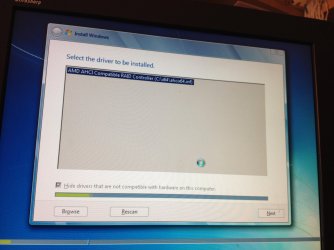
Hello please note this is a UEFI motherboard ASUS M5A97 Evo

My issue is

1- i am not install OS no matter what i do

Thanks
 

My Computer My Computer

At a glance

Windows 7 Ultimate x64AMD Phenom(tm) II X4 945 Processor16.00 GB(1) LogMeIn Mirror Driver (2) NVIDIA GeForce 210
Computer type
PC/Desktop
Computer Manufacturer/Model Number
None Home built server
OS
Windows 7 Ultimate x64
CPU
AMD Phenom(tm) II X4 945 Processor
Motherboard
ASUSTeK COMPUTER INC. M5A97 EVO
Memory
16.00 GB
Graphics Card(s)
(1) LogMeIn Mirror Driver (2) NVIDIA GeForce 210
Sound Card
(1) AnvSoft Virtual Sound Device (2) NVIDIA High Definitio
Monitor(s) Displays
None as it is server
Screen Resolution
None
Hard Drives
Hitachi HDS722020ALA330 ATA Device
Samsung SSD 840 Series ATA Device OS and C Drive
ST3000DM001-9YN166 ATA Device
WDC WD20EARX-22PASB0 ATA Device
WDC WD30EZRX-00DC0B0 ATA Device
WDC WD30EZRX-00MMMB0 ATA Device
Hitachi HDS5C3020ALA632 SCSI Dis
Other Info
It my Media system and i have all my stuff in it
No, if you lose one HD in a RAID1 then you lose everything. There is no redundancy. There is also no appreciable performance benefit vs. installing on one SSD without RAID.

So I would disconnect the RAID, set your SATA controller to AHCI, install to one HD with the other unplugged. If it prompts for driver then you have a bad installer. Start over with a new ISO burned to DVD with the tool from Steps 1 and 2 of Clean Reinstall - Factory OEM Windows 7

For UEFI follow these special steps: UEFI (Unified Extensible Firmware Interface) - Install Windows 7 with - Windows 7 Forums
 
No, if you lose one HD in a RAID1 then you lose everything. There is no redundancy. There is also no appreciable performance benefit vs. installing on one SSD without RAID.

So I would disconnect the RAID, set your SATA controller to AHCI, install to one HD with the other unplugged. If it prompts for driver then you have a bad installer. Start over with a new ISO burned to DVD with the tool from Steps 1 and 2 of Clean Reinstall - Factory OEM Windows 7

For UEFI follow these special steps: UEFI (Unified Extensible Firmware Interface) - Install Windows 7 with - Windows 7 Forums

Hello not arguing with your vast knowledge of computers and technlogy but Raid 0 is different Raid 1 which is mirror

Understanding RAID level-1

RAID level-1 uses data mirroring. Two physical drives are combined into an array, and data is striped across the array. The first half of a stripe is the original data; the second half of a stripe is a mirror (that is, a copy) of the data, but it is written to the other drive in the RAID level-1 array.
RAID level-1 provides data redundancy and high levels of performance, but the storage capacity is diminished. Because the data is mirrored, the capacity of the logical drive when assigned RAID level-1 is 50% of the array capacity.
RAID level-1 requires two physical drives.


http://publib.boulder.ibm.com/infocenter/eserver/v1r2/index.jsp?topic=/diricinfo/fqy0_craid1.html


However you actually suggested something really double at my level of technical skills so i am confident i will be able to do these task on my own so let me try what you have suggested and get back to you with results


BTW: today i was able to install The OS with Raid 1 but then i was doing Fail test and Raid was not rebuilding so i deleted the raid 1 and then re created it and then i tried to install OS when i got this issue and since then i am stuck


Thank you very very much
 

My Computer My Computer

At a glance

Windows 7 Ultimate x64AMD Phenom(tm) II X4 945 Processor16.00 GB(1) LogMeIn Mirror Driver (2) NVIDIA GeForce 210
Computer type
PC/Desktop
Computer Manufacturer/Model Number
None Home built server
OS
Windows 7 Ultimate x64
CPU
AMD Phenom(tm) II X4 945 Processor
Motherboard
ASUSTeK COMPUTER INC. M5A97 EVO
Memory
16.00 GB
Graphics Card(s)
(1) LogMeIn Mirror Driver (2) NVIDIA GeForce 210
Sound Card
(1) AnvSoft Virtual Sound Device (2) NVIDIA High Definitio
Monitor(s) Displays
None as it is server
Screen Resolution
None
Hard Drives
Hitachi HDS722020ALA330 ATA Device
Samsung SSD 840 Series ATA Device OS and C Drive
ST3000DM001-9YN166 ATA Device
WDC WD20EARX-22PASB0 ATA Device
WDC WD30EZRX-00DC0B0 ATA Device
WDC WD30EZRX-00MMMB0 ATA Device
Hitachi HDS5C3020ALA632 SCSI Dis
Other Info
It my Media system and i have all my stuff in it
Hi Thanks will Do and report back Thanks
 

My Computer My Computer

At a glance

Windows 7 Ultimate x64AMD Phenom(tm) II X4 945 Processor16.00 GB(1) LogMeIn Mirror Driver (2) NVIDIA GeForce 210
Computer type
PC/Desktop
Computer Manufacturer/Model Number
None Home built server
OS
Windows 7 Ultimate x64
CPU
AMD Phenom(tm) II X4 945 Processor
Motherboard
ASUSTeK COMPUTER INC. M5A97 EVO
Memory
16.00 GB
Graphics Card(s)
(1) LogMeIn Mirror Driver (2) NVIDIA GeForce 210
Sound Card
(1) AnvSoft Virtual Sound Device (2) NVIDIA High Definitio
Monitor(s) Displays
None as it is server
Screen Resolution
None
Hard Drives
Hitachi HDS722020ALA330 ATA Device
Samsung SSD 840 Series ATA Device OS and C Drive
ST3000DM001-9YN166 ATA Device
WDC WD20EARX-22PASB0 ATA Device
WDC WD30EZRX-00DC0B0 ATA Device
WDC WD30EZRX-00MMMB0 ATA Device
Hitachi HDS5C3020ALA632 SCSI Dis
Other Info
It my Media system and i have all my stuff in it
Every report we've gotten here is of RAID failure, never a single success. (Still waiting.)

Let us know how it goes. You can't go wrong with an SSD following these same steps to get and keep a perfect Clean Reinstall - Factory OEM Windows 7


Hello gregrocker

You rock my issue resolved i worked on it since 8 am till now and i was able to get Raid 1 with 2 SSD and install OS

You helped big time

Thanks
 

My Computer My Computer

At a glance

Windows 7 Ultimate x64AMD Phenom(tm) II X4 945 Processor16.00 GB(1) LogMeIn Mirror Driver (2) NVIDIA GeForce 210
Computer type
PC/Desktop
Computer Manufacturer/Model Number
None Home built server
OS
Windows 7 Ultimate x64
CPU
AMD Phenom(tm) II X4 945 Processor
Motherboard
ASUSTeK COMPUTER INC. M5A97 EVO
Memory
16.00 GB
Graphics Card(s)
(1) LogMeIn Mirror Driver (2) NVIDIA GeForce 210
Sound Card
(1) AnvSoft Virtual Sound Device (2) NVIDIA High Definitio
Monitor(s) Displays
None as it is server
Screen Resolution
None
Hard Drives
Hitachi HDS722020ALA330 ATA Device
Samsung SSD 840 Series ATA Device OS and C Drive
ST3000DM001-9YN166 ATA Device
WDC WD20EARX-22PASB0 ATA Device
WDC WD30EZRX-00DC0B0 ATA Device
WDC WD30EZRX-00MMMB0 ATA Device
Hitachi HDS5C3020ALA632 SCSI Dis
Other Info
It my Media system and i have all my stuff in it
Glad to hear it worked for you!

Please let us know how the RAID works out, particularly if you can compare it to a single SSD performance.
 
Glad to hear it worked for you!

Please let us know how the RAID works out, particularly if you can compare it to a single SSD performance.

Hi Raid 1 worked so if i shutdown the pc take one drive out my and then turn pc back on it will boot to windows like nothing happened

If i shutdown the pc put the SSD drive back it will and then turn it back on it will show boot fine
with both drives or just one drive

Because my MB is limited in Hardware raid it does not have rebuild function so the rebuild raid is silent as when one drive is missing i get critical error but if i put the second drive back it show initializing and once i login to windows 7 and keep using the pc and then reboot next start up will show both drive functional

Thanks alot for all the help
 

My Computer My Computer

At a glance

Windows 7 Ultimate x64AMD Phenom(tm) II X4 945 Processor16.00 GB(1) LogMeIn Mirror Driver (2) NVIDIA GeForce 210
Computer type
PC/Desktop
Computer Manufacturer/Model Number
None Home built server
OS
Windows 7 Ultimate x64
CPU
AMD Phenom(tm) II X4 945 Processor
Motherboard
ASUSTeK COMPUTER INC. M5A97 EVO
Memory
16.00 GB
Graphics Card(s)
(1) LogMeIn Mirror Driver (2) NVIDIA GeForce 210
Sound Card
(1) AnvSoft Virtual Sound Device (2) NVIDIA High Definitio
Monitor(s) Displays
None as it is server
Screen Resolution
None
Hard Drives
Hitachi HDS722020ALA330 ATA Device
Samsung SSD 840 Series ATA Device OS and C Drive
ST3000DM001-9YN166 ATA Device
WDC WD20EARX-22PASB0 ATA Device
WDC WD30EZRX-00DC0B0 ATA Device
WDC WD30EZRX-00MMMB0 ATA Device
Hitachi HDS5C3020ALA632 SCSI Dis
Other Info
It my Media system and i have all my stuff in it
Hello

hello

Feel sad back to start again Raid 1 OS wont stay something to do with Raid 1 and UEFI and no matter what i do
i cant properly install OS

I tried installing with UEFI Methods and after it install os and restart pc i get disk error even thought both SSD are fine


The reason for re-installing was black screen after login

http://www.sevenforums.com/general-discussion/310036-windows-7-black-screen-after-login.html


Strange issue i cant figure it out
 

My Computer My Computer

At a glance

Windows 7 Ultimate x64AMD Phenom(tm) II X4 945 Processor16.00 GB(1) LogMeIn Mirror Driver (2) NVIDIA GeForce 210
Computer type
PC/Desktop
Computer Manufacturer/Model Number
None Home built server
OS
Windows 7 Ultimate x64
CPU
AMD Phenom(tm) II X4 945 Processor
Motherboard
ASUSTeK COMPUTER INC. M5A97 EVO
Memory
16.00 GB
Graphics Card(s)
(1) LogMeIn Mirror Driver (2) NVIDIA GeForce 210
Sound Card
(1) AnvSoft Virtual Sound Device (2) NVIDIA High Definitio
Monitor(s) Displays
None as it is server
Screen Resolution
None
Hard Drives
Hitachi HDS722020ALA330 ATA Device
Samsung SSD 840 Series ATA Device OS and C Drive
ST3000DM001-9YN166 ATA Device
WDC WD20EARX-22PASB0 ATA Device
WDC WD30EZRX-00DC0B0 ATA Device
WDC WD30EZRX-00MMMB0 ATA Device
Hitachi HDS5C3020ALA632 SCSI Dis
Other Info
It my Media system and i have all my stuff in it
Are you trying install to a single HD using UEFI (Unified Extensible Firmware Interface) - Install Windows 7 with - Windows 7 Forums?

If UEFI fails to install post back the exact error message and at what step.

Those who cannot install in UEFI have so far all been able to successfully Bypass UEFI to Install WIn7

Hello i need UEFI as my pc is a mass storge system also with 3 TB and 4 TB drives but at this moment not thing is connected

so this what i am doing i put 2 SSD on Port 1 and Port 2 of Motherboard , Go to bios enable Hardware raid 1
once raid 1 is built then i have a USB Stick that was created by rufus_v1.3.4 and plugin USB to pc and go to bios and boot UEFI USB Data Drive windows os load , i put second USB which i have Raid Driver for windows 7 64bit , OS now see 2 hard drives as 1 with Raid 1 , i install OS , then after few windows updates pc restart and no os found

Then i tried with DVD , i am not able to make a bootable DVD of windows 7 64bit with UEFI so i go to bios and then Boot with DVD Room Drive with UEFI and same thing put usb get the raid driver install os

Then OS not found after restart

I have tried install OS with just DVD Room and NOT UEFI but same thing


Very strange thing not sure what to do here

Thanks in advance
 

My Computer My Computer

At a glance

Windows 7 Ultimate x64AMD Phenom(tm) II X4 945 Processor16.00 GB(1) LogMeIn Mirror Driver (2) NVIDIA GeForce 210
Computer type
PC/Desktop
Computer Manufacturer/Model Number
None Home built server
OS
Windows 7 Ultimate x64
CPU
AMD Phenom(tm) II X4 945 Processor
Motherboard
ASUSTeK COMPUTER INC. M5A97 EVO
Memory
16.00 GB
Graphics Card(s)
(1) LogMeIn Mirror Driver (2) NVIDIA GeForce 210
Sound Card
(1) AnvSoft Virtual Sound Device (2) NVIDIA High Definitio
Monitor(s) Displays
None as it is server
Screen Resolution
None
Hard Drives
Hitachi HDS722020ALA330 ATA Device
Samsung SSD 840 Series ATA Device OS and C Drive
ST3000DM001-9YN166 ATA Device
WDC WD20EARX-22PASB0 ATA Device
WDC WD30EZRX-00DC0B0 ATA Device
WDC WD30EZRX-00MMMB0 ATA Device
Hitachi HDS5C3020ALA632 SCSI Dis
Other Info
It my Media system and i have all my stuff in it
If the problem with a USB install is after the restart, it is often due to the stick self-booting to restart the install. Do you think this is what is happening?

Next time at the restart, remove the stick.

This is also the reason to set the HD to boot first, then trigger the USB stick installer to boot using the one-time BIOS boot menu key at boot.
 
If the problem with a USB install is after the restart, it is often due to the stick self-booting to restart the install. Do you think this is what is happening?

Next time at the restart, remove the stick.

This is also the reason to set the HD to boot first, then trigger the USB stick installer to boot using the one-time BIOS boot menu key at boot.

hello that is not the case though here for some reason The OS wont hold in the hard drive
either i get random strange errors like with black screen at login kinds or some other randoms issue

I personaly believe it has something to do with UEFI that is causing the issue

is there is any way to make a bootable UEFI DVD ?

Thanks
 

My Computer My Computer

At a glance

Windows 7 Ultimate x64AMD Phenom(tm) II X4 945 Processor16.00 GB(1) LogMeIn Mirror Driver (2) NVIDIA GeForce 210
Computer type
PC/Desktop
Computer Manufacturer/Model Number
None Home built server
OS
Windows 7 Ultimate x64
CPU
AMD Phenom(tm) II X4 945 Processor
Motherboard
ASUSTeK COMPUTER INC. M5A97 EVO
Memory
16.00 GB
Graphics Card(s)
(1) LogMeIn Mirror Driver (2) NVIDIA GeForce 210
Sound Card
(1) AnvSoft Virtual Sound Device (2) NVIDIA High Definitio
Monitor(s) Displays
None as it is server
Screen Resolution
None
Hard Drives
Hitachi HDS722020ALA330 ATA Device
Samsung SSD 840 Series ATA Device OS and C Drive
ST3000DM001-9YN166 ATA Device
WDC WD20EARX-22PASB0 ATA Device
WDC WD30EZRX-00DC0B0 ATA Device
WDC WD30EZRX-00MMMB0 ATA Device
Hitachi HDS5C3020ALA632 SCSI Dis
Other Info
It my Media system and i have all my stuff in it
Use a fresh copy of the latest official ISO for your version burned with tool in Clean Reinstall - Factory OEM Windows 7.

Have you tried install to a single SSD yet?

Have you checked that your SSD's have the latest firmware, and tested them using their drive diagnostics. If they're new you can have tech support help you with this with an eye to an RMA if necessary.

Mark the thread Unsolved at top so others will chip in ideas.
 
Use a fresh copy of the latest official ISO for your version burned with tool in Clean Reinstall - Factory OEM Windows 7.

Have you tried install to a single SSD yet?

Have you checked that your SSD's have the latest firmware, and tested them using their drive diagnostics. If they're new you can have tech support help you with this with an eye to an RMA if necessary.

Mark the thread Unsolved at top so others will chip in ideas.


Hello,
yes i got a fresh copy of Windows OEM just like that link said to do and SSD has up to date firmware and
Bios in my ASUS Motherboard been upgraded as well

Both SSD's are from Working laptops and yes if i install OS on Single drive on my laptop i have no issue

However i did not try to install OS onto just single drive as i was trying to setup Raid 1 , I know the drives are good because i never had issue with them on my other pc and my laptops

Thanks in advance
 

My Computer My Computer

At a glance

Windows 7 Ultimate x64AMD Phenom(tm) II X4 945 Processor16.00 GB(1) LogMeIn Mirror Driver (2) NVIDIA GeForce 210
Computer type
PC/Desktop
Computer Manufacturer/Model Number
None Home built server
OS
Windows 7 Ultimate x64
CPU
AMD Phenom(tm) II X4 945 Processor
Motherboard
ASUSTeK COMPUTER INC. M5A97 EVO
Memory
16.00 GB
Graphics Card(s)
(1) LogMeIn Mirror Driver (2) NVIDIA GeForce 210
Sound Card
(1) AnvSoft Virtual Sound Device (2) NVIDIA High Definitio
Monitor(s) Displays
None as it is server
Screen Resolution
None
Hard Drives
Hitachi HDS722020ALA330 ATA Device
Samsung SSD 840 Series ATA Device OS and C Drive
ST3000DM001-9YN166 ATA Device
WDC WD20EARX-22PASB0 ATA Device
WDC WD30EZRX-00DC0B0 ATA Device
WDC WD30EZRX-00MMMB0 ATA Device
Hitachi HDS5C3020ALA632 SCSI Dis
Other Info
It my Media system and i have all my stuff in it

My Computer My Computer

At a glance

Windows 7 Ultimate x64AMD Phenom(tm) II X4 945 Processor16.00 GB(1) LogMeIn Mirror Driver (2) NVIDIA GeForce 210
Computer type
PC/Desktop
Computer Manufacturer/Model Number
None Home built server
OS
Windows 7 Ultimate x64
CPU
AMD Phenom(tm) II X4 945 Processor
Motherboard
ASUSTeK COMPUTER INC. M5A97 EVO
Memory
16.00 GB
Graphics Card(s)
(1) LogMeIn Mirror Driver (2) NVIDIA GeForce 210
Sound Card
(1) AnvSoft Virtual Sound Device (2) NVIDIA High Definitio
Monitor(s) Displays
None as it is server
Screen Resolution
None
Hard Drives
Hitachi HDS722020ALA330 ATA Device
Samsung SSD 840 Series ATA Device OS and C Drive
ST3000DM001-9YN166 ATA Device
WDC WD20EARX-22PASB0 ATA Device
WDC WD30EZRX-00DC0B0 ATA Device
WDC WD30EZRX-00MMMB0 ATA Device
Hitachi HDS5C3020ALA632 SCSI Dis
Other Info
It my Media system and i have all my stuff in it

My Computer My Computer

At a glance

Windows 7 Ultimate x64AMD Phenom(tm) II X4 945 Processor16.00 GB(1) LogMeIn Mirror Driver (2) NVIDIA GeForce 210
Computer type
PC/Desktop
Computer Manufacturer/Model Number
None Home built server
OS
Windows 7 Ultimate x64
CPU
AMD Phenom(tm) II X4 945 Processor
Motherboard
ASUSTeK COMPUTER INC. M5A97 EVO
Memory
16.00 GB
Graphics Card(s)
(1) LogMeIn Mirror Driver (2) NVIDIA GeForce 210
Sound Card
(1) AnvSoft Virtual Sound Device (2) NVIDIA High Definitio
Monitor(s) Displays
None as it is server
Screen Resolution
None
Hard Drives
Hitachi HDS722020ALA330 ATA Device
Samsung SSD 840 Series ATA Device OS and C Drive
ST3000DM001-9YN166 ATA Device
WDC WD20EARX-22PASB0 ATA Device
WDC WD30EZRX-00DC0B0 ATA Device
WDC WD30EZRX-00MMMB0 ATA Device
Hitachi HDS5C3020ALA632 SCSI Dis
Other Info
It my Media system and i have all my stuff in it
Back
Top