December 2015 patch tuesday

Scottyboy99

New member
Member
VIP
Local time
4:59 PM
Messages
347
Anyone seen these show up yet? Normally I come home from work and they are waiting but today I'm off and checking (just want to get them done and out of the way). It's 5.30 UK time but no sign of them yet on my machine. I might be jumping the gun a bit

Cheers, Wayne
 

My Computer

Computer type
Laptop
Computer Manufacturer/Model Number
Alienware M17RX3
OS
Windows 7 Ultimate 64 bit
CPU
Sandybridge 2820 QM 2.3 ghz
Memory
8 gb
Graphics Card(s)
AMD Radeon 6970m
Sound Card
Integrated
Monitor(s) Displays
Laptop 17"
Screen Resolution
1980x1080
Hard Drives
750 gb mechanical (7,200RPM) Seagate Momentous paired with OCZ Synapse 128 gb SSD cache drive
Internet Speed
55 mbits download, 12 mbits download
Antivirus
Microsoft Security Essentials
Browser
IE11, Mozilla
I note from the link that one of the updates, KB3119075, relates to kernel-mode drivers. That's the category of update that is most prone to causing problems. Susan Bradley at Windows Secrets always recommends holding back on such updates until her further advice later in the month when it will be clear whether any problems have been encountered with them.

In any event, it is always best to avoid installing any updates for a good few days in order to give Microsoft time to withdraw or replace any rogue ones.

I personally always follow the discussion here each month as well as paying the nominal contribution to Windows Secrets in order to benefit from the Patch Watch articles Susan Bradley publishes twice per month. Woody Leonhard at Ask Woody is also a great source of advice on all things Windows including updates.
 

My Computer

Computer type
PC/Desktop
Computer Manufacturer/Model Number
Custom build by PC Specialist
OS
Windows 7 Home Premium 64
CPU
AMD Phenom II X4 955
Motherboard
Asus M4A78T-E
Memory
8GB Corsair XMS3 DDR3
Graphics Card(s)
Gigabyte Geforce GTX 960 2GB
Sound Card
SB Audigy
Monitor(s) Displays
BenQ 24"
Screen Resolution
1920 x 1080
Hard Drives
500GB Serial ATA
PSU
1010W Quiet Quad Rail
Case
Antec 900
Cooling
Fenrir
Keyboard
Corsair
Mouse
Logitech
Internet Speed
20mbps
Antivirus
MSE plus MBAM 2.x Free
Browser
Chrome
Other Info
Second desktop different spec but similar level.
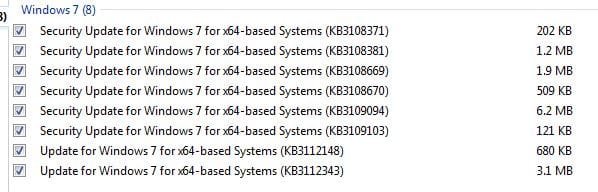
In addition to the above 12-8-15 updates, these KB's were also in the update. I have yet to install them because I do not know what they might do (W10 fears) They seem ok but, the KB 3112148 MS doesn't recognize, KB3112343 is a W10 upgrade file. Appreciate any comments Tx
 

Attachments

  • 128kb.JPG
    128kb.JPG
    31.3 KB · Views: 80

My Computer

Computer type
PC/Desktop
Computer Manufacturer/Model Number
Self Build
OS
Windows 7 Professional X64 Service Pack 1
CPU
AMD Phenom II X4 955 3.20GHz
Motherboard
Gigabyte GA-MA790X-UD4P
Memory
8G
Graphics Card(s)
GX550 Ti
Sound Card
On board
Monitor(s) Displays
Asus VW246H & Syncmaster 2243swx
Screen Resolution
1920x1080 & 1920x1080
Hard Drives
M4-CT128 SSD2, Samsung 840 256GB, 1 WDC 1TB
PSU
Corsair TX750W-V2
Case
Antec
Cooling
2 120mm fan
Keyboard
Microsoft Wireless 3050
Mouse
Microsoft Wireless 5000
Internet Speed
72/6Mbs (Cable)
Other Info
Asus AC1900 router, 8 port Trendnet Switch - Logitech Webcam Pro 9000
I installed them all a couple hours ago and all seems ok.
 

My Computer

Computer type
Laptop
Computer Manufacturer/Model Number
Alienware M17RX3
OS
Windows 7 Ultimate 64 bit
CPU
Sandybridge 2820 QM 2.3 ghz
Memory
8 gb
Graphics Card(s)
AMD Radeon 6970m
Sound Card
Integrated
Monitor(s) Displays
Laptop 17"
Screen Resolution
1980x1080
Hard Drives
750 gb mechanical (7,200RPM) Seagate Momentous paired with OCZ Synapse 128 gb SSD cache drive
Internet Speed
55 mbits download, 12 mbits download
Antivirus
Microsoft Security Essentials
Browser
IE11, Mozilla
Yep I skipped ...2343 ;)
 

My Computer

Computer type
PC/Desktop
Computer Manufacturer/Model Number
Custom assembled by me :}
OS
Win-7-Pro64bit 7-H-Prem-64bit
CPU
i7-5930K 2nd i9-9940x both water blocked VRM's too
Motherboard
ASUS SABERTOOTH X99 2nd ASUS x299 Apex
Memory
Trident-z 3200C14 2nd Trident-z 3600C16
Graphics Card(s)
EVGA 1080ti ftw3 2nd Titan Xp both water blocked
Sound Card
Built-in Realtek
Monitor(s) Displays
1-AOC G2460PG 24"G-Sync 144Hz/ 2nd 1-ASUS VG248QE 24" 144Hz
Screen Resolution
1920 x 1080 144Hz
Hard Drives
2-Samsung M.2 Evo & Evo Plus
2-Samsung 850 EVO 500GB SSD's/ 3-2.5 W.D. Black 1tb-&3-1tb/3-3.5 WD Black 1tb hdd's
PSU
EVGA SuperNOVA 1000-P2 2nd 1200-P2
Case
2-Corsair Obsidian Series 450D Black ATX Mid Tower
Cooling
Custom water loops
Keyboard
Logitech G710+/ 2nd Logitech G910
Mouse
2-RedDragon M901 Perdition 16400 dpi Gaming mouse = wired
Internet Speed
Comcast Ping 19ms 89.31mbps download speed 6.12mbps upload
Antivirus
Malwarebytes Pro/ Superantispyware Pro
Browser
FireFox & Pale moon
Other Info
2nd ASUS X299 Apex/Intel i9-9940x with Custom water loop/7H-Prem-x64/Corsair 450D case/Ram Trident-z 3600C16 4x8gb / Samsung970Evo plus 500gb SSD/Dual ssd EZ swap evo/PSU EVGA SuperNova 1200w-P2 80+Platinum/GPU Titan Xp /8-ML-140 on push-pull on 2-280GTX rads
I noticed MS update KB3112343 popped up earlier this month on 12/1 and I accidentally downloaded it but it seems to be innocuous. However, like all updates, proceed at your own risk. :devil:
 

My Computer

Computer type
PC/Desktop
OS
Windows 7 Home 64-bit
I note from the link that one of the updates, KB3119075, relates to kernel-mode drivers. That's the category of update that is most prone to causing problems. Susan Bradley at Windows Secrets always recommends holding back on such updates until her further advice later in the month when it will be clear whether any problems have been encountered with them.

In any event, it is always best to avoid installing any updates for a good few days in order to give Microsoft time to withdraw or replace any rogue ones.

I personally always follow the discussion here each month as well as paying the nominal contribution to Windows Secrets in order to benefit from the Patch Watch articles Susan Bradley publishes twice per month. Woody Leonhard at Ask Woody is also a great source of advice on all things Windows including updates.

I normally do not see the updates until Wednesday morning. I always wait until Saturday morning to download and install the updates after vetting them.
 

My Computer

Computer type
PC/Desktop
Computer Manufacturer/Model Number
Custom Build
OS
Win 7 Ultimate 64 bit
CPU
Intel i7-3930K
Motherboard
ASUS P9X79 WS
Memory
Kingston HyperX Genesis 32GB Kit (8x4GB Modules) 1600MHz DDR
Graphics Card(s)
MSI R7850 Twin Frozr 2GD5/OC Radeon HD 7850 2GB 256-bit GDDR
Sound Card
Asus Xonar Essence STX
Monitor(s) Displays
3x Asus VG248QE 24", Vizio 32" TV
Screen Resolution
1920 x 1080, ?
Hard Drives
Samsung 128GB 840 Pro SSD (1),
Samsung 4TB 850 EVO SSDs (4)
Samsung 4TB 850 EVO SSDs (16) external backup drives used in 2.5" hot swap bays in the computer.
PSU
Corsair HX750w
Case
Antec Two Hundred v2 (modified)
Cooling
Cooler Master GeminII S524 120mm (fan replaced with a 140mm)
Keyboard
Logitech G510s
Mouse
Logitech M525 (two in use)
Internet Speed
=< 32Mbps down, 8Mbps up
Antivirus
AVAST!, MBAM, SAS, Spybot S&D (all but MBAM free) Glary Util
Browser
IE11
Other Info
LSI 9211-8i HBA card (8 SATA III ports), 2.5" & 3.5" Hot Swap Bays, HooToo HT-CR001 PCI-E to USB 3.0 Internal Hub + 6 Slot Card Reader, and LG Model CH12LS28 BD-ROM Optical Drive. Also, ScanSnap S1500 ADF duplexing scanner, Canon 9000F flat bed scanner, Corsair SP2500 2.1 speakers, Samsung CLP 415nw laser color printer, Cyberpower PP2200SW UPS
I also usually don't see the Patch Tuesday updates until the system is booted up the following morning when WU does the regular update check. Just for giggles, I just ran WU and instantly got error code 80244019 for the first time in my recorded history. Since I'm normally not one to leap into the quagmire that has become Windows Updates, I'm going to let this sleeping dog lie until a few days have passed. I'll check WU tomorrow after boot up, but I still won't download/install any of them for the rest of the week until I can check them out and see what others have experienced.
 

My Computer

Computer type
PC/Desktop
Computer Manufacturer/Model Number
ASUS
OS
Windows 7 Home Premium 64 bit SP1
CPU
i5-2320 @3.00 GHz
Memory
6GB
Graphics Card(s)
NVIDIA GeForce 7300 LE
Monitor(s) Displays
Acer S200HQL 19.5 LED
Screen Resolution
1280 x 800 (1900 x 900 max)
Hard Drives
Drive 1: 1 TB SATA internal: C drive
Drive 2: 250 GB SATA internal: User Data Backup
Drive 3: 500 GB SATA USB: Full System Backup 1, Father
Drive 4: 500 GB SATA USB: Full System Backup 2, Son
Drive 5: 40 GB IDE USB: Kindle, ASUS Tabl
Keyboard
ASUS KB34211
Mouse
Logitech m325 cordless
Internet Speed
27Mb down, 3 Mb up cable modem w/Netgear R6400 WiFi
Antivirus
NIS, Spybot S&D, CCleaner, Malwarebytes, MSERT, MRT
Browser
FF v44.0.2;IE11 v11.0.9600.18015,uv11.0.23;Chrome v44.0.2403
Other Info
FF has AdBlockPlus and Ghostery plugins,
I also don't see them until I boot up my two machines on or after Wednesday morning (UK time).

I have 10 updates on one machine, the same plus an Office update on the other, as well as the usual MSRT on both. There's also a Silverlight update which is recommended on one machine and optional on the other (based on whether or not Silverlight is installed). Neither machine has the kernel-driver update mentioned above.

Time to sit back and see what transpires...
 

My Computer

Computer type
PC/Desktop
Computer Manufacturer/Model Number
Custom build by PC Specialist
OS
Windows 7 Home Premium 64
CPU
AMD Phenom II X4 955
Motherboard
Asus M4A78T-E
Memory
8GB Corsair XMS3 DDR3
Graphics Card(s)
Gigabyte Geforce GTX 960 2GB
Sound Card
SB Audigy
Monitor(s) Displays
BenQ 24"
Screen Resolution
1920 x 1080
Hard Drives
500GB Serial ATA
PSU
1010W Quiet Quad Rail
Case
Antec 900
Cooling
Fenrir
Keyboard
Corsair
Mouse
Logitech
Internet Speed
20mbps
Antivirus
MSE plus MBAM 2.x Free
Browser
Chrome
Other Info
Second desktop different spec but similar level.
My machine shows 16 allegedly important updates and two optional ones this morning. I haven't sorted through them yet.
 

My Computer

Computer type
PC/Desktop
Computer Manufacturer/Model Number
Custom Build
OS
Win 7 Ultimate 64 bit
CPU
Intel i7-3930K
Motherboard
ASUS P9X79 WS
Memory
Kingston HyperX Genesis 32GB Kit (8x4GB Modules) 1600MHz DDR
Graphics Card(s)
MSI R7850 Twin Frozr 2GD5/OC Radeon HD 7850 2GB 256-bit GDDR
Sound Card
Asus Xonar Essence STX
Monitor(s) Displays
3x Asus VG248QE 24", Vizio 32" TV
Screen Resolution
1920 x 1080, ?
Hard Drives
Samsung 128GB 840 Pro SSD (1),
Samsung 4TB 850 EVO SSDs (4)
Samsung 4TB 850 EVO SSDs (16) external backup drives used in 2.5" hot swap bays in the computer.
PSU
Corsair HX750w
Case
Antec Two Hundred v2 (modified)
Cooling
Cooler Master GeminII S524 120mm (fan replaced with a 140mm)
Keyboard
Logitech G510s
Mouse
Logitech M525 (two in use)
Internet Speed
=< 32Mbps down, 8Mbps up
Antivirus
AVAST!, MBAM, SAS, Spybot S&D (all but MBAM free) Glary Util
Browser
IE11
Other Info
LSI 9211-8i HBA card (8 SATA III ports), 2.5" & 3.5" Hot Swap Bays, HooToo HT-CR001 PCI-E to USB 3.0 Internal Hub + 6 Slot Card Reader, and LG Model CH12LS28 BD-ROM Optical Drive. Also, ScanSnap S1500 ADF duplexing scanner, Canon 9000F flat bed scanner, Corsair SP2500 2.1 speakers, Samsung CLP 415nw laser color printer, Cyberpower PP2200SW UPS
My system shows 12 important updates. Will go through them later this week. Yesterday's WU error must have been server issues at MS's end. Probably problems or workload issues with replication.

Update: 12/09/15 I had a few spare minutes, so I opened up WU to read up on the 12 Important updates that were waiting for me to download and install. I've already hidden #2423. Much to my "surprise", IE11 stops working on all 12 of them. Guess I will wait until this weekend to do any more on this set. Good Luck everyone.

Update 2: 12/10/15 I can now bring up the update information with IE11. This is the same scenario that occurred last month after Patch Tuesday. Still waiting until this weekend to go through the update vetting and installation process.
 
Last edited:

My Computer

Computer type
PC/Desktop
Computer Manufacturer/Model Number
ASUS
OS
Windows 7 Home Premium 64 bit SP1
CPU
i5-2320 @3.00 GHz
Memory
6GB
Graphics Card(s)
NVIDIA GeForce 7300 LE
Monitor(s) Displays
Acer S200HQL 19.5 LED
Screen Resolution
1280 x 800 (1900 x 900 max)
Hard Drives
Drive 1: 1 TB SATA internal: C drive
Drive 2: 250 GB SATA internal: User Data Backup
Drive 3: 500 GB SATA USB: Full System Backup 1, Father
Drive 4: 500 GB SATA USB: Full System Backup 2, Son
Drive 5: 40 GB IDE USB: Kindle, ASUS Tabl
Keyboard
ASUS KB34211
Mouse
Logitech m325 cordless
Internet Speed
27Mb down, 3 Mb up cable modem w/Netgear R6400 WiFi
Antivirus
NIS, Spybot S&D, CCleaner, Malwarebytes, MSERT, MRT
Browser
FF v44.0.2;IE11 v11.0.9600.18015,uv11.0.23;Chrome v44.0.2403
Other Info
FF has AdBlockPlus and Ghostery plugins,
I did the 12/08/15 updates this evening, but not 2423 it's hidden. No problems doing the updates, but once again, IE11 would crash if I tried to use it to view the update text on MS's site, even with the latest IE11 security update installed. Used FF to view the descriptions before doing the installs. I still find it hilarious that IE11 can't work with their own web pages.

Update: This series of updates generated a bunch of GWX registry entries and folders on the HDD. I don't know which update is responsible for them, but if one is interested, follow this thread:

http://www.sevenforums.com/windows-...indows-10-update-bully-windows-7-updates.html
 
Last edited:

My Computer

Computer type
PC/Desktop
Computer Manufacturer/Model Number
ASUS
OS
Windows 7 Home Premium 64 bit SP1
CPU
i5-2320 @3.00 GHz
Memory
6GB
Graphics Card(s)
NVIDIA GeForce 7300 LE
Monitor(s) Displays
Acer S200HQL 19.5 LED
Screen Resolution
1280 x 800 (1900 x 900 max)
Hard Drives
Drive 1: 1 TB SATA internal: C drive
Drive 2: 250 GB SATA internal: User Data Backup
Drive 3: 500 GB SATA USB: Full System Backup 1, Father
Drive 4: 500 GB SATA USB: Full System Backup 2, Son
Drive 5: 40 GB IDE USB: Kindle, ASUS Tabl
Keyboard
ASUS KB34211
Mouse
Logitech m325 cordless
Internet Speed
27Mb down, 3 Mb up cable modem w/Netgear R6400 WiFi
Antivirus
NIS, Spybot S&D, CCleaner, Malwarebytes, MSERT, MRT
Browser
FF v44.0.2;IE11 v11.0.9600.18015,uv11.0.23;Chrome v44.0.2403
Other Info
FF has AdBlockPlus and Ghostery plugins,
Back
Top