

Decrap - Windows PC De-crapifier, remove bloatware with ease!
Just a heads up to anyone who is thinking about using this software. I reckon that most users would be better off avoiding it.
There's two versions available. The full version that can be installed on windows and a portable version that runs without installation.
It's from the same people who developed jv16 Power Tools - an advanced registry cleaner that really isn't suited to inexperienced users. Since the advice given to forum users is to avoid using such tools it might be wise to avoid using the registry cleanup option that's present in PC De-crapifier as it appears to be almost the same as the registry cleaner that comes with jv16 Power Tools. Each detection needs to be reviewed by the user and not checked for removal unless you're absolutely certain that no harm will be done.
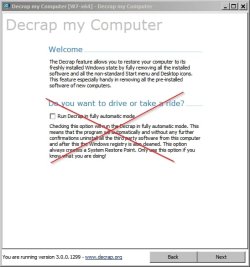
It has to be said that users of PC De-crapifier are clearly warned not to proceed with automated cleanup unless they know what they are doing!
Full automatic mode should be avoided!
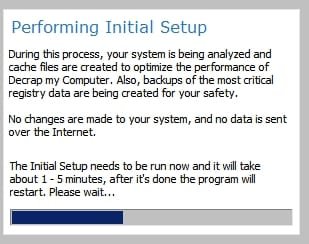
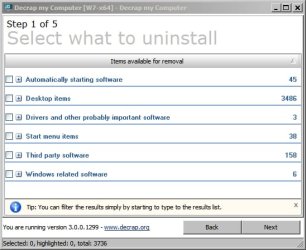
You are presented with a list of items to select from:
Create a System Restore Point:

Suggest avoiding Fully Automatic uninstallation option and Automatically Clean The Registry - (Registry cleaner is too aggressive):

Personally I used this software to test remove a single application and ran the registry cleaner choosing "Clean the registry but let me verify results"
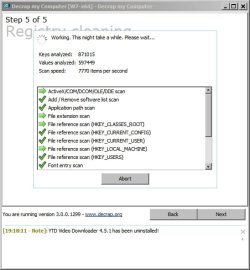
Strangely it didn't detect any registry entries for the application that was removed and detected a whole lot of other entries that in my opinion were unsafe to remove!
In addition a subsequent manual registry scan using another trusted application revealed a total of 13 missed entries and a couple of missed folders!
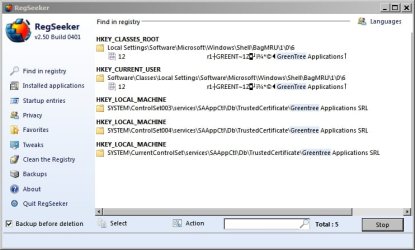
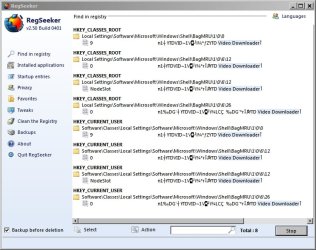
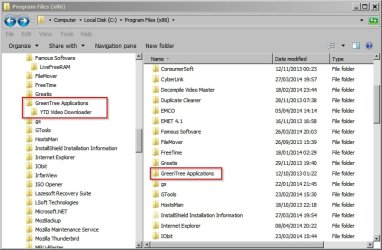
This is just a warning to users who might be tempted to run this application. Only use with care - or better still, don't use it at all!
Just a heads up to anyone who is thinking about using this software. I reckon that most users would be better off avoiding it.
There's two versions available. The full version that can be installed on windows and a portable version that runs without installation.
It's from the same people who developed jv16 Power Tools - an advanced registry cleaner that really isn't suited to inexperienced users. Since the advice given to forum users is to avoid using such tools it might be wise to avoid using the registry cleanup option that's present in PC De-crapifier as it appears to be almost the same as the registry cleaner that comes with jv16 Power Tools. Each detection needs to be reviewed by the user and not checked for removal unless you're absolutely certain that no harm will be done.
It has to be said that users of PC De-crapifier are clearly warned not to proceed with automated cleanup unless they know what they are doing!
Full automatic mode should be avoided!
You are presented with a list of items to select from:
Create a System Restore Point:
Suggest avoiding Fully Automatic uninstallation option and Automatically Clean The Registry - (Registry cleaner is too aggressive):
Personally I used this software to test remove a single application and ran the registry cleaner choosing "Clean the registry but let me verify results"
Strangely it didn't detect any registry entries for the application that was removed and detected a whole lot of other entries that in my opinion were unsafe to remove!
In addition a subsequent manual registry scan using another trusted application revealed a total of 13 missed entries and a couple of missed folders!
This is just a warning to users who might be tempted to run this application. Only use with care - or better still, don't use it at all!
My Computer
- Computer type
- Laptop
- Computer Manufacturer/Model Number
- ASUS
- OS
- Microsoft Windows 7 Home Premium 64-bit 7601 Multiprocessor Free Service Pack 1
- CPU
- AMD C-60 APU with Radeon(tm) HD Graphics
- Motherboard
- ASUSTeK COMPUTER INC. X501U
- Memory
- 4.00 GB
- Graphics Card(s)
- AMD Radeon HD 6290 Graphics
- Sound Card
- (1) AMD High Definition Audio Device (2) Realtek High Defi
- Screen Resolution
- 1366 x 768 x 32 bits (4294967296 colors) @ 60 Hz
- Hard Drives
- Hitachi HTS545050A7E380 SATA Disk Device
- Antivirus
- Comodo CIS & FW, SecureAplus App Whitelisting, Threatfire
- Browser
- Cyberfox 64bit, Opera 64bit, Airfox
- Other Info
- Spy-The-Spy, HitmanPro.Alert, Norton Connect Safe, MJRegWatcher, BitDefender TrafficLight, Voodoo Shield, Zemana AntiMalware


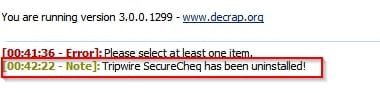


 Agree with you, I do not recommend PC-Decrapifier in auto-mode. I have the pay-for jv16PowerTools, and when I run that, I run it cautiously, carefully, line by line, choice by choice, there is no auto-run at anytime.