
Solved Dedicated System Memory

CityLady

New member
Member
Local time
9:37 PM
Messages
85
Location
Cape Town, South Africa
Hi I am wondering why my pc is showing under my graphics card dedicated system memory as 0MB when my shared system memory is 1279MB I got these from the sub score print out posted below. Is it ok as I have been having a lot of blue screens lately just random, as I have not even installed any new software or hardware. My worry is maybe something to do with this factor and if so how how do I set system memory and what would I set it too?


Many thanks in advance

CityLady
 

Attachments
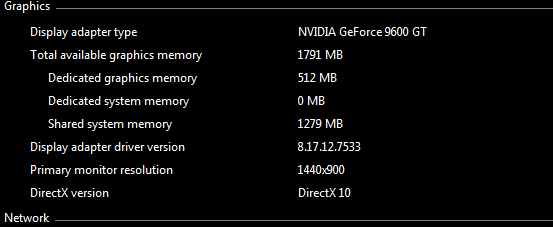
  • Capture.PNG
    Capture.PNG
    3.8 KB · Views: 69

My Computer

Computer type
PC/Desktop
Computer Manufacturer/Model Number
ACPI x 86-based pc
OS
windows 7 64bit Enterprise
CPU
Intel core i5- 3330 CPU @ 3.00GHz
Motherboard
MSI MS-7756
Memory
8gb
Graphics Card(s)
Nvidia GeForce GT630 2Gb ram
Sound Card
High definition audio device
Monitor(s) Displays
Dell 1908 FP (Analog)
Screen Resolution
1440 x900
Hard Drives
Maxtor 2F040L0 ATA 360gb
SATA ST3120026a ATA 120gb
SATA ST332061 3AS 120gb
WD 2tb hard drive
PSU
500watts
Case
not sure
Cooling
not sure
Keyboard
Standard PS/2 Keyboard
Mouse
Logitech wireless HID-compliant mouse
Internet Speed
4MB/s
It means how much of your RAM is given to the Graphics card. Shared is just what Windows reserves in case it needs more memory. However, that reservation is not guaranteed. As far as I am concerned you want Dedicated System Memory to be 0.
 

My Computer

Computer type
PC/Desktop
Computer Manufacturer/Model Number
Alienware Aurora ALX R4
OS
Windows 10 Pro (x64)
CPU
Intel Core i7-3930K (3.2GHz - 4.5GHz)
Motherboard
Alienware Aurora-R4 x79
Memory
4x Samsung 4GB PC3-12800 DDR3 (16GB 1600MHz)
Graphics Card(s)
Nvidia Geforce GTX 690
Sound Card
SteelSeries Siberia Elite
Monitor(s) Displays
Dell UltraSharp U3011
Screen Resolution
2560x1600
Hard Drives
Samsung 850 Pro 256 GB, Seagate 1TB Desktop Hybrid HDD, 2x Western Digital 4TB Green HDD
PSU
875W Some Dell PSU <.<
Case
Alienware Aurora ALX
Cooling
Custom Liquid Cooling (EK CPU & GPU blocks) dual EK 480RAD
Keyboard
Logitech G710+ Mechanical
Mouse
Logitech G700s
Internet Speed
Verizon Fios (50 mbps average)
Other Info
Server: Intel NUC D54250WYK: i5-4250U, 16GB, 256 GB mSATA, Windows Server 2012 R2

My Computer

Computer type
PC/Desktop
Computer Manufacturer/Model Number
Me
OS
Win 7 Ultimate x64
CPU
FX-8350 @ 4.6 GHz so far
Motherboard
Asus M5A97 EVO
Memory
ADATA XPG V1 Series Black 8GB DDR3 1600
Graphics Card(s)
Sapphire R9 270x Dual-X
Sound Card
Xonar DGX w/ Corsair Vengence 1300
Monitor(s) Displays
Acer S232HL Abid
Screen Resolution
1920x1080
Hard Drives
120 GB OCZ Vertex 3
500 GB Seagate 7200.12
PSU
Antec Earthwatts 650W Green
Case
Antec Three Hundred
Cooling
Cooler Master 212 EVO
Keyboard
Logitech G510
Mouse
Logitech G500s
Internet Speed
35000/3000
I think you are reading this wrong. You have dedicted memory which is in the chip and then you have shared memory which is in RAM. But there is no dedicted memory in RAM (which is the normal case). Read: System Memory = RAM.
 

My Computer

Computer Manufacturer/Model Number
HP, Dell, Gateway, Toshiba - 4 laptops and 2 desktops
OS
Vista, Windows7, Mint Mate, Zorin, Windows 8
CPU
from 1.6GHz Duo to i7
Monitor(s) Displays
2x HP w2207
Hard Drives
5x HDD, 7x SSD, 12x Externals
Keyboard
with trackball - no mices
Mouse
Trackball mice
Internet Speed
DSL 6000
Hello CityLady -

Those numbers do not appear out of line. You haven't a specified/dedicated amount of system RAM set aside for video; instead it is an amount of system RAM that is shared with video if/when needed. Not sure how you would set system RAM as dedicated to video (perhaps in your BIOS set up).

Blue screens can be caused by any number of things; heat build up in the computer is a common cause, especially if the heat sink fins get coated in dust (both CPU and video card).

Regards,
GEWB
 

My Computer

Computer type
PC/Desktop
Computer Manufacturer/Model Number
(7 different computers booting up to 10 systems)
OS
Linux Mint / XP / Win7 Home, Pro, Ultimate / Win8.1 / Win10
Other Info
Four desktops, two laptops, one notebook and one tablet
Thank you all for your help in this matter you have put my mind at ease.. I especially like the guide which I have saved in my windows 7 help folder.


Thanks again guys very much appreciated.

CityLady
 

My Computer

Computer type
PC/Desktop
Computer Manufacturer/Model Number
ACPI x 86-based pc
OS
windows 7 64bit Enterprise
CPU
Intel core i5- 3330 CPU @ 3.00GHz
Motherboard
MSI MS-7756
Memory
8gb
Graphics Card(s)
Nvidia GeForce GT630 2Gb ram
Sound Card
High definition audio device
Monitor(s) Displays
Dell 1908 FP (Analog)
Screen Resolution
1440 x900
Hard Drives
Maxtor 2F040L0 ATA 360gb
SATA ST3120026a ATA 120gb
SATA ST332061 3AS 120gb
WD 2tb hard drive
PSU
500watts
Case
not sure
Cooling
not sure
Keyboard
Standard PS/2 Keyboard
Mouse
Logitech wireless HID-compliant mouse
Internet Speed
4MB/s
Back
Top