Default email to Yahoo almost done but....

superbeast

New member
Local time
9:37 PM
Messages
3
Hello Windows 7 Forums, great place you have here! I've found pretty much anything I need in these well detailed forums, except one last detail, and I can't find the solution anywhere.

I am migrating from Outlook to just using Yahoo for my work accounts (it's a cloud philosophy thing). I found a registry edit that works excellent for changing Windows 7 default email from Outlook to Gmail thru Chrome (or any browser), but I can't get it to work perfectly for Yahoo. When I click on a "mailto:" link in a Word document or "mailto:" hyperlink in a browser, Yahoo mail will open to a new message, but will not fill in the "To" address - it is blank. It does work in Gmail. I believe it's just a syntax issue, but I don't know what the exact hyperlink Yahoo needs to complete this in full. Below is how I made this work (and I don't take credit for this, the Gmail solution is posted in some obscure places around the internet).

1. Standard warning about changing settings in Registry - Backup/ Restore Point/ Backup....
2. Regedit
3. HKEY_LOCAL_MACHINE\SOFTWARE\Classes\mailto\shell\open\command\
4. Right-Click on Name field - should say "Default" and click "Modify"
5. Copy and Paste "Value Data" in a txt file as a Backup if something goes wrong
6. Paste EXACTLY what is below INCLUDING quotes. Change "username" to your own

"C:\Users\username\AppData\Local\Google\Chrome\Application\chrome.exe" https://mail.google.com/mail?extsrc=mailto&url=%1"

The above works PERFECTLY for Gmail. I changed the second part to this:

http://compose.mail.yahoo.com/?$qs"

Works fine for Yahoo except it doesn't fill in the To section. Again, I think it's just a syntax issue with the last few characters. Does anybody know?

Thanks Windows 7 Forums.....
 

My Computer My Computer

Computer Manufacturer/Model Number
Apple MacBook Pro 17"
OS
Windows 7x64 on Boot Camp
CPU
Intel Core 2 Duo T7600 2.33Ghz
Memory
2GB
Graphics Card(s)
ATI Radeon X1600
Sound Card
IDT High Definition Audio
Monitor(s) Displays
17" Notebook LCD / 24" Apple Cinema Display
Screen Resolution
1680x1050 / 1920x1200
Hard Drives
Hitachi 100GB 7200rpm / 3 Partitions
Try downloading and installing Yahoo messenger, and Yahoo toolbar. Then you should be able to set it as default in Internet Options for default programs.

A cleaner way may be to use Firefox.
 

My Computer My Computer

OS
Windows 7
CPU
i5-750
Motherboard
Asus
Memory
4GB DDR3 1600
Graphics Card(s)
GT220
Yes, you'll need to follow Desslok's instructions.. here's some more info:

Download Yahoo Toolbar: Yahoo! Toolbar - Stay in touch with your world.

Once Installed: Start > Control Panel > Internet Options > Programs Tab > Set E-mail to Yahoo Mail! in dropdown.
 

My Computer My Computer

Computer Manufacturer/Model Number
Apple Macbook Pro (April 2009)
OS
W7 Ult. x64 | OS X
CPU
Intel Mobile Core 2 Duo 2.93Ghz [T9800 Penryn]
Motherboard
NVIDIA nForce 730i Rev. B1 [Mac-F2268EC8 (U2E1)]
Memory
4096MB Samsung DDR3 Dual Channel [PC3-8500F 1066Mhz]
Graphics Card(s)
NVIDIA GeForce 9600M GT 512MB [G96M Rev. C1]
Sound Card
SB X-Fi Surround 5.1 USB | Onboard Realtek (Disabled)
Monitor(s) Displays
Acer x223wbd 22" | Apple Anti-Glare 17" (Disabled)
Screen Resolution
{Current} 1440x900 {Acer} 1680x1050 {Apple} 1920x1200
Hard Drives
{Internal}
Seagate Momentus 320GB 2.5" 7200RPM [ST9320421AS]

{Externals}
LaCie 320GB USB 2.0 HDD [301284UR]
LaCie 750GB USB 2.0 FW400 eSATA HDD [301314U]
LaCie 1TB USB 2.0 HDD [301304UR]
PSU
Magsafe
Case
Aluminum/Unibody (MBP52)
Cooling
2 x 6000 RPM Fans
Keyboard
Logitech G-15v2 [PN 920-000379]
Mouse
Logitech G-9 [PN 910-000338]
Internet Speed
12Mbps/2.5Mbps w/ 24Mbps Speed Boost [Comcast]
Other Info
Logitech X-540 Speakers [PN 970223-0122]
Sennheiser PC-151 Headset
Hey Fellas,

thanks for the advice, it is very much appreciated. I was trying not to install any extra software or add-ons to solve something so simple, I seriously think I'm just missing a few characters at the end of the hyperlink.

Here's a follow-up question then: If I do install Yahoo Toolbar, will this allow "mailto:" hyperlinks in Word or Powerpoint documents to go to Yahoo? Or will it still go to the default Outlook?
 

My Computer My Computer

Computer Manufacturer/Model Number
Apple MacBook Pro 17"
OS
Windows 7x64 on Boot Camp
CPU
Intel Core 2 Duo T7600 2.33Ghz
Memory
2GB
Graphics Card(s)
ATI Radeon X1600
Sound Card
IDT High Definition Audio
Monitor(s) Displays
17" Notebook LCD / 24" Apple Cinema Display
Screen Resolution
1680x1050 / 1920x1200
Hard Drives
Hitachi 100GB 7200rpm / 3 Partitions

My Computer My Computer

Computer Manufacturer/Model Number
Apple Macbook Pro (April 2009)
OS
W7 Ult. x64 | OS X
CPU
Intel Mobile Core 2 Duo 2.93Ghz [T9800 Penryn]
Motherboard
NVIDIA nForce 730i Rev. B1 [Mac-F2268EC8 (U2E1)]
Memory
4096MB Samsung DDR3 Dual Channel [PC3-8500F 1066Mhz]
Graphics Card(s)
NVIDIA GeForce 9600M GT 512MB [G96M Rev. C1]
Sound Card
SB X-Fi Surround 5.1 USB | Onboard Realtek (Disabled)
Monitor(s) Displays
Acer x223wbd 22" | Apple Anti-Glare 17" (Disabled)
Screen Resolution
{Current} 1440x900 {Acer} 1680x1050 {Apple} 1920x1200
Hard Drives
{Internal}
Seagate Momentus 320GB 2.5" 7200RPM [ST9320421AS]

{Externals}
LaCie 320GB USB 2.0 HDD [301284UR]
LaCie 750GB USB 2.0 FW400 eSATA HDD [301314U]
LaCie 1TB USB 2.0 HDD [301304UR]
PSU
Magsafe
Case
Aluminum/Unibody (MBP52)
Cooling
2 x 6000 RPM Fans
Keyboard
Logitech G-15v2 [PN 920-000379]
Mouse
Logitech G-9 [PN 910-000338]
Internet Speed
12Mbps/2.5Mbps w/ 24Mbps Speed Boost [Comcast]
Other Info
Logitech X-540 Speakers [PN 970223-0122]
Sennheiser PC-151 Headset
Installed Yahoo Toolbar for Firefox, Yahoo mail works fine with "mailto" links within the browser, but still have the problem with clicking on "mailto" hyperlinks outside of the browser, e.g. MS Word.

When I go here:
Start > Control Panel > Internet Options > Programs Tab > Set Programs > Set Your Default Programs

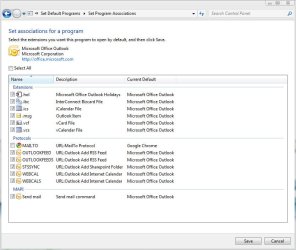
there isn't any options for Yahoo. Under the Outlook "Choose defaults for this program", Outlook is still listed as the default Protocol for MAILTO, and it is uncheckable.

You can, however, change the Outlook MAILTO Protocol with the registry edit in the first post to whatever browser you want. I've attached a picture of what this looks like.

I think the problem is telling the Windows Operating System, and not just the browser, how to send email. I can get this to work perfectly with Gmail, just can't get Yahoo to fill in the "To" address box.

It's a minor annoyance to have to copy and paste the address into the "To" box, but will have to resort to this since it appears the Yahoo Toolbar won't change Windows "mailto" protocol.

thanks again
 

Attachments

  • email regedit to chrome.jpg
    email regedit to chrome.jpg
    85.4 KB · Views: 43

My Computer My Computer

Computer Manufacturer/Model Number
Apple MacBook Pro 17"
OS
Windows 7x64 on Boot Camp
CPU
Intel Core 2 Duo T7600 2.33Ghz
Memory
2GB
Graphics Card(s)
ATI Radeon X1600
Sound Card
IDT High Definition Audio
Monitor(s) Displays
17" Notebook LCD / 24" Apple Cinema Display
Screen Resolution
1680x1050 / 1920x1200
Hard Drives
Hitachi 100GB 7200rpm / 3 Partitions
Installed Yahoo Toolbar for Firefox, Yahoo mail works fine with "mailto" links within the browser, but still have the problem with clicking on "mailto" hyperlinks outside of the browser, e.g. MS Word.
n
Pretty sure you need to install it for IE, so that Yahoo option will appear in Internet options. Remember IE is tied closely to the OS.
 

My Computer My Computer

OS
Windows 7
CPU
i5-750
Motherboard
Asus
Memory
4GB DDR3 1600
Graphics Card(s)
GT220

My Computer My Computer

Computer Manufacturer/Model Number
Apple Macbook Pro (April 2009)
OS
W7 Ult. x64 | OS X
CPU
Intel Mobile Core 2 Duo 2.93Ghz [T9800 Penryn]
Motherboard
NVIDIA nForce 730i Rev. B1 [Mac-F2268EC8 (U2E1)]
Memory
4096MB Samsung DDR3 Dual Channel [PC3-8500F 1066Mhz]
Graphics Card(s)
NVIDIA GeForce 9600M GT 512MB [G96M Rev. C1]
Sound Card
SB X-Fi Surround 5.1 USB | Onboard Realtek (Disabled)
Monitor(s) Displays
Acer x223wbd 22" | Apple Anti-Glare 17" (Disabled)
Screen Resolution
{Current} 1440x900 {Acer} 1680x1050 {Apple} 1920x1200
Hard Drives
{Internal}
Seagate Momentus 320GB 2.5" 7200RPM [ST9320421AS]

{Externals}
LaCie 320GB USB 2.0 HDD [301284UR]
LaCie 750GB USB 2.0 FW400 eSATA HDD [301314U]
LaCie 1TB USB 2.0 HDD [301304UR]
PSU
Magsafe
Case
Aluminum/Unibody (MBP52)
Cooling
2 x 6000 RPM Fans
Keyboard
Logitech G-15v2 [PN 920-000379]
Mouse
Logitech G-9 [PN 910-000338]
Internet Speed
12Mbps/2.5Mbps w/ 24Mbps Speed Boost [Comcast]
Other Info
Logitech X-540 Speakers [PN 970223-0122]
Sennheiser PC-151 Headset
Starting with Kotix's regedit tip for gmail here and splicing in the way firefox treats mailto links to send them to yahoo in firefox's about:config, I logically derived that the answer is:
"C:\Program Files (x86)\Mozilla Firefox\firefox.exe" http://compose.mail.yahoo.com/?To=%1

After all the help i've gotten from people on the internet, it's nice to finally give something back!
 

My Computer My Computer

OS
win 7 pro 64bit
Back
Top