
Solved default gateway issue

drmax

New member
Member
VIP
Local time
12:45 PM
Messages
314
I can add the default gateway in the network adaptor IPv4, but when I restart my pc, it goes away. I can't keep a connection to the net, without getting this default gateway in place, or so I've read. DHCP is enabled.
What is happening, I have a AT&T modem and for some reason, after my PC build, I get kicked of the net, within a few minutes. I've read I had to stick in the default gateway. (which I know what that is) When I do stick it in, it's there but grayed out, because the "obtain IP addy auto" is ck'd. If I unck and try to use the "use this IP addy", then I don't know what that is. Something is screwed up. It was working fine a few wks ago. Please advise.
 

My Computer

OS
W7 premium 64
CPU
amd a8-3850
Motherboard
asus f1-a75v pro
Memory
8G g-skill
Graphics Card(s)
asus gt-520 silent
Monitor(s) Displays
LED viewsonic 24"
Hard Drives
seagate sata 120
wd 2T green
PSU
cool master 600W silent pro (80+bronze)
If the obtain the IP address is checked for auto the rest of it should automatically populate. What is your gateway? Do you have a router that you connect to or are just straight plugging into the modem?
 

My Computer

Computer type
PC/Desktop
Computer Manufacturer/Model Number
Custom Build
OS
Windows 7 Pro 64bit build 7601 SP1
CPU
Intel Core I5 3570K 3.4Ghz w/ Zalman CNPS9900NT RT
Motherboard
MSI Z77A-G45 Gaming
Memory
G.Skill F3-12800CL9D-8GbXL ; 4Gx2
Graphics Card(s)
EVGA Geforce GTX 770 Superclocked
Sound Card
Creative Sound Blaster Z
Monitor(s) Displays
Dual ViewSonic VX2770Smh-LED Black 27"IPS-Panel
Screen Resolution
1920x1080
Hard Drives
Kingston Hyper X 240GB SSD Win8 Pro 64bit 6GB/s Sata III
Intel 335 Series SSD 240GB Win8 Storage 6GB/s Sata III
Intel 320 Series SSD 600GB Storage 3GB/s Sata II
Western Digital Scorpio Black 1TB - Docked via Esata
PSU
Coolermaster GX 750W
Case
Corsair Vengence C70
Cooling
Coolermaster 120mm and Enermax 140mm
Keyboard
Corsair Vengence K70
Mouse
Logitech G500
Internet Speed
22mbps+
Browser
Firefox, Chrome, IE
Other Info
Swan M50W 2.1 speakers
APC UPS
Thermaltake BlacX HDD Dock
Samsung BD Optical Drive
Netgear WNDR4500
additional info

If the obtain the IP address is checked for auto the rest of it should automatically populate. What is your gateway? Do you have a router that you connect to or are just straight plugging into the modem?
My modem is speedstream 5100. I'm also using a wrt54gs lnksys router. The ip addy and default gateway I was getting, was from the lnksys. i unplugged router and went directly into modem and abviously got a different set of number. Apparently, I need to see something different in my windows 7, to let the lnksys operate normally, or do something with the router. Unsure at this point. With it all hooked up, it works for maybe 1 minute, then I get the yellow mark in int. connection bottom right corner. The built-in "troubleshooter" can not fix this one.
 

My Computer

OS
W7 premium 64
CPU
amd a8-3850
Motherboard
asus f1-a75v pro
Memory
8G g-skill
Graphics Card(s)
asus gt-520 silent
Monitor(s) Displays
LED viewsonic 24"
Hard Drives
seagate sata 120
wd 2T green
PSU
cool master 600W silent pro (80+bronze)

My Computer

Computer type
PC/Desktop
Computer Manufacturer/Model Number
Custom Build
OS
Windows 7 Pro 64bit build 7601 SP1
CPU
Intel Core I5 3570K 3.4Ghz w/ Zalman CNPS9900NT RT
Motherboard
MSI Z77A-G45 Gaming
Memory
G.Skill F3-12800CL9D-8GbXL ; 4Gx2
Graphics Card(s)
EVGA Geforce GTX 770 Superclocked
Sound Card
Creative Sound Blaster Z
Monitor(s) Displays
Dual ViewSonic VX2770Smh-LED Black 27"IPS-Panel
Screen Resolution
1920x1080
Hard Drives
Kingston Hyper X 240GB SSD Win8 Pro 64bit 6GB/s Sata III
Intel 335 Series SSD 240GB Win8 Storage 6GB/s Sata III
Intel 320 Series SSD 600GB Storage 3GB/s Sata II
Western Digital Scorpio Black 1TB - Docked via Esata
PSU
Coolermaster GX 750W
Case
Corsair Vengence C70
Cooling
Coolermaster 120mm and Enermax 140mm
Keyboard
Corsair Vengence K70
Mouse
Logitech G500
Internet Speed
22mbps+
Browser
Firefox, Chrome, IE
Other Info
Swan M50W 2.1 speakers
APC UPS
Thermaltake BlacX HDD Dock
Samsung BD Optical Drive
Netgear WNDR4500
Hello,

Is this a wired or wireless connection issue?

Pls. provide an ipconfig /all output for us while your computer is connected to your router:
Click on Start => in run or search box type cmd, press enter. From the command prompt (black screen), Copy and Paste these ipconfig /all >c:\ipconfig.txt . Please attach the .txt file to be found in your Local Disk 'C' on your next post.
 

My Computer

Computer Manufacturer/Model Number
Lenovo Desktop/Samsung Laptop
OS
Win7 & Win8 64bit
CPU
Intel i5
Internet Speed
Charter-20 Mbps
Antivirus
Avast
Browser
FF, IE9 and Chrome
Hello,

Is this a wired or wireless connection issue?

Pls. provide an ipconfig /all output for us while your computer is connected to your router:
Click on Start => in run or search box type cmd, press enter. From the command prompt (black screen), Copy and Paste these ipconfig /all >c:\ipconfig.txt . Please attach the .txt file to be found in your Local Disk 'C' on your next post.
"access denied is what i get"
i am always signed in as administrator
 

My Computer

OS
W7 premium 64
CPU
amd a8-3850
Motherboard
asus f1-a75v pro
Memory
8G g-skill
Graphics Card(s)
asus gt-520 silent
Monitor(s) Displays
LED viewsonic 24"
Hard Drives
seagate sata 120
wd 2T green
PSU
cool master 600W silent pro (80+bronze)

My Computer

OS
W7 premium 64
CPU
amd a8-3850
Motherboard
asus f1-a75v pro
Memory
8G g-skill
Graphics Card(s)
asus gt-520 silent
Monitor(s) Displays
LED viewsonic 24"
Hard Drives
seagate sata 120
wd 2T green
PSU
cool master 600W silent pro (80+bronze)
hold on....i got it figured out....
 

My Computer

OS
W7 premium 64
CPU
amd a8-3850
Motherboard
asus f1-a75v pro
Memory
8G g-skill
Graphics Card(s)
asus gt-520 silent
Monitor(s) Displays
LED viewsonic 24"
Hard Drives
seagate sata 120
wd 2T green
PSU
cool master 600W silent pro (80+bronze)
my ipconfig txt

here you are. thank you. i'm a bit tired...:sleepy:
 

Attachments

My Computer

OS
W7 premium 64
CPU
amd a8-3850
Motherboard
asus f1-a75v pro
Memory
8G g-skill
Graphics Card(s)
asus gt-520 silent
Monitor(s) Displays
LED viewsonic 24"
Hard Drives
seagate sata 120
wd 2T green
PSU
cool master 600W silent pro (80+bronze)
more info.

Wanted to clerify...I have 2 other pc's working off this router, wirelessly. It's just my new pc that wired, rather the main tower with W7, that is having the issues.
 

My Computer

OS
W7 premium 64
CPU
amd a8-3850
Motherboard
asus f1-a75v pro
Memory
8G g-skill
Graphics Card(s)
asus gt-520 silent
Monitor(s) Displays
LED viewsonic 24"
Hard Drives
seagate sata 120
wd 2T green
PSU
cool master 600W silent pro (80+bronze)
Thanks for the ipconfig /all output. There's an issue, your not getting the Private IP Addresses.
Autoconfiguration IPv4 Address. . : 169.254.219.63(Preferred)
Subnet Mask . . . . . . . . . . . : 255.255.0.0
Verify that all your Network Services are Started.
Click on Start, type services.msc then press enter.

• COM+ Event System (for WZC issues)
• Computer Browser
• DHCP Client
• DNS Client
• Network Connections
• Network Location Awareness
• Remote Procedure Call (RPC)
• Server
• TCP/IP Netbios helper
• Wireless Zero Configuration ( XP wireless configurations only)
• WLAN AutoConfig ( Vista wireless configurations only)
• Workstation

What type of Anti Virus or Security Softwar do you have installed?
 

My Computer

Computer Manufacturer/Model Number
Lenovo Desktop/Samsung Laptop
OS
Win7 & Win8 64bit
CPU
Intel i5
Internet Speed
Charter-20 Mbps
Antivirus
Avast
Browser
FF, IE9 and Chrome
antivirus

Avast
 

My Computer

OS
W7 premium 64
CPU
amd a8-3850
Motherboard
asus f1-a75v pro
Memory
8G g-skill
Graphics Card(s)
asus gt-520 silent
Monitor(s) Displays
LED viewsonic 24"
Hard Drives
seagate sata 120
wd 2T green
PSU
cool master 600W silent pro (80+bronze)

My Computer

Computer Manufacturer/Model Number
Lenovo Desktop/Samsung Laptop
OS
Win7 & Win8 64bit
CPU
Intel i5
Internet Speed
Charter-20 Mbps
Antivirus
Avast
Browser
FF, IE9 and Chrome
ok, i'll undo avast for troubleshooting purposes. this was all working before, with avast, but will give this a try. will let you know what happens. thx
 

My Computer

OS
W7 premium 64
CPU
amd a8-3850
Motherboard
asus f1-a75v pro
Memory
8G g-skill
Graphics Card(s)
asus gt-520 silent
Monitor(s) Displays
LED viewsonic 24"
Hard Drives
seagate sata 120
wd 2T green
PSU
cool master 600W silent pro (80+bronze)
without installing anything else, just removed avast. attached is my ipconfig afterwards. please advise. if has changed, i guess i'll use the other antivirus.
thank you kindly. ps..dunno why this would all the sudden start doing this, as it had worked in the past. strange.
also, would it have something to do with me having to reset the router, since the signal is going through linksys 1st, then to pc? you see, the router used to me hooked up through my other tower, which is XP. hope my info helps...
 

Attachments

My Computer

OS
W7 premium 64
CPU
amd a8-3850
Motherboard
asus f1-a75v pro
Memory
8G g-skill
Graphics Card(s)
asus gt-520 silent
Monitor(s) Displays
LED viewsonic 24"
Hard Drives
seagate sata 120
wd 2T green
PSU
cool master 600W silent pro (80+bronze)
no go

No go. Doing the same thing.
 

My Computer

OS
W7 premium 64
CPU
amd a8-3850
Motherboard
asus f1-a75v pro
Memory
8G g-skill
Graphics Card(s)
asus gt-520 silent
Monitor(s) Displays
LED viewsonic 24"
Hard Drives
seagate sata 120
wd 2T green
PSU
cool master 600W silent pro (80+bronze)
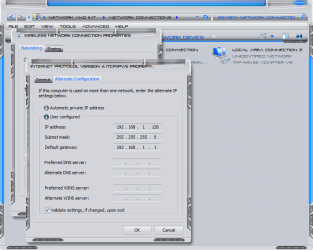
169.254.219.63(Preferred) was with auto config.

now it's 192.168.1.101(Preferred)

type in 192.168.1.126
 

My Computer

Computer Manufacturer/Model Number
Alienware
OS
Windows 7 Ultimate x64
CPU
I7
Motherboard
GA-X58-USB3
Memory
6 x 1.5V DDR3 DIMM sockets supporting up to 24 GB of system
Graphics Card(s)
GeForce GTX 580
Sound Card
Realtek ALC892 codec 2/4/5.1/7.1-channel
Monitor(s) Displays
NEC Display Solutions E321 Black 32"
Screen Resolution
1366 x 768
Hard Drives
OCZ Colossus LT Series OCZSSD2-1CLSLT1T 3.5" 1TB SATA II MLC Internal Solid State Drive
PSU
XFX Black Edition XPS-850W-BES 850W ATX12V
Case
Antec
Cooling
Zalman
Keyboard
Microsoft
Mouse
Microsoft
169.254.219.63(Preferred) was with auto config.

now it's 192.168.1.101(Preferred)

type in 192.168.1.126
Sorry, but do I type this somewhere in the IPv4 settings?
 

My Computer

OS
W7 premium 64
CPU
amd a8-3850
Motherboard
asus f1-a75v pro
Memory
8G g-skill
Graphics Card(s)
asus gt-520 silent
Monitor(s) Displays
LED viewsonic 24"
Hard Drives
seagate sata 120
wd 2T green
PSU
cool master 600W silent pro (80+bronze)
Yes
 

Attachments

  • 9-3-2011 7-29-53 PM.png
    9-3-2011 7-29-53 PM.png
    127.1 KB · Views: 6

My Computer

Computer Manufacturer/Model Number
Alienware
OS
Windows 7 Ultimate x64
CPU
I7
Motherboard
GA-X58-USB3
Memory
6 x 1.5V DDR3 DIMM sockets supporting up to 24 GB of system
Graphics Card(s)
GeForce GTX 580
Sound Card
Realtek ALC892 codec 2/4/5.1/7.1-channel
Monitor(s) Displays
NEC Display Solutions E321 Black 32"
Screen Resolution
1366 x 768
Hard Drives
OCZ Colossus LT Series OCZSSD2-1CLSLT1T 3.5" 1TB SATA II MLC Internal Solid State Drive
PSU
XFX Black Edition XPS-850W-BES 850W ATX12V
Case
Antec
Cooling
Zalman
Keyboard
Microsoft
Mouse
Microsoft
Back
Top