
IzalithFuror
New member
- Local time
- 4:20 PM
- Messages
- 4
Windows refuses to change the version application called upon with default program.
I have 2 versions of 3ds max (2010 and 2015) on my system. I need both for different utilities (some that work in 2010 do not work in 2015, and vice versa).
I tried to change the default left click open program to 3ds max 2015.

However, Windows refuses to acknowledge this and insists on using 3ds Max 2010's 3dsmax.exe instead.
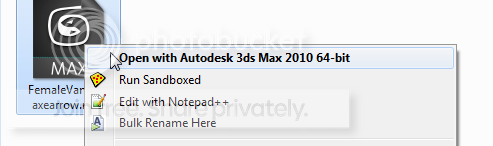
I am using the correct path to the launcher in the 2015 version's folder, I made sure of this at least 15 times.
I have gone through regedit tutorials, even downloaded a utility called openwithview, and tried working with the UI interface for 'open with' for hours but to no avail. Why is windows so insistent on using 3dsmax.exe from the 2010 version even when explicitly told to use the 2015 version? What is causing it to fight so hard with me? How can I change this behavior?
I have 2 versions of 3ds max (2010 and 2015) on my system. I need both for different utilities (some that work in 2010 do not work in 2015, and vice versa).
I tried to change the default left click open program to 3ds max 2015.
However, Windows refuses to acknowledge this and insists on using 3ds Max 2010's 3dsmax.exe instead.
I am using the correct path to the launcher in the 2015 version's folder, I made sure of this at least 15 times.
I have gone through regedit tutorials, even downloaded a utility called openwithview, and tried working with the UI interface for 'open with' for hours but to no avail. Why is windows so insistent on using 3dsmax.exe from the 2010 version even when explicitly told to use the 2015 version? What is causing it to fight so hard with me? How can I change this behavior?
My Computer
At a glance
Windows 7 64 bit
- OS
- Windows 7 64 bit
