Solved Default Programs

meyrick39

New member
Local time
3:26 PM
Messages
4
Location
Newbury. UK
I am suffering with a very annoying problem. I am using Win 7, Outlook 2010, IE9.
If I receive an email with an http link when clicked fires up Firefox insteadof IE9. I have Firefox as a backup browser but rarely use it.
I have explored Default Programs and have clicked on Default Programs but IE is not listed.
I have also explored Associate a file with and when I get down to Protocols I see HTTP and HTTPS have Firefox as default. Clicking on Change programs gives the choice of Firefox and nothing else.
Can anyone please throw a light on this problem?
 

My Computer

OS
Windows 7
On the Programs tab of Internet Options (in IE9, Tools/cog icon > Internet Options), click the button saying "Make default" at the top of the window.

If it's disabled, then we have a larger problem at hand! :p
 

My Computer

Computer Manufacturer/Model Number
CreepinJesus Mk. IV
OS
Windows 7 Ultimate x64
CPU
Intel Core i5-2500 3.3GHz
Motherboard
Asus P8H67-M PRO
Memory
8GB DDR3 1333MHz
Graphics Card(s)
On-board
Sound Card
On-board
Monitor(s) Displays
Samsung SyncMaster BX2250 22.5" LED-backlit LCD
Screen Resolution
1920 * 1080
Hard Drives
OCZ Agility 3 120GB, SATA-III
PSU
Thermaltake Toughpower Grand TPG-650M
Case
Lian-Li PC-A04
Cooling
Standard fans. They blow.
Keyboard
Logitech K360
Mouse
Generic Logitech from the bargain-bin by the checkout
Internet Speed
Over 9000! ...Mbps.
Other Info
Chocolate digestives are my favourite biscuit.
Thank yo CJ I have been there and clicked it many times as it tells me it is not my default browser. When I click it looks OK but the apply button is greyed out. Go back after a couple of mins and it has not changed still telling me it is not my default.. Any ideas?
 

My Computer

OS
Windows 7
I am very tempted to delete completely Firefox and see what happens when I click on a link. I have now ticked on "Tell me if IE is not the default browser". It keeps on telling me it is not. It's in a complete loop now.
 

My Computer

OS
Windows 7
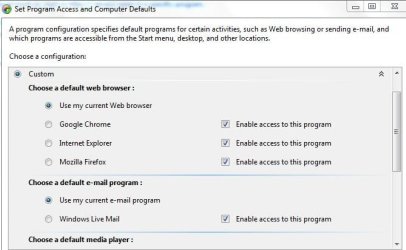
Go default programs. Then go to set program access and computer defaults. In custom tab set it up from there it should work for you
This is how I have mine set
Capture.JPG
 

My Computer

Computer Manufacturer/Model Number
Put together
OS
Win7 Pro-64 Bit
CPU
i7-2600-3.4GHz
Motherboard
ASRock Z68M
Memory
8 GIG DDR3
Graphics Card(s)
onboard
Sound Card
onboard
Hard Drives
Seagate 1TB 7200RPM
PSU
680 W
Case
black
Cooling
stock fans
Keyboard
Microsoft
Mouse
Microsoft optical
Thank you everybody for you help. I have sorted the problem after a fashion. I deleted Firefox so when I click on a link it has to go to IE. This seems to work OK but IE does not appear in default programs.
 

My Computer

OS
Windows 7

My Computer

Computer type
PC/Desktop
Computer Manufacturer/Model Number
Self built custom
OS
64-bit Windows 11 Pro for Workstations
CPU
Intel i7-8700K OC'd to 5 GHz
Motherboard
ASUS ROG Maximus XI Formula Z390
Memory
64 GB (4x16GB) G.SKILL TridentZ RGB DDR4 3600 MHz
Graphics Card(s)
ASUS ROG-STRIX-GTX1080TI-O11G-GAMING
Sound Card
Integrated
Monitor(s) Displays
2 x Samsung Odyssey G7 27"
Screen Resolution
2560x1440
Hard Drives
1TB Samsung 990 PRO M.2,
4TB Samsung 990 PRO PRO M.2,
TerraMaster F8 SSD Plus NAS
PSU
Seasonic Prime Titanium 850W
Case
Thermaltake Core P3
Cooling
Corsair Hydro H115i
Keyboard
Logitech wireless K800
Mouse
Logitech MX Master 4
Internet Speed
2 Gb/s Download and 100 Mb/s Upload
Antivirus
Malwarebyte Anti-Malware Premium
Browser
Google Chrome
Other Info
Logitech Z625 speaker system,
Logitech BRIO 4K Pro webcam,
HP Color LaserJet Pro MFP M477fdn,
APC SMART-UPS RT 1000 XL - SURT1000XLI,
Galaxy S23 Plus phone
I have this exact same problem, but following the instructions at your provided link DID NOT add IE to the default programs list. Please help if you can.
 

My Computer

Computer type
PC/Desktop
OS
Win 7
Hello Davey, and welcome to Seven Forums.

If you like, you could do a system restore using a restore point dated before this happened to hopefully undo and fix this for you. :)
 

My Computer

Computer type
PC/Desktop
Computer Manufacturer/Model Number
Self built custom
OS
64-bit Windows 11 Pro for Workstations
CPU
Intel i7-8700K OC'd to 5 GHz
Motherboard
ASUS ROG Maximus XI Formula Z390
Memory
64 GB (4x16GB) G.SKILL TridentZ RGB DDR4 3600 MHz
Graphics Card(s)
ASUS ROG-STRIX-GTX1080TI-O11G-GAMING
Sound Card
Integrated
Monitor(s) Displays
2 x Samsung Odyssey G7 27"
Screen Resolution
2560x1440
Hard Drives
1TB Samsung 990 PRO M.2,
4TB Samsung 990 PRO PRO M.2,
TerraMaster F8 SSD Plus NAS
PSU
Seasonic Prime Titanium 850W
Case
Thermaltake Core P3
Cooling
Corsair Hydro H115i
Keyboard
Logitech wireless K800
Mouse
Logitech MX Master 4
Internet Speed
2 Gb/s Download and 100 Mb/s Upload
Antivirus
Malwarebyte Anti-Malware Premium
Browser
Google Chrome
Other Info
Logitech Z625 speaker system,
Logitech BRIO 4K Pro webcam,
HP Color LaserJet Pro MFP M477fdn,
APC SMART-UPS RT 1000 XL - SURT1000XLI,
Galaxy S23 Plus phone
It has been like this since I got my computer 2 years ago.
 

My Computer

Computer type
PC/Desktop
OS
Win 7
Back
Top