Default Recording Device cannot be set.

Darkcyprus

New member
Local time
12:22 AM
Messages
25
Location
Cairo, Egypt
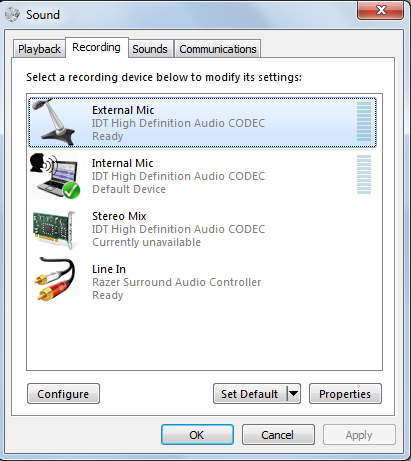
I can't set my default recording device.

e25fbebf18be26c82081d429539f7c61.png


I press the Set Default button, and nothing happens. I remember seeing another thread here where Skype was causing this, but I need to be sure, because I'm trying to install a new microphone for use with Skype.
 

My Computer

Computer type
Laptop
Computer Manufacturer/Model Number
Lenovo G510
OS
Windows 7 Ultimate x64
CPU
Intel(R) Core(TM) i5-4200M CPU @ 2.50GHz
Motherboard
Unknown (For now!)
Memory
6.00 GB
Graphics Card(s)
Intel HD Graphics 4600 / Radeon R5 M230
Sound Card
Conexant
Screen Resolution
1366x768
Hard Drives
(One drive, two partitions) |ST500LT0 12-1DG142 SCSI Disk Device
| C:\ - 50GB
| D:\ - 415GB
| External (Samsung) - 500GB
Internet Speed
1Mb/s :(
Antivirus
Avast
Browser
Chrome / Firefox / Vivaldi
The Razer surround controller may be causing this. Try disabling it (probably in the Device Manager) and see if that allows the Stereo Mix to be set.
 

My Computer

Computer type
PC/Desktop
Computer Manufacturer/Model Number
My Own Build
OS
Windows 10 64 bit
CPU
Intel i7 6700K
Motherboard
ASUS ROG Maximus VIII Hero
Memory
16GB Corsair Dominator
Graphics Card(s)
Intel CPU Graphics
Sound Card
RealTek
Monitor(s) Displays
27" Dell S2719dgf
Screen Resolution
2560X1440
Hard Drives
1 TB Samsung 850 EVO SSD for Win 10 Pro
500GB Samsung 850 EVO SSD for Win 10 Insider
2 TB drive for backup
PSU
EVGA Supernova 750G2
Case
BeQuiet Silent Base 600
Cooling
Deepcool Captain 120EX
Keyboard
Microsoft Wireless 2000
Mouse
Microsoft wireless
Internet Speed
100 MB/sec (Cable)
Antivirus
Microsoft Defender and Malwarebytes
Browser
Edge/Firefox
Other Info
Cakewalk (Sonar) by BandLab and Studio One 4.1 Pro recording studio software. MOTU 896Mk3 Hybrid recording interface, Frontier Tranzport wireless control unit, Behringer X-Touch Control Surface.
Five USB connected optical drives for CD Audio production using Nero BurningROM

I just tried that, no difference.
 

My Computer

Computer type
Laptop
Computer Manufacturer/Model Number
Lenovo G510
OS
Windows 7 Ultimate x64
CPU
Intel(R) Core(TM) i5-4200M CPU @ 2.50GHz
Motherboard
Unknown (For now!)
Memory
6.00 GB
Graphics Card(s)
Intel HD Graphics 4600 / Radeon R5 M230
Sound Card
Conexant
Screen Resolution
1366x768
Hard Drives
(One drive, two partitions) |ST500LT0 12-1DG142 SCSI Disk Device
| C:\ - 50GB
| D:\ - 415GB
| External (Samsung) - 500GB
Internet Speed
1Mb/s :(
Antivirus
Avast
Browser
Chrome / Firefox / Vivaldi
Recycle the IDT sound drivers. Uninstall it in the Device Manager, but DO NOT uninstall the drivers. Restart the PC and when Windows starts it will detect and reinstall the sound. Then try to set the Stereo Mix.

Has this ever worked?
 

My Computer

Computer type
PC/Desktop
Computer Manufacturer/Model Number
My Own Build
OS
Windows 10 64 bit
CPU
Intel i7 6700K
Motherboard
ASUS ROG Maximus VIII Hero
Memory
16GB Corsair Dominator
Graphics Card(s)
Intel CPU Graphics
Sound Card
RealTek
Monitor(s) Displays
27" Dell S2719dgf
Screen Resolution
2560X1440
Hard Drives
1 TB Samsung 850 EVO SSD for Win 10 Pro
500GB Samsung 850 EVO SSD for Win 10 Insider
2 TB drive for backup
PSU
EVGA Supernova 750G2
Case
BeQuiet Silent Base 600
Cooling
Deepcool Captain 120EX
Keyboard
Microsoft Wireless 2000
Mouse
Microsoft wireless
Internet Speed
100 MB/sec (Cable)
Antivirus
Microsoft Defender and Malwarebytes
Browser
Edge/Firefox
Other Info
Cakewalk (Sonar) by BandLab and Studio One 4.1 Pro recording studio software. MOTU 896Mk3 Hybrid recording interface, Frontier Tranzport wireless control unit, Behringer X-Touch Control Surface.
Five USB connected optical drives for CD Audio production using Nero BurningROM
I've never tried that, I will attempt ASAP.
 

My Computer

Computer type
Laptop
Computer Manufacturer/Model Number
Lenovo G510
OS
Windows 7 Ultimate x64
CPU
Intel(R) Core(TM) i5-4200M CPU @ 2.50GHz
Motherboard
Unknown (For now!)
Memory
6.00 GB
Graphics Card(s)
Intel HD Graphics 4600 / Radeon R5 M230
Sound Card
Conexant
Screen Resolution
1366x768
Hard Drives
(One drive, two partitions) |ST500LT0 12-1DG142 SCSI Disk Device
| C:\ - 50GB
| D:\ - 415GB
| External (Samsung) - 500GB
Internet Speed
1Mb/s :(
Antivirus
Avast
Browser
Chrome / Firefox / Vivaldi
I've done as you said. Now I can't hear any audio.

464ed541b6919445fd0757898c6977c0


EDIT: I've System Restore'd my way back to functioning audio. Welp, not doing that again.
 
Last edited:

My Computer

Computer type
Laptop
Computer Manufacturer/Model Number
Lenovo G510
OS
Windows 7 Ultimate x64
CPU
Intel(R) Core(TM) i5-4200M CPU @ 2.50GHz
Motherboard
Unknown (For now!)
Memory
6.00 GB
Graphics Card(s)
Intel HD Graphics 4600 / Radeon R5 M230
Sound Card
Conexant
Screen Resolution
1366x768
Hard Drives
(One drive, two partitions) |ST500LT0 12-1DG142 SCSI Disk Device
| C:\ - 50GB
| D:\ - 415GB
| External (Samsung) - 500GB
Internet Speed
1Mb/s :(
Antivirus
Avast
Browser
Chrome / Firefox / Vivaldi
Back
Top