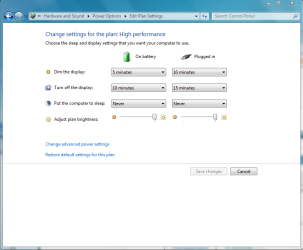
Firstly, i was on problem where my monitor stopped to turn off in 1 minute (Im using auto turn off monitor). I tried to figure out what the problem is. Then i tried the settings on command prompt. I used "powercfg.exe /?" to see the list of available commands and i modified value of "powercfg-change-monitor-timeout-ac" into 0.1
And, it doesnt work. My monitor still wont shut. Next, i reboot my computer and after that, i waited for 1 min on my desktop and monitor finally turned off.
lol. So the problem is because i havent reboot my computer yet.
So my question is, what is the default value of that setting (powercfg-change-monitor-timeout-ac) and what is the function of that command? I need to revert it back to default because i have screw it up.
Thanks.
And, it doesnt work. My monitor still wont shut. Next, i reboot my computer and after that, i waited for 1 min on my desktop and monitor finally turned off.
lol. So the problem is because i havent reboot my computer yet.
So my question is, what is the default value of that setting (powercfg-change-monitor-timeout-ac) and what is the function of that command? I need to revert it back to default because i have screw it up.
Thanks.
Last edited:
My Computer
At a glance
Windows 7 Ultimate x86Intel® Core™ 2 Duo T5200 @1.60 GHz1 GBATI Mobility Radeon X1400
- Computer Manufacturer/Model Number
- Toshiba Satellite A100
- OS
- Windows 7 Ultimate x86
- CPU
- Intel® Core™ 2 Duo T5200 @1.60 GHz
- Memory
- 1 GB
- Graphics Card(s)
- ATI Mobility Radeon X1400
- Sound Card
- Realtek Semiconductor Corp.
- Monitor(s) Displays
- 15.4" CSV 1280 x 800
- Hard Drives
- 120 GB
- Mouse
- e PRO
- Internet Speed
- 1 Mbps down / 80 Kbps up