Solved Defender Error

TechnoMage2016

Retired PC Tech
Pro User
VIP
Local time
7:52 PM
Messages
717
Location
Central Florida
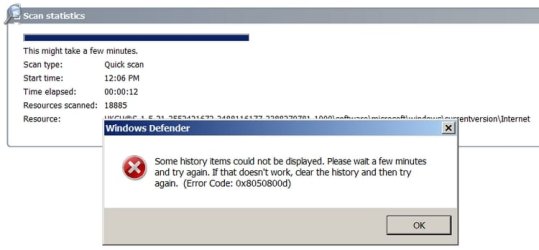
I'm running Windows 7/Pro/x86 and I'm using Windows Defender, and I'd like to be able to continue to use it....but, every time I try to do a scan, it tells me I've not done a scan in over 140 days. :cry:
Then it gives me this error message: Telling me that I should clear the history. What?

I have no idea where the history is stored, let alone how I'd go about clearing it.


When I tried to look that up on the net, I always get references to Win-10...not Win-7. Arggg!


Any help would be much appreciated.


TM :cool:
 

Attachments

  • Defender Error.jpg
    Defender Error.jpg
    98.4 KB · Views: 14

My Computer

Computer type
PC/Desktop
Computer Manufacturer/Model Number
Various
OS
Win 7 Pro, SP1, x86, Win-11/Pro/64
CPU
AMD
Motherboard
Various
Memory
8GB Crucial
Graphics Card(s)
Various
Sound Card
OnBoard
Monitor(s) Displays
Acer 21.5"
Hard Drives
Crucial SSD, 500 GB
PSU
OEM
Case
SFF Slim Line Case
Cooling
OEM
Keyboard
eMachines
Mouse
Logitech Wireless
Internet Speed
varies
Antivirus
Windows Defender/Super Anti-Spyware
Browser
Firefox
Hi TechnoMage2016,

Do you have another AV program installed? That could cause the 0x805800d error message.
 

My Computer

Computer type
PC/Desktop
OS
Windows 7 x64, Vista x64, 8.1 smartphone
CPU
Intel E8400 65W 64-bit
Motherboard
Gigabyte EP45-UD3LR
Memory
DDR2 2 x 2GB, 1GB x 2
Graphics Card(s)
XFX Radeon HD5750
Sound Card
AMD High Definition Audio; Realtek High Definition Audio
Monitor(s) Displays
iiyama prolite X2377HDS
Screen Resolution
1920 x 1080
Hard Drives
500GB 7200 rpm Seagate ST3500413AS 16MB, 500GB 5400 rpm Toshiba MQ02ABF050H 32MB, 200GB 7200 rpm Seagate ST3200820AS 8MB, 2TB 7200 rpm Western Digital WD20EZRX 64MB
PSU
Enermax Liberty Modular
Case
Antec P193 Midi Tower
Keyboard
Mionix ZIBAL 60
Mouse
Razer USB 2.0 Diamondback Mouse or Huion Graphics Tablet
Browser
Internet Explorer, Lunascape, Firefox, Opera, Avast Safezone
Hi

Why Windows Defender - its not an AV - Spyware only

Id download MSE, if you wanna stick with an MS prog.

MS renamed the combined AS/AV. Defender. for W10 some time back
Microsoft Security Essentials - Wikipedia


theres not much around for that error, you could try the standard repair options
sfc /scannow
chkdsk /r
kb947821


Roy
 

My Computer

Computer type
PC/Desktop
Computer Manufacturer/Model Number
medionl/Aspire 6930G/acer x55a
OS
W7 home premium 32bit/W7HP 64bit/w10 tp insider ring
CPU
E5300 dual core
Motherboard
medion MS7366
Memory
3gb
Graphics Card(s)
Nvidia Geforce 7100 Nforce 630i
Monitor(s) Displays
avixc
Internet Speed
n (isp resticted to 72)
Antivirus
mse/pands
Browser
palemoon
Other Info
Belkin Fd7050 n USB using Railink RT2870 drivers, more upto date
Hi TechnoMage2016,

Do you have another AV program installed? That could cause the 0x805800d error message.


NO I don't! And I really don't want to install something else. So please......


I do however use Super Anti-Spyware, and Spyware Blaster. But no AV software, as such.


If I were going to install an AV program, I'd just install AVG. I have it on my Utilities CD.
But I really wanted to keep Windows Defender on this PC. I have it on some of my other PC's that run W-7, and it works great on all of them, , , but not this one. Arggg! Something got in there and screwed it up, but I just don't know what and the internet was of no use at all. Grrrr!


I may have to just do a Clean Re-Install of Win-7, which I usually have to do at least once a year anyway.


Cheers Mates!


:cool:
 

My Computer

Computer type
PC/Desktop
Computer Manufacturer/Model Number
Various
OS
Win 7 Pro, SP1, x86, Win-11/Pro/64
CPU
AMD
Motherboard
Various
Memory
8GB Crucial
Graphics Card(s)
Various
Sound Card
OnBoard
Monitor(s) Displays
Acer 21.5"
Hard Drives
Crucial SSD, 500 GB
PSU
OEM
Case
SFF Slim Line Case
Cooling
OEM
Keyboard
eMachines
Mouse
Logitech Wireless
Internet Speed
varies
Antivirus
Windows Defender/Super Anti-Spyware
Browser
Firefox
AVG???? :roflmao:
That became useless 10 years ago....and more recently was shown to sell user data/information to other parties. No one uses AVG anymore.

As Torchwood said : install MSE.
 

My Computer

Computer type
PC/Desktop
Computer Manufacturer/Model Number
Golden Mk. I.4
OS
Windows 10 Pro x64 ; Xubuntu x64
CPU
Intel i7 860 @ 2.80 GHz O/C'ed to 4.0GHz
Motherboard
Gigabyte P55A-UD3R Rev.1. Award BIOS F13
Memory
16GB Corsair Vengance DDR3 @ 661 MHz Dual Channel (9-9-9-24)
Graphics Card(s)
EVGA NVidia GTX 560 1024MB
Sound Card
Realtek Integrated
Monitor(s) Displays
Dual Samsung SyncMaster 2494HS
Screen Resolution
1920*1080 and 1920*1080
Hard Drives
1*Samsung 840 EVO 120GB SSD;
1*OCZ Vertex 2 60GB SSD;
2*Samsung F3 SpinPoint 1TB in RAID0;
1*Samsung F1 SpinPoint 1TB;
2*Western Digital 1TB External USB 3.0
1*Western Digital 500GB External USB 3.0
1*Seagate 500GB External USB 2.0
PSU
Thermaltake ToughPower QFan 750W
Case
Thermaltake Element S VK60001W2Z
Cooling
Corsair H60 Water Cooling, 2*230mm and 2*80mm case fans
Keyboard
Logitech G110
Mouse
Logitech MX518
Clean Re-Install of Win-7 once a year, that sounds a bit much to me, do you have any computer proficiency?

The history is stored in C:\ProgramData\Microsoft\Windows Defender\Scans. You can delete the scans folder and it will re-create on boot. Unhide folders before you look.

I agree with the others posts about MSE.
 

My Computer

Computer type
PC/Desktop
OS
Windows 7 x64, Vista x64, 8.1 smartphone
CPU
Intel E8400 65W 64-bit
Motherboard
Gigabyte EP45-UD3LR
Memory
DDR2 2 x 2GB, 1GB x 2
Graphics Card(s)
XFX Radeon HD5750
Sound Card
AMD High Definition Audio; Realtek High Definition Audio
Monitor(s) Displays
iiyama prolite X2377HDS
Screen Resolution
1920 x 1080
Hard Drives
500GB 7200 rpm Seagate ST3500413AS 16MB, 500GB 5400 rpm Toshiba MQ02ABF050H 32MB, 200GB 7200 rpm Seagate ST3200820AS 8MB, 2TB 7200 rpm Western Digital WD20EZRX 64MB
PSU
Enermax Liberty Modular
Case
Antec P193 Midi Tower
Keyboard
Mionix ZIBAL 60
Mouse
Razer USB 2.0 Diamondback Mouse or Huion Graphics Tablet
Browser
Internet Explorer, Lunascape, Firefox, Opera, Avast Safezone
"do you have any computer proficiency?"

Surely you jest!!!!!! I've been a Personal Computer builder/technician for about 40 years now.
I started off by re-writing the OS on the Commodore 64, and soon moved up to building my own IBM PC compatible. That propelled me into the PC building business.

I may now be retired, but at 76 I still run service calls on PC's all over Central Florida.

I can reinstall Windows 7 as easily as I'd install a new game. A clean RE-Install, gets rid of a lot of little bugs that can develop in a heavily used PC over time.

Not finding a solution to my Windows Defender problem in short order, I just set up a temporary install of Win 7/Pro/32 on a spare 2TB Seagate HD, and just as soon as I get that all set up the way I want it, I'll clone that drive to my SSD, which I use as my main drive. I'll keep the spinner as a backup.

So I guess I can mark this thread CLOSED. And I thank Y'all for your help.
TM :cool:
 

My Computer

Computer type
PC/Desktop
Computer Manufacturer/Model Number
Various
OS
Win 7 Pro, SP1, x86, Win-11/Pro/64
CPU
AMD
Motherboard
Various
Memory
8GB Crucial
Graphics Card(s)
Various
Sound Card
OnBoard
Monitor(s) Displays
Acer 21.5"
Hard Drives
Crucial SSD, 500 GB
PSU
OEM
Case
SFF Slim Line Case
Cooling
OEM
Keyboard
eMachines
Mouse
Logitech Wireless
Internet Speed
varies
Antivirus
Windows Defender/Super Anti-Spyware
Browser
Firefox
Sorry about my wry humour. I should have added an emoticon to the end of the question, if I was any good myself, at these Forums. So don't let me get in your way now.

Bless. I'm glad that you have found a workable solution.
 

My Computer

Computer type
PC/Desktop
OS
Windows 7 x64, Vista x64, 8.1 smartphone
CPU
Intel E8400 65W 64-bit
Motherboard
Gigabyte EP45-UD3LR
Memory
DDR2 2 x 2GB, 1GB x 2
Graphics Card(s)
XFX Radeon HD5750
Sound Card
AMD High Definition Audio; Realtek High Definition Audio
Monitor(s) Displays
iiyama prolite X2377HDS
Screen Resolution
1920 x 1080
Hard Drives
500GB 7200 rpm Seagate ST3500413AS 16MB, 500GB 5400 rpm Toshiba MQ02ABF050H 32MB, 200GB 7200 rpm Seagate ST3200820AS 8MB, 2TB 7200 rpm Western Digital WD20EZRX 64MB
PSU
Enermax Liberty Modular
Case
Antec P193 Midi Tower
Keyboard
Mionix ZIBAL 60
Mouse
Razer USB 2.0 Diamondback Mouse or Huion Graphics Tablet
Browser
Internet Explorer, Lunascape, Firefox, Opera, Avast Safezone
Sorry about my wry humor. I should have added an emoticon to the end of the question, if I was any good myself, at these Forums. So don't let me get in your way now.
Bless. I'm glad that you have found a workable solution.

iko22,
I did find a workable solution....the one you gave me. ;) My forty years of experience wasn't helping me in that case. Thanks a Million!

I just got back on my main drive, my 120GB Sandisk SSD, and after shutting down Windows Defender and Taking ownership of that "Scans" folder, I then Deleted the folder, as per your instruction.
(Enabling Windows to Show all files and folders is one of the first things I always do when installing any OS.)

Then I went back into "Services.msc" and turned Windows Defender back ON, and rebooted.
My Windows Defender is now running scans without giving me Errors. Success!

Yes, I'm OLD, but never too old to learn something new. That's why I come to this forum, always hoping that I'll learn something new. And, sometimes I do!;)

Thanks again,
TechnoMage :geek:
 

My Computer

Computer type
PC/Desktop
Computer Manufacturer/Model Number
Various
OS
Win 7 Pro, SP1, x86, Win-11/Pro/64
CPU
AMD
Motherboard
Various
Memory
8GB Crucial
Graphics Card(s)
Various
Sound Card
OnBoard
Monitor(s) Displays
Acer 21.5"
Hard Drives
Crucial SSD, 500 GB
PSU
OEM
Case
SFF Slim Line Case
Cooling
OEM
Keyboard
eMachines
Mouse
Logitech Wireless
Internet Speed
varies
Antivirus
Windows Defender/Super Anti-Spyware
Browser
Firefox
I've been a Personal Computer builder/technician for about 40 years now.
I started off by re-writing the OS on the Commodore 64, and soon moved up to building my own IBM PC compatible. That propelled me into the PC building business.

I may now be retired, but at 76 I still run service calls on PC's all over Central Florida.
Perhaps you better read up bit more to stay to stay in touch with a quickly changing landscape - unfortunately things change exceptionally quickly. Thee aren't the DOS/XP days anymore. I really hope you aren't advising your clients to use AVG anymore.
 

My Computer

Computer type
PC/Desktop
Computer Manufacturer/Model Number
Golden Mk. I.4
OS
Windows 10 Pro x64 ; Xubuntu x64
CPU
Intel i7 860 @ 2.80 GHz O/C'ed to 4.0GHz
Motherboard
Gigabyte P55A-UD3R Rev.1. Award BIOS F13
Memory
16GB Corsair Vengance DDR3 @ 661 MHz Dual Channel (9-9-9-24)
Graphics Card(s)
EVGA NVidia GTX 560 1024MB
Sound Card
Realtek Integrated
Monitor(s) Displays
Dual Samsung SyncMaster 2494HS
Screen Resolution
1920*1080 and 1920*1080
Hard Drives
1*Samsung 840 EVO 120GB SSD;
1*OCZ Vertex 2 60GB SSD;
2*Samsung F3 SpinPoint 1TB in RAID0;
1*Samsung F1 SpinPoint 1TB;
2*Western Digital 1TB External USB 3.0
1*Western Digital 500GB External USB 3.0
1*Seagate 500GB External USB 2.0
PSU
Thermaltake ToughPower QFan 750W
Case
Thermaltake Element S VK60001W2Z
Cooling
Corsair H60 Water Cooling, 2*230mm and 2*80mm case fans
Keyboard
Logitech G110
Mouse
Logitech MX518
Back
Top