

You can manually run the scheduled task anytime you want, even though you defragged a different way.
I just wanted to make sure your scheduled defrag task would run.
I found the last scheduled defrag task did not run for me - i found this on 2 Win 7 systems I looked at!
I think this thread has jinx'd me

I've never seen that before, but I don't check the defrag history very often.
So now it seems I'm seeing the same issue as you.
My task history shows the defrag ran weekly until this week - as far back as my task history shows.
In my case, all the disks to be defragged showed 0% fragmentation.
Maybe the defrag task doesn't run if it's not needed ???
Maybe it's something caused by the last patch Tuesday updates, for me ???
Some people have reported issues with the last patch Tuesday updates...
There was a new update issued yesterday to fix a bad update from the last patch Tueday updates, but that patch may have issues from what I've read.
I'm not sure what I'm going to do about this latest round of updates and issues - I may restore a System Image from before Patch Tuesday...and go from there.
ANYWAY
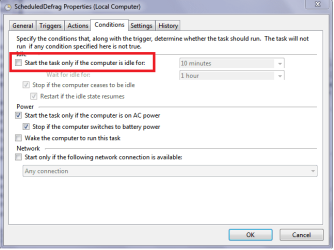
I played around with the defrag task and found if I uncheck "Start the task only if the computer is idle for:" in the defrag task / Conditions, the task does run as scheduled.
(See screen print 1 below)
Also, I set it to run a few minutes later, so I don't have to wait a week.
The problem with that is it causes an error trying to get to the Windows (file) Explorer Defragmentation window.
(See screen print 2 below)
It's up to you if you want to change your Defrag task to test if it will run without the idle condition.
If I click on "Remove Settings" in screen print 2, it removes my manual changes to the task and I can get to the window...

I just wanted to make sure your scheduled defrag task would run.
I found the last scheduled defrag task did not run for me - i found this on 2 Win 7 systems I looked at!
I think this thread has jinx'd me
I've never seen that before, but I don't check the defrag history very often.
So now it seems I'm seeing the same issue as you.
My task history shows the defrag ran weekly until this week - as far back as my task history shows.
In my case, all the disks to be defragged showed 0% fragmentation.
Maybe the defrag task doesn't run if it's not needed ???
Maybe it's something caused by the last patch Tuesday updates, for me ???
Some people have reported issues with the last patch Tuesday updates...
There was a new update issued yesterday to fix a bad update from the last patch Tueday updates, but that patch may have issues from what I've read.
I'm not sure what I'm going to do about this latest round of updates and issues - I may restore a System Image from before Patch Tuesday...and go from there.
ANYWAY
I played around with the defrag task and found if I uncheck "Start the task only if the computer is idle for:" in the defrag task / Conditions, the task does run as scheduled.
(See screen print 1 below)
Also, I set it to run a few minutes later, so I don't have to wait a week.
The problem with that is it causes an error trying to get to the Windows (file) Explorer Defragmentation window.
(See screen print 2 below)
It's up to you if you want to change your Defrag task to test if it will run without the idle condition.
If I click on "Remove Settings" in screen print 2, it removes my manual changes to the task and I can get to the window...
My Computer
- Computer type
- PC/Desktop
- Computer Manufacturer/Model Number
- home built
- OS
- Multi-Boot W7_Pro_x64 W8.1_Pro_x64 W10_Pro_x64 +Linux_VMs +Chromium_VM
- CPU
- AMD Athlon II x4 620
- Motherboard
- Gigabyte GA-MA785G-UD3H
- Memory
- 6GB GSkill DDR2 800
- Graphics Card(s)
- AMD 4670 GPU + AMD 4200 IGP
- Sound Card
- on board Realtek ALC889A
- Monitor(s) Displays
- RCA 40" LCD TV, Insignia 32" LCD TV, HP 15" LCD monitor
- Screen Resolution
- 1680 x 1050
- Hard Drives
- OCZ Vertex 3 120GB,
Samsung F3 1TB (3),
Several others - WD, Seagate, Hitachi, ...
- PSU
- Corsair 500 W
- Case
- Rosewill mid tower
- Cooling
- CM 90mm rifle
- Keyboard
- Gyration wireless, Logitech wireless, Dell USB wired
- Mouse
- Gyration wireless, Logitech wireless, V7 USB wired
- Internet Speed
- Spectrum - 100Mbps D / 10Mbps U
- Antivirus
- Avast, MBAM3, EMET, WinPatrol
- Browser
- Pale Moon, Firefox, IE
- Other Info
- 2 multi-boot PC's
Mainly HTPC/Office/Gen purpose (no gaming).
Trendnet USB KVM.
LG DVD burner/Blue Ray Player.
Tray system for removable SATA backup drives.
Not currently OCd, under-volted.
I use Hybrid sleep, rarely re-boot or shutdown.
Hauppauge HD-PVR, Avermedia PCIe TV Tuner, Hauppauge PCI TV Tuner.

