Delay In Shutdown

Shukla

Lost Somewhere
Member
Local time
12:28 AM
Messages
39
Location
India
My PC is taking long time to shutdown from few days and sometimes windows shows error that desktop is not responding and asked me to force shutdown . Please help .:cry:
 

My Computer

Computer type
PC/Desktop
Computer Manufacturer/Model Number
Self Assembled
OS
Windows 7 Ultimate x86 SP1
Internet Speed
4.2 Mbps Up ; 2.6 Mbps Down
Antivirus
Kasperskey Internet Security
Browser
Google Chrome
After click the Shutdown butten . Go to start , type regedit, in the run box and press Enter and in the left pane navigate to HKEY_LOCAL_MACHINE\SYSTEM\CurrentControlSet and click on the Control folder. Look for WaitToKillServiceTimeout, right-click it and choose Modify. I suspect it’s stored in milliseconds, in which case 3600000 represents 1 hour.
Test it first, set to, say, 5 minutes (30000

Hopefully it will help you
 

My Computer

Computer type
PC/Desktop
OS
microsoft window7 Ultimate x64
Yes TC and britny I do that in both the control sets - see pic - works a treat!!

Oops meant to add that changes that third set so you don't need to change it:)
 

Attachments

  • CONT4.PNG
    CONT4.PNG
    26.7 KB · Views: 6

My Computer

Computer type
PC/Desktop
Computer Manufacturer/Model Number
Own build (new) Desk1 / Asus ROG Win 7 / Desk2 1st build
OS
Desk1 7 Home Prem / Desk2 10 Pro / Main lap Asus ROG 10 Pro 2 laptop Toshiba 7 Pro Asus P2520 7 & 10
CPU
Desk1 i5 3750K / Laptop i7 GTX 860M / Desk2 i5 2500
Motherboard
Desk1 Asus P877-V / Desk2 Gigabyte H67 UD3H / Laptop ?
Memory
Desk1 8GB (1866) / Desk2 16GB (1333) / Laptop 8Gb DDR3
Graphics Card(s)
Desk 1& 2NVidia GTX 650 & Laptops on board Intel
Sound Card
Desk 1 & 2 -XONAR DG Realtek High Def audio Laptop
Monitor(s) Displays
Desk 1 Benq HD 2450 / Desk2 Philips 24" / Laptop 17.5"
Screen Resolution
1920x1080 D1 & D2 & Laptop 1
Hard Drives
Desk1 Samsung 120GB 830 SSD
Asus ROG 256GB 850 Pro SSD
Desk2 Samsung 840 256 SSD
Toshiba 120GB EVO
PSU
Desk 1 Corsair HX 1050/ Laptop ? / Desk 2 Corsair HX 650
Case
Desk 1 Cooler HAF XM ? Toshiba laptop / Desk2 Coolermaster
Cooling
Fans on all Desk1 -2 Desk2 - all Coolermasters 5 Laptop ?
Keyboard
Desk 1 MS Sidewinder X6 Desk 2 MS Sidewinder X 4
Mouse
Desk 1&2 - Gigabyte MS 900 gamer - laptop - Logitec wireless
Internet Speed
ADSL2+
Other Info
One other Desktop (tester) and spare Toshba laptop both with SSD's
Running Kaspersky 2016 ISS on all machines config'd identically
Logitec audio stereo systems on each machine (x3)
Canon MG5250MFC
Router/modem TP-Link running WPA2SK

My Computer

Computer type
PC/Desktop
Computer Manufacturer/Model Number
Own build (new) Desk1 / Asus ROG Win 7 / Desk2 1st build
OS
Desk1 7 Home Prem / Desk2 10 Pro / Main lap Asus ROG 10 Pro 2 laptop Toshiba 7 Pro Asus P2520 7 & 10
CPU
Desk1 i5 3750K / Laptop i7 GTX 860M / Desk2 i5 2500
Motherboard
Desk1 Asus P877-V / Desk2 Gigabyte H67 UD3H / Laptop ?
Memory
Desk1 8GB (1866) / Desk2 16GB (1333) / Laptop 8Gb DDR3
Graphics Card(s)
Desk 1& 2NVidia GTX 650 & Laptops on board Intel
Sound Card
Desk 1 & 2 -XONAR DG Realtek High Def audio Laptop
Monitor(s) Displays
Desk 1 Benq HD 2450 / Desk2 Philips 24" / Laptop 17.5"
Screen Resolution
1920x1080 D1 & D2 & Laptop 1
Hard Drives
Desk1 Samsung 120GB 830 SSD
Asus ROG 256GB 850 Pro SSD
Desk2 Samsung 840 256 SSD
Toshiba 120GB EVO
PSU
Desk 1 Corsair HX 1050/ Laptop ? / Desk 2 Corsair HX 650
Case
Desk 1 Cooler HAF XM ? Toshiba laptop / Desk2 Coolermaster
Cooling
Fans on all Desk1 -2 Desk2 - all Coolermasters 5 Laptop ?
Keyboard
Desk 1 MS Sidewinder X6 Desk 2 MS Sidewinder X 4
Mouse
Desk 1&2 - Gigabyte MS 900 gamer - laptop - Logitec wireless
Internet Speed
ADSL2+
Other Info
One other Desktop (tester) and spare Toshba laptop both with SSD's
Running Kaspersky 2016 ISS on all machines config'd identically
Logitec audio stereo systems on each machine (x3)
Canon MG5250MFC
Router/modem TP-Link running WPA2SK
I dunno, the last time I had to do this was in Windows XP.
Hum I got this from the Optimise tutorial and I found the 1 was is deal.
http://www.sevenforums.com/tutorials/11728-optimize-windows-7-a.html?filter[2]=Performance Maintenance point 20

I haven't changed this yet my shut down time is precisely 3 seconds: from the moment I click Shut Down, my computer is completely powered off in 3 seconds. Here's how I count it: when I click Shut Down, I wait exactly 1 second before I say "1" while looking at the second hand on my clock. If I said "1" as soon as I clicked Shut Down, then I'd get 4 seconds which is inaccurate.

Anyway, I haven't made any tweaks similar to this where I would otherwise get a longer shut down time. I don't know why it's this fast for me, but it just is.
 

My Computer

Computer type
PC/Desktop

Attachments

  • REG.PNG
    REG.PNG
    24 KB · Views: 1

My Computer

Computer type
PC/Desktop
Computer Manufacturer/Model Number
Own build (new) Desk1 / Asus ROG Win 7 / Desk2 1st build
OS
Desk1 7 Home Prem / Desk2 10 Pro / Main lap Asus ROG 10 Pro 2 laptop Toshiba 7 Pro Asus P2520 7 & 10
CPU
Desk1 i5 3750K / Laptop i7 GTX 860M / Desk2 i5 2500
Motherboard
Desk1 Asus P877-V / Desk2 Gigabyte H67 UD3H / Laptop ?
Memory
Desk1 8GB (1866) / Desk2 16GB (1333) / Laptop 8Gb DDR3
Graphics Card(s)
Desk 1& 2NVidia GTX 650 & Laptops on board Intel
Sound Card
Desk 1 & 2 -XONAR DG Realtek High Def audio Laptop
Monitor(s) Displays
Desk 1 Benq HD 2450 / Desk2 Philips 24" / Laptop 17.5"
Screen Resolution
1920x1080 D1 & D2 & Laptop 1
Hard Drives
Desk1 Samsung 120GB 830 SSD
Asus ROG 256GB 850 Pro SSD
Desk2 Samsung 840 256 SSD
Toshiba 120GB EVO
PSU
Desk 1 Corsair HX 1050/ Laptop ? / Desk 2 Corsair HX 650
Case
Desk 1 Cooler HAF XM ? Toshiba laptop / Desk2 Coolermaster
Cooling
Fans on all Desk1 -2 Desk2 - all Coolermasters 5 Laptop ?
Keyboard
Desk 1 MS Sidewinder X6 Desk 2 MS Sidewinder X 4
Mouse
Desk 1&2 - Gigabyte MS 900 gamer - laptop - Logitec wireless
Internet Speed
ADSL2+
Other Info
One other Desktop (tester) and spare Toshba laptop both with SSD's
Running Kaspersky 2016 ISS on all machines config'd identically
Logitec audio stereo systems on each machine (x3)
Canon MG5250MFC
Router/modem TP-Link running WPA2SK
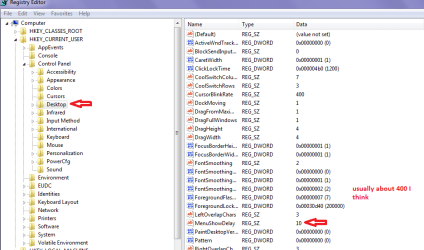
So I guess you didn't change the settings I did? if you didn't it would be interesting to see what those settings are in your regedit - usually 20000 in my installs.

I usually shorten the menu show time too as point 14 in http://www.sevenforums.com/tutorials/11728-optimize-windows-7-a.html

They're all at 12000 which I guess is the default in Windows 7. I didn't set it to this, but I just learned something about this part of the registry: this is referring to services that take too long. If a service gets stuck, then this waits 12 seconds before it kills it so that the end-user doesn't have to sit there waiting forever. Normally, Windows 7 should be able to get everything to close long before then.

In Windows XP, I had to set this to a much smaller number because I had a service that had a problem but I needed it in each Windows session. Fortunately, it never became corrupted by having Windows kill it before it was actually ready to close, so I left it that way and enjoyed an extremely short shut down time. In Windows 7, my software environment is different and so I don't have that problem service anymore which means I didn't have to tweak this part of the Registry. Everything closes immediately when I choose Shut Down or Restart just as it's all supposed to.

If you set this back to 12000, then do you have to wait 12 seconds for Windows 7 to shut down when you choose either Shut Down or Restart? If so, then you may have one or more problem services like I did. I don't remember how I discovered which service it was though.

Edit: I looked at that guide of tweaks just now, and I noticed that it mentioning using No GUI Boot. This one is a joke in my opinion because it doesn't make even 1 millisecond of difference for me. Using No GUI Boot means that your installation of Windows is now in Diagnostic Mode. Isn't that neat? :)
 
Last edited:

My Computer

Computer type
PC/Desktop
Hum must have a word with Shawn as I raised the Wait to kill to 20000 and no difference:confused:
 

My Computer

Computer type
PC/Desktop
Computer Manufacturer/Model Number
Own build (new) Desk1 / Asus ROG Win 7 / Desk2 1st build
OS
Desk1 7 Home Prem / Desk2 10 Pro / Main lap Asus ROG 10 Pro 2 laptop Toshiba 7 Pro Asus P2520 7 & 10
CPU
Desk1 i5 3750K / Laptop i7 GTX 860M / Desk2 i5 2500
Motherboard
Desk1 Asus P877-V / Desk2 Gigabyte H67 UD3H / Laptop ?
Memory
Desk1 8GB (1866) / Desk2 16GB (1333) / Laptop 8Gb DDR3
Graphics Card(s)
Desk 1& 2NVidia GTX 650 & Laptops on board Intel
Sound Card
Desk 1 & 2 -XONAR DG Realtek High Def audio Laptop
Monitor(s) Displays
Desk 1 Benq HD 2450 / Desk2 Philips 24" / Laptop 17.5"
Screen Resolution
1920x1080 D1 & D2 & Laptop 1
Hard Drives
Desk1 Samsung 120GB 830 SSD
Asus ROG 256GB 850 Pro SSD
Desk2 Samsung 840 256 SSD
Toshiba 120GB EVO
PSU
Desk 1 Corsair HX 1050/ Laptop ? / Desk 2 Corsair HX 650
Case
Desk 1 Cooler HAF XM ? Toshiba laptop / Desk2 Coolermaster
Cooling
Fans on all Desk1 -2 Desk2 - all Coolermasters 5 Laptop ?
Keyboard
Desk 1 MS Sidewinder X6 Desk 2 MS Sidewinder X 4
Mouse
Desk 1&2 - Gigabyte MS 900 gamer - laptop - Logitec wireless
Internet Speed
ADSL2+
Other Info
One other Desktop (tester) and spare Toshba laptop both with SSD's
Running Kaspersky 2016 ISS on all machines config'd identically
Logitec audio stereo systems on each machine (x3)
Canon MG5250MFC
Router/modem TP-Link running WPA2SK
Hum must have a word with Shawn as I raised the Wait to kill to 20000 and no difference:confused:

Yeah, just because someone makes a guide, it doesn't mean they know everything (I apologize, Brink!). :) If I were to go through that guide with a fine-toothed comb, then I bet I could find a couple more things that don't need to be in there - but I won't do that because it's not really my place to do so. At least, I don't think it is.
 

My Computer

Computer type
PC/Desktop
Yeah and it could possibly be me mis interpreting it too:shock:
 

My Computer

Computer type
PC/Desktop
Computer Manufacturer/Model Number
Own build (new) Desk1 / Asus ROG Win 7 / Desk2 1st build
OS
Desk1 7 Home Prem / Desk2 10 Pro / Main lap Asus ROG 10 Pro 2 laptop Toshiba 7 Pro Asus P2520 7 & 10
CPU
Desk1 i5 3750K / Laptop i7 GTX 860M / Desk2 i5 2500
Motherboard
Desk1 Asus P877-V / Desk2 Gigabyte H67 UD3H / Laptop ?
Memory
Desk1 8GB (1866) / Desk2 16GB (1333) / Laptop 8Gb DDR3
Graphics Card(s)
Desk 1& 2NVidia GTX 650 & Laptops on board Intel
Sound Card
Desk 1 & 2 -XONAR DG Realtek High Def audio Laptop
Monitor(s) Displays
Desk 1 Benq HD 2450 / Desk2 Philips 24" / Laptop 17.5"
Screen Resolution
1920x1080 D1 & D2 & Laptop 1
Hard Drives
Desk1 Samsung 120GB 830 SSD
Asus ROG 256GB 850 Pro SSD
Desk2 Samsung 840 256 SSD
Toshiba 120GB EVO
PSU
Desk 1 Corsair HX 1050/ Laptop ? / Desk 2 Corsair HX 650
Case
Desk 1 Cooler HAF XM ? Toshiba laptop / Desk2 Coolermaster
Cooling
Fans on all Desk1 -2 Desk2 - all Coolermasters 5 Laptop ?
Keyboard
Desk 1 MS Sidewinder X6 Desk 2 MS Sidewinder X 4
Mouse
Desk 1&2 - Gigabyte MS 900 gamer - laptop - Logitec wireless
Internet Speed
ADSL2+
Other Info
One other Desktop (tester) and spare Toshba laptop both with SSD's
Running Kaspersky 2016 ISS on all machines config'd identically
Logitec audio stereo systems on each machine (x3)
Canon MG5250MFC
Router/modem TP-Link running WPA2SK
Yeah and it could possibly be me mis interpreting it too:shock:

Well I don't know about that because the guide specifically says that these tweaks help speed up Windows and improve its performance. I know for a fact that on my system, choosing No GUI Boot makes absolutely zero difference - not even by 1 millisecond. The same goes for WaitToKillTimeOut because I don't have any processes or services that are taking too long to close.

Some of these other tweaks may just be providing the Placebo Effect, such as turning off unneeded Windows Features, disabling Hibernate, enabling High Performance in the Power Plan, etc.

Anyway, I'm getting way off-topic here and I apologize for that. I love guides, but some of them have things in them that don't have to be there.
 

My Computer

Computer type
PC/Desktop
Back
Top