Solved Delay Shut Down ..

sevenrock

New member
Local time
4:20 AM
Messages
24
Hi All .
I have Sony VPC-ES23FXS , ever since when i shut down , it keep ask to close back ground programs before it shut off ...

Sometime, after i click shut-down and close the lid thinking that it will do ..
but the next day when i open the lid ...It stilled hanging ...!!!

It's there a way to set it to shut down immediately with out asking ...?

Thanks .
 

My Computer

OS
Wds 7 Home Pre. 64-bit SP1
CPU
Intel Core i5 2450M @ 2.50GHz
Motherboard
Sony Vaio
Memory
4.00 GB Single-Channel DDR3
Graphics Card(s)
Intel(R) HD-3000-1813 MB * AMD Radeon(TM) HD 6470M
Hard Drives
596GB TOSHIBA (SATA)
What programs is Windows asking you to shut down?
Did you shut those programs down before shutting down the computer?
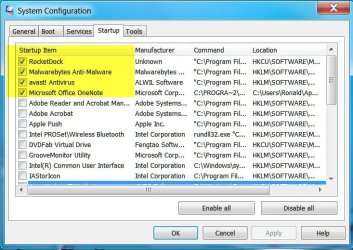
Go to Start Orb and type in msconfig and then go to Start Up and let us know what is checked.
 

My Computer

Computer type
PC/Desktop
Computer Manufacturer/Model Number
Home made Desktop
OS
Windows 10 Pro. 64/ version 1709 Windows 7 Pro/64
CPU
Intel i7-6800K @ 4.3
Motherboard
ASUS X-99 Deluxe II
Memory
Corsair Platinum 16 gig @2400
Graphics Card(s)
EVGA GTX 1070 OC
Monitor(s) Displays
Asus 27" LED LCD/VE278Q
Screen Resolution
1920-1080 or 1280-720 HDMI
Hard Drives
INTEL SSD 730-240 Gb Sata 3.0/
PSU
EVGA Platium 1200W
Case
Phanteks Luxe Tempered Glass 8 fans/ one radiator
Cooling
XSPC/ Water Cooled CPU
Keyboard
Das 4 Professional
Mouse
Logitech M705/MX Anywhere 2-S
Internet Speed
100 mbits
Antivirus
Microsoft Security Essentials/ Malwarebytes Premium 3.0/ SAS
Browser
I.E. 11 default/Firefox/ ISP Time Warner Cable/Spectrum
Other Info
LG BluRay Burner/
Sound system-KLipsch-THX/
Icy Dock ssd Hot Swap bays.
I olny have :

Rocket dock
Avast IS
MalwareByte
and Office Onenote

As usual ..on all my pc at home ..they automatically shut down without
saying " Wating to close down back ground programs ...or force shut down .."

It's kind of annoying .

( Anybody has same proplem ...?)
 

My Computer

OS
Wds 7 Home Pre. 64-bit SP1
CPU
Intel Core i5 2450M @ 2.50GHz
Motherboard
Sony Vaio
Memory
4.00 GB Single-Channel DDR3
Graphics Card(s)
Intel(R) HD-3000-1813 MB * AMD Radeon(TM) HD 6470M
Hard Drives
596GB TOSHIBA (SATA)
I olny have :

Rocket dock
Avast IS
MalwareByte
and Office Onenote

As usual ..on all my pc at home ..they automatically shut down without
saying " Wating to close down back ground programs ...or force shut down .."

It's kind of annoying .

( Anybody has same proplem ...?)

As Layback Bear has already asked, what program(s) is still running?; it is listed in the message box that says "Waiting to close background programs".
 

My Computer

Computer type
PC/Desktop
Computer Manufacturer/Model Number
Custom Built
OS
Windows 7 Professional x64
CPU
Intel i5 quad processor
Motherboard
DP67BG
Memory
16 GB
Graphics Card(s)
Radeon HD 5770
Sound Card
Realtek High Definition Audio
Monitor(s) Displays
Samsung SyncMaster
Screen Resolution
1920X1080
Hard Drives
WD 2TB (SATA Internal)
WD 1TB (USB External)
PSU
Corsair GS800
Case
Tower (Generic)
Cooling
3 Internal Fans
Keyboard
MS Wireless
Mouse
MS Optical Wired
Internet Speed
54 mbps
Antivirus
Emsisoft
Browser
IE-Version 9, Palemoon-Version 24.2.0
What Malwarebytes Anti Malware do you use. On demand free, trial or Pro?
I would start by removing Avast and installing MSEentials
Microsoft Security Essentials - Free Antivirus for Windows
I would also un-check Office One note. You can always start it when needed in programs or a icon on desktop.
We need to know what programs Windows is complaining about.
 

My Computer

Computer type
PC/Desktop
Computer Manufacturer/Model Number
Home made Desktop
OS
Windows 10 Pro. 64/ version 1709 Windows 7 Pro/64
CPU
Intel i7-6800K @ 4.3
Motherboard
ASUS X-99 Deluxe II
Memory
Corsair Platinum 16 gig @2400
Graphics Card(s)
EVGA GTX 1070 OC
Monitor(s) Displays
Asus 27" LED LCD/VE278Q
Screen Resolution
1920-1080 or 1280-720 HDMI
Hard Drives
INTEL SSD 730-240 Gb Sata 3.0/
PSU
EVGA Platium 1200W
Case
Phanteks Luxe Tempered Glass 8 fans/ one radiator
Cooling
XSPC/ Water Cooled CPU
Keyboard
Das 4 Professional
Mouse
Logitech M705/MX Anywhere 2-S
Internet Speed
100 mbits
Antivirus
Microsoft Security Essentials/ Malwarebytes Premium 3.0/ SAS
Browser
I.E. 11 default/Firefox/ ISP Time Warner Cable/Spectrum
Other Info
LG BluRay Burner/
Sound system-KLipsch-THX/
Icy Dock ssd Hot Swap bays.
I have Malwarebyte Pro , Avast IE Pro 6 ... as i mentioned ...
All of my pc have the same start up programs but only sony laptop acting like this ..!!

It's OK ... if i can not set it to close out those programs automatically + silently when shutting down ,,then be it ..


Thanks for your help .
 

My Computer

OS
Wds 7 Home Pre. 64-bit SP1
CPU
Intel Core i5 2450M @ 2.50GHz
Motherboard
Sony Vaio
Memory
4.00 GB Single-Channel DDR3
Graphics Card(s)
Intel(R) HD-3000-1813 MB * AMD Radeon(TM) HD 6470M
Hard Drives
596GB TOSHIBA (SATA)
There may be "pre-installed Sony" programs on that laptop that are not on your other machine(s) that are causing this.

If you want to fix this, you need to answer the questions Layback Bear asked in post #2.
 

My Computer

Computer type
PC/Desktop
Computer Manufacturer/Model Number
home built
OS
Multi-Boot W7_Pro_x64 W8.1_Pro_x64 W10_Pro_x64 +Linux_VMs +Chromium_VM
CPU
AMD Athlon II x4 620
Motherboard
Gigabyte GA-MA785G-UD3H
Memory
6GB GSkill DDR2 800
Graphics Card(s)
AMD 4670 GPU + AMD 4200 IGP
Sound Card
on board Realtek ALC889A
Monitor(s) Displays
RCA 40" LCD TV, Insignia 32" LCD TV, HP 15" LCD monitor
Screen Resolution
1680 x 1050
Hard Drives
OCZ Vertex 3 120GB,
Samsung F3 1TB (3),
Several others - WD, Seagate, Hitachi, ...
PSU
Corsair 500 W
Case
Rosewill mid tower
Cooling
CM 90mm rifle
Keyboard
Gyration wireless, Logitech wireless, Dell USB wired
Mouse
Gyration wireless, Logitech wireless, V7 USB wired
Internet Speed
Spectrum - 100Mbps D / 10Mbps U
Antivirus
Avast, MBAM3, EMET, WinPatrol
Browser
Pale Moon, Firefox, IE
Other Info
2 multi-boot PC's
Mainly HTPC/Office/Gen purpose (no gaming).
Trendnet USB KVM.
LG DVD burner/Blue Ray Player.
Tray system for removable SATA backup drives.

Not currently OCd, under-volted.
I use Hybrid sleep, rarely re-boot or shutdown.

Hauppauge HD-PVR, Avermedia PCIe TV Tuner, Hauppauge PCI TV Tuner.
There may be "pre-installed Sony" programs on that laptop that are not on your other machine(s) that are causing this.

If you want to fix this, you need to answer the questions Layback Bear asked in post #2.


I Did ... Only 4 programs when start-up ..

[all pcs are Sony]

7-24-2012 9-51-53 AM.jpg
 

My Computer

OS
Wds 7 Home Pre. 64-bit SP1
CPU
Intel Core i5 2450M @ 2.50GHz
Motherboard
Sony Vaio
Memory
4.00 GB Single-Channel DDR3
Graphics Card(s)
Intel(R) HD-3000-1813 MB * AMD Radeon(TM) HD 6470M
Hard Drives
596GB TOSHIBA (SATA)

My Computer

Computer type
PC/Desktop
Computer Manufacturer/Model Number
HP Pavilion P7-1010
OS
Windows 7 Professional x64 Service Pack 1
CPU
AMD Athlon X4 645
Motherboard
Foxxcon N-Alvorix RS880
Memory
6GB DDR3 1066
Graphics Card(s)
Sapphire Radeon HD 5670 512MB GDDR5
Sound Card
Realtek Integrated Audio
Monitor(s) Displays
HP 2011x
Screen Resolution
1600x900
Hard Drives
1. Crucial M4 128GB SSD
2. 1TB Seagate Barracuda 7200.12 RPM
3. 1TB Western Digital Caviar Green 5400RPM
PSU
Seasonic S12 II Bronze 380 Watt
Case
HP OEM
Cooling
Coolermaster Heatsink, AVC Case Fan
Keyboard
HP OEM- Made by Chicony
Mouse
HP OEM- Made by Logitech
Internet Speed
20MBit Down/4 Up
Antivirus
Microsoft Security Essentials
Browser
Internet Explorer 10
Cool ..I'll try that later ..

[BTW . for now, i just pin Rocketdoc to tastbar ...seems to work well]

Thanks everybody .
You'r great .
 

My Computer

OS
Wds 7 Home Pre. 64-bit SP1
CPU
Intel Core i5 2450M @ 2.50GHz
Motherboard
Sony Vaio
Memory
4.00 GB Single-Channel DDR3
Graphics Card(s)
Intel(R) HD-3000-1813 MB * AMD Radeon(TM) HD 6470M
Hard Drives
596GB TOSHIBA (SATA)
Back
Top