Delete backup on D:

villanuevayael

New member
Member
Local time
7:52 AM
Messages
40
Okay here's the situation.

Before I put my backup and windowsimagebackup at my Local Disk D(Secondary disk, Disk Space: 29.8 GB) but then I chose to use an external flash drive instead(Disk Space: 8 GB) because it uses a lot of disk space.

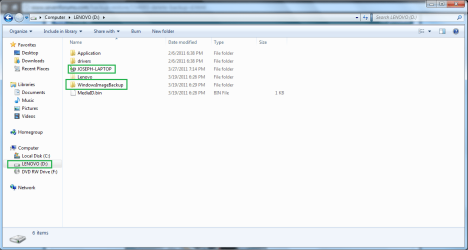
The Backup on the external flash drive was successful but then on my Local Disk D: the backup and windowsimagebackup is still there and using a big amount of disk space to the extend the color of the bar turns red.

How do I remove the backup and windowsimagebackup on D: so that I may be able to free some disk space on D:
 

My Computer

OS
Windows 7 Home Premium
CPU
Discovery
Motherboard
Asrock
Memory
2.00 GB
Graphics Card(s)
NVIDIA 1.00 GB
Screen Resolution
1366 x 768
Hard Drives
C:74 GB
D:74.9 GB
Case
Discovery
Keyboard
A4Tech
Mouse
A4Tech Run on Shine
Internet Speed
80 mbps
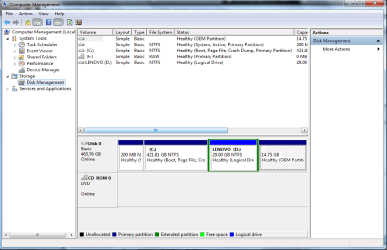
Before we go ahead,could you post up a screenshot of your disk management?
Just incase you don't accidently wipe the Disk with boot files on it.
*Start>Control Panel>System and Security>Administrative Tools>Computer Management>Disk Management (bottom left).

Use this guide to upload your screenshot after taking it with the snipping tool.

If everything looks good theres two options depending on the situation.

If you have files on D: you want to keep you can simply go computer>D: (double click) > Select the file you want deleted and click delete. Then go to recycle bin and permanently delete them.

If you have no files you wish to keep on D: and would like it fully cleaned you can format it by Right clicking D: in My Computer Page>Format>Format as NTFS/Quick Format>Start.
Job done.

Dan
 

My Computer

Computer Manufacturer/Model Number
Blue Shards 1.0
OS
Windows 7 Ultimate 64bit
CPU
AMD Phenom II 555 Black Edition Quad Core OC'd to 4.0GHz
Motherboard
ASUS M4A88T-M
Memory
G Skill RipJaw 1333MHz 4GB
Graphics Card(s)
ATI raideon 4250 HD/XFX ATI Radeon 1GB HD4650
Sound Card
Realteck HD Audio
Monitor(s) Displays
2x 22" Widescreen HD Monitors
Hard Drives
500GB Sata 7500RPM
80GB IDE
PSU
850W OCUK Modular
Case
Antec Dark Fleet DF-30
Cooling
Titan Fenrir Pro (CPU)
Keyboard
Logitech Wireless
Mouse
Logitech Wireless
Internet Speed
24Meg
Other Info
Getting soon-
2TB 7200RPM HDD
+8GB RAM
30GB SSD
HD6950/70
Before we go ahead,could you post up a screenshot of your disk management?
Just incase you don't accidently wipe the Disk with boot files on it.
*Start>Control Panel>System and Security>Administrative Tools>Computer Management>Disk Management (bottom left).

Use this guide to upload your screenshot after taking it with the snipping tool.

If everything looks good theres two options depending on the situation.

If you have files on D: you want to keep you can simply go computer>D: (double click) > Select the file you want deleted and click delete. Then go to recycle bin and permanently delete them.

If you have no files you wish to keep on D: and would like it fully cleaned you can format it by Right clicking D: in My Computer Page>Format>Format as NTFS/Quick Format>Start.
Job done.

Dan


-- If I delete the backup and windowsimagebackup as simply as delete, wouldn't it do damage to my computer and tamper its system ?

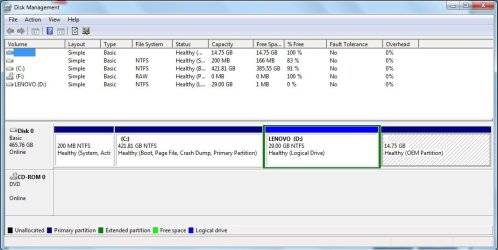
Anyhow I have the screenshot, as you can see D: si really full. I don't really wish to format my D: drive for I know some of my computer files are on there are and are on large amount so deleting them would mean to install them again from the start on C: which would be very annoying.

So is there not a technical and systematic way to erase the backup and windowsimagebackup without disturbing the normal flow of my computer's system?Maybe some kind of wizard may help like that? :D;)
 

Attachments

  • snip.png
    snip.png
    28.3 KB · Views: 198
  • snipper.jpg
    snipper.jpg
    66.4 KB · Views: 105

My Computer

OS
Windows 7 Home Premium
CPU
Discovery
Motherboard
Asrock
Memory
2.00 GB
Graphics Card(s)
NVIDIA 1.00 GB
Screen Resolution
1366 x 768
Hard Drives
C:74 GB
D:74.9 GB
Case
Discovery
Keyboard
A4Tech
Mouse
A4Tech Run on Shine
Internet Speed
80 mbps
No screenshot was uploaded.

Before proceeding please explain how you fit your files and WindowsImageBackup on a 8gb USB flash drive.

You need to buy an external HD with enough space for storage, or leave the WindowsImageBackup on D and drag your active user folders to the USB flash drive.
 
Okay sorry for no screenshots here :D I'm just new on this category :p Well here goes the screenshots

- D: drive full
- Backup and windowsimagebackup on D:
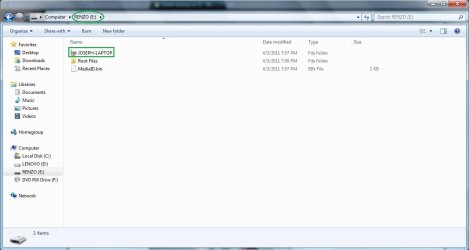
- 8 GB Flash Drive wih backup
 

Attachments

  • ddrivefull.png
    ddrivefull.png
    36.7 KB · Views: 149
  • flash.jpg
    flash.jpg
    45.5 KB · Views: 109
  • omg.png
    omg.png
    3.9 KB · Views: 53

My Computer

OS
Windows 7 Home Premium
CPU
Discovery
Motherboard
Asrock
Memory
2.00 GB
Graphics Card(s)
NVIDIA 1.00 GB
Screen Resolution
1366 x 768
Hard Drives
C:74 GB
D:74.9 GB
Case
Discovery
Keyboard
A4Tech
Mouse
A4Tech Run on Shine
Internet Speed
80 mbps
You should backup your files and image externally, but it will take a lot larger external HD than 8gb.

Have you made your Recovery Disks off the 15gb partition at the far right? Look in All Programs to see if the utility to make Recovery Disks is still functional.
 
A relatively cheap external USB for image and file/folder backup would be recommended.

You may want to consider adjusting the C:, D: (logical) sizes. I'd be tempted to make C: 100-200GB(max). and increase the size of D:.
 

My Computer

Computer type
PC/Desktop
Computer Manufacturer/Model Number
Own build
OS
Windows 7x64 Home Premium SP1
CPU
Intel i7 2600k
Motherboard
ASUS P8Z68 Deluxe
Memory
G.Skill Ripjaws (DDR3-1600) 2x4GB
Graphics Card(s)
Nvidia GeForce GTS 450; Intel HD Graphics 3000(GT2+)
Monitor(s) Displays
Dell Ultrasharp IPS panel U2311H, Samsung SyncMaster P2350
Screen Resolution
1920x1080
Hard Drives
Samsung 850 Pro SSD 256GB, Samsung SSD 840 120GB, Seagates 1TB Barracuda ST31000528AS x2
PSU
Seasonic M12II 520W
Case
Lian Li Lancool PC-K60
Cooling
Case: 1x120mm, 3x140mm CPU: Hyper 212+
Keyboard
Logitech MK520 (wireless)
Mouse
Logitech MK520
Internet Speed
6-7 Mbps
Antivirus
Norton Security Premium, Malwarebytes on 2 (MSE on 3rd PC)
Browser
FireFox
Other Info
Audio: Logitech Z523 2.1
Back
Top