Delete file/folder bug??

theapostle21

New member
Local time
8:32 AM
Messages
7
Hi,

This is a strange issue, i know, but it has happened to me at least 4 times on 2 different machines, with different hardware, one with Win7 x64 Premium, the other Win7 x32 Pro.

Lets say you have 20 files and folders inside the Downloads folder. What has happened to me is that I was deleting files and folders inside this Downloads folder, only for the entire Downloads folder and its contents to dissapear. I wasn't using Shift+Delete, so you would expect some evidence in the Recycle Bin, but nothing. Even using tools like Recuva didn't find all of the files again.

Has anyone seen anything like this? Anyone aware of a HotFix from MS?? I have searched around the net for any similar complaints, but nothing.

Any help would be good, as I would hate to lose some critical files.

Thanks
 

My Computer

OS
Windows 7 Pro 32bit
of the many different ways to delete stuff, which method were you using..

eg. High-light and Del key, or right-click and select Delete from the drop-down list, etc, etc..

- knowing which method you employ may yield a clue..;)
 

My Computer

Computer type
PC/Desktop
Computer Manufacturer/Model Number
benchtec, built to personal specs
OS
Windows10 Pro - 64Bit vs.10547
CPU
i7-965 Extreme Edition (8 Cores) at 3.3GHz (no OC)
Motherboard
BloodRageX58 (Socket1366)
Memory
12G Corsair Dominator DDR3 - tripled
Graphics Card(s)
2xAMD SapphireNITRO R9 380(4G) crossfire
Sound Card
Sonar(SB)X-Fi onboard
Monitor(s) Displays
SyncMaster P2050 20"
Screen Resolution
1600x900 (widescreen)
Hard Drives
480G\OCZSolid3SSD, 64G\OCZVertex3SSD,60G\OCZVertex2SSD, 1TB\spinpointF1SATAHDD
PSU
1200w Power Station Gold
Case
ANTEC 900/2 all blue lights, etc..
Cooling
Noctua SE1366 NH-U12P - a tight fit, but a monster cooler!!
Keyboard
Logitech G19 (wired)
Mouse
Logitech G9 Laser (wired)
Internet Speed
150mb unlimited
Browser
IE11(RP)
Other Info
Xbox One, Nokia735 Windows10 mobile, LG HD/DVD/Blu-Ray r/w, CyberlinkPowerDVD15, LogitechZ5500-SS(5.1), LogitechG35Phones-SS(7.1),MSOffice 2007,CorelDrawX7,Painter2016, Wacom Intuos Pro-SE
Highlight & Del key is my weapon of choice.
 

My Computer

OS
Windows 7 Pro 32bit
Hi, theapostle21, welcome to the forums!

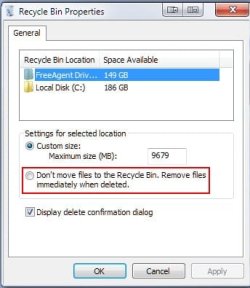
Have you checked your recycle bin settings to be certain no changes have been inadvertently implemented?

Right-click on your Recycle Bin icon and select "Properties":
ScreenShot00001.jpg

Then be certain the setting indicated below is not selected:
ScreenShot00002.jpg

Did you see a delete confirmation dialog?
 

My Computer

Computer Manufacturer/Model Number
Toshiba L355D
OS
Windows 7 Ultimate x64 SP1
CPU
Core2 Duo
Motherboard
Intel
Memory
4 GB
Graphics Card(s)
GM965 on-board
Sound Card
RealTek on-board
Monitor(s) Displays
19"+17"(laptop)
Screen Resolution
1440x900 (x 2)
Hard Drives
500GB Ext. 200GB Internal
PSU
N/A
Case
N/A
Cooling
N/A
Hi,

Recycle Bin settings are as above on both machines.

The problem is that it is not the files that I have deleted that I am trying to recover - it is that there are other files in the same folder, which I havent deleted or attempted to delete, that dissapear...
 

My Computer

OS
Windows 7 Pro 32bit
Are you using any mouse or keyboard that has proprietary drivers/software?
 

My Computer

Computer Manufacturer/Model Number
Custom
OS
Win7 HP (x64)/Win7 Ultimate (x64)
CPU
Core i7 920
Motherboard
Intel X58
Memory
6 x 2GB Corsair XMS3
Graphics Card(s)
CF HD4890
Sound Card
Asus Xonar
Monitor(s) Displays
Dell 2408WFP
Screen Resolution
1920 x 1200
Hard Drives
2 x 150GB WDC Velociraptors (Raid 0)
1 x 1TB Seagate
1 x 1.5TB Seagate
PSU
Corsair HX1000W
Case
Antec 1200
Keyboard
Razer Lycosa/N52te
Mouse
Razer Lachesis
I'm using a Lenovo standard keyboard on my work PC, and a Microsoft keyboard at home (old PS2 based, not running Intelli software). Unless the Lenovo keyboard has some weird drivers...
 

My Computer

OS
Windows 7 Pro 32bit
If you can, try substituting your keyboard and mouse selectively (one at a time) to check whether it's not the hardware at fault.
 

My Computer

Computer Manufacturer/Model Number
Custom
OS
Win7 HP (x64)/Win7 Ultimate (x64)
CPU
Core i7 920
Motherboard
Intel X58
Memory
6 x 2GB Corsair XMS3
Graphics Card(s)
CF HD4890
Sound Card
Asus Xonar
Monitor(s) Displays
Dell 2408WFP
Screen Resolution
1920 x 1200
Hard Drives
2 x 150GB WDC Velociraptors (Raid 0)
1 x 1TB Seagate
1 x 1.5TB Seagate
PSU
Corsair HX1000W
Case
Antec 1200
Keyboard
Razer Lycosa/N52te
Mouse
Razer Lachesis
Hi

My apologies for tacking onto the end of this post, I appreciate that it was last active a few months back, but I just wanted to chime in and say that I have exactly the same problem.

It happened to me twice today and I feel that if there is an issue or bug with Windows 7 then more people should be made aware of it.

When deleting files the whole folder disappeared. In the first instance I highlighted and selected multiple files in the download folder and every file in the folder disappeared. The Download folder itself did not disappear because there was a file that was half way through downloading so it couldn't.

I wondered what the hell had happened but I couldn't find the deleted files for love nor money. In the second instance I only deleted a single file and the whole folder disappeared completely! No warning, just gone.

I certainly didn't do anything wrong and I am an IT professional of 10 years standing so I can usually delete files without deleting folders, so I am at a loss.

By poking around the Internet I can see that this has happened to other people. Has anyone got ideas? Or is this indeed a bug?
 

My Computer

Computer Manufacturer/Model Number
Dell Dimension 5000
OS
Windows 7 Ultimate 32bit
CPU
Intel Pentium 4
Memory
4 GB
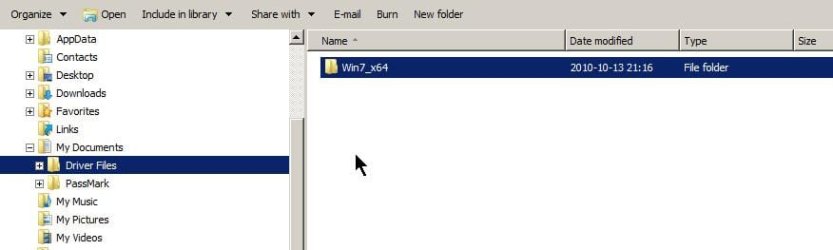
Maybe the OP has run into this (serious, in my view) GUI bug that has bit me lots of times. See the attachment. Pressing delete, what is deleted, the "Driver Files" parent folder or the "Win7_x64" child folder? There's no way to tell, it depends on which one was selected first. And if you don't watch out you will delete the upper folder ("Driver Files" in this case). This has bug (yes, I consider it such) has been with W7 since the beginning. I do not think it was present in XP, I cannot recall being bit by it anyway (and Vista, I have no idea, never used).

In my opinion, selecting "Driver Files" should un-select "Win7_x64". It doesn't...
 

Attachments

  • GUI bug.jpg
    GUI bug.jpg
    18.3 KB · Views: 51

My Computer

OS
Win 7
Hi Alan,

Finally, someone doesnt think I am insane!! I am also an IT Pro, and I actually had to have it happen to me 4 or 5 times before I could convince myself it was a Windows issue and not me pressing Shift+Del on the parent folder. I was finally convinced when I had hundreds of files in the Downloads folder and upon pressing Del, the all went in the blink of an eye...Too quick for Windows to delete all those files.
 

My Computer

OS
Windows 7 Pro 32bit
OK, I see what OppfinnarJocke is saying, that when you delete a child object (file or folder) the parent folder inadvertently gets deleted too. If this is what is happening then it is undoubtedly a bug. But I don't think this entirely explains what has happened to me (and theapostle21).

In my case (in fact both times) I was given no warning, no confirmation, no little window that says "are you sure that you want to permanently delete these two files?"

Even if you have files selected by mistake and you press shift+delete to prevent those files going to the Recycle Bin you should still get a confirmation warning. I didn't either time, I just lost my files in an instant, no warning, no nothing. And even with clever (paid for) recovery software like Active@FileRecovery (which has never failed in the past) the files are gone like they never existed.

I cannot replicate the issue, so I wonder if it is something specific to the Download folder and recently downloaded files? I know that doesn't make sense, but I've never seen anything like this before.

Has anyone any more theories?
 

My Computer

Computer Manufacturer/Model Number
Dell Dimension 5000
OS
Windows 7 Ultimate 32bit
CPU
Intel Pentium 4
Memory
4 GB
Same problem only have not deleted anything. Have a bunch of downloads and when reopen folder they are gone. Would like to fix the problem, but no clue.
 

My Computer

Computer Manufacturer/Model Number
HP Pavilion a6000n
OS
Windows 7 Home Primium SP1
CPU
2.20 gigahertz AMD Athlon 64 X2 Dual Core
Motherboard
ASUSTek Computer INC. NARRA 1.0
Memory
3.5 gig
Graphics Card(s)
NVIDIA GeForce 7300 GT
Monitor(s) Displays
Samsung SyncMaster HTAPA02906, Samsung SyncMaster H9NX842736
Hard Drives
Western Digital 500 GB Black
There is definitely a vicious bug in Windows 7.

Clicking a folder or file and pressing the shift key, then press delete. Instead of a window popping up to confirm, all files/folders inside the parent folder gets deleted without any confirmation. Only files that are being used by another application or are marked read-only are left untouched.

I have experienced the same for 3 times at different periods. Can't replicate the issue no matter what key combinations I used.

Also, deleted files that size are bigger than 350MB are all unrecoverable by any undelete apps, which is absurd. The files affected are stored in a separate logical drive & have not been overwritten by any other files.

BTW, I am using a Lenovo Thinkpad SL510 notebook.
 

My Computer

OS
Windows 7 32-bit Professional
Just has this (or similar) happen in Window 10.
Machine origionally with windows 8 then updated to 8.1 and recently to 10.

It deleted loads of movie files from both a local drive and from an attached hard drive. Two seperate actions.
Basically I was cleaning up the directories. Delete different files etc and all was ok.
Then as far as I can recall:
1. I drag and drop a file --Casablanca.mp4 [file]-- (approx 1Gb) to a parent folder --Movies--.
2. I press delete for the subfolder --Casablanca [folder]--I was deleting from.
(I image the failure was that this was done before the move was finished)
--> result everything (like 20Gb) deletes without a trace.
....again i work in IT and the files are not in any obvious place.
...I will try to replicate it but the way the data disappears is scary

Directory structure
Movies
--Casablanca [folder]
-----Casablanca.mp4 [file]


I'll have a better look at it but it weird that there is very little on the internet about this. Its either a rare virus or a serious bug with the Microsoft OS's.

Anyone find out any more on this?
 

My Computer

Computer type
PC/Desktop
OS
Windows 10
Back
Top