Solved Delete Folder Content Software

My Computer

Computer type
PC/Desktop
Computer Manufacturer/Model Number
Self built custom
OS
64-bit Windows 11 Pro for Workstations
CPU
Intel i7-8700K OC'd to 5 GHz
Motherboard
ASUS ROG Maximus XI Formula Z390
Memory
64 GB (4x16GB) G.SKILL TridentZ RGB DDR4 3600 MHz
Graphics Card(s)
ASUS ROG-STRIX-GTX1080TI-O11G-GAMING
Sound Card
Integrated
Monitor(s) Displays
2 x Samsung Odyssey G7 27"
Screen Resolution
2560x1440
Hard Drives
1TB Samsung 990 PRO M.2,
4TB Samsung 990 PRO PRO M.2,
TerraMaster F8 SSD Plus NAS
PSU
Seasonic Prime Titanium 850W
Case
Thermaltake Core P3
Cooling
Corsair Hydro H115i
Keyboard
Logitech wireless K800
Mouse
Logitech MX Master 4
Internet Speed
2 Gb/s Download and 100 Mb/s Upload
Antivirus
Malwarebyte Anti-Malware Premium
Browser
Google Chrome
Other Info
Logitech Z625 speaker system,
Logitech BRIO 4K Pro webcam,
HP Color LaserJet Pro MFP M477fdn,
APC SMART-UPS RT 1000 XL - SURT1000XLI,
Galaxy S23 Plus phone
Hmm, ok.

This below is what that site added.

Add Empty Folder Contents to Windows Right Click Context Menu

Code:
[HKEY_CLASSES_ROOT\Directory\shell\Delete Folder Contents\Command]
@="cmd /c \"cd /d %1 && del /s /f /q *.*\""

The .reg file should have removed it with this below. Are you sure you approved all prompts, and did this in an administrator account? You might see if restarting the computer afterwards may help.

http://www.sevenforums.com/attachme...tent-software-remove-deletefoldercontents.reg

Code:
[-HKEY_CLASSES_ROOT\Directory\shell\Delete Folder Contents]
 

My Computer

Computer type
PC/Desktop
Computer Manufacturer/Model Number
Self built custom
OS
64-bit Windows 11 Pro for Workstations
CPU
Intel i7-8700K OC'd to 5 GHz
Motherboard
ASUS ROG Maximus XI Formula Z390
Memory
64 GB (4x16GB) G.SKILL TridentZ RGB DDR4 3600 MHz
Graphics Card(s)
ASUS ROG-STRIX-GTX1080TI-O11G-GAMING
Sound Card
Integrated
Monitor(s) Displays
2 x Samsung Odyssey G7 27"
Screen Resolution
2560x1440
Hard Drives
1TB Samsung 990 PRO M.2,
4TB Samsung 990 PRO PRO M.2,
TerraMaster F8 SSD Plus NAS
PSU
Seasonic Prime Titanium 850W
Case
Thermaltake Core P3
Cooling
Corsair Hydro H115i
Keyboard
Logitech wireless K800
Mouse
Logitech MX Master 4
Internet Speed
2 Gb/s Download and 100 Mb/s Upload
Antivirus
Malwarebyte Anti-Malware Premium
Browser
Google Chrome
Other Info
Logitech Z625 speaker system,
Logitech BRIO 4K Pro webcam,
HP Color LaserJet Pro MFP M477fdn,
APC SMART-UPS RT 1000 XL - SURT1000XLI,
Galaxy S23 Plus phone
Right click..after restart still says empty folders and sub folders. I must of done something wrong. I apologize gotta go to a wedding. Maybe walk me thru this one more time tomorrow at your convenience. I just re downloaded Delete folder content software. Chuck
 

My Computer

OS
Windows 7 Home Premium 64 bit
Ok. I'll be here tomorrow to further help. Have fun at the wedding. :)


Not sure where you got "empty folders and sub folders" from since that's not from any link mentioned here so far.

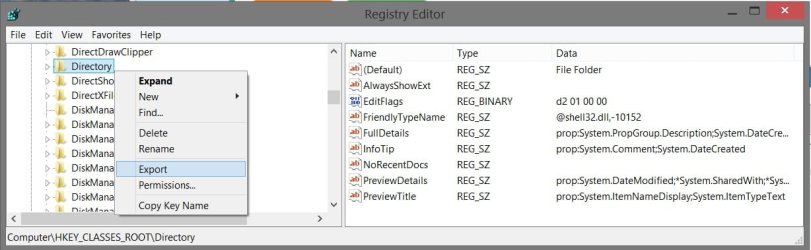
If you like, open Registry Editor (regedit.exe), go to the registry location below, right click on the Directory key in the left pane (you'll need to scroll past all the file extensions to then see Directory a bit further down), and click on Export. Save it to your desktop as a .reg file, then upload the .reg file here. I'll be happy to take a look at it to see if I spot what's wrong.

HKEY_CLASSES_ROOT\Directory


registry.jpg
 
Last edited:

My Computer

Computer type
PC/Desktop
Computer Manufacturer/Model Number
Self built custom
OS
64-bit Windows 11 Pro for Workstations
CPU
Intel i7-8700K OC'd to 5 GHz
Motherboard
ASUS ROG Maximus XI Formula Z390
Memory
64 GB (4x16GB) G.SKILL TridentZ RGB DDR4 3600 MHz
Graphics Card(s)
ASUS ROG-STRIX-GTX1080TI-O11G-GAMING
Sound Card
Integrated
Monitor(s) Displays
2 x Samsung Odyssey G7 27"
Screen Resolution
2560x1440
Hard Drives
1TB Samsung 990 PRO M.2,
4TB Samsung 990 PRO PRO M.2,
TerraMaster F8 SSD Plus NAS
PSU
Seasonic Prime Titanium 850W
Case
Thermaltake Core P3
Cooling
Corsair Hydro H115i
Keyboard
Logitech wireless K800
Mouse
Logitech MX Master 4
Internet Speed
2 Gb/s Download and 100 Mb/s Upload
Antivirus
Malwarebyte Anti-Malware Premium
Browser
Google Chrome
Other Info
Logitech Z625 speaker system,
Logitech BRIO 4K Pro webcam,
HP Color LaserJet Pro MFP M477fdn,
APC SMART-UPS RT 1000 XL - SURT1000XLI,
Galaxy S23 Plus phone
I like Brink's solution when he finishes....

Thinking thru the steps, Brink's solution might take fewer operations:

Assuming that these new files come in a compressed file that W7 can open...
...then the steps might be as follows:
1) Double click on the compressed file (folder?)
2) Click on one file in the right hand pane of Explorer
3) Ctrl+A to select all of the files
4) Ctrl+C to copy all of the files
5) Navigate to the destination folder*
6) Right click on the destination folder
7) Select "delete stuff" from the context menu
8) Confirm the deletion process.
9) Right click on the destination folder
10) Select Paste from the context menu

*This step can be avoided if you place a shortcut to the destination folder on your desktop.


If you do not use W7 to open the compressed file (folder?)...
...then the steps might be as follows:
1) Navigate to the destination folder*
2) Right click on the destination folder
3) Select "delete stuff" from the context menu
4) Confirm the deletion process.
5) Double click on the compressed file (folder?)
6) Extract the files to the destination folder**
**The number of steps/clicks that it takes to do step 6 depends on the software.

If your compression/decompression software allows you to add customized "Extract to <folder>" items to the context menu for compressed files, then things get even simpler.


The batch file that I originally had in mind for this thread depends on the source files being in a normal folder. Keep the batch file on your desktop, then right click/drag/copy it to the folder of interest. Double click on that batch file and the rest is done automatically.

I also assumed that you would reuse these scenery/texture files. In other words, you could have a folder filled with scenery/texture folders. To reuse a set of files from the past, open the folder of interest and double click on the batch file and the rest is done automatically.

The batch file method might not be the best solution if you have to put the files into a normal folder before you can use the batch file... you might as well put the files into the destination folder. However, if you plan on reusing the files and you can afford the hard drive space that it takes to store them in normal folders, then the batch file method is the way to go.
 

My Computer

Computer type
Laptop
Computer Manufacturer/Model Number
Employer provided Dell Latitude
OS
W7 Pro SP1 64bit
CPU
i7
Memory
8GB
Graphics Card(s)
Intel HD Graphics
Hard Drives
crappy SSD
Antivirus
Employer mandated Symantec Endpoint Protection
Browser
Pale Moon 64bit, IE11 64bit & Chrome 64bit
The right click menu says among the regular things..."empty folder and sub-folders"..this is how it all started. If I select that option everything is deleted and does not go to the recycle bin..hope I am clear now..sorry
 

My Computer

OS
Windows 7 Home Premium 64 bit
When I click on the paper clip I do not get browse option..nothing happens..can I e mail it to you..or if all else fails..I have free phone service thru my internet supplier..Can I call you?
 

My Computer

OS
Windows 7 Home Premium 64 bit
When I click on the paper clip I do not get browse option..nothing happens......
What browser are you using?
If IE, hold Ctrl+Alt while clicking on the paperclip. That should allow the popup.

edit:
hmmm, I had to turn off popup blocking to get the popup.
How odd that Ctrl+Alt+click failed.
 

My Computer

Computer type
Laptop
Computer Manufacturer/Model Number
Employer provided Dell Latitude
OS
W7 Pro SP1 64bit
CPU
i7
Memory
8GB
Graphics Card(s)
Intel HD Graphics
Hard Drives
crappy SSD
Antivirus
Employer mandated Symantec Endpoint Protection
Browser
Pale Moon 64bit, IE11 64bit & Chrome 64bit
Is the popup blocker turned off?

Which IE did you try?
IE8?
IE9?
IE10?
IE11?
 

My Computer

Computer type
Laptop
Computer Manufacturer/Model Number
Employer provided Dell Latitude
OS
W7 Pro SP1 64bit
CPU
i7
Memory
8GB
Graphics Card(s)
Intel HD Graphics
Hard Drives
crappy SSD
Antivirus
Employer mandated Symantec Endpoint Protection
Browser
Pale Moon 64bit, IE11 64bit & Chrome 64bit
Add Empty Folder Contents to Windows Right Click Context Menu This is where I got it. I like your option better. Can I delete this registry entry?

Right click..after restart still says empty folders and sub folders. I must of done something wrong. I apologize gotta go to a wedding. Maybe walk me thru this one more time tomorrow at your convenience. I just re downloaded Delete folder content software. Chuck

The right click menu says among the regular things..."empty folder and sub-folders"..this is how it all started. If I select that option everything is deleted and does not go to the recycle bin..hope I am clear now..sorry

The links that you provided use the phrase Empty Folder Contents or Delete Folder Contents.

Your registry contains the phrase Empty Folder and Subfolders.

That is why the first reg file that I uploaded failed for you.

Either you manually changed the phrase via regedit or you downloaded a different reg file than the one that you have linked to.

You can try the reg file that I've attached to this post.

That reg file contains this text:
Code:
Windows Registry Editor Version 5.00

[-HKLM\Directory\shell\[COLOR=Red]Empty Folder and Subfolders[/COLOR]]
We have to know the exact text on the key to be deleted.
 

Attachments

My Computer

Computer type
Laptop
Computer Manufacturer/Model Number
Employer provided Dell Latitude
OS
W7 Pro SP1 64bit
CPU
i7
Memory
8GB
Graphics Card(s)
Intel HD Graphics
Hard Drives
crappy SSD
Antivirus
Employer mandated Symantec Endpoint Protection
Browser
Pale Moon 64bit, IE11 64bit & Chrome 64bit

Attachments

My Computer

Computer type
PC/Desktop
Computer Manufacturer/Model Number
Self built custom
OS
64-bit Windows 11 Pro for Workstations
CPU
Intel i7-8700K OC'd to 5 GHz
Motherboard
ASUS ROG Maximus XI Formula Z390
Memory
64 GB (4x16GB) G.SKILL TridentZ RGB DDR4 3600 MHz
Graphics Card(s)
ASUS ROG-STRIX-GTX1080TI-O11G-GAMING
Sound Card
Integrated
Monitor(s) Displays
2 x Samsung Odyssey G7 27"
Screen Resolution
2560x1440
Hard Drives
1TB Samsung 990 PRO M.2,
4TB Samsung 990 PRO PRO M.2,
TerraMaster F8 SSD Plus NAS
PSU
Seasonic Prime Titanium 850W
Case
Thermaltake Core P3
Cooling
Corsair Hydro H115i
Keyboard
Logitech wireless K800
Mouse
Logitech MX Master 4
Internet Speed
2 Gb/s Download and 100 Mb/s Upload
Antivirus
Malwarebyte Anti-Malware Premium
Browser
Google Chrome
Other Info
Logitech Z625 speaker system,
Logitech BRIO 4K Pro webcam,
HP Color LaserJet Pro MFP M477fdn,
APC SMART-UPS RT 1000 XL - SURT1000XLI,
Galaxy S23 Plus phone
Back
Top