Solved Delete function not working

bravoelt255

New member
Local time
11:29 PM
Messages
12
Hi,

Unfortunately today I have encountered a very strange problem. Everything works fine on my laptop except the Delete function. When I try to delete a file/folder I am prompted with the usual message asking whether I am sure that I want to delete and as soon as I press the ok nothing happens. I have tried to delete files/folder in various places and the same problem exists. I have tried to do this on an external pen drive/hard drive as well and the same problem exists. I am sure that this is not a permissions issue since there was no error. The OS user that I am using is an administrator.

I would appreciate your help in this regard.

Thanks in advance,

bravoelt255
 

My Computer

Computer Manufacturer/Model Number
Acer 5940G - 724G50Mn
OS
Windows 7 Home Premiun 64bit
CPU
Intel Core I7 720QM
Motherboard
Acer
Memory
4GB
Graphics Card(s)
ATI Mobility Radeon HD 4650
Sound Card
Acer
Monitor(s) Displays
Laptop Screen
Hard Drives
320Gb - Acer
Hi, welcome to the forums :)

Just out of curiosity, what heppens when you try to delete a file then press F5 to refresh the current open window?


OS
 

My Computer

Computer Manufacturer/Model Number
Compaq Desktop
OS
Windows 7 Ultimate x64
CPU
AMD Sempron Dual Core
Memory
3GB
Graphics Card(s)
NVIDIA GeForce 6150SE nForce 430
Screen Resolution
1024x768
Hard Drives
150GB Sata
Hi,

Nothing happens. I even closed internet explorer and opened it again. In one instance, I deleted a file, rebooted my laptop and noticed that the file was not there anymore. So a reboot refreshed the folder.

bravoelt255
 

My Computer

Computer Manufacturer/Model Number
Acer 5940G - 724G50Mn
OS
Windows 7 Home Premiun 64bit
CPU
Intel Core I7 720QM
Motherboard
Acer
Memory
4GB
Graphics Card(s)
ATI Mobility Radeon HD 4650
Sound Card
Acer
Monitor(s) Displays
Laptop Screen
Hard Drives
320Gb - Acer
I think the folder behavior has become unstable, try this

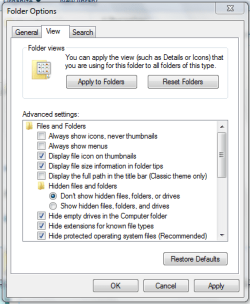
  1. Open Explorer and click 'Organize' then 'Folder and Search options'. Under the 'View' tab click 'Reset Folders' then OK (see attatched pic)
  2. Reboot your machine and see if the delete function has returned
Reset Folders.PNG

Hope it helps :)


OS
 

My Computer

Computer Manufacturer/Model Number
Compaq Desktop
OS
Windows 7 Ultimate x64
CPU
AMD Sempron Dual Core
Memory
3GB
Graphics Card(s)
NVIDIA GeForce 6150SE nForce 430
Screen Resolution
1024x768
Hard Drives
150GB Sata
Hi,

It worked. Thanks!

Regards,

bravoelt255
 

My Computer

Computer Manufacturer/Model Number
Acer 5940G - 724G50Mn
OS
Windows 7 Home Premiun 64bit
CPU
Intel Core I7 720QM
Motherboard
Acer
Memory
4GB
Graphics Card(s)
ATI Mobility Radeon HD 4650
Sound Card
Acer
Monitor(s) Displays
Laptop Screen
Hard Drives
320Gb - Acer
Thant's great news, enjoy the rest of the forums :)
 

My Computer

Computer Manufacturer/Model Number
Compaq Desktop
OS
Windows 7 Ultimate x64
CPU
AMD Sempron Dual Core
Memory
3GB
Graphics Card(s)
NVIDIA GeForce 6150SE nForce 430
Screen Resolution
1024x768
Hard Drives
150GB Sata
Delete button Inoperative

My delete button was inop for several days. System W7-64, I7, ASUS. I downloaded and installed Update
KB 3145739 (a security update) from the Microsoft.com website. The DEL button function was restored after rebooting the system.
 

My Computer

Computer type
PC/Desktop
Computer Manufacturer/Model Number
SYX/ASUS
OS
Windows 7 Ultimate x64
CPU
i7
Motherboard
ASUS
Back
Top