
Solved Delete Media Player Cached .tmp Files?

  • Thread starter Thread starter MisterActorMan
  • Start date Start date
M

MisterActorMan

Guest
So, for a while I have been searching for the reason why my 150 gb drive is super crazy full...I just moved all my back up data onto an ext hdd and deleted the local files....much to my surprise i still had giant unbelievably huge amounts of gb taken up in my users/etc location.

So I go through each file and under media player in app data (local) I find 23 gb of cached .tmp files. Capture.PNG
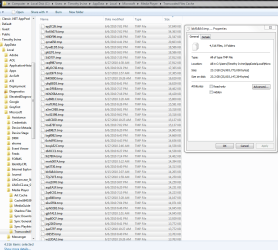
Umm....what? I must not have checked the "Delete Temporary Files After Use" box, or something?

Can anyone explain what these files are for; why they are not deleted automatically; and if I can safely delete them without any repercussions?

23 gb of temp files is....excessive? insane? wasteful? annoying? potential for hella awesome storage of other stuff?! You pick the adjective! I'd appreciate an answer to those above questions, too :D
 

My Computer

Computer Manufacturer/Model Number
Over Clockers Ultima Viper 2.80Ghz
OS
Windows 7 Ultimate 64 - OEM Service Pack 1
CPU
Intel Core i7 930 2.80Ghz Bloomfield Socket LGA 1366
Motherboard
Gigabyte GA-X58A-UD3R Intel X58 Socket 1366 DDR3
Memory
Patriot Viper 6GB 3x2GB DDR3 PC3-1200C9 1600Mhz Tri Channel
Graphics Card(s)
Asus ATI Radeon HD 5770 CuCore 1024MB GDDR5 PCI Express
Sound Card
Realtek ALC889 @ Intel 82801JB ICH10 - High Definition Audio
Monitor(s) Displays
Samsung SyncMaster 920N 19"
Screen Resolution
1280*1024
Hard Drives
1 x OCZ Vertex2 Series 120GB 2.5" SATA-II SSD
1 x Seagate Barracuda 7200.12 1TB SATA-II 32MB Cache
1 x Western Digital Caviar Green 2TB SATA-II 64 MB Cache
PSU
Corsair TX 650W ATX SLi
Case
Antec 902 Ultimate Gaming Case Black
Cooling
Prolimatech Megahalems Rev B CPU Cooler Socket 775/1156/1366
Keyboard
Microsoft Comfort Curve Keyboard
Mouse
Microsoft Optical USB
Internet Speed
ADSL24 FTTC 34.2 Mbps Down 7.1Mbps Up
Other Info
OcUK 22x DVDSATA ReWriter Black
Akasa AK-FN058 Apache Black Super Silent 120mm Fan
Printer Epson Stylus Photo R300
Scanner Canon Canoscan 8000F
Why not just run disk cleanup with all the boxes checked :)
 

My Computer

Computer Manufacturer/Model Number
Dell XPS 730
OS
Windows 7 Home Premium 64 bit
CPU
Intel Core 2 quad Extreme Q9770 @ 3.2 GHz
Memory
4x2 GB Muskin 1600 MHz ram
Graphics Card(s)
NVidia GTX 250
Sound Card
Soundblaster X-Fi Fatality Champion
Monitor(s) Displays
2 Dell 2007WFP Ultrascans
Screen Resolution
3360 x 1050
Hard Drives
WD Black 1TB sata, 2-WD Black 500 sata, 2-Seagate 500 Go external
PSU
1000 Watt
Cooling
air
Keyboard
MS Natrual Keyboard Pro
Mouse
Logitech Wireless Trackball
Internet Speed
DSL Elite
okeedoklee. I just avoid using programs like that unless I must. But since I just backed up, you're right!
 
Ran Disk Cleanup and yep, there were 25gb of temp files found and 7gb of temp internet files. Ooooooops. But, plus my backed-up and no-longer-on-my-pc-itself, I freed 70 gbs of space. Ahhh, my computer is back!
 
Back
Top