Delete Partition?

karajjamjar

New member
Local time
10:35 PM
Messages
4
Sorry if this topic is already covered but im a noob and just joined!:D

Anyway, after going through days of pain and fustration of trying to install 7, i thought I will just try and dual boot instead. So i installed XP again, created partitions.

Here are a list of my partitions -
XP 44GB
OS/Programs (With my seven installation on) 230GB
Documents 190GB

I have now succesfully installed 7.

But what I want to do is remove XP and remove the Documents partitions. Then with the unallocated space format that to create a 234GB partition for my Documents.

I know how to do this, but Windows partition manager recognises the XP partition as a system drive and doesn't let me delete it - how do I remove this OS and overcome this problem.

Many Thanks
Jamie J W Smith
 

My Computer

OS
7
Welcome Jamie!

While you're in Windows 7, try deleting the partition using Partition Wizard.

There are other ways, but that is a quick and easy one.

You can also open a copmmand prompt and run the following commands:

diskpart

list disk

select disk
[XP disk #]

list partition

select partition
[XP partition #]

delete partition override

Before you do that, it would be a good idea to create a repair disc, in the unlikely event you damage your system.
 

My Computer

Computer Manufacturer/Model Number
Custom
OS
Windows 7 Professional x64
CPU
Intel i7 2600K OC'd @ 4620 MHz
Motherboard
Asus P8Z68-V Pro
Memory
16GB GSkill Sniper 2133 Mhz (4x4GB)
Graphics Card(s)
EVGA GeForce GTX 480 SuperClocked+
Sound Card
Realtek High Definition Audio
Monitor(s) Displays
2x Acer S273HLbmii 27"
Screen Resolution
2 x 1920x1080
Hard Drives
64GB Crucial M4 SSD

Storage: Hitachi 1TB 5400RPM, Samsung 1.5TB 5400RPM
PSU
Corsair HW Series 750w (modular)
Case
Cooler Master HAF 932 Advanced Blue Edition
Cooling
CM Hyper 212+ CPU cooler, 3x 230mm + 1x 140mm case fans
Keyboard
Logitech MK320 (wireless)
Mouse
Logitech MK320 (wireless)
Internet Speed
30 Mb/s : 2 Mb/s
Please post back a screenshot of your full Disk Management drive map, using SNipping Tool in Start Menu, attach file using paper clip in Reply Box.

We can then give you the exact steps with certainty on how to use Partition Wizard to delete XP and recover it's System Active MBR and disk space into Win7. Tell us if this is what you want, or exactly what you do want.
 
Cheers

I am very grateful for the replies, however after doing research I here it can be a tedious process. The boot manager is on the XP partition and so what i am going to do is leave it there. I have removed all the programs files and unesscary windows system files on the xp partition so it only takes up a GB. I am removed XP from the boot manager and hidden the rest of the files. So I have a extra partition just incase i run out of space
 

My Computer

OS
7
We have helped remove hundreds of dual boots here without a single failure. All you have to do is follow the steps to mark Win7 active, delete XP and recover its space and System MBR into Win7 partition.

With a Win7 Backup Image, you can reimage your HD to start over in 15 minutes. So there is zero risk.

If you change your mind, post back a screenshot of your full Disk Management drive map.
 
Okay then....

Thing is with an image - does it mean I have to boot to the DVD or sommit - becuase if so, no can do. The problem I had in the first place is Windows 7's drivers didn't support my motherboard and countless problems occured - such as the DVD freezing, BSOD's - thus the reason why I dual booted becuase all the drivers were transfered from Xp to the installation then Windows 7.

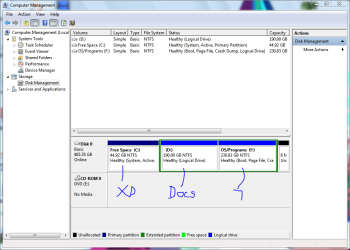
However if your confident that I can sucessfully do this with no data loss, then here the image below:
Capture.PNG

Thanks anyway - also what I have already done is made Windows 7 the main OS, and removed XP from the boot manager so the boot screen no longer shows up. It is just a case of moving the boot manager.
 

My Computer

OS
7
Here's what to do:

First, boot up your Windows 7 DVD or repair disc, and when it gets to the language screen, press Shift+10 to bring up a command prompt.

Then enter these commands:

diskpart

list disk

select disk
[XP disk #]

list partition

select partition
[XP partition #]

delete partition override

At that point, the XP partition will be deleted, and you will be unable to boot to Windows 7. No worries, continue to the next step and it will be repaired.

Next, mark your Windows 7 partition as active. Enter the following commands:

list partition

select partition
[windows 7 partition]

active

Now, you are all set to repair the boot loader. The final step is running a startup repair.

Edit: Looking at Greg's post, I realize that this will cause you major problems if you do it without first correcting the problem below.
Do not do this until Windows 7 is on a Primary partition!
 
Last edited:

My Computer

Computer Manufacturer/Model Number
Custom
OS
Windows 7 Professional x64
CPU
Intel i7 2600K OC'd @ 4620 MHz
Motherboard
Asus P8Z68-V Pro
Memory
16GB GSkill Sniper 2133 Mhz (4x4GB)
Graphics Card(s)
EVGA GeForce GTX 480 SuperClocked+
Sound Card
Realtek High Definition Audio
Monitor(s) Displays
2x Acer S273HLbmii 27"
Screen Resolution
2 x 1920x1080
Hard Drives
64GB Crucial M4 SSD

Storage: Hitachi 1TB 5400RPM, Samsung 1.5TB 5400RPM
PSU
Corsair HW Series 750w (modular)
Case
Cooler Master HAF 932 Advanced Blue Edition
Cooling
CM Hyper 212+ CPU cooler, 3x 230mm + 1x 140mm case fans
Keyboard
Logitech MK320 (wireless)
Mouse
Logitech MK320 (wireless)
Internet Speed
30 Mb/s : 2 Mb/s
The problem here is that you have placed Win7 on a logical drive.

In order to mark it Active so you can recover the MBR into Win7, it must first be converted to a Primary partition. Then the MBR can be written to Win7 using booted Win7 DVD repair console or Repair disk.

If you are unable to boot the Win7 DVD to access it's repair console, or the Win7 Repair CD, then you should not attempt these operations until you resolve the issues blocking Win7 DVD repair from running.

What happens when you attempt to boot the Win7 DVD? Is BIOS setup correctly configured to boot from DVD first? http://pcsupport.about.com/od/tipstricks/ht/bootcddvd.htm

Do you have the latest BIOS version update from your computer or mobo model's Support Downloads webpage? What is the SATA controller setting in BIOS setup?

Please explain how having XP allowed you to install Win7 whereas you could not access drivers before, as I am not familar with this.
 
Last edited:
In order to boot to the dvd I have to disabe the USB controller which is an issue as both by keyboard and mouse are usb. I have no acess to anything and i am not buying anything.
 

My Computer

OS
7
Back
Top