Attached picture of what I would like gone. Just did clean reinstall of 7.1 from disc and then a day or so of downloaded updates. Managed to hide the 2 Free Windows 10 Task Bar add-ons after deleting them every time. Had a new HP ENVY with sweet CPU, 24 GB Ram and 4 GB Graphics card but because there was no guarantee [from Costco] that it would take the 7.1 op system, I took the Windows 10 unit in and got my money back and am back on my old machine. Windows 10 is not for folks who like easy control of their computer...too much junk to delete.
Any idea what download number this annoyance might be? I almost blocks my "Show Desktop" area on the Task Bar. I am getting too old for annoyances if I can get rid of them, but if not, then I will live with it the few years the machine and I have left.
Attachments
Power Bar Windows 7 point 1.JPG
12.8 KB
· Views: 27
My Computer
Computer type
PC/Desktop
Computer Manufacturer/Model Number
Custom Build by Computer Shop in S Reno, NV 1-2014
OS
64 Bit, Pro
CPU
Intel i5 4460
Motherboard
ASUS Z87-C 1150
Memory
12 GB DDR 3 RAM
Graphics Card(s)
Nvidia GeForce GT 520
Hard Drives
1 500 GB WD Blue [old name Raptor] 10,000
1 500 GB WD Blue [old name Raptor] 10,000
1 2 TB WD Red 7,200
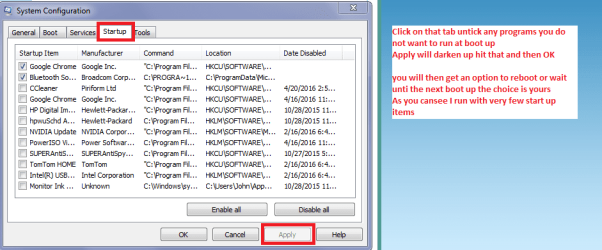
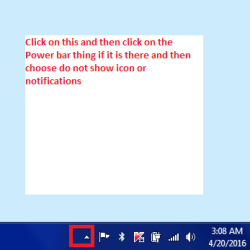
Something else you can do is click on the Notification pointer and choose Customise that will bring up a screen with all the notification area contents click on that Power thing and a drop down menu will ask you what to do click Hide icon and notifications see pics
Now while I am thinking of it - if you do not use it does it show in Programs and Features?
Attachments
MSCONFIG.PNG
22.6 KB
· Views: 0
CUSTOMISE.PNG
4.1 KB
· Views: 15
My Computer
Computer type
PC/Desktop
Computer Manufacturer/Model Number
Own build (new) Desk1 / Asus ROG Win 7 / Desk2 1st build
OS
Desk1 7 Home Prem / Desk2 10 Pro / Main lap Asus ROG 10 Pro 2 laptop Toshiba 7 Pro Asus P2520 7 & 10
One other Desktop (tester) and spare Toshba laptop both with SSD's
Running Kaspersky 2016 ISS on all machines config'd identically
Logitec audio stereo systems on each machine (x3)
Canon MG5250MFC
Router/modem TP-Link running WPA2SK
Yep well indie is right it is an add on and if you read this Powerbar.exe Windows process - What is it? it explains what it is supposed to do and it is not something that I would be happy with on my machines.
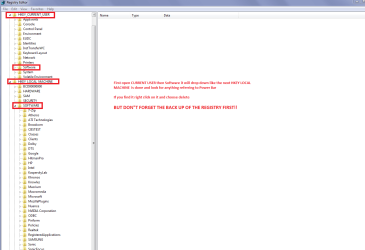
Now if you want to get rid of it look in Control Panel > Programs and Features if there uninstall it. To make absolutely sure it is gone even after a reboot I would be checking the registry entries - HKEY LOCAL MACHINE and CURRENT USER < look in both for Software > open it out and check down the list for the darn thing if there are still some registry entries for it right clcik on it and then delete. But before you do anything like that do this http://www.sevenforums.com/tutorials/4230-registry-backup-restore.html
In my pic you will see what I mean and to get to the registry you need to go to Start > type regedit > right click on it > Run as admin see pics to see how to open them out
Of course you do not have to go that far if the Control Panel has removed it but those types of PUPs have a tendency to be hard to get rid of.
Attachments
REGEDIT.PNG
27.1 KB
· Views: 0
My Computer
Computer type
PC/Desktop
Computer Manufacturer/Model Number
Own build (new) Desk1 / Asus ROG Win 7 / Desk2 1st build
OS
Desk1 7 Home Prem / Desk2 10 Pro / Main lap Asus ROG 10 Pro 2 laptop Toshiba 7 Pro Asus P2520 7 & 10
One other Desktop (tester) and spare Toshba laptop both with SSD's
Running Kaspersky 2016 ISS on all machines config'd identically
Logitec audio stereo systems on each machine (x3)
Canon MG5250MFC
Router/modem TP-Link running WPA2SK