Delete the XP partition

sergiu

New member
Local time
12:36 AM
Messages
16
Hello,

I'm a new user of windows7. I have XP installed on a partition (20GB) and i've installed last week win7 in the other partition (140 GB). Now i want to delete the XP partition and expand my win7 partition, but when i try to delete the partition with XP on it under win7 it gives me a message that i cannot delete the partition. What is the problem and how i can solve my problems? :D
P.S. Sorry if this problem was posted before but i'm new also on this forum.
 

My Computer

Computer Manufacturer/Model Number
Dell Inspiron 1525
OS
Windows 7
CPU
Pentium Dual Core T2390 (1.86Ghz 533 1MB)
Memory
Memory Dual-Channel 2048MB (2x1024) 667MHz DDR2 SDRAM
Graphics Card(s)
Graphic Intel Integrated GMA X3100
Monitor(s) Displays
Display 15.4" Widescreen WXGA (1280x800) with TrueLife
Hard Drives
Hard Drive 160GB Serial ATA (7200rpm)

My Computer

Computer Manufacturer/Model Number
Keeps changing - (Custom)
OS
Windows 7 Professional x64
CPU
Intel Core i7 860
Motherboard
Gigabyte GA-P55-UD4P
Memory
4GB DDR3 Mushkin 1600Mhz @ 7-8-7-20
Graphics Card(s)
MSI GTS250 1GB DDR3 Twin Frozr
Sound Card
Onboard realtek
Monitor(s) Displays
Samsung SyncMaster 24" P2450 + Samsung 20" 2033
Screen Resolution
1920 X 1080 and 1600 X 900 (#2 system 1440 X 900)
Hard Drives
Patriot Inferno 120GB SSD + 3 WD Blue 640GB drives
PSU
Corsair 750 HX Modular
Case
Lancool PC-K62
Cooling
Cooler Master TX3 CPU cooler and 4-140mm and 1-120mm case
Keyboard
Gigabyte USB keyboard
Mouse
Microsoft wireless laser mouse 5000
Internet Speed
7 Mb down 1.5 up
Other Info
System #2: AMD Phenom II X6 1055T (Freezer 7 Pro cooler) - Gigabyte 880GMA-UD2H - WD 500GB Black - 9500GT (1GB) 500W OCZ modular PSU - Antec 200 case. System #3 (LapTop) Core 2 Duo T6670 - 320GB 7200RPM HD - 4GB DDR3 RAM.
Hello,

I'm a new user of windows7. I have XP installed on a partition (20GB) and i've installed last week Windows 7 in the other partition (140 GB). Now i want to delete the XP partition and expand my Windows 7 partition, but when i try to delete the partition with XP on it under Windows 7 it gives me a message that i cannot delete the partition. What is the problem and how i can solve my problems?
P.S. Sorry if this problem was posted before but i'm new also on this forum.

Hi sergiu & welcome to SF :party:
Can you post a screenshot of your disk management please? :D

Start Menu > Right Click Computer > Click manage (accept the UAC prompt) > Under Storage click Disk management and take a screenie of that. :)
 

My Computer

Computer Manufacturer/Model Number
HP Touchsmart IQ771.uk
OS
Windows 7 Ultimate x64
CPU
AMD Turion(tm) 64 X2 Mobile Technology TL-56
Motherboard
ASUS Pheonix
Memory
3GB Nanya PC2-6400 DDR2-SDRAM SO-DIM (400MHz)
Graphics Card(s)
NVIDIA GeForce Go 7600 256MB GDDR3 SDRAM
Sound Card
High Definition Intergrated NVIDIA MCP51
Monitor(s) Displays
46" Sony Bravia HDTV
Screen Resolution
1600x1200
Hard Drives
1.5TB Samsug
320GB Seagate ST3320820AS - SATA 3Gb/s 8MB
500GB Maxtor Basics STM305003EHD301-RK
Internet Speed
↓6.32 Mb/s ↑0.35 Mb/s ↔26ms
Other Info
BIOS - American Megatrends Inc. 5.07
Ethernet Port - NVIDIA nForce 10/100/1000 Mbps
DVD Drive - TSSTcorp DVDR/RW TS-T632L
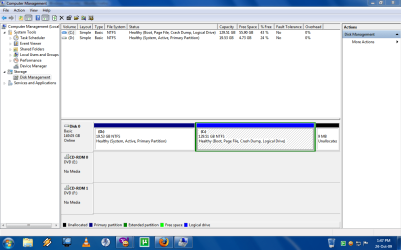
Here it is.
Where is the XP entry? i can't find it :confused:
 

Attachments

  • Capture.PNG
    Capture.PNG
    48.8 KB · Views: 101

My Computer

Computer Manufacturer/Model Number
Dell Inspiron 1525
OS
Windows 7
CPU
Pentium Dual Core T2390 (1.86Ghz 533 1MB)
Memory
Memory Dual-Channel 2048MB (2x1024) 667MHz DDR2 SDRAM
Graphics Card(s)
Graphic Intel Integrated GMA X3100
Monitor(s) Displays
Display 15.4" Widescreen WXGA (1280x800) with TrueLife
Hard Drives
Hard Drive 160GB Serial ATA (7200rpm)
Disk mangement cannot move to the left. That's why you can't delete the 20GB partition.
If you installed XP in the 20GB partition then XP is in D:
There are 2 options.
Either boot off of your 7 DVD and clean install 7 over XP in D:. You'll then be able to format C: and extend D: over C:
Or you can see this thread, i think it's relevant to you ;)
 

My Computer

Computer Manufacturer/Model Number
HP Touchsmart IQ771.uk
OS
Windows 7 Ultimate x64
CPU
AMD Turion(tm) 64 X2 Mobile Technology TL-56
Motherboard
ASUS Pheonix
Memory
3GB Nanya PC2-6400 DDR2-SDRAM SO-DIM (400MHz)
Graphics Card(s)
NVIDIA GeForce Go 7600 256MB GDDR3 SDRAM
Sound Card
High Definition Intergrated NVIDIA MCP51
Monitor(s) Displays
46" Sony Bravia HDTV
Screen Resolution
1600x1200
Hard Drives
1.5TB Samsug
320GB Seagate ST3320820AS - SATA 3Gb/s 8MB
500GB Maxtor Basics STM305003EHD301-RK
Internet Speed
↓6.32 Mb/s ↑0.35 Mb/s ↔26ms
Other Info
BIOS - American Megatrends Inc. 5.07
Ethernet Port - NVIDIA nForce 10/100/1000 Mbps
DVD Drive - TSSTcorp DVDR/RW TS-T632L
what thread?
 

My Computer

Computer Manufacturer/Model Number
Dell Inspiron 1525
OS
Windows 7
CPU
Pentium Dual Core T2390 (1.86Ghz 533 1MB)
Memory
Memory Dual-Channel 2048MB (2x1024) 667MHz DDR2 SDRAM
Graphics Card(s)
Graphic Intel Integrated GMA X3100
Monitor(s) Displays
Display 15.4" Widescreen WXGA (1280x800) with TrueLife
Hard Drives
Hard Drive 160GB Serial ATA (7200rpm)
Have you had any luck in "deleting" that partition? I HOPE so! IF so, please share with me what you did.
I have been trying to do something very similar....I am using W'7 RC 7100 and the HD has been partitioned into 3 and one partition [SYSTEM] has W' Vista on it [which is unuseable], I want it OFF of the HD before I use W'7 UPGRADE disc...........I have used MSCONFIG to take W'Vista OFF of the dual boot....but Disk Manager will NOT allow me to re-format or delete that partition. My "C" partition is the BOOT drive and has W'7 RC on it.
PLEASE help me if you can --- I want to do the UPGRADE install of the NEW W'7 Upgrade disc.

TKS michael:confused:
 

My Computer

Computer Manufacturer/Model Number
DELL
OS
W'7 Home Premium
CPU
Athlon II 2 x 2.9GHz
Motherboard
? DELL ?
Memory
4 GB
Graphics Card(s)
ATI 4200
Sound Card
Integrated
Monitor(s) Displays
Samsung 19"
Hard Drives
640GB
PSU
300 Watt
Case
DELL
Internet Speed
Cable Broadband 10-12 MBs

My Computer

Computer Manufacturer/Model Number
HP Touchsmart IQ771.uk
OS
Windows 7 Ultimate x64
CPU
AMD Turion(tm) 64 X2 Mobile Technology TL-56
Motherboard
ASUS Pheonix
Memory
3GB Nanya PC2-6400 DDR2-SDRAM SO-DIM (400MHz)
Graphics Card(s)
NVIDIA GeForce Go 7600 256MB GDDR3 SDRAM
Sound Card
High Definition Intergrated NVIDIA MCP51
Monitor(s) Displays
46" Sony Bravia HDTV
Screen Resolution
1600x1200
Hard Drives
1.5TB Samsug
320GB Seagate ST3320820AS - SATA 3Gb/s 8MB
500GB Maxtor Basics STM305003EHD301-RK
Internet Speed
↓6.32 Mb/s ↑0.35 Mb/s ↔26ms
Other Info
BIOS - American Megatrends Inc. 5.07
Ethernet Port - NVIDIA nForce 10/100/1000 Mbps
DVD Drive - TSSTcorp DVDR/RW TS-T632L
Sorry sergiu, i didn't realise i forgot the link to the thread LOL!

Here it is!

http://www.sevenforums.com/installation-setup/8304-partitioning-trouble.html

Thanks for providing that thread which is in itself a tutorial on moving 7 over onto deleted XP partition.

We have helped a dozen guys do this here since release date and each one is a headache.

Amazing how fast people want to bail out of XP, get it off their machine!

In Summary:

You need to use a free Partition Manager like Partition Wizard bootable.

Delete XP, mark the 7 partition active, copy it over onto the XP unallocated space. (if XP is larger, you need to shrink it before copying), delete original Win7 partition

Run startup repair 3 times until it takes.
 
10x everybody :P
 

My Computer

Computer Manufacturer/Model Number
Dell Inspiron 1525
OS
Windows 7
CPU
Pentium Dual Core T2390 (1.86Ghz 533 1MB)
Memory
Memory Dual-Channel 2048MB (2x1024) 667MHz DDR2 SDRAM
Graphics Card(s)
Graphic Intel Integrated GMA X3100
Monitor(s) Displays
Display 15.4" Widescreen WXGA (1280x800) with TrueLife
Hard Drives
Hard Drive 160GB Serial ATA (7200rpm)
Back
Top