
Delete Vista from 2nd drive (has system partition)

jkshop

New member
Local time
5:28 AM
Messages
2
I had Vista on "disk 0", my D drive. Installed Win7 on "disk 1", my C drive. I now want to reformat the D drive and rid myself forever of Vista. It also has mechanical issues I am going to try to fix...

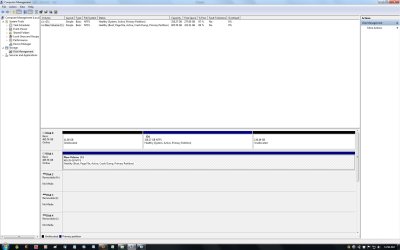
I can't reformat it, apparently because D holds my system partition (see attached screenshot).

How can I move my system partition to the other drive? Or is there another solution?

I've seen similar questions on the SevenForums, but none are exactly the same so I don't want to assume my solution is the same...

Thanks!
 

Attachments
  • disk mgt.jpg
    disk mgt.jpg
    136.6 KB · Views: 204

My Computer My Computer

At a glance

Win 7AMD 9600 Quad 2300 Mhz3GB PC2-5300 DDR2ATI Radeon HD 2400 XT
Computer Manufacturer/Model Number
Gateway GM5664
OS
Win 7
CPU
AMD 9600 Quad 2300 Mhz
Memory
3GB PC2-5300 DDR2
Graphics Card(s)
ATI Radeon HD 2400 XT
Monitor(s) Displays
Dell 30"
Hard Drives
Two: Western Digital 500GB 7200rpm SATA
I had Vista on "disk 0", my D drive. Installed Win7 on "disk 1", my C drive. I now want to reformat the D drive and rid myself forever of Vista. It also has mechanical issues I am going to try to fix...

I can't reformat it, apparently because D holds my system partition (see attached screenshot).

How can I move my system partition to the other drive? Or is there another solution?

I've seen similar questions on the SevenForums, but none are exactly the same so I don't want to assume my solution is the same...

Thanks!

I assume you were dual booting and vista was on the machine when win 7 was installed. The file from win 7 were put into a hidden folder in vista called boot.

Am I correct in that assumption?


Ken
 

My Computer My Computer

At a glance

Win 8 Release candidate 8400[email protected]4 gigsNvidia 9600M
Computer Manufacturer/Model Number
HP Pavillion dv-7 1005 Tx
OS
Win 8 Release candidate 8400
CPU
[email protected]
Memory
4 gigs
Graphics Card(s)
Nvidia 9600M
Sound Card
HD built-in
Monitor(s) Displays
17" Wxga
Screen Resolution
1440x900
Cooling
none
Internet Speed
45Mb down 5Mb up
If this is your setup.

SATA1=Disk0=Vista
SATA2=Disk1=Win 7

Remove Disk0=Vista.

Replace with Win 7 HD.

SATA1=Disk0=Win 7

Do a startup repair, You may need to do startup repair 3 to 4 times.

http://www.sevenforums.com/tutorials/681-startup-repair.html?ltr=S

Replace your Vista HD, when Win 7 is booting OK.

Setup will be.

SATA1=Disk0=Win 7
SATA2=Disk1=Old Vista HD.
 

My Computer My Computer

At a glance

ME/XP/Vista/Win7
OS
ME/XP/Vista/Win7
The cleanest solution would be to install Win7 on disk1 with disk0 disconnected. Then (after reattaching disk0) the Vista partition will only appear as a data partition in Win7 which you can reformat, delete or whatever.
 

My Computer My Computer

At a glance

Vista, Windows7, Mint Mate, Zorin, Windows 8from 1.6GHz Duo to i7
Computer Manufacturer/Model Number
HP, Dell, Gateway, Toshiba - 4 laptops and 2 desktops
OS
Vista, Windows7, Mint Mate, Zorin, Windows 8
CPU
from 1.6GHz Duo to i7
Monitor(s) Displays
2x HP w2207
Hard Drives
5x HDD, 7x SSD, 12x Externals
Keyboard
with trackball - no mices
Mouse
Trackball mice
Internet Speed
DSL 6000
Had similar issues with XP. This worked for me so should also work with Vista.

Xp was installed first, then Windows 7 added as dual boot. Now no need to keep XP. However boot files are on XP partition so you cannot just delete/format the XP partition.

So get EasyBCD 2.0 latest, you need to register but it's free.


Check Windows Disk Management for the "system" flag.
If it's not XP, you can go ahead and format it.
If it is XP, use EasyBCD 2.0 latest build / Diagnostics Center/ change boot drive
Point it at your Windows 7 drive.
Reboot (remember to change BIOS boot sequence if they're on different HDDs)
delete the XP entry from the BCD using EasyBCD
format XP

I know it works because I have just done it.
 

My Computer My Computer

At a glance

Windows 7 64 bitIntel 2500K @4.3 GHzCorsair 16gb DDR3ATI Radeon HD 5670
Computer type
PC/Desktop
Computer Manufacturer/Model Number
Self Build
OS
Windows 7 64 bit
CPU
Intel 2500K @4.3 GHz
Motherboard
ASUS P8Z68-V PRO
Memory
Corsair 16gb DDR3
Graphics Card(s)
ATI Radeon HD 5670
Monitor(s) Displays
19 inch Asus
Hard Drives
Samsung Evo 850 256gb
Toshiba 2TB
Toshiba 4TB
WD Green 2TB
PSU
Antec 650
Case
NZXT BETA EVO
Cooling
Arctic Freezer 13
Keyboard
Logitech Wireless
Mouse
Logitech Wireless
Internet Speed
120 to 160mbps Virgin Cable
Antivirus
MS Essentials
Browser
Firefox
Since the Win 7 partition is already active, in Win 7 open an adminstrative command prompt and type the following and enter after:
bcdboot C:\Windows /s C:

Wait for confirmation and close window. This will put the boot files on the Win 7 partition if they are not already there.

Reboot and change the drive order in the bios to put the Win 7 drive first and it will boot back to the Win 7 drive.

The Drive 0 or 1 is controlled by the SATA connectors, as has been mentioned, so if you change those, double check the drive order in the bios.
 

My Computer My Computer

At a glance

Windows 7 x64i7-2600K8 GGTX 480
Computer Manufacturer/Model Number
Homebuilt
OS
Windows 7 x64
CPU
i7-2600K
Motherboard
Asus P8Z77-v Pro
Memory
8 G
Graphics Card(s)
GTX 480
Sound Card
Onboard
Monitor(s) Displays
LG W2753V
Screen Resolution
1920x1080
Hard Drives
Crucial M4 128 G SSD
Saltgrass,

I thought there was not to be a space between /S and the system drive

Am I wrong?
 

My Computer My Computer

At a glance

MS Windows 7 Ultimate SP1 64-bitAMD A10-4600M6.00 GB Dual-Channel DDR3 @ 798MHz (11-11-12-28)AMD Radeon HD 7660G
Computer Manufacturer/Model Number
Toshiba Satellite S875D-S7239 laptop
OS
MS Windows 7 Ultimate SP1 64-bit
CPU
AMD A10-4600M
Motherboard
AMD Pumori (Socket FT1)
Memory
6.00 GB Dual-Channel DDR3 @ 798MHz (11-11-12-28)
Graphics Card(s)
AMD Radeon HD 7660G
Sound Card
High Definition Audio Device
Monitor(s) Displays
Generic PnP Monitor (1600x900@60Hz)
Screen Resolution
1600x900@60Hz
Hard Drives
SSD 119GB Corsair CSSD-V128GB2 ATA Device
Keyboard
Standard PS/2 Keyboard
Mouse
HP Wireless Optical Mobile Mouse Model FHA-3410
Internet Speed
What the local pub, local coffee shop offers.
Other Info
Optical Drive:MATSHITA BD-CMB UJ160B ATA Device


Also have an Asus ha1002xp netbook with Win 7 Ultimate installed.
Unplug DISK0 and plug its cable into DISK1, making sure DISK1 is set as first HD to boot in BIOS setup.

Boot the WIn7 DVD Repair console or Repair CD, click through to Recov Tools list to run Startup Repair up to 3 separate times with reboots to write the MBR to Win7, which is already marked Active.

Then plug old Vista HD into DISK1 cable, delete and format in Disk Mgmt or using Partition Wizard.
 
Problem solved

To avoid having to tweak hardware, I used the free EasyBCD app (pretty slick) to copy system partition settings. Worked like a charm, my prodigal Vista drive has returned and been wiped clean!!! Thanks all for the responses, I much appreciate it.
So far, Win7 works like Vista should have.
 

My Computer My Computer

At a glance

Win 7AMD 9600 Quad 2300 Mhz3GB PC2-5300 DDR2ATI Radeon HD 2400 XT
Computer Manufacturer/Model Number
Gateway GM5664
OS
Win 7
CPU
AMD 9600 Quad 2300 Mhz
Memory
3GB PC2-5300 DDR2
Graphics Card(s)
ATI Radeon HD 2400 XT
Monitor(s) Displays
Dell 30"
Hard Drives
Two: Western Digital 500GB 7200rpm SATA
Another vote for EasyBCD (it must be V2 though) I had exactly the same problem while trying to rid my netbook of XP. EasyBCD worked like a charm and I was able to recover my old XP partition to use as data space......but with a small niggle - I now have the old XP bootloader (scrolling green bar) until Win7 kicks in properly. The boot time feels slower too.

Strange ..... I suspect it has something to do with my previous file-fiddling but has anyone got any ideas how to get back to Win7 loader?
 

My Computer My Computer

At a glance

Windows 7 Ultimate x642 x Quad Xeon E5320 @1.86Mhz4Gb DDR2XFX HD Radeon 4850
Computer Manufacturer/Model Number
HP XW6400 Workstation
OS
Windows 7 Ultimate x64
CPU
2 x Quad Xeon E5320 @1.86Mhz
Motherboard
HP
Memory
4Gb DDR2
Graphics Card(s)
XFX HD Radeon 4850
Sound Card
Realtek High Definition Audio
Monitor(s) Displays
HP W20"
Screen Resolution
1680 x 1050
Hard Drives
1Tb Samsung + ReadyNAS Duo 1Tb
PSU
HP 575W
Case
HP
Cooling
Std
Keyboard
Logitech Wireless
Mouse
Logitech Trackman Wireless
Internet Speed
6Mb
Boot the Win7 DVD Repair console or Repair CD, click through to Startup Repair to run up to 3 separate times with reboots. It will repair the MBR.

Post back a screenshot of your full Disk Management drive map, using Snipping Tool in Start Menu, attach file using paper clip in Reply Box. We'll give you the steps to delete and recover the old OS space into Win7.
 
I'm not quite sure what happened but in my impatience I tried a 'repair installation' and everything went totally pear shaped -:cry: My netbook was running so painfully slow that I decided to reinstall Win7 to make everything minty fresh again. I reformatted the old XP partition and installed Win7, leaving the old installation for me to pick its bones for files, settings etc later.

Strangely, the old loading bar is still there - just a few seconds now (and Win7 boots fine) but the damn thing just will not die!

I tried the repair CD iso (from a bootable usb drive) but I've obviously angered the Win7 gods because that refuses to recognize my installation, giving one menu option of
'Windows Setup [EMS Enabled]'

which when selected returns an error of
'The selected entry could not be loaded because the application is missing or corrupt'

I'm off for a lie down in a darkened room now :confused:
 

My Computer My Computer

At a glance

Windows 7 Ultimate x642 x Quad Xeon E5320 @1.86Mhz4Gb DDR2XFX HD Radeon 4850
Computer Manufacturer/Model Number
HP XW6400 Workstation
OS
Windows 7 Ultimate x64
CPU
2 x Quad Xeon E5320 @1.86Mhz
Motherboard
HP
Memory
4Gb DDR2
Graphics Card(s)
XFX HD Radeon 4850
Sound Card
Realtek High Definition Audio
Monitor(s) Displays
HP W20"
Screen Resolution
1680 x 1050
Hard Drives
1Tb Samsung + ReadyNAS Duo 1Tb
PSU
HP 575W
Case
HP
Cooling
Std
Keyboard
Logitech Wireless
Mouse
Logitech Trackman Wireless
Internet Speed
6Mb
Unplug one HD and clean install Win7 to other HD. Clean it good before install by booting Win7 DVD Repair console, opening Command Prompt to type:

DISKPART
LIST DISK
SELECT DISK # (Win7 HD, plugged in alone)
CLEAN ALL
EXIT

Now boot the Win7 installer, select Custom Install>Create new partition(s) as you wish, format then install Win7 to first partition.
 
Excellent advice there Greg ..... if I was installing to my workstation - this is a netbook. :p

No worries now anyway, it was fun while it lasted (NOT) and I am now giving the Office 2010 Beta a try :doh:
 

My Computer My Computer

At a glance

Windows 7 Ultimate x642 x Quad Xeon E5320 @1.86Mhz4Gb DDR2XFX HD Radeon 4850
Computer Manufacturer/Model Number
HP XW6400 Workstation
OS
Windows 7 Ultimate x64
CPU
2 x Quad Xeon E5320 @1.86Mhz
Motherboard
HP
Memory
4Gb DDR2
Graphics Card(s)
XFX HD Radeon 4850
Sound Card
Realtek High Definition Audio
Monitor(s) Displays
HP W20"
Screen Resolution
1680 x 1050
Hard Drives
1Tb Samsung + ReadyNAS Duo 1Tb
PSU
HP 575W
Case
HP
Cooling
Std
Keyboard
Logitech Wireless
Mouse
Logitech Trackman Wireless
Internet Speed
6Mb
RazMan,
I realize that it is after the fact now, but by hitting Shift-
F10 at that first screen (actually at any time) when doing a Win 7 install, you will get to a command prompt where you can run Diskpart. Since your are running a DiskPart that's in ram, you can partition without overwriting the DiskPart program you would be running.

You can also put WinPE on a USB stick-I believe there is a tutorial from Brink for doing that- or if you are rolling your own WinPE on a UFD (USB Flash Drive) using WAIK then it's a piece of cake to substitiute the WinRe.Wim for the WinPe.wim and produce you own RecoveryDisk on a USB.

I also have a netbook and I put WinRe.Wim onto a USB using WAIK procedure so that in case of a disaster which made my netbook unbootable, then I'd be able to boot from the USB and repair the MBR, bootrecord, BCD or whatever got clobbered (example-installing Ubuntu and then removing Ubuntu).
 

My Computer My Computer

At a glance

MS Windows 7 Ultimate SP1 64-bitAMD A10-4600M6.00 GB Dual-Channel DDR3 @ 798MHz (11-11-12-28)AMD Radeon HD 7660G
Computer Manufacturer/Model Number
Toshiba Satellite S875D-S7239 laptop
OS
MS Windows 7 Ultimate SP1 64-bit
CPU
AMD A10-4600M
Motherboard
AMD Pumori (Socket FT1)
Memory
6.00 GB Dual-Channel DDR3 @ 798MHz (11-11-12-28)
Graphics Card(s)
AMD Radeon HD 7660G
Sound Card
High Definition Audio Device
Monitor(s) Displays
Generic PnP Monitor (1600x900@60Hz)
Screen Resolution
1600x900@60Hz
Hard Drives
SSD 119GB Corsair CSSD-V128GB2 ATA Device
Keyboard
Standard PS/2 Keyboard
Mouse
HP Wireless Optical Mobile Mouse Model FHA-3410
Internet Speed
What the local pub, local coffee shop offers.
Other Info
Optical Drive:MATSHITA BD-CMB UJ160B ATA Device


Also have an Asus ha1002xp netbook with Win 7 Ultimate installed.
Back
Top