I am dual booting Windows XP and 7 and when I boot up it shows a boot manager where I can choose which OS to boot. In Win7 under the boot tab in the System Configuration (msconfig) I DO NOT see the Windows XP entry? I only see the Windows 7 entry. How do I delete Windows XP from the boot manager? I want Windows 7 as my default OS.
I booted Windows XP and went into the boot tab of msconfig. There I only saw five lines of XP code. There was nothing with Windows 7 mentioned.
So.... how do I delete XP from the Boot Manager and have Windows 7 boot up only without the Boot Manager screen?
I think I found out what the problem is... Windows XP boot entry in embedded in the Windows 7 BCDEDIT but does NOT show up in the Windows 7 msconfig boot tab. Windows 7 is the default OS "Windows Boot Loader" and Windows XP is the "Windows Legacy OS Loader."
What code do I type in Windows 7 BCDEDIT to remove Windows XP as the "Windows Legacy OS Loader" from the Boot Manager?
/delete ...??? Can someone please tell me the full command line I have to type?
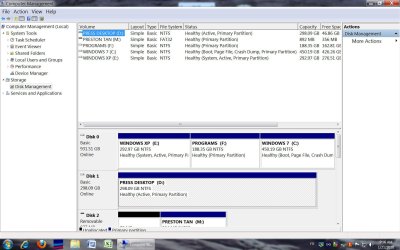
Do you also want to remove the XP installation? If so, please post back a screenshot of your full Disk Management drive map, using Snipping Tool in Start Menu attaching file using paper clip in reply box.
So this command: bcdedit /delete {ntldr} /f done in Windows 7 will remove Windows XP (Windows Legacy OS Loader) from the Windows 7 Boot Manager, and will leave Windows 7 as my default OS to boot, is that correct?
What does the /f mean?
I would like to delete Windows XP from my hard drive, eventually. Attached is a screenshot of Disk Management.
Do you have your Win7 programs on the Programs partition?
If so, then you'll need to save it if you don't want to reinstall your programs.
If not, you can use free Partition Wizard bootable CD to rightclick>Delete both XP and Programs partitions, then rightclick Win7 partition to Modify>Set Active, and rightclick>Resize to drag left border over the deleted space.
Then boot into the Win7 DVD, select Repair My Computer on second screen, click through to Recovery Tools to run Startup Repair up to 3 separate times with reboots to rewrite MBR to Windows 7.
If you need to keep the Programs partition, then in order to reclaim the lower address for Win7 you would need to shrink and copy it there, then resize both partitions as you wish before running Startup Repair to write MBR to Win7.
Back up your files and a Win7 Backup image as resizing operations can fail.