Deleted files reappearing (coming back)

Sylveon Fetish

Banned
VIP
Local time
4:49 AM
Messages
138
I delete a file or multiple files, usually it happens with files of the media type; pictures, videos, music, etc. I will delete the file, and empty the recycle bin just to see the file returns to its original directory a week to a few months later. I've only seen this behavior on Windows 7 machines, all of them I've previously owned has experienced this problem, my computer now isn't any different. I deleted a Xerneas pictures back in May because I already posted it to Twitter, just today, that same image is back into my 'Twitter Upload' folder in the 'My Documents' of my user folder. I have emptied the recycle bin a few different times since, but the file has returned today. I did some searching around and saw that this question has been asked on various forums but no valid answer.
 

My Computer My Computer

Computer type
PC/Desktop
Computer Manufacturer/Model Number
Dell Optiplex 780
OS
Windows 7 Ultimate 64-bit SP1
CPU
Intel Core 2 Duo E8400 @ 3.00GHz
Motherboard
Dell Inc. 03NVJ6 (CPU)
Memory
8.00GB Single-Channel DDR3 @ 531MHz (7-7-7-20)
Graphics Card(s)
Intel Q45/Q43 Express Chipset (Dell)
Sound Card
SoundMAX Integrated Digital High Definition Audio
Monitor(s) Displays
Viore
Screen Resolution
1920x1080
Hard Drives
149GB Seagate ST3160318AS (SATA)
Keyboard
Dell
Mouse
Dell
Internet Speed
up to 7 Mbps (average 3.2 Mbps)
Antivirus
AVG IS
Browser
Firefox, Chrome
Not sure what the problem is here. It may help if you state what steps you have already taken to attempt to resolve the issue.

Recyle Bin (All Drives)

Open an elevated Elevated Command Prompt: Elevated Command Prompt Tutorial

Type:

RD /S /Q C:\$Recycle.bin

Assuming that drive C: is your windows partition. If it uses a different drive letter replace C: in the line above with the correct letter.

Press Enter

Repeat the above for all other drives.

Then right click desktop and choose "Refresh"

You might need to reboot and fresh recycle bins will be created.

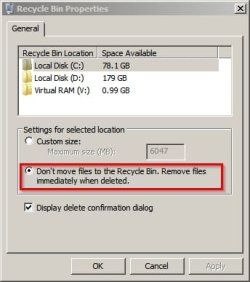
Other than that try setting all recycle bins to delete files immediately.

Right click the recycle bin icon and choose "Properties". For each drive set it like this:

Recycle Bin Properties.jpg

Question. What's a Xerneas picture?

Also what created this "Twitter Upload Folder" ?

Is that a folder you created yourself or was it created by an application and used as the default save location for images when you use that application? Is anything set to sync with that folder?

Thanks.
 

My Computer My Computer

Computer type
Laptop
Computer Manufacturer/Model Number
ASUS
OS
Microsoft Windows 7 Home Premium 64-bit 7601 Multiprocessor Free Service Pack 1
CPU
AMD C-60 APU with Radeon(tm) HD Graphics
Motherboard
ASUSTeK COMPUTER INC. X501U
Memory
4.00 GB
Graphics Card(s)
AMD Radeon HD 6290 Graphics
Sound Card
(1) AMD High Definition Audio Device (2) Realtek High Defi
Screen Resolution
1366 x 768 x 32 bits (4294967296 colors) @ 60 Hz
Hard Drives
Hitachi HTS545050A7E380 SATA Disk Device
Antivirus
Comodo CIS & FW, SecureAplus App Whitelisting, Threatfire
Browser
Cyberfox 64bit, Opera 64bit, Airfox
Other Info
Spy-The-Spy, HitmanPro.Alert, Norton Connect Safe, MJRegWatcher, BitDefender TrafficLight, Voodoo Shield, Zemana AntiMalware
I will do that command prompt command once I am done with the forfiles command I am currently using to move 50,000 or so png files across in recup_dir_1 - recup_dir_10000 recovered from my old computer's bad drive into one folder following a tutorial found on SuperUser so I can easily go through them and remove junk ones.


Question. What's a Xerneas picture?
Xerneas is a Pokémon. I was referring to a picture of her.

Also what created this "Twitter Upload Folder" ?

Is that a folder you created yourself or was it created by an application and used as the default save location for images when you use that application? Is anything set to sync with that folder?

Thanks.

I created this folder to put pictures I plan on posting to Twitter
 

My Computer My Computer

Computer type
PC/Desktop
Computer Manufacturer/Model Number
Dell Optiplex 780
OS
Windows 7 Ultimate 64-bit SP1
CPU
Intel Core 2 Duo E8400 @ 3.00GHz
Motherboard
Dell Inc. 03NVJ6 (CPU)
Memory
8.00GB Single-Channel DDR3 @ 531MHz (7-7-7-20)
Graphics Card(s)
Intel Q45/Q43 Express Chipset (Dell)
Sound Card
SoundMAX Integrated Digital High Definition Audio
Monitor(s) Displays
Viore
Screen Resolution
1920x1080
Hard Drives
149GB Seagate ST3160318AS (SATA)
Keyboard
Dell
Mouse
Dell
Internet Speed
up to 7 Mbps (average 3.2 Mbps)
Antivirus
AVG IS
Browser
Firefox, Chrome
Back
Top