
Solved Deleted Desktop Folder Keeps Reappearing

voyager

New member
Local time
3:46 PM
Messages
39
Location
Hawaii
I have a folder on my PC's Desktop that will not stay deleted.
It reappears after rebooting, shutting down and restarting and some times it seems to spontaneously reappear without a restart.
I have loaded it with things to be deleted, then deleted it only to have it reappear again, but empty.
I have changed it's name and it reappears alongside the newly named folder.
I have done a couple of RD/RMDIR command prompt deletes and it is still reappearing on my desktop.
I am at a loss as to how to get rid of this folder once and for all.
It is driving me up the wall!

I'm considering a clean reinstall of Win7 just to stop this irritation.
Any suggestions as to an easier way to get rid of it?
 
Last edited:

My Computer

Computer type
PC/Desktop
Computer Manufacturer/Model Number
Voyager's PC Foundry - VPCF07
OS
Windows 7 Ultimate x64
CPU
i7-3770k OC to 4.5GHz
Motherboard
ASUS P8Z77-V
Memory
4x4GB Kingston HyperX 1600
Graphics Card(s)
XFX Radeon R7 260X
Sound Card
Onboard HD sound
Monitor(s) Displays
2X Dell U2412M
Screen Resolution
1920 x 1200 [3840 X 1200]
Hard Drives
1X Crucial MX300 750 GB SATA-III SSD;
1x Seagate 2TB ST2000DM001 SATA-III;
2x Hitachi 2TB Ultrastar HUA723020ALA641 SATA III
PSU
Corsair RM Series 850W
Case
Corsair Graphite T600
Cooling
Noctua NH-U12P SE2
Keyboard
Azio KB505U Large Print Backlit - wired
Mouse
Cheapest I can find - wired
Internet Speed
50mbps
Antivirus
Bit Defender Free
Browser
Palemoon
Other Info
Epson SureColor 400;
Brother MFC L2740DW;
Nikon Super CoolScan 4000ED;
TCC 750LC PreAmp;
MCS [Technics] 6603 Turntable;
Hauppauge WinTV-HVR 1850 TV tuner card;
Syba SD-SA2PEX-2IR SATA RAID card
How was the folder created?

Did you create this folder manually or was it created by some other method?

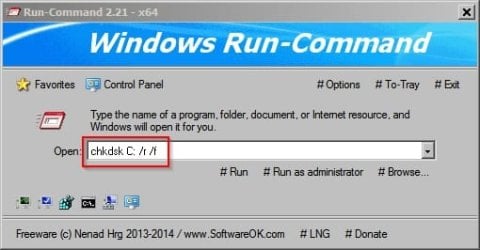
I've seen a problem with re-appearing folders on my machine a couple of times and the usual solution is to use secure deletion followed by running chkdsk C: r/ f/

Assumes that windows is installed on drive C:

Run-Command 2.jpg

Other than that there are some applications that write files to a folder that you specify as the default one to use for that application and if you located such a folder on your desktop the application may re-create the folder when the application runs.
 

My Computer

Computer type
Laptop
Computer Manufacturer/Model Number
ASUS
OS
Microsoft Windows 7 Home Premium 64-bit 7601 Multiprocessor Free Service Pack 1
CPU
AMD C-60 APU with Radeon(tm) HD Graphics
Motherboard
ASUSTeK COMPUTER INC. X501U
Memory
4.00 GB
Graphics Card(s)
AMD Radeon HD 6290 Graphics
Sound Card
(1) AMD High Definition Audio Device (2) Realtek High Defi
Screen Resolution
1366 x 768 x 32 bits (4294967296 colors) @ 60 Hz
Hard Drives
Hitachi HTS545050A7E380 SATA Disk Device
Antivirus
Comodo CIS & FW, SecureAplus App Whitelisting, Threatfire
Browser
Cyberfox 64bit, Opera 64bit, Airfox
Other Info
Spy-The-Spy, HitmanPro.Alert, Norton Connect Safe, MJRegWatcher, BitDefender TrafficLight, Voodoo Shield, Zemana AntiMalware
If you sure you don't want that folder on your computer try this.
Right click on the icon and select Open File Location. Once it opens right click and select delete.

Then go to the Start Orb and type msconfig. Open it and go to Start Up and see if you see it in there. If so uncheck it.
Reboot.
 

My Computer

Computer type
PC/Desktop
Computer Manufacturer/Model Number
Home made Desktop
OS
Windows 10 Pro. 64/ version 1709 Windows 7 Pro/64
CPU
Intel i7-6800K @ 4.3
Motherboard
ASUS X-99 Deluxe II
Memory
Corsair Platinum 16 gig @2400
Graphics Card(s)
EVGA GTX 1070 OC
Monitor(s) Displays
Asus 27" LED LCD/VE278Q
Screen Resolution
1920-1080 or 1280-720 HDMI
Hard Drives
INTEL SSD 730-240 Gb Sata 3.0/
PSU
EVGA Platium 1200W
Case
Phanteks Luxe Tempered Glass 8 fans/ one radiator
Cooling
XSPC/ Water Cooled CPU
Keyboard
Das 4 Professional
Mouse
Logitech M705/MX Anywhere 2-S
Internet Speed
100 mbits
Antivirus
Microsoft Security Essentials/ Malwarebytes Premium 3.0/ SAS
Browser
I.E. 11 default/Firefox/ ISP Time Warner Cable/Spectrum
Other Info
LG BluRay Burner/
Sound system-KLipsch-THX/
Icy Dock ssd Hot Swap bays.
@ Callender
The folder was manually created.
I scanned some pages as JPEGs, then stored them in this folder.
After burning the folder to a CD, I copied it to another partition on another HDD to archive it.
Then, I manually deleted it from the desktop, or so I thought.

I have secure deleted it several times now with several different apps that have secure delete functions, including using the Gutmann method.
I have run "chkdsk C: r/ f/" [corrected to "chkdsk C: /r /f"] several times.

That folder is still sitting on my desktop after each reboot!!!
I have done a search on C: drive for the folder name thinking that there might be a duplicate somewhere.
No luck in finding one.
I have just gone to the copy of the original folder with its original contents on the other HDD in another partition and made a zip file of it.
Then, I deleted that folder copy and the ghost of it that keeps reappearing on my desktop.
The ghost still comes back after a reboot.

@
Layback Bear
When right clicking on the icon, "Open File Location" option is not offered.
It is not in the Startup list as found through "msconfig", or as found by several maintenance utilities.
Nor is it in the Startup folder.
 

My Computer

Computer type
PC/Desktop
Computer Manufacturer/Model Number
Voyager's PC Foundry - VPCF07
OS
Windows 7 Ultimate x64
CPU
i7-3770k OC to 4.5GHz
Motherboard
ASUS P8Z77-V
Memory
4x4GB Kingston HyperX 1600
Graphics Card(s)
XFX Radeon R7 260X
Sound Card
Onboard HD sound
Monitor(s) Displays
2X Dell U2412M
Screen Resolution
1920 x 1200 [3840 X 1200]
Hard Drives
1X Crucial MX300 750 GB SATA-III SSD;
1x Seagate 2TB ST2000DM001 SATA-III;
2x Hitachi 2TB Ultrastar HUA723020ALA641 SATA III
PSU
Corsair RM Series 850W
Case
Corsair Graphite T600
Cooling
Noctua NH-U12P SE2
Keyboard
Azio KB505U Large Print Backlit - wired
Mouse
Cheapest I can find - wired
Internet Speed
50mbps
Antivirus
Bit Defender Free
Browser
Palemoon
Other Info
Epson SureColor 400;
Brother MFC L2740DW;
Nikon Super CoolScan 4000ED;
TCC 750LC PreAmp;
MCS [Technics] 6603 Turntable;
Hauppauge WinTV-HVR 1850 TV tuner card;
Syba SD-SA2PEX-2IR SATA RAID card

My Computer

Computer type
PC/Desktop
Computer Manufacturer/Model Number
Custom Built
OS
Windows 10 Pro
CPU
AMD Ryzen 5 2400G Processor with Radeon RX Vega 11 Graphics
Motherboard
ASRock X470 Master SLI/AC AM4 AMD Promontory X470 SATA 6Gb/s
Memory
G.SKILL Ripjaws V Series 16GB (2 x 8GB) 288-Pin DDR4 SDRAM D
Graphics Card(s)
2047MB NVIDIA GeForce GTX 1060 6GB (EVGA)
Sound Card
Motherboard Built in
Monitor(s) Displays
Acer R240HY bidx 23.8-Inch IPS HDMI DVI VGA (1920 x 1080) Wi
Screen Resolution
1920 x 1080
Hard Drives
1TB Sandisk SSD PLUS (Main drive)
500 GB Seagate 7200 RPM (Games)
500 GB Western Digital 7200 RPM (Virtual Machines)
PSU
CORSAIR TX Series TX650M 650W 80+ Gold Modular Power Supply
Case
CORSAIR CARBIDE SPEC-02 Mid-Tower Gaming Case, Red LED Fan
Cooling
220mm, two 120mm, and four 60mm fans
Keyboard
Wired Dell keyboard
Mouse
Wireless Logitech mouse
Internet Speed
250mb down, 30mb up
Antivirus
Panda Cloud Antivirus
Browser
Chrome-ish x64
Other Info
Your awesome for reading this.
@andrew129260
Icon cache rebuild = No changes
Tried both before and after deleting the icon.

File Shredder = Same results as the other secure delete utilities I've tried = No changes
 

My Computer

Computer type
PC/Desktop
Computer Manufacturer/Model Number
Voyager's PC Foundry - VPCF07
OS
Windows 7 Ultimate x64
CPU
i7-3770k OC to 4.5GHz
Motherboard
ASUS P8Z77-V
Memory
4x4GB Kingston HyperX 1600
Graphics Card(s)
XFX Radeon R7 260X
Sound Card
Onboard HD sound
Monitor(s) Displays
2X Dell U2412M
Screen Resolution
1920 x 1200 [3840 X 1200]
Hard Drives
1X Crucial MX300 750 GB SATA-III SSD;
1x Seagate 2TB ST2000DM001 SATA-III;
2x Hitachi 2TB Ultrastar HUA723020ALA641 SATA III
PSU
Corsair RM Series 850W
Case
Corsair Graphite T600
Cooling
Noctua NH-U12P SE2
Keyboard
Azio KB505U Large Print Backlit - wired
Mouse
Cheapest I can find - wired
Internet Speed
50mbps
Antivirus
Bit Defender Free
Browser
Palemoon
Other Info
Epson SureColor 400;
Brother MFC L2740DW;
Nikon Super CoolScan 4000ED;
TCC 750LC PreAmp;
MCS [Technics] 6603 Turntable;
Hauppauge WinTV-HVR 1850 TV tuner card;
Syba SD-SA2PEX-2IR SATA RAID card
Malware infected the folder maybe?

System restore somehow trying to bring it back?

Try disabling your security software and delete it and reboot it.

Or scan your pc with a full scan and see what turns up...
 

My Computer

Computer type
PC/Desktop
Computer Manufacturer/Model Number
Custom Built
OS
Windows 10 Pro
CPU
AMD Ryzen 5 2400G Processor with Radeon RX Vega 11 Graphics
Motherboard
ASRock X470 Master SLI/AC AM4 AMD Promontory X470 SATA 6Gb/s
Memory
G.SKILL Ripjaws V Series 16GB (2 x 8GB) 288-Pin DDR4 SDRAM D
Graphics Card(s)
2047MB NVIDIA GeForce GTX 1060 6GB (EVGA)
Sound Card
Motherboard Built in
Monitor(s) Displays
Acer R240HY bidx 23.8-Inch IPS HDMI DVI VGA (1920 x 1080) Wi
Screen Resolution
1920 x 1080
Hard Drives
1TB Sandisk SSD PLUS (Main drive)
500 GB Seagate 7200 RPM (Games)
500 GB Western Digital 7200 RPM (Virtual Machines)
PSU
CORSAIR TX Series TX650M 650W 80+ Gold Modular Power Supply
Case
CORSAIR CARBIDE SPEC-02 Mid-Tower Gaming Case, Red LED Fan
Cooling
220mm, two 120mm, and four 60mm fans
Keyboard
Wired Dell keyboard
Mouse
Wireless Logitech mouse
Internet Speed
250mb down, 30mb up
Antivirus
Panda Cloud Antivirus
Browser
Chrome-ish x64
Other Info
Your awesome for reading this.
@andrew129260
Icon cache rebuild = No changes
Tried both before and after deleting the icon.

File Shredder = Same results as the other secure delete utilities I've tried = No changes

Give this a try; Place one of the original files back in the folder, then change the extension to "old" so you should have something like "file name.old". Now, try deleting the folder.

HTH
 

My Computer

Computer type
PC/Desktop
Computer Manufacturer/Model Number
Custom Built
OS
Windows 7 Professional x64
CPU
Intel i5 quad processor
Motherboard
DP67BG
Memory
16 GB
Graphics Card(s)
Radeon HD 5770
Sound Card
Realtek High Definition Audio
Monitor(s) Displays
Samsung SyncMaster
Screen Resolution
1920X1080
Hard Drives
WD 2TB (SATA Internal)
WD 1TB (USB External)
PSU
Corsair GS800
Case
Tower (Generic)
Cooling
3 Internal Fans
Keyboard
MS Wireless
Mouse
MS Optical Wired
Internet Speed
54 mbps
Antivirus
Emsisoft
Browser
IE-Version 9, Palemoon-Version 24.2.0
You may try to disable system restore, delete the folder again and restart. File history is kept in system restore points I think and it may recover this folder every start for whatever reason.
 

My Computer

OS
Windows 7 build 7127 x64
CPU
Intel Core-i7 2600k 3.4 GHz
Motherboard
Onboard audio (Realtek ALC662 codec)
Memory
Patriot Extreme Performance 4GB PC2-6400 4-4-4-12
Graphics Card(s)
Intel G31
Sound Card
Creative Sound Blaster Audigy 2
Monitor(s) Displays
Viewsonic Professional Series P95f+
Screen Resolution
1280x1024 @ 85Hz
Hard Drives
Western Digital Raptor, 74GB 10000RPM (system drive)
Maxtor DiamondMax 10, 200GB 7200RPM
Seagate Barracuda 7200.10, 500GB 7200RPM
PSU
Antec Truepower 430watt
Case
Cooler Master TAC-T01 WaveMaster
Cooling
Intel & Nvidia stock cooller + 3 80mm case fans
Keyboard
Logitech Internet Navigator
Mouse
Logitech MX-518
Internet Speed
8/1MBPS
You could also go into Safe mode and see if you can find the bad guy.
You might not be able to remove it in normal mode because it is in use.

I also use this free tool to search for things and it does work great.

Download Everything

Another suggestion.
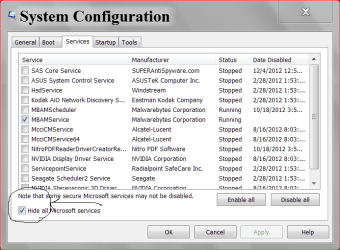
msconfic/Services/ put a check mark in Hide all Microsoft Services in the lower left corner. See if it hiding in their.

At this point I would be concerned with infections. Something put the bad guy on your computer. If you need suggestion on what scans to do just ask.

services msconfig.PNG
 

My Computer

Computer type
PC/Desktop
Computer Manufacturer/Model Number
Home made Desktop
OS
Windows 10 Pro. 64/ version 1709 Windows 7 Pro/64
CPU
Intel i7-6800K @ 4.3
Motherboard
ASUS X-99 Deluxe II
Memory
Corsair Platinum 16 gig @2400
Graphics Card(s)
EVGA GTX 1070 OC
Monitor(s) Displays
Asus 27" LED LCD/VE278Q
Screen Resolution
1920-1080 or 1280-720 HDMI
Hard Drives
INTEL SSD 730-240 Gb Sata 3.0/
PSU
EVGA Platium 1200W
Case
Phanteks Luxe Tempered Glass 8 fans/ one radiator
Cooling
XSPC/ Water Cooled CPU
Keyboard
Das 4 Professional
Mouse
Logitech M705/MX Anywhere 2-S
Internet Speed
100 mbits
Antivirus
Microsoft Security Essentials/ Malwarebytes Premium 3.0/ SAS
Browser
I.E. 11 default/Firefox/ ISP Time Warner Cable/Spectrum
Other Info
LG BluRay Burner/
Sound system-KLipsch-THX/
Icy Dock ssd Hot Swap bays.
OK,
I have scanned with my AV [AVG Free], Malwarebytes, and ran HouseCall all day yesterday.
Nothing shows up.
I've disables System Restore,deleted all restore points, rebooted in safe mode, deleted it in Safe mode, checked services and startup in msconfig - nothing stands out as an anomaly.
It still reappears after deleting it and rebooting.

Added info:
The folder was created 3/11/'14 and moved to its archive location the same day after burning it to CD.
There were no restore points before the 18th.

I do have a C: drive image from Nov 6th. I may try making an image of my present C: drive, then loading the Nov image to see how much my configuration has changed. It may be acceptable to me.
I'm getting tired of chasing this, and really don't want to do a clean install.
It will be close to a week's steady work to get it in and all set up.

I am still open to suggestions.
I would like to figure out what is happening here.

EDIT:
I have opened the archived zip file and restored the original folder and it's contents to the desktop overwriting the ghost folder, then deleted it.
It still reappears.
 

My Computer

Computer type
PC/Desktop
Computer Manufacturer/Model Number
Voyager's PC Foundry - VPCF07
OS
Windows 7 Ultimate x64
CPU
i7-3770k OC to 4.5GHz
Motherboard
ASUS P8Z77-V
Memory
4x4GB Kingston HyperX 1600
Graphics Card(s)
XFX Radeon R7 260X
Sound Card
Onboard HD sound
Monitor(s) Displays
2X Dell U2412M
Screen Resolution
1920 x 1200 [3840 X 1200]
Hard Drives
1X Crucial MX300 750 GB SATA-III SSD;
1x Seagate 2TB ST2000DM001 SATA-III;
2x Hitachi 2TB Ultrastar HUA723020ALA641 SATA III
PSU
Corsair RM Series 850W
Case
Corsair Graphite T600
Cooling
Noctua NH-U12P SE2
Keyboard
Azio KB505U Large Print Backlit - wired
Mouse
Cheapest I can find - wired
Internet Speed
50mbps
Antivirus
Bit Defender Free
Browser
Palemoon
Other Info
Epson SureColor 400;
Brother MFC L2740DW;
Nikon Super CoolScan 4000ED;
TCC 750LC PreAmp;
MCS [Technics] 6603 Turntable;
Hauppauge WinTV-HVR 1850 TV tuner card;
Syba SD-SA2PEX-2IR SATA RAID card
Application used for scanning?

@ Callender
The folder was manually created.
I scanned some pages as JPEGs, then stored them in this folder.
After burning the folder to a CD, I copied it to another partition on another HDD to archive it.
/QUOTE]

What was the name of the application used to scan pages? - Pages of what? Documents, web pages or something else?

I suspect that this application is the culprit. Run the application again and choose to save the output. See where it wants to save it. Check the default location for output - within the application. My guess is that it's remembered to store files in a folder (even if you created the folder yourself) on your desktop and that it is recreating the folder automatically.
 
Last edited:

My Computer

Computer type
Laptop
Computer Manufacturer/Model Number
ASUS
OS
Microsoft Windows 7 Home Premium 64-bit 7601 Multiprocessor Free Service Pack 1
CPU
AMD C-60 APU with Radeon(tm) HD Graphics
Motherboard
ASUSTeK COMPUTER INC. X501U
Memory
4.00 GB
Graphics Card(s)
AMD Radeon HD 6290 Graphics
Sound Card
(1) AMD High Definition Audio Device (2) Realtek High Defi
Screen Resolution
1366 x 768 x 32 bits (4294967296 colors) @ 60 Hz
Hard Drives
Hitachi HTS545050A7E380 SATA Disk Device
Antivirus
Comodo CIS & FW, SecureAplus App Whitelisting, Threatfire
Browser
Cyberfox 64bit, Opera 64bit, Airfox
Other Info
Spy-The-Spy, HitmanPro.Alert, Norton Connect Safe, MJRegWatcher, BitDefender TrafficLight, Voodoo Shield, Zemana AntiMalware
I don't think you're right about this one.
But, here goes:
I received medical record paper copies by mail and scanned them with my long time owned Brother MFC 7420.
I used the Brother ControlCenter3 software, which I have used for years without incident, to scan the 41 pages as JPEGs directly to the offending folder.

I then used Acrobat to combine the JPEGs into a PDF which was placed in the same folder with the JPEGs,
the same offending folder.

I've never had a problem similar to this with Acrobat either.

ControlCenter3 wants to save the scans to:
Libraries/Pictures/ ControlCenter3 by default.

There are no copies of the scans there.
As in other cases, I set the location to scan to as the folder I wanted it in, the offending folder.
 

My Computer

Computer type
PC/Desktop
Computer Manufacturer/Model Number
Voyager's PC Foundry - VPCF07
OS
Windows 7 Ultimate x64
CPU
i7-3770k OC to 4.5GHz
Motherboard
ASUS P8Z77-V
Memory
4x4GB Kingston HyperX 1600
Graphics Card(s)
XFX Radeon R7 260X
Sound Card
Onboard HD sound
Monitor(s) Displays
2X Dell U2412M
Screen Resolution
1920 x 1200 [3840 X 1200]
Hard Drives
1X Crucial MX300 750 GB SATA-III SSD;
1x Seagate 2TB ST2000DM001 SATA-III;
2x Hitachi 2TB Ultrastar HUA723020ALA641 SATA III
PSU
Corsair RM Series 850W
Case
Corsair Graphite T600
Cooling
Noctua NH-U12P SE2
Keyboard
Azio KB505U Large Print Backlit - wired
Mouse
Cheapest I can find - wired
Internet Speed
50mbps
Antivirus
Bit Defender Free
Browser
Palemoon
Other Info
Epson SureColor 400;
Brother MFC L2740DW;
Nikon Super CoolScan 4000ED;
TCC 750LC PreAmp;
MCS [Technics] 6603 Turntable;
Hauppauge WinTV-HVR 1850 TV tuner card;
Syba SD-SA2PEX-2IR SATA RAID card
@Callender You are CORRECT!!!

I had set CC3 up to scan to files, into the offending folder.
I just went back into CC3 set it to scan a file to a new folder, then made the scan.
I then deleted both folders.
Only the newly made folder returned as the new ghost.
I'll go back and delete the scan to file settings and the problem should be fixed.
Thank you.

Yep!
The problem is fixed.
It again points to the original default scan to location.
Even old things, when used in a new way, can screw things up.
 

My Computer

Computer type
PC/Desktop
Computer Manufacturer/Model Number
Voyager's PC Foundry - VPCF07
OS
Windows 7 Ultimate x64
CPU
i7-3770k OC to 4.5GHz
Motherboard
ASUS P8Z77-V
Memory
4x4GB Kingston HyperX 1600
Graphics Card(s)
XFX Radeon R7 260X
Sound Card
Onboard HD sound
Monitor(s) Displays
2X Dell U2412M
Screen Resolution
1920 x 1200 [3840 X 1200]
Hard Drives
1X Crucial MX300 750 GB SATA-III SSD;
1x Seagate 2TB ST2000DM001 SATA-III;
2x Hitachi 2TB Ultrastar HUA723020ALA641 SATA III
PSU
Corsair RM Series 850W
Case
Corsair Graphite T600
Cooling
Noctua NH-U12P SE2
Keyboard
Azio KB505U Large Print Backlit - wired
Mouse
Cheapest I can find - wired
Internet Speed
50mbps
Antivirus
Bit Defender Free
Browser
Palemoon
Other Info
Epson SureColor 400;
Brother MFC L2740DW;
Nikon Super CoolScan 4000ED;
TCC 750LC PreAmp;
MCS [Technics] 6603 Turntable;
Hauppauge WinTV-HVR 1850 TV tuner card;
Syba SD-SA2PEX-2IR SATA RAID card
Brother MFC-7420

Configure or change the settings of the ControlCenter 2 or&n : Brother

Well I could be wrong but I've seen folders automatically created by applications before so it's worth checking.

Check your "Scan to file" settings as shown in the above link and if it's set to "Desktop/ Problem Folder Name" - clear that location from the settings or choose another default location to save scanned files.

If you don't see these settings - then it can't be the cause of the problem! It's just something to check.

EDIT: You were quicker than me!

Glad it's sorted.
 
Last edited:

My Computer

Computer type
Laptop
Computer Manufacturer/Model Number
ASUS
OS
Microsoft Windows 7 Home Premium 64-bit 7601 Multiprocessor Free Service Pack 1
CPU
AMD C-60 APU with Radeon(tm) HD Graphics
Motherboard
ASUSTeK COMPUTER INC. X501U
Memory
4.00 GB
Graphics Card(s)
AMD Radeon HD 6290 Graphics
Sound Card
(1) AMD High Definition Audio Device (2) Realtek High Defi
Screen Resolution
1366 x 768 x 32 bits (4294967296 colors) @ 60 Hz
Hard Drives
Hitachi HTS545050A7E380 SATA Disk Device
Antivirus
Comodo CIS & FW, SecureAplus App Whitelisting, Threatfire
Browser
Cyberfox 64bit, Opera 64bit, Airfox
Other Info
Spy-The-Spy, HitmanPro.Alert, Norton Connect Safe, MJRegWatcher, BitDefender TrafficLight, Voodoo Shield, Zemana AntiMalware
Back
Top