Solved Deleting 32 bit Window 7

johnwhite

New member
Local time
1:32 PM
Messages
8
I have two SSDs with a 32 bit on one and 64 bit version of Windows 7 on the other. I am almost certain that the 64 bit is on drive D but I would like to be sure before deleting anything. Is there a simple way to identify the opsys and the drive it is installed on?
 

My Computer

Computer type
PC/Desktop
OS
Windows 7 64 bit
CPU
AMD
Motherboard
gigabyte
Memory
4gb
Graphics Card(s)
nvidia
Hard Drives
ssd 64gb
ssd 120gb
ext usb
Go into the Control Panel and open up System. That should tell you which version of Windows 7 you are currently booted up in.
 

My Computer

Computer Manufacturer/Model Number
Customized build from CyberPower
OS
Windows 7 Home Premium 64bit SP 1
CPU
Intel i5 2500k
Motherboard
Asus P8P67 Deluxe
Memory
8 gigabytes Corsair PC3-12800 DDR3
Graphics Card(s)
EVGA GeForce GTX 460 superclocked
Sound Card
Integrated
Monitor(s) Displays
ViewSonic 23" LCD
Screen Resolution
1980 x 1080
Hard Drives
120 Gb Samsung 840 Pro SSD
120 Gb Kingston Hyper X SSD
1 Tb WD Caviar Black HDD
PSU
Coolermaster 1000 watt modular
Case
Coolermaster HAF X full tower
Cooling
Coolermaster Hyper 212 plus
Keyboard
Logitech USB
Mouse
Microsoft 3 button
Internet Speed
download 1.5 Mb/sec upload 300Kb/sec
Hi Littlejay, thanks you for replying so quickly - problem is the tiny bit of info I need is the drive letter.
 

My Computer

Computer type
PC/Desktop
OS
Windows 7 64 bit
CPU
AMD
Motherboard
gigabyte
Memory
4gb
Graphics Card(s)
nvidia
Hard Drives
ssd 64gb
ssd 120gb
ext usb
Hello Johnwhite, and welcome to Seven Forums.

You could disconnect the SSD to see which one you have still connected, then mark the SDD. :)
 

My Computer

Computer type
PC/Desktop
Computer Manufacturer/Model Number
Self built custom
OS
64-bit Windows 11 Pro for Workstations
CPU
Intel i7-8700K OC'd to 5 GHz
Motherboard
ASUS ROG Maximus XI Formula Z390
Memory
64 GB (4x16GB) G.SKILL TridentZ RGB DDR4 3600 MHz
Graphics Card(s)
ASUS ROG-STRIX-GTX1080TI-O11G-GAMING
Sound Card
Integrated
Monitor(s) Displays
2 x Samsung Odyssey G7 27"
Screen Resolution
2560x1440
Hard Drives
1TB Samsung 990 PRO M.2,
4TB Samsung 990 PRO PRO M.2,
TerraMaster F8 SSD Plus NAS
PSU
Seasonic Prime Titanium 850W
Case
Thermaltake Core P3
Cooling
Corsair Hydro H115i
Keyboard
Logitech wireless K800
Mouse
Logitech MX Master 4
Internet Speed
2 Gb/s Download and 100 Mb/s Upload
Antivirus
Malwarebyte Anti-Malware Premium
Browser
Google Chrome
Other Info
Logitech Z625 speaker system,
Logitech BRIO 4K Pro webcam,
HP Color LaserJet Pro MFP M477fdn,
APC SMART-UPS RT 1000 XL - SURT1000XLI,
Galaxy S23 Plus phone
Good idea, I'm just a bit surprised that there isn't a method for the computer to interrogate itself. If by some madness I tried to delete the opsys that was currently in use, would Windows allow that to proceed?
 

My Computer

Computer type
PC/Desktop
OS
Windows 7 64 bit
CPU
AMD
Motherboard
gigabyte
Memory
4gb
Graphics Card(s)
nvidia
Hard Drives
ssd 64gb
ssd 120gb
ext usb
No. You would get an "in use" or "access denied" type error.
 

My Computer

Computer type
PC/Desktop
Computer Manufacturer/Model Number
Self built custom
OS
64-bit Windows 11 Pro for Workstations
CPU
Intel i7-8700K OC'd to 5 GHz
Motherboard
ASUS ROG Maximus XI Formula Z390
Memory
64 GB (4x16GB) G.SKILL TridentZ RGB DDR4 3600 MHz
Graphics Card(s)
ASUS ROG-STRIX-GTX1080TI-O11G-GAMING
Sound Card
Integrated
Monitor(s) Displays
2 x Samsung Odyssey G7 27"
Screen Resolution
2560x1440
Hard Drives
1TB Samsung 990 PRO M.2,
4TB Samsung 990 PRO PRO M.2,
TerraMaster F8 SSD Plus NAS
PSU
Seasonic Prime Titanium 850W
Case
Thermaltake Core P3
Cooling
Corsair Hydro H115i
Keyboard
Logitech wireless K800
Mouse
Logitech MX Master 4
Internet Speed
2 Gb/s Download and 100 Mb/s Upload
Antivirus
Malwarebyte Anti-Malware Premium
Browser
Google Chrome
Other Info
Logitech Z625 speaker system,
Logitech BRIO 4K Pro webcam,
HP Color LaserJet Pro MFP M477fdn,
APC SMART-UPS RT 1000 XL - SURT1000XLI,
Galaxy S23 Plus phone
Thank you, I think I will try it (I want the redundant SSD to provide a place for a back up image of my main system).
 

My Computer

Computer type
PC/Desktop
OS
Windows 7 64 bit
CPU
AMD
Motherboard
gigabyte
Memory
4gb
Graphics Card(s)
nvidia
Hard Drives
ssd 64gb
ssd 120gb
ext usb
The OS you are presently booted into will be labeled Boot in Disk Mgmt.

In order for it to be able to boot itself, either it or its System Reserved boot partition must also be labeled System and Active.

So in Disk Mgmt, the OS which is not labeled Boot can be deleted so long as the one you are presently booted into (which should be C) is labeled System, Active, Boot, and Page File.
 
That is interesting, I am looking now. I have two SSD a 64GB and 128GB
New Volume D: 59.62 GB NTFS Healthy (System, Active, Primary Partition)
System Reserved E: 100 MB NTFS Healthy (Active, Primary Partition)
C: 119.14 GB NTFS Healthy (Boot, Page File, Crash Dump, Primary Partion)
So I think the one to delete is on Vol D: the 64GB SSD
Thanks for your help, does my conclusion sound correct?
 

My Computer

Computer type
PC/Desktop
OS
Windows 7 64 bit
CPU
AMD
Motherboard
gigabyte
Memory
4gb
Graphics Card(s)
nvidia
Hard Drives
ssd 64gb
ssd 120gb
ext usb
Post a shot of disk management from the windows 7 OS you want to keep. You can format the one you want to delete right from disk management.

If you go into Computer Properties (as suggested) it will tell you whether you`re using the 32 bit or the 64 bit OS.
 
Last edited:

My Computer

Computer type
PC/Desktop
Computer Manufacturer/Model Number
Skylake Special #666
OS
Windows 10 Pro x64
CPU
Intel Core i7 6700K
Motherboard
Asus Sabertooth Z170 Mark 1
Memory
GSkill TridentZ RGB 16GB 3600 16-16-16-36
Graphics Card(s)
EVGA GTX 980 Ti SC x2
Sound Card
Realtek High Definition
Monitor(s) Displays
AOC G2460PG
Screen Resolution
1920 x 1080 144Hz
Hard Drives
Samsung 860 Pro 256GB, Seagate Barracuda 4TB x2
PSU
EVGA 1000 P2, EVGA White Custom Braided Cables
Case
Corsair Vengeance C70 Gunmetal Black
Cooling
Corsair H100i v2, Corsair ML120 x2, Thermal Grizzly Kryonaut
Keyboard
Logitech G910 Orion Spectrum
Mouse
Logitech G700s
Internet Speed
Verizon Fios Quantum Gateway 75/75
Antivirus
Windows Defender, Malwarebytes Free 3.8.3
Browser
Chrome
Other Info
Corsair SP120 x4, LG Blu-ray Drive, Durabrand HT-395 100 Watt Dolby Digital Amp, Corsair H2100 Wireless 7.1 Headset
It would be best to see the screenshot of Disk Management - Post a Screen Capture Image
since we can't tell by what you wrote which is on which HD, only guess.

But with those listings if System Reserved is on the HD with C then it is intended to boot C but is not doing so as signified by it lacking a System Flag. We see the System flag on D which means it is booting both.

So since System Reserved is already marked Active, you only need to power down to unplug the other SSD, preferably swap its cable to the Win7 drive you want to keep so it is first in order, boot into Win7 installation media or System Repair Disk to run Startup Repair - Run 3 Separate Times until Win7 starts and SysReserved holds the System Active flags.

You can then plug back in the other drive to delete it in Disk Mgmt. You may need to first Mark Partition as Inactive - Windows 7 Forums
 
Well I've got a screen shot but the paperclip does not reveal a dropdown menu for the upload!
 

My Computer

Computer type
PC/Desktop
OS
Windows 7 64 bit
CPU
AMD
Motherboard
gigabyte
Memory
4gb
Graphics Card(s)
nvidia
Hard Drives
ssd 64gb
ssd 120gb
ext usb
Well I've got a screen shot but the paperclip does not reveal a dropdown menu for the upload!

It doesn`t give you a drop down, it opens another window. Choose the file you want then click upload.
 
Last edited:

My Computer

Computer type
PC/Desktop
Computer Manufacturer/Model Number
Skylake Special #666
OS
Windows 10 Pro x64
CPU
Intel Core i7 6700K
Motherboard
Asus Sabertooth Z170 Mark 1
Memory
GSkill TridentZ RGB 16GB 3600 16-16-16-36
Graphics Card(s)
EVGA GTX 980 Ti SC x2
Sound Card
Realtek High Definition
Monitor(s) Displays
AOC G2460PG
Screen Resolution
1920 x 1080 144Hz
Hard Drives
Samsung 860 Pro 256GB, Seagate Barracuda 4TB x2
PSU
EVGA 1000 P2, EVGA White Custom Braided Cables
Case
Corsair Vengeance C70 Gunmetal Black
Cooling
Corsair H100i v2, Corsair ML120 x2, Thermal Grizzly Kryonaut
Keyboard
Logitech G910 Orion Spectrum
Mouse
Logitech G700s
Internet Speed
Verizon Fios Quantum Gateway 75/75
Antivirus
Windows Defender, Malwarebytes Free 3.8.3
Browser
Chrome
Other Info
Corsair SP120 x4, LG Blu-ray Drive, Durabrand HT-395 100 Watt Dolby Digital Amp, Corsair H2100 Wireless 7.1 Headset
If I click on the smiley next door it drops down but the paper clip does not. If I right click the paperclip I get a white background menu that is more system and not the web page, options there "Save image as, Copy image URL.... etc."
 

My Computer

Computer type
PC/Desktop
OS
Windows 7 64 bit
CPU
AMD
Motherboard
gigabyte
Memory
4gb
Graphics Card(s)
nvidia
Hard Drives
ssd 64gb
ssd 120gb
ext usb
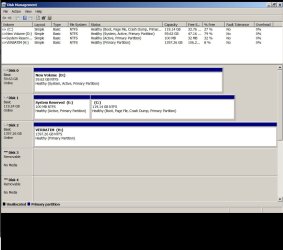
Pop up blocker now off so here is the disk management screenshot!
 

Attachments

  • Disk Management.jpg
    Disk Management.jpg
    119.8 KB · Views: 0

My Computer

Computer type
PC/Desktop
OS
Windows 7 64 bit
CPU
AMD
Motherboard
gigabyte
Memory
4gb
Graphics Card(s)
nvidia
Hard Drives
ssd 64gb
ssd 120gb
ext usb
You are presently booted into C as signfied by the Boot flag on the partition. C is being booted by the small System Reserved partition to its left which needs both the System and Active flags to be able to boot itself. But the only System flag is on D which means it is booting both OS's now.

So to make C bootable on its own you must write the System boot files to System Reserved partition. Since it is already marked Active, power down to unplug all other HD's, swap the DISK0 cable to DISK1 so that it is the preferred DISK0 position if possible, then boot the Win7 installer to run Startup Repair - Run 3 Separate Times until Win7 starts and System Reserved holds the System Active flags.

You can then plug back in the other drives, wipe any old OS HD of all code using Diskpart Clean Command then repartition it in Disk Mgmt.

I notice you are running the hideous Win98 graphics instead of Win7's beautiful Aero Graphics. I would type Aero into Start Search box to run the Aero Troubleshooter to find out what is needed. At the minimum I would select an Aero, or if it is unavailable a Basic Win7 theme in Control Panel>Personalize to enjoy Win7's much nicer graphics than the Soviet file cabinet theme.
 
I notice you are running the hideous Win98 graphics instead of Win7's beautiful Aero Graphics. I would type Aero into Start Search box to run the Aero Troubleshooter to find out what is needed. At the minimum I would select an Aero, or if it is unavailable a Basic Win7 theme in Control Panel>Personalize to enjoy Win7's much nicer graphics than the Soviet file cabinet theme.

Not quite applicable to the situation though is it? More of a personal preference thing really.
 

My Computer

Computer type
PC/Desktop
Computer Manufacturer/Model Number
Systems by SmartEyeball
OS
8 Pro x64
CPU
i7 3770K 4.6GHz
Motherboard
ASUS P8Z77 WS
Memory
16GB G.Skill Trident X 2666mhz
Graphics Card(s)
x2 EVGA 780 Ti Superclocked SLI
Sound Card
SB X-FI Surround 5.1 PRO USB / ATH-AD900 Headphones
Monitor(s) Displays
x3 Dell U2410 / 58" Samsung
Screen Resolution
5760*1200/ 1920*1200
Hard Drives
2x Intel 520 240GB (RAID 0) * 2x WD Caviar Blacks 2TB (RAID 0) * 2TB WD Caviar Black * Sony Optirac DVD
PSU
Silverstone Strider Evolution 1200W
Case
Thermaltake Level 10 GT Snow Edition
Cooling
Noctua NH-D14
Keyboard
Topre Realforce // Ducky Shine MX Black // Filco Ninja TKL
Mouse
Thermaltake Theron (Highly Recommended) + Razer Imperator
Antivirus
MSE
Browser
IE, FF, WaterFox
Other Info
GT Extreme V2 Sim Racing Cockpit + 40" LCD and K/B Mouse stand ▼
Fanatec CSR Elite Wheel + Clubsport V1 Pedals + CSR shifter/7G-H ▼Saitek X52 Pro ▼ TrackIR 5 Pro
Buttkicker v2 Seat Rumbler with Dedicated 5.1 and Sub Woofer attached to frame ▼
=
Bloody Big Grin
Back
Top