That360Guy
New member
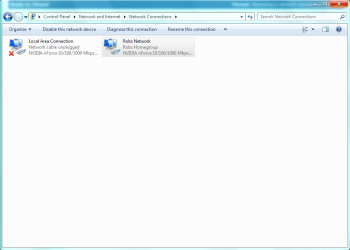
Hello, I have 3 comptuers Running Windows 7 Ultimate. Anyway I am having an issue networking them correctly and getting homegroup to link up. I have narrowed down the issue. A month back I was using a new Cable Modem that didn't end up being fully supported by my ISP. SO I switched back to the old and noticed that instead of just having (Local Area Connection) I have Local Area Connection and Local Area Connection 2.
I am assuming all my other PC's are trained to Homegroup with Local Area Connection and not the 2nd one.
I can't for the life of me delete the Local Area Connection 2. I went to properties and both the connections are Identical in settings and when I disable one and try to connect to the other, it tells me that a network cable is unplugged....
Any ideas?
I am assuming all my other PC's are trained to Homegroup with Local Area Connection and not the 2nd one.
I can't for the life of me delete the Local Area Connection 2. I went to properties and both the connections are Identical in settings and when I disable one and try to connect to the other, it tells me that a network cable is unplugged....
Any ideas?
My Computer
- Computer Manufacturer/Model Number
- Home Built
- OS
- Windows 7 64 Bit
- CPU
- Intel Core i7 920 @ 2.67 GHz
- Motherboard
- Asus P6TD Deluxe Intel X58 Socket LGA1366 Motherboard
- Memory
- Corsair XMS 6144MB PC12800 DDR3 1600MHz 12GB Total
- Graphics Card(s)
- ATI Radeon HD 5870
- Monitor(s) Displays
- Samsung LN52A650 (52" LCD Display)
- Hard Drives
- Seagate 1.5TB Serial ATA HD 7200/32MB/SATA-3G
- Case
- NZXT Tempest Blk ATX Mid Tower Case