Deleting old windows 7 .

tejasvi

New member
Local time
9:05 AM
Messages
12
hello,
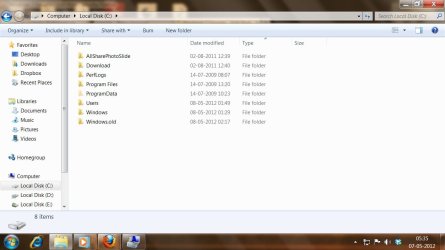
i want to know how do i delete old windows 7 from my C drive while i am being in my new windows 7 in E drive.

here are the steps i followed and nothing came out of them.

- i simply deleted old windows in C drive , which still didnt freed C drive of the space
- i then used disk cleanup and cleaned up system files but still it the drive was as it is
- i reinstalled new windows 7 in C drive , computer made a folder of old windows

so in total i have 3 windows installed on my system.
Now i want to simply delete this C drive and reformat it, but my pc says it is primary drive so i cant format it, but my main windows is in E drive.

i have no data in C drive. so is there any way to reclaim it
i
 

Attachments
  • pok.jpg
    pok.jpg
    105.5 KB · Views: 27
  • iop.jpg
    iop.jpg
    63.9 KB · Views: 14

My Computer

Computer Manufacturer/Model Number
intex
OS
Windows 7 Ultimate 32 bit
CPU
intex
Motherboard
intex
Memory
intex
Graphics Card(s)
intex
Sound Card
intex
Monitor(s) Displays
intex
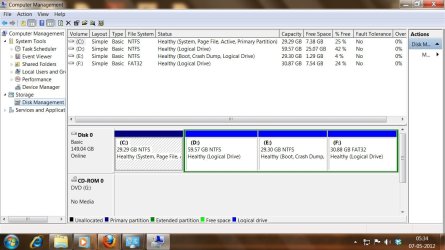
Post a screen shot of what you see in Windows Disk Management.
 

My Computer

Computer type
PC/Desktop
Computer Manufacturer/Model Number
Ignatz Special; 4 speed manual gearbox; factory air conditioning; one of one
OS
Windows 7 Home Premium SP1, 64-bit
CPU
Intel Skylake i5-6600K, not overclocked
Motherboard
AsRock Z170M Extreme 4, micro ATX
Memory
8 GB HyperX DDR4-2666 (2 x 4 GB)
Graphics Card(s)
none; graphics are integrated on CPU
Sound Card
onboard: Realtek ALC1150; external: USB Behringer UF0-202
Monitor(s) Displays
Dell S2340M 23 inch IPS
Screen Resolution
1600 x 900
Hard Drives
System: Crucial MX100 series SSD, 128 GB;
Data: Samsung Spinpoint 103SJ, 1 TB;
Backup: WD Caviar Green WD30EZRX-00D8PB0, 3 TB
PSU
Rosewill SilentNight 500 watt fanless, semi-modular
Case
Antec Solo II
Cooling
Noctua NH-U12S; Noctua F12 intake, Noctua S12A exhaust
Keyboard
Microsoft 200 6JH-00001 USB
Mouse
Dell or Microsoft optical wired; USB
Antivirus
Microsoft Security Essentials and Malwarebytes Premium
Browser
Pale Moon
Other Info
All fans PWM; speeds at idle: CPU circa 500 rpm; intake circa 600 rpm; exhaust circa 600 rpm; CPU temps 27 idle and 47 C load in a warm room (27 C/81 F) when running Intel Extreme Tuning Utility stress test.
posted screen shots
 

My Computer

Computer Manufacturer/Model Number
intex
OS
Windows 7 Ultimate 32 bit
CPU
intex
Motherboard
intex
Memory
intex
Graphics Card(s)
intex
Sound Card
intex
Monitor(s) Displays
intex
Is "E" drive another hard drive or another partition on the same hard drive?

Remember that windows 7 creates it's own small boot partition and if you wipe that out, Windows 7 won't boot and you'll need to run startup repair with the DVD.

This boot partition may not be on the E drive but still on the C drive that references to the E drive.

I agree we need to see disk management and how it looks.

You can always boot with the Win 7 DVD and wipe it out from there. But as I said, careful not to wipe out that boot partition.
 

My Computer

Computer type
PC/Desktop
OS
Windows 7 Pro 64 bit SP1
CPU
Intel Core i7 950 Quad OC'ed to 3.2 GHZ
Motherboard
ASRock X58
Memory
12GB DDR 3
Graphics Card(s)
Radeon HD 5870 1GB
Sound Card
Onboard
Monitor(s) Displays
23" Acer HD
Screen Resolution
1920x1080
Hard Drives
128GB SSD
PSU
700W
Case
Coolermaster
Antivirus
Avast Free
Browser
Firefox
Is "E" drive another hard drive or another partition on the same hard drive?
I dont know that.
I agree we need to see disk management and how it looks.
i have posted
 

My Computer

Computer Manufacturer/Model Number
intex
OS
Windows 7 Ultimate 32 bit
CPU
intex
Motherboard
intex
Memory
intex
Graphics Card(s)
intex
Sound Card
intex
Monitor(s) Displays
intex
Is "E" drive another hard drive or another partition on the same hard drive?
I dont know that.
I agree we need to see disk management and how it looks.
i have posted

Nevermind, this is all on one physical hard drive you are speaking about.

It looks to me that you are still booting to Windows 7 through the C: partition. You cannot expect to wipe C: partition out with you still booting from it.

It looks as if your E partition contains the bootstrap files that references to the C: partition where it looks for win7 installation.
 

My Computer

Computer type
PC/Desktop
OS
Windows 7 Pro 64 bit SP1
CPU
Intel Core i7 950 Quad OC'ed to 3.2 GHZ
Motherboard
ASRock X58
Memory
12GB DDR 3
Graphics Card(s)
Radeon HD 5870 1GB
Sound Card
Onboard
Monitor(s) Displays
23" Acer HD
Screen Resolution
1920x1080
Hard Drives
128GB SSD
PSU
700W
Case
Coolermaster
Antivirus
Avast Free
Browser
Firefox
What I am confused is you are missing the "system reserved" 100 megabyte partition that windows 7 makes where it stores the bootstrap files. Weird??
 

My Computer

Computer type
PC/Desktop
OS
Windows 7 Pro 64 bit SP1
CPU
Intel Core i7 950 Quad OC'ed to 3.2 GHZ
Motherboard
ASRock X58
Memory
12GB DDR 3
Graphics Card(s)
Radeon HD 5870 1GB
Sound Card
Onboard
Monitor(s) Displays
23" Acer HD
Screen Resolution
1920x1080
Hard Drives
128GB SSD
PSU
700W
Case
Coolermaster
Antivirus
Avast Free
Browser
Firefox

My Computer

Computer Manufacturer/Model Number
HP Pavilion Elite 495UK
OS
Windows 7 Ultimate SP1 64-Bit
CPU
Intel Core i7 870 @ 2.93GHz
Motherboard
MSI 2A9C (CPU1)
Memory
8Gb Dual-Channel DDR3 @ 664MHz
Graphics Card(s)
nVidia GeForce GTX 460 1024MB dedicated RAM
Sound Card
Realtek HD Audio
Monitor(s) Displays
HP2310i
Screen Resolution
1920 x 1080
Hard Drives
1x1954GB Hitachi HDS22020ALA 330 (RAID), 1x1954GB Hitachi External for backup and storage
PSU
460W
Case
HP Elite
Cooling
Air cooled
Keyboard
Logitech K750 solar-powered keyboard
Mouse
Logitech Wireless M180 mouse
Internet Speed
2Mb
Other Info
Pure Avanti Flow Internet Radio with iPod Dock, 64Gb iPod, HP USB Speakers, Sony MDR-V500 Headphones, Sony Vaio F-Series Laptop
oh no that is very lengthy process
 

My Computer

Computer Manufacturer/Model Number
intex
OS
Windows 7 Ultimate 32 bit
CPU
intex
Motherboard
intex
Memory
intex
Graphics Card(s)
intex
Sound Card
intex
Monitor(s) Displays
intex
I agree with vixen it seems like you've made a mess there. :shock:

What is on the D: and F: ??
 

My Computer

Computer type
PC/Desktop
OS
Windows 7 Pro 64 bit SP1
CPU
Intel Core i7 950 Quad OC'ed to 3.2 GHZ
Motherboard
ASRock X58
Memory
12GB DDR 3
Graphics Card(s)
Radeon HD 5870 1GB
Sound Card
Onboard
Monitor(s) Displays
23" Acer HD
Screen Resolution
1920x1080
Hard Drives
128GB SSD
PSU
700W
Case
Coolermaster
Antivirus
Avast Free
Browser
Firefox
Well, it's your choice, but your computer is not a lot of good to you in its present state.

Try this method for a clean install because at some stage you're going to have to bite the bullet and do it.

http://www.sevenforums.com/tutorials/1649-clean-install-windows-7-a.html

There's not much point in asking for advice, and then dismissing it out of hand. It just means we're wasting our time in trying to help you when the time could be spent on those that co-operate with us.
 

My Computer

Computer Manufacturer/Model Number
HP Pavilion Elite 495UK
OS
Windows 7 Ultimate SP1 64-Bit
CPU
Intel Core i7 870 @ 2.93GHz
Motherboard
MSI 2A9C (CPU1)
Memory
8Gb Dual-Channel DDR3 @ 664MHz
Graphics Card(s)
nVidia GeForce GTX 460 1024MB dedicated RAM
Sound Card
Realtek HD Audio
Monitor(s) Displays
HP2310i
Screen Resolution
1920 x 1080
Hard Drives
1x1954GB Hitachi HDS22020ALA 330 (RAID), 1x1954GB Hitachi External for backup and storage
PSU
460W
Case
HP Elite
Cooling
Air cooled
Keyboard
Logitech K750 solar-powered keyboard
Mouse
Logitech Wireless M180 mouse
Internet Speed
2Mb
Other Info
Pure Avanti Flow Internet Radio with iPod Dock, 64Gb iPod, HP USB Speakers, Sony MDR-V500 Headphones, Sony Vaio F-Series Laptop

My Computer

Computer type
PC/Desktop
Computer Manufacturer/Model Number
Self assembled
OS
Windows 10 Home 64Bit
CPU
Intel Core i5 10400 @ 2.90GHz
Motherboard
Intel Corporation DG41WV (PROCESSOR)
Memory
8.00GB Single-Channel Unknown @ 1329MHz (16-20-20-38)
Sound Card
Realtek High Definition Audio
Monitor(s) Displays
DELL E170S
Screen Resolution
1280x1024 pixels
Hard Drives
931GB TOSHIBA DT01ACA100 (SATA)
238GB TEAM TM8PS7256G (SATA SSD)
Case
Nothing Fancy
Cooling
Fans
Keyboard
A4 Tech Co LTD
Mouse
A4 Tech Co Ltd/Logitech
Internet Speed
25 Mbps
if i install a new windows in F drive then would i be able to delete C drive completely and reformat it
 

My Computer

Computer Manufacturer/Model Number
intex
OS
Windows 7 Ultimate 32 bit
CPU
intex
Motherboard
intex
Memory
intex
Graphics Card(s)
intex
Sound Card
intex
Monitor(s) Displays
intex
How many windows do you have installed now? and on which partition's one are you logged into?
 

My Computer

Computer type
PC/Desktop
Computer Manufacturer/Model Number
Self assembled
OS
Windows 10 Home 64Bit
CPU
Intel Core i5 10400 @ 2.90GHz
Motherboard
Intel Corporation DG41WV (PROCESSOR)
Memory
8.00GB Single-Channel Unknown @ 1329MHz (16-20-20-38)
Sound Card
Realtek High Definition Audio
Monitor(s) Displays
DELL E170S
Screen Resolution
1280x1024 pixels
Hard Drives
931GB TOSHIBA DT01ACA100 (SATA)
238GB TEAM TM8PS7256G (SATA SSD)
Case
Nothing Fancy
Cooling
Fans
Keyboard
A4 Tech Co LTD
Mouse
A4 Tech Co Ltd/Logitech
Internet Speed
25 Mbps
currently i have windows 7 in E drive and from there i operate my computer.
i have in total 3 windows . 2 in C drive and 1 in E drive
 

My Computer

Computer Manufacturer/Model Number
intex
OS
Windows 7 Ultimate 32 bit
CPU
intex
Motherboard
intex
Memory
intex
Graphics Card(s)
intex
Sound Card
intex
Monitor(s) Displays
intex
currently i have windows 7 in E drive and from there i operate my computer.
i have in total 3 windows . 2 in C drive and 1 in E drive

How do you know from which one you operate?

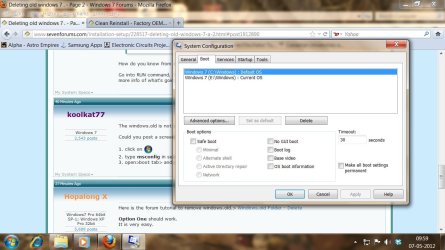
Go into RUN command, type in msconfig, and click the BOOT menu tab. Take a snapshot. This will allow us to see more info of what's going on.
 

My Computer

Computer type
PC/Desktop
OS
Windows 7 Pro 64 bit SP1
CPU
Intel Core i7 950 Quad OC'ed to 3.2 GHZ
Motherboard
ASRock X58
Memory
12GB DDR 3
Graphics Card(s)
Radeon HD 5870 1GB
Sound Card
Onboard
Monitor(s) Displays
23" Acer HD
Screen Resolution
1920x1080
Hard Drives
128GB SSD
PSU
700W
Case
Coolermaster
Antivirus
Avast Free
Browser
Firefox
The windows.old is not counted as it is no longer working. So you have 2 in total.

Could you post a screenshot of your boot tab in msconfig.

1. click on :orb:
2. type msconfig in search
3. open>boot tab> and post a screen shot of it.
 

My Computer

Computer type
PC/Desktop
Computer Manufacturer/Model Number
Self assembled
OS
Windows 10 Home 64Bit
CPU
Intel Core i5 10400 @ 2.90GHz
Motherboard
Intel Corporation DG41WV (PROCESSOR)
Memory
8.00GB Single-Channel Unknown @ 1329MHz (16-20-20-38)
Sound Card
Realtek High Definition Audio
Monitor(s) Displays
DELL E170S
Screen Resolution
1280x1024 pixels
Hard Drives
931GB TOSHIBA DT01ACA100 (SATA)
238GB TEAM TM8PS7256G (SATA SSD)
Case
Nothing Fancy
Cooling
Fans
Keyboard
A4 Tech Co LTD
Mouse
A4 Tech Co Ltd/Logitech
Internet Speed
25 Mbps
The correct way to delete an OS is to delete it's partition, not the windows folder which will give you all kinds of problems even if you Take Ownership. But to do this in a dual boot you must first move the System Active flags to the other Windows partition.

However in your case the other Win7 on E is on a Logical partition which cannot be marked Active to receive the Win7 System boot files.

To solve this you would boot free Partition Wizard bootable CD, rightclick on the E to Modify>Convert to Primary, click OK. You will also need to repeat this on D and F since they are not contiguous as a Logical extended partition must remain. Then click Apply.

Once E is Primary, you can rightclick it to Modify>Set to Active, OK, then click on Disk # to highlight it, from Disk tab select Rebuild MBR, OK, Apply. Reboot to see if Win7 starts. If not run Startup Repair - Run 3 Separate Times until Win7 starts and E holds the System flag. You can then delete the old C partition and create a new partition there.

Also, if you did not boot the Win7 installer when installing to E it will not be C when booted. Plus it is more desireable to have Win7 on C in the first partition slot.

So if you want Win7 to be on C when booted as it normally is when installed correctly from boot, I would consider reinstalling after moving all data off the HD, deleting all partitions during reinstall, then creating new ones to format, install Win7 to first install partition.
 
here is the screen shot
 

Attachments

  • non.jpg
    non.jpg
    107.1 KB · Views: 7

My Computer

Computer Manufacturer/Model Number
intex
OS
Windows 7 Ultimate 32 bit
CPU
intex
Motherboard
intex
Memory
intex
Graphics Card(s)
intex
Sound Card
intex
Monitor(s) Displays
intex
The correct way to delete an OS is to delete it's partition, not the windows folder which will give you all kinds of problems even if you Take Ownership. But to do this in a dual boot you must first move the System Active flags to the other Windows partition.

However in your case the other Win7 on E is on a Logical partition which cannot be marked Active to receive the Win7 System boot files.

To solve this you would boot free Partition Wizard bootable CD, rightclick on the E to Modify>Convert to Primary, click OK. You will also need to repeat this on D and F since they are not contiguous as a Logical extended partition must remain. Then click Apply.

Once E is Primary, you can rightclick it to Modify>Set to Active, OK, then click on Disk # to highlight it, from Disk tab select Rebuild MBR, OK, Apply. Reboot to see if Win7 starts. If not run Startup Repair - Run 3 Separate Times until Win7 starts and E holds the System flag. You can then delete the old C partition and create a new partition there.

Also, if you did not boot the Win7 installer when installing to E it will not be C when booted. Plus it is more desireable to have Win7 on C in the first partition slot.

So if you want Win7 to be on C when booted as it normally is when installed correctly from boot, I would consider reinstalling after moving all data off the HD, deleting all partitions during reinstall, then creating new ones to format, install Win7 to first install partition.
this seems to be right way , descriptive , can you do it for me VIA Remote assistance
 

My Computer

Computer Manufacturer/Model Number
intex
OS
Windows 7 Ultimate 32 bit
CPU
intex
Motherboard
intex
Memory
intex
Graphics Card(s)
intex
Sound Card
intex
Monitor(s) Displays
intex
Back
Top