Deleting Partition

TKoomen

New member
Local time
10:26 PM
Messages
9
So the installation of windows 7 went very smoothly. Previously I had 2 partitions with vista on it. How do I delete the partition that still has vista on it?


Thank You,
Teddy
 

My Computer

Computer Manufacturer/Model Number
MSI
OS
Vista 32
CPU
ATI Turion X2 Ultra 64
Memory
4gb
Graphics Card(s)
ATI Radeon HD3850
Hard Drives
400gb Hitatchi
Hello TKoomen, welcome to Seven Forums!


Before we make any specific recommendations will you please post a snip/screen-shot of the entire disk management drive map with a full description as to which drive/partition is which, so we can see what you have going on as there may be a fairly simple way to resolve the situation.

In the Windows start menu right click computer and click manage, in the left pane of the "Computer Management" window that opens click disk management and post a snip of that.

How to Upload and Post a Screenshot and File in Seven Forums

Be sure to post back with any further questions you may have and to keep us informed.
 

My Computer

Computer Manufacturer/Model Number
* BFK Customs *
OS
W 7 64-bit Ultimate
CPU
Intel Q9550 Yorkfield
Motherboard
ASUS P5Q Pro
Memory
8GB Dominator 8500C5D
Graphics Card(s)
ATI : XFX 5870
Sound Card
Realtek HD Audio 7-1
Monitor(s) Displays
1x 47" LCD HDMI & 3x 26" LCD HDMI
Screen Resolution
1920x1080P & 1920x1200
Hard Drives
1x 80GB Intel X25-M G2 SSD : 1x 500GB & 1x 640GB WD Caviar Black(s)
PSU
Corsair 620HX
Case
Cooler Master RC-690
Cooling
Tuniq Tower 120, 2x 140mm and 3x 120mm case fans
Keyboard
Microsoft 500
Mouse
Razer Diamondback 3G
Internet Speed
14 Mb/s
Other Info
1x Koutech 3Gb/s SATA HDD Hot Swap Rack
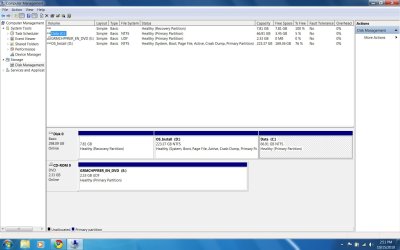
here is the screenshot
 

Attachments

  • Disk Management.jpg
    Disk Management.jpg
    123.7 KB · Views: 18

My Computer

Computer Manufacturer/Model Number
MSI
OS
Vista 32
CPU
ATI Turion X2 Ultra 64
Memory
4gb
Graphics Card(s)
ATI Radeon HD3850
Hard Drives
400gb Hitatchi
The one highlighted is the partition that vista is on
 

My Computer

Computer Manufacturer/Model Number
MSI
OS
Vista 32
CPU
ATI Turion X2 Ultra 64
Memory
4gb
Graphics Card(s)
ATI Radeon HD3850
Hard Drives
400gb Hitatchi
The one highlighted is the partition that vista is on


Then I would use the Partition Wizard boot CD to do a partition specific wipe "secure erase" to the Vista partition, then you can use the partition for other things after a format; have a look at Option Three in this tutorial at the link below for an out-line on how to do a wipe.
   Information

After you have made backups of everything you care to save and you want to do a real wipe "secure erase" to the Hard Disk Drive (HDD) partition have a look at this tutorial at the link below, it over-writes everything, all the old Windows code including the old Windows drivers, everything all data.

Partition Wizard : Use the Bootable CD


My Computer

Computer Manufacturer/Model Number
* BFK Customs *
OS
W 7 64-bit Ultimate
CPU
Intel Q9550 Yorkfield
Motherboard
ASUS P5Q Pro
Memory
8GB Dominator 8500C5D
Graphics Card(s)
ATI : XFX 5870
Sound Card
Realtek HD Audio 7-1
Monitor(s) Displays
1x 47" LCD HDMI & 3x 26" LCD HDMI
Screen Resolution
1920x1080P & 1920x1200
Hard Drives
1x 80GB Intel X25-M G2 SSD : 1x 500GB & 1x 640GB WD Caviar Black(s)
PSU
Corsair 620HX
Case
Cooler Master RC-690
Cooling
Tuniq Tower 120, 2x 140mm and 3x 120mm case fans
Keyboard
Microsoft 500
Mouse
Razer Diamondback 3G
Internet Speed
14 Mb/s
Other Info
1x Koutech 3Gb/s SATA HDD Hot Swap Rack
   Note

Contrary to popular belief, formatting does not remove any data at all, it just checks for sector errors and marks the space to be over-written as needed, all the data is still there including all the code from previous/failed installation attempts.

To just absorb the old Vista partition into a new install of Windows 7 without a wipe first sounds like a really bad idea to me and is just asking for issues with Windows 7.


In this situation the bootable version of Partition Wizard is not needed, you could install and use this version to do the wipe from within Windows.

Free Partition Wizard Home Edition


.
 
Last edited:

My Computer

Computer Manufacturer/Model Number
* BFK Customs *
OS
W 7 64-bit Ultimate
CPU
Intel Q9550 Yorkfield
Motherboard
ASUS P5Q Pro
Memory
8GB Dominator 8500C5D
Graphics Card(s)
ATI : XFX 5870
Sound Card
Realtek HD Audio 7-1
Monitor(s) Displays
1x 47" LCD HDMI & 3x 26" LCD HDMI
Screen Resolution
1920x1080P & 1920x1200
Hard Drives
1x 80GB Intel X25-M G2 SSD : 1x 500GB & 1x 640GB WD Caviar Black(s)
PSU
Corsair 620HX
Case
Cooler Master RC-690
Cooling
Tuniq Tower 120, 2x 140mm and 3x 120mm case fans
Keyboard
Microsoft 500
Mouse
Razer Diamondback 3G
Internet Speed
14 Mb/s
Other Info
1x Koutech 3Gb/s SATA HDD Hot Swap Rack
Back
Top