johnmorris
New member
I am at a bit of a stand still as I seem to have a couple of problems.
Firstly, I have been trying to get my HDD into a position where I can clone to a new SSD but without Win XP which is still on the hard drive, as 1 of 3 partitions.
I have Acronis software to clone with (SSD is Crucial BX100 500GB) but I have found if I use an optoion to not clone the win XP part of the drive it does not clone anything at all.
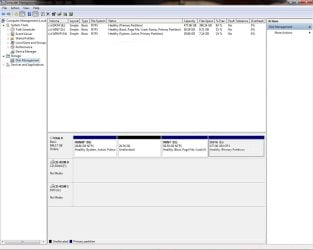
I tried to follow the steps using disc manager. No good, the "Format" and "Delete" options are greyed out. I have just rea an article on using diskpart as an option but I'm not sure if this will delete other data on the HDD as well???
So I'm stuck on this. I need to get rid of the Win XP partition while leaving my Win 7 partition and my data partition intact so I can then clone to the new SSD.
Can you help?
Now, as I have just joined this forum I'm not sure if the following is being posted in the correct place but if not can you please direct me to the correct section
The problem is 2 fold.
In filling in the details for this forum group I checked on my PC for the RAM Memory installed (as it asks for it on here). It says "Not Available"?? I have 3 banks of RAM in the slots and think there may be a problem if the PC can't tell me what's installed????
Second problem. Express gate.
If I try to start up the PC it comes up with a message that express gate is not installed. It ehn just goes to a black screen and does not boot into windows. BUT, If I unplug the SATA cable, start up the PC and, at the time the logo screen appears (ASUS) I re plug the SATA cable to the HDD it boots up into the start page where I can choose windows 7 or an older version (Win XP as I explained earlier)
I recently had to change the battery on the motherboard as the time/date settings were not being saved, but I have done this now and gone into the setup page to add in the time date etc and it seems to have worked in that respect.
Can anyone shed some light and offer assistance to help me get both problems above solved. I am not a techie as such so am a bit out of my depth.
Thanks
J Morris
Firstly, I have been trying to get my HDD into a position where I can clone to a new SSD but without Win XP which is still on the hard drive, as 1 of 3 partitions.
I have Acronis software to clone with (SSD is Crucial BX100 500GB) but I have found if I use an optoion to not clone the win XP part of the drive it does not clone anything at all.
I tried to follow the steps using disc manager. No good, the "Format" and "Delete" options are greyed out. I have just rea an article on using diskpart as an option but I'm not sure if this will delete other data on the HDD as well???
So I'm stuck on this. I need to get rid of the Win XP partition while leaving my Win 7 partition and my data partition intact so I can then clone to the new SSD.
Can you help?
Now, as I have just joined this forum I'm not sure if the following is being posted in the correct place but if not can you please direct me to the correct section
The problem is 2 fold.
In filling in the details for this forum group I checked on my PC for the RAM Memory installed (as it asks for it on here). It says "Not Available"?? I have 3 banks of RAM in the slots and think there may be a problem if the PC can't tell me what's installed????
Second problem. Express gate.
If I try to start up the PC it comes up with a message that express gate is not installed. It ehn just goes to a black screen and does not boot into windows. BUT, If I unplug the SATA cable, start up the PC and, at the time the logo screen appears (ASUS) I re plug the SATA cable to the HDD it boots up into the start page where I can choose windows 7 or an older version (Win XP as I explained earlier)
I recently had to change the battery on the motherboard as the time/date settings were not being saved, but I have done this now and gone into the setup page to add in the time date etc and it seems to have worked in that respect.
Can anyone shed some light and offer assistance to help me get both problems above solved. I am not a techie as such so am a bit out of my depth.
Thanks
J Morris
My Computer
- Computer type
- PC/Desktop
- Computer Manufacturer/Model Number
- Home built. Asus M4A785TD-V EVO Motherboard
- OS
- windows 7 Ultimate X 64
- CPU
- AMD Phenom 11 64GB Quad Core
- Motherboard
- Asus M4A785TD-V EVO Motherboard
- Memory
- 3 banks Crucial DDR3 1333MHz It says Size "Not Available"
- Graphics Card(s)
- ATI Radeon HD4200
- Hard Drives
- cant find the specification HDD not SSD at the moment
- Antivirus
- AVG
- Browser
- Explorer, Firefox, Chrome