Deleting Windows 7 Beta Partition

vintagesierra

New member
Local time
9:14 PM
Messages
6
I am currently running XP as my main OS on one partition but I also have Windows 7 Beta on a separate partition on the same hard drive. Right now I cannot currently access Windows 7 when booting up, I have no clue why that is as I used to be able to do that.

What I want to do is delete the partition Windows 7 Beta is on and install Windows 7 RC as my main OS. I have tried booting to a disc with GParted on it to delete the partition but it will not boot to the cd, I know my BIOS is in the right order as I can easily boot to the Windows 7 RC dvd I have made. When I try to use something like EASEUS Partition Master or the Disk Management on XP, the delete option is greyed out when I right click on the Windows 7 Beta partition. I cannot figure out how to do delete it so I can extend my XP partition to the full space on the hard drive and then install the Windows 7 RC.

Thanks in advance.
 

My Computer

OS
Windows XP
Hi,

Not sure I follow you.

Did you have XP installed first, then create another partition and install 7beta?

Then you got a choice of XP or 7beta on booting up?

Now, 7 beta has disappeared from that boot menu and you can only select XP?

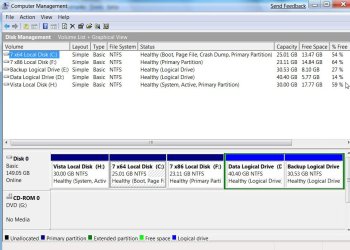
Please post a screenshot of Disk Management like this:

DISKMANAGEMENT2009-02-04_031947.jpg

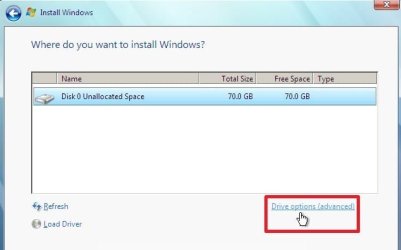
You should be able to fix it by installing 7RC from the dvd, select Drive Options (advanced), delete the 7beta partition , recreate it, format it and install 7 RC to it.

As you can boot the 7dvd - it seems the fault is with the Gparted cd - you may want to d/l and burn it again later.
 

My Computers

System One System Two

  • Computer type
    PC/Desktop
    OS
    7 X64
    CPU
    i5 8400
    Motherboard
    gigabyte b365m ds3h
    Memory
    2x8gb 3200mhz
    Hard Drives
    various
    PSU
    pure power 11 400w cm
    Case
    Coolermaster
    Cooling
    cryorig m9i
  • Computer type
    PC/Desktop
    OS
    7x64
    CPU
    g5400
    Motherboard
    ga b365m ds3h
    Memory
    8gb ddr4 2400
    PSU
    xfx pro 450w
Okay. I have gone ahead and installed 7 RC on the separate partition because the rest of my family is not sure we should go ahead and use it as the main OS. I am on 7 RC right now. What I am saying is, if I decide to have 7 RC as the main OS, I will need to delete the 7 RC partition and extend the XP partition to the full hard drive, correct? I was thinking I had to delete the 7 RC partition before installing 7 as the main OS, but you can do it on the 7 RC dvd when installing it under the drive options as you said, correct? I did not know that.
 

My Computer

OS
Windows XP
Yes , there is a partitioning function during the installation under the Drive Options .


If you want to install 7RC as the only o/s on the hard drive on one big partition:


Boot the 7RC dvd - start the install - when you get this screen :

DRIVE OPTIONS(ADVANCED)2009-03-19_151649.jpg

Select Drive Options Advanced - delete both the partitions - create and format the whole drive as just one new partition and install 7RC onto it.

http://www.sevenforums.com/tutorials/1649-clean-install-windows-7-a.html
 

My Computers

System One System Two

  • Computer type
    PC/Desktop
    OS
    7 X64
    CPU
    i5 8400
    Motherboard
    gigabyte b365m ds3h
    Memory
    2x8gb 3200mhz
    Hard Drives
    various
    PSU
    pure power 11 400w cm
    Case
    Coolermaster
    Cooling
    cryorig m9i
  • Computer type
    PC/Desktop
    OS
    7x64
    CPU
    g5400
    Motherboard
    ga b365m ds3h
    Memory
    8gb ddr4 2400
    PSU
    xfx pro 450w
Okay, great, thanks for your help! I didn't realize I could do all that without a tool like GParted.
 

My Computer

OS
Windows XP
Back
Top