Delivery confirmation not coming back

Vincenzo

New member
Power User
Local time
1:51 PM
Messages
218
I've been trying to contact two people at a small sized organization. Outlook is set to provide a delivery confirmation but I never get one back. Nor do I get notification that the email is undeliverable.

Does delivery confirmation occur when their email server receives the message, or when the person's computer downloads the email?

Any ideas why it would not be coming back to me?

Thanks
 

My Computer

OS
Windows 7 Professional x64
AFAIK (I haven't used confirmations in the last fife or so years) the confirmation is sent when the user opens the mail.
It doesn't make sense to send it out as soon as the mail is on the server because it doesn't mean, that the recipient really gets it. Besides some email programs (like Eudora) ask, before any confirmation is send out. So if the Recipient doesn't want it to be sent, you'll never get a confirmation.

-DG
 

My Computer

Computer Manufacturer/Model Number
HP m8000n
OS
Windows 7 Ultimate x86
CPU
DualCore AMD Athlon 64 X2, 2600 MHz 5200+
Motherboard
Asus M2N68-LA (Narra)
Memory
Samsung 2GB DDR2
Graphics Card(s)
Onboard NVIDIA GeForce 6150SE nForce 430
Sound Card
Onboard nVIDIA nForce 6100-430 (MCP61P)
Monitor(s) Displays
Westinghouse 19" LED
Screen Resolution
1280x1024
Hard Drives
SATA II Seagate Barracuda 500GB
USB II WD Elements 500GB
USB II WD My Book 1TB
USB II WD My Book 2TB
PSU
Stock (HP)
Case
Stock (HP)
Cooling
Stock
Keyboard
Logitech Classic KB 200
Mouse
Standard HP opticle USB mouse
For instance when using Outlook, delivery receipts only work if you are using Microsoft Exchange Server as your mail service (Delivery receipts and read receipts in Outlook). When delivery receipt is asked, it is sent as soon as the message has been confirmed to be delivered to recipients mailbox, so in other words it is sent also if recipient never actually reads the message. Successful delivery is enough.

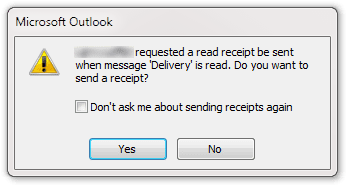
Read receipt works also with so called Internet Mail, you don't need Microsoft Exchange Server. Here's two typical situations why you do net receive a read receipt:
  • Recipient selects NO when asked if read receipt should be sent:
    .
    Microsoft Outlook Delivery Request.png
    .
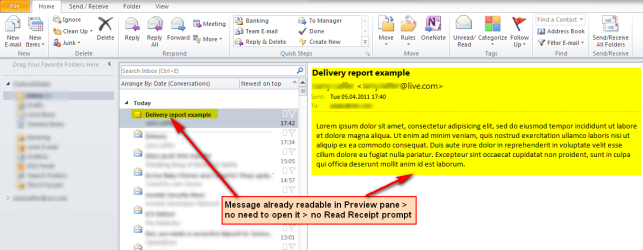
  • Recipient reads the message without actually opening it. Because read receipt is only activated when the message is opened, the receipt request promt is not presented to recipient, and no receipt is sent. For example I seldom even notice these requests if the message is short enough to be read in preview pane, in which case I do not open the message:
    .
    Microsoft Outlook Delivery Request 2.png

Kari
 

My Computer

Computer type
Laptop
Computer Manufacturer/Model Number
HP ENVY 17-1150eg
OS
Windows 10 Pro x64 EN-GB
CPU
1.6 GHz Intel Core i7-720QM Processor
Memory
6 GB
Graphics Card(s)
ATI Mobility Radeon HD 5850 Graphics
Sound Card
Beats sound system with integrated subwoofer
Monitor(s) Displays
17" laptop display, 22" LED and 32" Full HD TV through HDMI
Screen Resolution
1600*900 (1), 1920*1080 (2&3)
Hard Drives
Internal: 2 x 500 GB SATA Hard Disk Drive 7200 rpm
External: 2TB for backups, 3TB USB3 network drive for media
Cooling
As Envy runs a bit warm, I have it on a Cooler Master pad
Keyboard
Logitech diNovo Media Desktop Laser (bluetooth)
Mouse
Logitech Performance Mouse MX
Internet Speed
50/10 Mbps VDSL
Antivirus
Windows Defender 4.3.9431.0
Browser
Maxthon 3.5.2., IE11
That linked page does indeed say you need Exchange Server for delivery receipts to work. Odd, since I thought I've used them before without Exchange Server. Interesting that Read receipts will work with Internet Mail though.

Thanks for the info.
 

My Computer

OS
Windows 7 Professional x64
Back
Top