
Dell 370 Bluetooth Minicard Registry Problem

TAxxOUTBR3AKxx

New member
Local time
9:15 AM
Messages
8
It's the simplest way I could word the title. I was having some issues with my bluetooth device: Dell 370 Bluetooth Minicard, in my Alienware M17x. I had Bluesoleil and Widcomm drivers installed. I uninstalled both and went to the registry to delete traces of both Bluesoleil and Widcomm. Well, I also accidentally removed something under Bluetooth, without even thinking. Here's the problem now:

Instead of getting bluetooth devices, it fails to install driver software for my mini-card. Actually, it doesn't even recognize my device as Bluetooth. It shows up in Device Manager under "Other Devices" and in that tree is called "Unknown Device." I know that my device is probably screwed due to the registry edit, I'm just hoping the only way of fixing this ISN'T a complete reinstall of Windows 7.
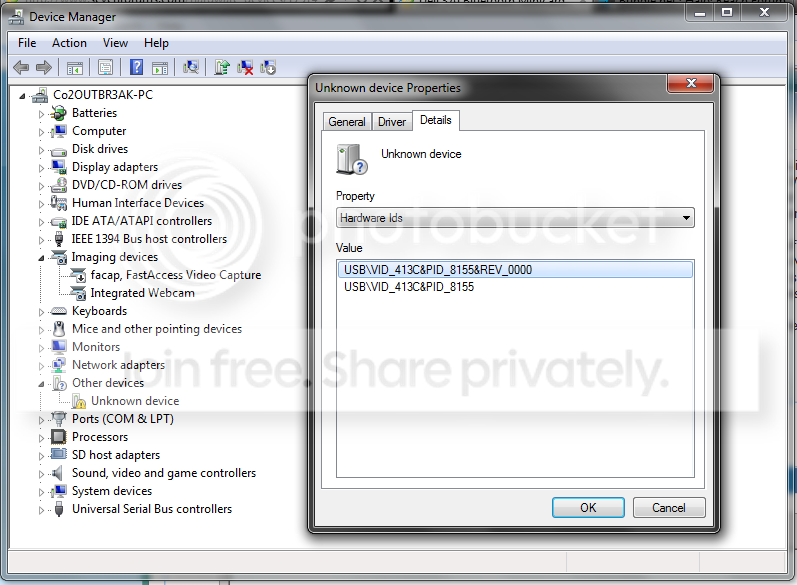
Untitled-4.png

Can anyone possibly help me with fixing this? If not I'll start the process of moving 400+GB of personal files.....
 
Last edited:

My Computer My Computer

Computer Manufacturer/Model Number
Alienware M17x
OS
Windows 7 Home Premium x64
CPU
Intel Core 2 Duo P8700 @ 2.53GHz
Memory
4GB
Graphics Card(s)
NVIDIA GeForce GTX 260M; Nvidia GeForce 9400
Monitor(s) Displays
1440 x 900 (32bit) (60Hz)
Screen Resolution
1440 x 900
Hard Drives
500GB Internal HDD
Internet Speed
Cable (20mb Down; 2mb Up)
It's the simplest way I could word the title. I was having some issues with my bluetooth device: Dell 370 Bluetooth Minicard, in my Alienware M17x. I had Bluesoleil and Widcomm drivers installed. I uninstalled both and went to the registry to delete traces of both Bluesoleil and Widcomm. Well, I also accidentally removed something under Bluetooth, without even thinking. Here's the problem now:

Instead of getting bluetooth devices, it fails to install driver software for my mini-card. Actually, it doesn't even recognize my device as Bluetooth. It shows up in Device Manager under "Other Devices" and in that tree is called "Unknown Device." I know that my device is probably screwed due to the registry edit, I'm just hoping the only way of fixing this ISN'T a complete reinstall of Windows 7.

Can anyone possibly help me with fixing this? If not I'll start the process of moving 400+GB of personal files.....

Hi, try doing a system restore prior to when you started having the problem http://www.sevenforums.com/tutorials/700-system-restore.html :)
 

My Computer My Computer

Computer type
PC/Desktop
Computer Manufacturer/Model Number
self build
OS
win 7 ultimate32bit, Win8.1pro wmc 32bit
CPU
amd phenom x4 9600
Motherboard
asus m2n32-sli deluxe
Memory
corsair twinxs 2x2gb
Graphics Card(s)
2x nvidia 1gb 8500gt
Sound Card
onboard
Monitor(s) Displays
23" PB Viseo 233d
Screen Resolution
1920x1080
Hard Drives
maxtor sata 500gb
maxtor sata 320gb
fujitsu sata200gb
PSU
oryxx tornado 750w
Case
thermaltake xaser lll
Cooling
artic freezer64 pro + 7 case fans
Hello, I tried doing a system restore, actually multi restores that all were noted by the system as successful, up to 1 month before yesterday, which is when the problem occurred. My guess is it's due to System Restore's not affecting registry edits.
 

My Computer My Computer

Computer Manufacturer/Model Number
Alienware M17x
OS
Windows 7 Home Premium x64
CPU
Intel Core 2 Duo P8700 @ 2.53GHz
Memory
4GB
Graphics Card(s)
NVIDIA GeForce GTX 260M; Nvidia GeForce 9400
Monitor(s) Displays
1440 x 900 (32bit) (60Hz)
Screen Resolution
1440 x 900
Hard Drives
500GB Internal HDD
Internet Speed
Cable (20mb Down; 2mb Up)
Since no one is able to help me, I guess it's going to have to come down to a complete reinstall....
 

My Computer My Computer

Computer Manufacturer/Model Number
Alienware M17x
OS
Windows 7 Home Premium x64
CPU
Intel Core 2 Duo P8700 @ 2.53GHz
Memory
4GB
Graphics Card(s)
NVIDIA GeForce GTX 260M; Nvidia GeForce 9400
Monitor(s) Displays
1440 x 900 (32bit) (60Hz)
Screen Resolution
1440 x 900
Hard Drives
500GB Internal HDD
Internet Speed
Cable (20mb Down; 2mb Up)
Since no one is able to help me, I guess it's going to have to come down to a complete reinstall....

before doing a complete reinstall ,just update the chipset drivers for your laptop that should reset the registry entries back to where they should be :)
 

My Computer My Computer

Computer type
PC/Desktop
Computer Manufacturer/Model Number
self build
OS
win 7 ultimate32bit, Win8.1pro wmc 32bit
CPU
amd phenom x4 9600
Motherboard
asus m2n32-sli deluxe
Memory
corsair twinxs 2x2gb
Graphics Card(s)
2x nvidia 1gb 8500gt
Sound Card
onboard
Monitor(s) Displays
23" PB Viseo 233d
Screen Resolution
1920x1080
Hard Drives
maxtor sata 500gb
maxtor sata 320gb
fujitsu sata200gb
PSU
oryxx tornado 750w
Case
thermaltake xaser lll
Cooling
artic freezer64 pro + 7 case fans
Back
Top