Dell and DVD Formats

dfs4

New member
Member
VIP
Local time
12:53 AM
Messages
199
I bought a couple recordable dvds a few nights ago only to discover my dell laptop dvd drive wasn't detecting them. I took them back and found out it was dvd-r opposed to dvd+r(who knew the difference... I didn't).

I don't know the price difference either but seems dvd+r has more capacity than the dvd-r.
 
Last edited:

My Computer

Computer type
Laptop
Computer Manufacturer/Model Number
Dell Inspiron
OS
Microsoft Windows 7 Home Premium 32-bit 7600 Multiprocessor Free
CPU
Intel(R) Core(TM) i3-4030U CPU @ 1.90GHz
Motherboard
Dell Inc. 0CG89M
Memory
4.00 GB
Graphics Card(s)
Intel(R) HD Graphics Family
Sound Card
High Definition Audio Device
There are several different optical drives that can be supplied with this model, however, given the recent age of this model it should have capabilities for both plus and minus formats. I have a 3 year old Dell Dimension desktop and it came with a plus/minus DVD burner standard.

Here is the description of the different DVD types, that I got from the local newspaper about two years ago:
DVD-R and DVD-RW. The first recordable format, allows users to write to a disc only once. The DVD-RW feature allows for re-writes but to play the discs on a standard DVD player or a computer, the disc must be finalized, meaning it can't be recorded to again.
DVD+R and DVD+RW. The most recently developed formats are the +R and +RW. The plus sign indicates the recordings on +R or +RW discs do not have to be finalized before viewing. You can write over what you've recorded or watch an already recorded disc and add more to it later.
 

My Computer

Computer type
PC/Desktop
Computer Manufacturer/Model Number
My Own Build
OS
Windows 10 64 bit
CPU
Intel i7 6700K
Motherboard
ASUS ROG Maximus VIII Hero
Memory
16GB Corsair Dominator
Graphics Card(s)
Intel CPU Graphics
Sound Card
RealTek
Monitor(s) Displays
27" Dell S2719dgf
Screen Resolution
2560X1440
Hard Drives
1 TB Samsung 850 EVO SSD for Win 10 Pro
500GB Samsung 850 EVO SSD for Win 10 Insider
2 TB drive for backup
PSU
EVGA Supernova 750G2
Case
BeQuiet Silent Base 600
Cooling
Deepcool Captain 120EX
Keyboard
Microsoft Wireless 2000
Mouse
Microsoft wireless
Internet Speed
100 MB/sec (Cable)
Antivirus
Microsoft Defender and Malwarebytes
Browser
Edge/Firefox
Other Info
Cakewalk (Sonar) by BandLab and Studio One 4.1 Pro recording studio software. MOTU 896Mk3 Hybrid recording interface, Frontier Tranzport wireless control unit, Behringer X-Touch Control Surface.
Five USB connected optical drives for CD Audio production using Nero BurningROM
strange

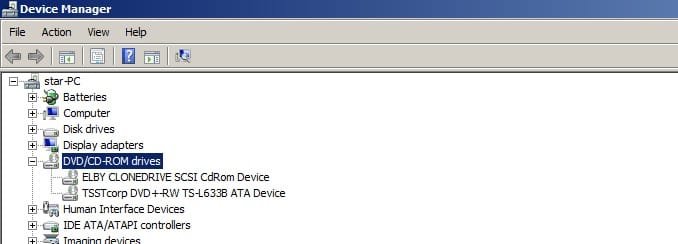
this is strange because in device manager it says it supports both formats. why didn't it work with those dvds then? btw I have tried other non-recordable DVDs and they work fine.
 

Attachments

  • Untitled.jpg
    Untitled.jpg
    18.2 KB · Views: 10

My Computer

Computer type
Laptop
Computer Manufacturer/Model Number
Dell Inspiron
OS
Microsoft Windows 7 Home Premium 32-bit 7600 Multiprocessor Free
CPU
Intel(R) Core(TM) i3-4030U CPU @ 1.90GHz
Motherboard
Dell Inc. 0CG89M
Memory
4.00 GB
Graphics Card(s)
Intel(R) HD Graphics Family
Sound Card
High Definition Audio Device
I haven't been around a player that didn't support both formats for quite some time. I prefer -R discs myself, but will certainly buy +R when the deal is right.
 

My Computer

Computer Manufacturer/Model Number
Self-Built in July 2009
OS
Windows 7 Ultimate x64
CPU
Intel Q9550 2.83Ghz OC'd to 3.40Ghz
Motherboard
Gigabyte GA-EP45-UD3R rev. 1.1, F12 BIOS
Memory
8GB G.Skill PI DDR2-800, 4-4-4-12 timings
Graphics Card(s)
EVGA 1280MB Nvidia GeForce GTX570
Sound Card
Realtek ALC899A 8 channel onboard audio
Monitor(s) Displays
23" Acer x233H
Screen Resolution
1920x1080
Hard Drives
Intel X25-M 80GB Gen 2 SSD
Western Digital 1TB Caviar Black, 32MB cache. WD1001FALS
PSU
Corsair 620HX modular
Case
Antec P182
Cooling
stock
Keyboard
ABS M1 Mechanical
Mouse
Logitech G9 Laser Mouse
Internet Speed
15/2 cable modem
Other Info
Windows and Linux enthusiast. Logitech G35 Headset.
Back
Top