Here To Help
Banned
Dell Dimension 8200 Memory Problem
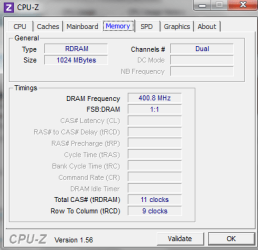
Today I just received my new processor for my Dell Dimension 8200. I know it old but runs great as a media pc. I upgraded from a 2.0 GHz, 400 bus, 256 L2 processor to a 3.06 GHz, 533 bus, 512 L2 with Hyper-Threading. The new processor runs at 2.3 GHz since I do not have the Dell Dimension 8200 with the 533 bus. I knew this before updating the computer. However after running the Windows Experience Scoring I went from a 4.2 score in memory to a 3.3 score. The processor went from a 2.6 score. The following is the build on this computer. 1024MB (4x256 ) Samsung PC400 45NS RDRAM running as duel channel. Any Ideas?On PCI Raid CardOn PCI Raid CardOn PCI Raid Card3.2
Determined by lowest subscore
Memory (RAM)
1.00 GB
3.3
Graphics
ATI Radeon 9550 / X1050 Series
4.2
Gaming graphics
287 MB Total available graphics memory
3.8
Primary hard disk
100GB Free (120GB Total)
5.4
Windows 7 Professional
Manufacturer
Dell Computer Corporation
Model
Dimension 8200
Total amount of system memory
1.00 GB RAM
System type
32-bit operating system
Number of processor cores
1
64-bit capable
No
Storage
Total size of hard disk(s)
382 GB
Disk partition (C
101 GB Free (120 GB Total) On PCI Raid Card
Disk partition (D
110 GB Free (149 GB Total) On PCI Raid Card (Raid 0)
Disk partition (E
53 GB Free (112 GB Total) On PCI Raid Card
Media drive (F
CD/DVD On PCI Raid Card
Media drive (G
CD/DVD
Graphics
Display adapter type
ATI Radeon 9550 / X1050 Series
Total available graphics memory
287 MB
Dedicated graphics memory
256 MB
Dedicated system memory
0 MB
Shared system memory
31 MB
Display adapter driver version
8.593.100.0
Primary monitor resolution
1280x720
DirectX version
DirectX 9.0 or better
Network
Network Adapter
Bluetooth Device (Personal Area Network)
Network Adapter
Linksys WUSB600N Wireless-N USB Network Adapter with Dual-Band ver. 2
Today I just received my new processor for my Dell Dimension 8200. I know it old but runs great as a media pc. I upgraded from a 2.0 GHz, 400 bus, 256 L2 processor to a 3.06 GHz, 533 bus, 512 L2 with Hyper-Threading. The new processor runs at 2.3 GHz since I do not have the Dell Dimension 8200 with the 533 bus. I knew this before updating the computer. However after running the Windows Experience Scoring I went from a 4.2 score in memory to a 3.3 score. The processor went from a 2.6 score. The following is the build on this computer. 1024MB (4x256 ) Samsung PC400 45NS RDRAM running as duel channel. Any Ideas?On PCI Raid CardOn PCI Raid CardOn PCI Raid Card3.2
Determined by lowest subscore
Memory (RAM)
1.00 GB
3.3
Graphics
ATI Radeon 9550 / X1050 Series
4.2
Gaming graphics
287 MB Total available graphics memory
3.8
Primary hard disk
100GB Free (120GB Total)
5.4
Windows 7 Professional
Manufacturer
Dell Computer Corporation
Model
Dimension 8200
Total amount of system memory
1.00 GB RAM
System type
32-bit operating system
Number of processor cores
1
64-bit capable
No
Storage
Total size of hard disk(s)
382 GB
Disk partition (C
101 GB Free (120 GB Total) On PCI Raid Card
Disk partition (D
110 GB Free (149 GB Total) On PCI Raid Card (Raid 0)
Disk partition (E
53 GB Free (112 GB Total) On PCI Raid Card
Media drive (F
CD/DVD On PCI Raid Card
Media drive (G
CD/DVD
Graphics
Display adapter type
ATI Radeon 9550 / X1050 Series
Total available graphics memory
287 MB
Dedicated graphics memory
256 MB
Dedicated system memory
0 MB
Shared system memory
31 MB
Display adapter driver version
8.593.100.0
Primary monitor resolution
1280x720
DirectX version
DirectX 9.0 or better
Network
Network Adapter
Bluetooth Device (Personal Area Network)
Network Adapter
Linksys WUSB600N Wireless-N USB Network Adapter with Dual-Band ver. 2
My Computer
At a glance
Windows 7 Pro x64 Bit2 GB DDR 333 RamATI 200m
- Computer Manufacturer/Model Number
- HP Dv 5215us
- OS
- Windows 7 Pro x64 Bit
- Memory
- 2 GB DDR 333 Ram
- Graphics Card(s)
- ATI 200m
- Screen Resolution
- 1280 x 800


 As it is one to one with the cpu. The memory score went from a 4.2 to a 3.3 why I don't know. All I changed was the CPU not the ram. Nothing else changed.