Dell Driver Download Problem

Valor D

New member
Power User
Local time
9:16 PM
Messages
80
Evidently, I have over 30 driver downloads available for download thru the Dell Support Center. However, in order to download these updates, I need to have the Dell Driver Download Manager installed. I've installed it, and my pc confirms that it's installed. I've also tried reinstalling it, and when I do, I get a message from the Dell Driver Download Manager telling me: "there are no files to download. Please go to drivers and downloads to select file(s)". But, every time I try to select and download the updates, the support center tells me that I need to have the Download Manager installed. See the problem? lol
 

My Computer

Computer Manufacturer/Model Number
DELL Inspiron 1564
OS
Windows 7 64 bit
CPU
Intel Core Processor i3-330M
Motherboard
4 GB
Memory
320 GB Harddrive
Graphics Card(s)
Integrated Intel Graphics Media Accelerator HD
Sound Card
Realtek HD Audio
Keyboard
Standard PS/2
Mouse
DELL Touchpad
Delete Temporary Internet Files. Try again.
 

My Computer

Computer Manufacturer/Model Number
Asus P5B
OS
Windows 7 Ultimate
CPU
Intel Q9550
Motherboard
Asus P5B
Memory
4x2GB HyperX
Graphics Card(s)
ATI HD3850 512
Sound Card
Creative X-Fi Platinum
Monitor(s) Displays
Samsung 50 / Samsung 24
Screen Resolution
1920*1080 / 1920*1200
Hard Drives
Multiple RAID volumes
PSU
ThermalTake ToughPower
Case
Armor
Cooling
Liquid
Keyboard
$6 2.4 gHz desktop
Internet Speed
Just this side of fast enough.
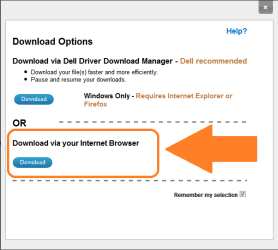
When you go to the dell website and enter your system specs you should arrive at your system page. Once you've done that you should be able to click to download a file. It should give you a choice between downloading from the download manager or using your browser to do so.

delldownload.png

If that menu doesn't appear, you've likely preselected it and remembered it. You simply need to clear out your temp files and cookies to reset it and/or log out of the dell website.
 

My Computer

Computer Manufacturer/Model Number
Apple Macbook Pro (April 2009)
OS
W7 Ult. x64 | OS X
CPU
Intel Mobile Core 2 Duo 2.93Ghz [T9800 Penryn]
Motherboard
NVIDIA nForce 730i Rev. B1 [Mac-F2268EC8 (U2E1)]
Memory
4096MB Samsung DDR3 Dual Channel [PC3-8500F 1066Mhz]
Graphics Card(s)
NVIDIA GeForce 9600M GT 512MB [G96M Rev. C1]
Sound Card
SB X-Fi Surround 5.1 USB | Onboard Realtek (Disabled)
Monitor(s) Displays
Acer x223wbd 22" | Apple Anti-Glare 17" (Disabled)
Screen Resolution
{Current} 1440x900 {Acer} 1680x1050 {Apple} 1920x1200
Hard Drives
{Internal}
Seagate Momentus 320GB 2.5" 7200RPM [ST9320421AS]

{Externals}
LaCie 320GB USB 2.0 HDD [301284UR]
LaCie 750GB USB 2.0 FW400 eSATA HDD [301314U]
LaCie 1TB USB 2.0 HDD [301304UR]
PSU
Magsafe
Case
Aluminum/Unibody (MBP52)
Cooling
2 x 6000 RPM Fans
Keyboard
Logitech G-15v2 [PN 920-000379]
Mouse
Logitech G-9 [PN 910-000338]
Internet Speed
12Mbps/2.5Mbps w/ 24Mbps Speed Boost [Comcast]
Other Info
Logitech X-540 Speakers [PN 970223-0122]
Sennheiser PC-151 Headset
ok, that worked. Now, how do I install them? They downloaded as .zip files, and when I tried to run the first one, all it did was unzip and got stored in my program files. does that mean it's installed??
 

My Computer

Computer Manufacturer/Model Number
DELL Inspiron 1564
OS
Windows 7 64 bit
CPU
Intel Core Processor i3-330M
Motherboard
4 GB
Memory
320 GB Harddrive
Graphics Card(s)
Integrated Intel Graphics Media Accelerator HD
Sound Card
Realtek HD Audio
Keyboard
Standard PS/2
Mouse
DELL Touchpad
Oh My God. I just read thru an online tutorial on how to install the driver updates, and all I can say is YOU MUST BE KIDDING ME! Is this what they call "so easy, a 7-year-old can do it"??? Could this stuff be any more complicated?? I think not! What deranged maniac dreamt this system up, and where can I find him/her, so I can strangle them with my power cord! lol I don't understand the half of this garbage, and I'm afraid to even try to proceed, lest I screw up my pc in the process! I might as well just take it down to the Geek Squad and pay them to do it!
 

My Computer

Computer Manufacturer/Model Number
DELL Inspiron 1564
OS
Windows 7 64 bit
CPU
Intel Core Processor i3-330M
Motherboard
4 GB
Memory
320 GB Harddrive
Graphics Card(s)
Integrated Intel Graphics Media Accelerator HD
Sound Card
Realtek HD Audio
Keyboard
Standard PS/2
Mouse
DELL Touchpad
Can someone just tell me exactly what driver update I need to install (and how) so I don't have to keep adjusting the brightness and contrast on my laptop every 10 minutes??? Is it a display adapter? When I set the brightness and contrast, I want it to STAY THAT WAY! I swear to God, that's all I want to do! Is that really so much to ask for?? I have a Dell Inspiron 1564 Laptop.

I've been trying to solve this problem for some time now, and I can't seem to get a simple, straight answer! Does anybody know?
 

My Computer

Computer Manufacturer/Model Number
DELL Inspiron 1564
OS
Windows 7 64 bit
CPU
Intel Core Processor i3-330M
Motherboard
4 GB
Memory
320 GB Harddrive
Graphics Card(s)
Integrated Intel Graphics Media Accelerator HD
Sound Card
Realtek HD Audio
Keyboard
Standard PS/2
Mouse
DELL Touchpad
hi ValorD, you need the intel driver , check in device manager what version is installed for the display adaptor, the version on Dell's site is V8.15.10.1986 AO2 from 1-25-2010 so we need to know if your version is the same or lower :)
 

My Computer

Computer type
PC/Desktop
Computer Manufacturer/Model Number
self build
OS
win 7 ultimate32bit, Win8.1pro wmc 32bit
CPU
amd phenom x4 9600
Motherboard
asus m2n32-sli deluxe
Memory
corsair twinxs 2x2gb
Graphics Card(s)
2x nvidia 1gb 8500gt
Sound Card
onboard
Monitor(s) Displays
23" PB Viseo 233d
Screen Resolution
1920x1080
Hard Drives
maxtor sata 500gb
maxtor sata 320gb
fujitsu sata200gb
PSU
oryxx tornado 750w
Case
thermaltake xaser lll
Cooling
artic freezer64 pro + 7 case fans
ok, that worked. Now, how do I install them? They downloaded as .zip files, and when I tried to run the first one, all it did was unzip and got stored in my program files. does that mean it's installed??
Go to the unzipped folder and click on the exe file to start the install.

I've been trying to solve this problem for some time now, and I can't seem to get a simple, straight answer! Does anybody know?
Considering this is the first you've mentioned it on here, it's no wonder you've not got an answer. Have you tried THIS driver?
 

My Computer

Computer Manufacturer/Model Number
Sony Vaio FZ21Z
OS
Windows 7 Ultimate x64 ®™
CPU
Intel Core 2 Duo (2.2 GHz)
Motherboard
Sony (Intel Chipset)
Memory
2x 2GB Corsair (667 MHz)
Graphics Card(s)
NVIDIA 8600M GS (256MB)
Sound Card
Sigmatel
Monitor(s) Displays
15.4" TFT X-Black
Screen Resolution
1280x800
Hard Drives
Western Digital 300GB Scorpio Black (7200rpm)
Mouse
Logitech Anywhere MX
Internet Speed
Sky 5MB
ok, that worked. Now, how do I install them? They downloaded as .zip files, and when I tried to run the first one, all it did was unzip and got stored in my program files. does that mean it's installed??
Go to the unzipped folder and click on the exe file to start the install.

I've been trying to solve this problem for some time now, and I can't seem to get a simple, straight answer! Does anybody know?
Considering this is the first you've mentioned it on here, it's no wonder you've not got an answer. Have you tried THIS driver?

No, actually I've been asking these same questions all over the forum in different categories for over a week, and they keep moving my posts around.
 

My Computer

Computer Manufacturer/Model Number
DELL Inspiron 1564
OS
Windows 7 64 bit
CPU
Intel Core Processor i3-330M
Motherboard
4 GB
Memory
320 GB Harddrive
Graphics Card(s)
Integrated Intel Graphics Media Accelerator HD
Sound Card
Realtek HD Audio
Keyboard
Standard PS/2
Mouse
DELL Touchpad

My Computer

Computer Manufacturer/Model Number
DELL Inspiron 1564
OS
Windows 7 64 bit
CPU
Intel Core Processor i3-330M
Motherboard
4 GB
Memory
320 GB Harddrive
Graphics Card(s)
Integrated Intel Graphics Media Accelerator HD
Sound Card
Realtek HD Audio
Keyboard
Standard PS/2
Mouse
DELL Touchpad
Alright, I installed it and rebooted. But, I don't see any difference. And, the stupid brightness and contrast are still returning to the default whenever they feel like it. What's supposed to be different? How do I access the new program to adjust my settings? Same as before, by right clicking on the desktop and going to display?
 

My Computer

Computer Manufacturer/Model Number
DELL Inspiron 1564
OS
Windows 7 64 bit
CPU
Intel Core Processor i3-330M
Motherboard
4 GB
Memory
320 GB Harddrive
Graphics Card(s)
Integrated Intel Graphics Media Accelerator HD
Sound Card
Realtek HD Audio
Keyboard
Standard PS/2
Mouse
DELL Touchpad
what does it tell you in device manager under display adapters? you may not have the right driver installed ,for your model of laptop there are 3 different types of graphic card :)
 

My Computer

Computer type
PC/Desktop
Computer Manufacturer/Model Number
self build
OS
win 7 ultimate32bit, Win8.1pro wmc 32bit
CPU
amd phenom x4 9600
Motherboard
asus m2n32-sli deluxe
Memory
corsair twinxs 2x2gb
Graphics Card(s)
2x nvidia 1gb 8500gt
Sound Card
onboard
Monitor(s) Displays
23" PB Viseo 233d
Screen Resolution
1920x1080
Hard Drives
maxtor sata 500gb
maxtor sata 320gb
fujitsu sata200gb
PSU
oryxx tornado 750w
Case
thermaltake xaser lll
Cooling
artic freezer64 pro + 7 case fans
what does it tell you in device manager under display adapters? you may not have the right driver installed ,for your model of laptop there are 3 different types of graphic card :)

Intel(R) Graphics Media Accelerator HD
 

My Computer

Computer Manufacturer/Model Number
DELL Inspiron 1564
OS
Windows 7 64 bit
CPU
Intel Core Processor i3-330M
Motherboard
4 GB
Memory
320 GB Harddrive
Graphics Card(s)
Integrated Intel Graphics Media Accelerator HD
Sound Card
Realtek HD Audio
Keyboard
Standard PS/2
Mouse
DELL Touchpad
Alright, I installed it and rebooted. But, I don't see any difference. And, the stupid brightness and contrast are still returning to the default whenever they feel like it. What's supposed to be different? How do I access the new program to adjust my settings? Same as before, by right clicking on the desktop and going to display?

Is your laptop plugged in or on batteries when the brightness changes? It's probably a power saving setting.
 

My Computer

Computer type
Laptop
Computer Manufacturer/Model Number
Apple
OS
El Capitan / Windows 10
CPU
i7-4980HQ
Memory
16GB
Graphics Card(s)
Iris 5200
Alright, I installed it and rebooted. But, I don't see any difference. And, the stupid brightness and contrast are still returning to the default whenever they feel like it. What's supposed to be different? How do I access the new program to adjust my settings? Same as before, by right clicking on the desktop and going to display?

Is your laptop plugged in or on batteries when the brightness changes? It's probably a power saving setting.

No, it does it while it's plugged in, too. I thought of that. I've tried changing the various power management settings. I've tried everything I can think of. Someone suggested I download the latest drivers, and that might help. So far it hasn't changed a thing.
 

My Computer

Computer Manufacturer/Model Number
DELL Inspiron 1564
OS
Windows 7 64 bit
CPU
Intel Core Processor i3-330M
Motherboard
4 GB
Memory
320 GB Harddrive
Graphics Card(s)
Integrated Intel Graphics Media Accelerator HD
Sound Card
Realtek HD Audio
Keyboard
Standard PS/2
Mouse
DELL Touchpad

My Computer

Computer type
PC/Desktop
Computer Manufacturer/Model Number
self build
OS
win 7 ultimate32bit, Win8.1pro wmc 32bit
CPU
amd phenom x4 9600
Motherboard
asus m2n32-sli deluxe
Memory
corsair twinxs 2x2gb
Graphics Card(s)
2x nvidia 1gb 8500gt
Sound Card
onboard
Monitor(s) Displays
23" PB Viseo 233d
Screen Resolution
1920x1080
Hard Drives
maxtor sata 500gb
maxtor sata 320gb
fujitsu sata200gb
PSU
oryxx tornado 750w
Case
thermaltake xaser lll
Cooling
artic freezer64 pro + 7 case fans
Back
Top