Dell Inspiron 560 Error Beeps

lopploio

New member
Member
Local time
5:10 AM
Messages
70
Hi, My sister was using her computer and she booted up windows 7. She then tried updating steam and opening chrome. Her computer then lost the display and crashed windows. It started doing beep codes. I can't tell how many beeps there are though. its either beep-beep beep or beep-beep or beep beep-beep.

Any help is appreciated.

Here is a Youtube Video
Dell Beep Code for Inspiron 560 - YouTube
<iframe width="560" height="315" src="http://www.youtube.com/embed/qJcJteVwhP0" frameborder="0" allowfullscreen></iframe>
 

My Computer My Computer

OS
Windows 7 Home Premium 64 bit
That does not sound like normal beep code to me. If that is 3 short beeps in each series it is too fast. There is no way to tell if there is any short or long beeps in that because it is too fast.

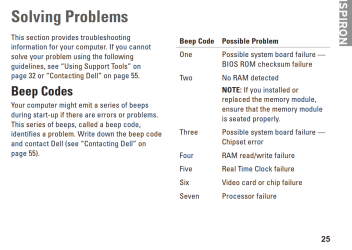
Here are the beep codes for the Inspiron:
Capture.PNG

And here is a link to the manual:
http://support.dell.com/support/edocs/systems/insp560mt/en/sg/sg_en.pdf

First thing to try: shut off, remove power cord, wait a few minutes, then connect the power cord and try and start up again.

You might try performing a Clear CMOS (resetting the BIOS). I don't know what motherboard you have in the computer, so I don't know if it has a CLRTC or ClearCMOS jumper, but most do.

Procedure:

  • Note all your current BIOS settings (Ignore this in your case)
  • Shut down the computer > remove the power cord.
  • Remove the 3v battery.
  • Move the CLRTC jumper from pins 1-2 to 2-3.
  • Touch a metal part of the case and Press and Hold the reset button for approx. 30 seconds to discharge all power from the board.
  • Put the CLRTC jumper back on pins 1-2.
  • Replace the 3v battery > replace the power cord > boot.
  • Immediately go back into BIOS and reset all your preferred settings. If the CLRTC worked you will need to reset the date and time.
 

My Computer My Computer

Computer type
PC/Desktop
Computer Manufacturer/Model Number
Home Built - Jan 2013
OS
Windows 7 64 Bit Home Premium SP1
CPU
i7-3820
Motherboard
Asus P9X79-PRO - Bios 4608
Memory
GSkill F3-14900CL9Q - 16GB
Graphics Card(s)
EVGA GeForce GTX660 - Driver 352.86
Sound Card
On board Realtek ALC898
Monitor(s) Displays
Acer S271HL
Screen Resolution
1920 x 1080
Hard Drives
#1- Samsung 840 Pro Series
#2- Western Digital WD1002FAEX Sata3 Black
#3- Western Digital WD1002FAEX Sata3 Black
PSU
Corsair CMPSU-850TX-V2 - 850 watt (by Seasonic)
Case
Corsair Obsidian 550D
Cooling
Standard 3 120mm case fans, Cooler Master Hyper 212 EVO
Keyboard
MS KC-0405
Mouse
Intellimouse 5-button
Internet Speed
56 Mbits/Sec (on a good day)
Antivirus
Avast & Malwarebytes
Browser
Firefox
Other Info
Asus DVD - DRW-24B1ST 24X
Hi,

Following are the possible issues according to the series of beeps:

One
Possible system board failure — BIOS ROM checksum failure.

Two
No RAM detected
NOTE: If you installed or replaced the memory module ensure that the memory module is seated properly.

Three
Possible system board failure — Chipset error.

Four
RAM read/write failure.

Five
Real Time Clock failure.

Six
Video card or chip failure.

Seven
Processor failure.

*The delay between each beep is 300ms, the delay between each set of beeps is 3 sec, the beep sound last 300ms.

Please reply with results.
 
Last edited:

My Computer My Computer

OS
Windows 7 Enterprise x64
I was having a hard time figuring out what the beep code could mean because it goes by so fast. She encounters this problem occasionally. It has happened twice so far in the last week when it first started. It happens when she first starts her computer and logs in to windows.
 

My Computer My Computer

OS
Windows 7 Home Premium 64 bit
Beep codes occur long before the machine starts to load Windows. The motherboard will send out a beep code right after the Power On Self Test, within the first couple of seconds.

If the "beeping" happens after Windows starts to load ("Starting Windows" on the black screen with the coalescing squares) then it may be something completely different.

Can you confirm when in the startup process this occurs?
 

My Computer My Computer

Computer type
PC/Desktop
Computer Manufacturer/Model Number
Home Built - Jan 2013
OS
Windows 7 64 Bit Home Premium SP1
CPU
i7-3820
Motherboard
Asus P9X79-PRO - Bios 4608
Memory
GSkill F3-14900CL9Q - 16GB
Graphics Card(s)
EVGA GeForce GTX660 - Driver 352.86
Sound Card
On board Realtek ALC898
Monitor(s) Displays
Acer S271HL
Screen Resolution
1920 x 1080
Hard Drives
#1- Samsung 840 Pro Series
#2- Western Digital WD1002FAEX Sata3 Black
#3- Western Digital WD1002FAEX Sata3 Black
PSU
Corsair CMPSU-850TX-V2 - 850 watt (by Seasonic)
Case
Corsair Obsidian 550D
Cooling
Standard 3 120mm case fans, Cooler Master Hyper 212 EVO
Keyboard
MS KC-0405
Mouse
Intellimouse 5-button
Internet Speed
56 Mbits/Sec (on a good day)
Antivirus
Avast & Malwarebytes
Browser
Firefox
Other Info
Asus DVD - DRW-24B1ST 24X
This error happens after she loads Windows and starts doing things like opening steam, chrome, or anything else. it doesn't always occur. Windows does load though. It usually happens when windows if first loaded The display disappears and computer begins to beep. with the blinking amber light consistent with beep codes.
 
Last edited:

My Computer My Computer

OS
Windows 7 Home Premium 64 bit
A long shot - does she have a program called Bitmeter installed?

I'm also thinking it might be an overheating warning. Is there a lot of dust inside the case? What happens if you run it with the side of the case left off?
 

My Computer My Computer

Computer type
PC/Desktop
Computer Manufacturer/Model Number
Home Built - Jan 2013
OS
Windows 7 64 Bit Home Premium SP1
CPU
i7-3820
Motherboard
Asus P9X79-PRO - Bios 4608
Memory
GSkill F3-14900CL9Q - 16GB
Graphics Card(s)
EVGA GeForce GTX660 - Driver 352.86
Sound Card
On board Realtek ALC898
Monitor(s) Displays
Acer S271HL
Screen Resolution
1920 x 1080
Hard Drives
#1- Samsung 840 Pro Series
#2- Western Digital WD1002FAEX Sata3 Black
#3- Western Digital WD1002FAEX Sata3 Black
PSU
Corsair CMPSU-850TX-V2 - 850 watt (by Seasonic)
Case
Corsair Obsidian 550D
Cooling
Standard 3 120mm case fans, Cooler Master Hyper 212 EVO
Keyboard
MS KC-0405
Mouse
Intellimouse 5-button
Internet Speed
56 Mbits/Sec (on a good day)
Antivirus
Avast & Malwarebytes
Browser
Firefox
Other Info
Asus DVD - DRW-24B1ST 24X
Hi,

I would suggest you to do Flee Power. Remove any 3rd party peripherals and power cord from your Desktop, press and hold the power button for 20 seconds to discharge any residual current inside the desktop. This clears RAM and resets the hardware.

Also, would suggest you to reseat the Memory Module(s) one by one which could fix this issue. You can click on the URL mentioned which will guide you in reseating the Memory Module(s):
http://support.dell.com/support/edocs/systems/insp560st/en/sm/memory.htm#wp1181566

*To guard against electrical shock, always unplug your computer from the electrical outlet before removing the cover.

Hope this helps.
 

My Computer My Computer

OS
Windows 7 Enterprise x64
She does not have bitmeter installed and I checked the temperatures with speedfan. It says they're normal. I ran RAM diagnostics and it passed.
 

My Computer My Computer

OS
Windows 7 Home Premium 64 bit
I honestly don't know what would cause a motherboard to beep after the operating system has started.

As I stated before: it does not sound like a typical motherboard beep. I'm thinking it might be something else. And since the display cuts out when this happens I'm wondering if the sound is coming from the video card?

Can you open up the case a check the next time this happens?
 

My Computer My Computer

Computer type
PC/Desktop
Computer Manufacturer/Model Number
Home Built - Jan 2013
OS
Windows 7 64 Bit Home Premium SP1
CPU
i7-3820
Motherboard
Asus P9X79-PRO - Bios 4608
Memory
GSkill F3-14900CL9Q - 16GB
Graphics Card(s)
EVGA GeForce GTX660 - Driver 352.86
Sound Card
On board Realtek ALC898
Monitor(s) Displays
Acer S271HL
Screen Resolution
1920 x 1080
Hard Drives
#1- Samsung 840 Pro Series
#2- Western Digital WD1002FAEX Sata3 Black
#3- Western Digital WD1002FAEX Sata3 Black
PSU
Corsair CMPSU-850TX-V2 - 850 watt (by Seasonic)
Case
Corsair Obsidian 550D
Cooling
Standard 3 120mm case fans, Cooler Master Hyper 212 EVO
Keyboard
MS KC-0405
Mouse
Intellimouse 5-button
Internet Speed
56 Mbits/Sec (on a good day)
Antivirus
Avast & Malwarebytes
Browser
Firefox
Other Info
Asus DVD - DRW-24B1ST 24X
To temporarily eliminate any Windows system function beeps, go to the Control Panel/Hardware and Sound. Click on Change System Sounds, under the Sound entry. Change the Sound Scheme to "no sounds" and then click Apply. That will eliminate any Windows system sounds or sounds from programs that use the Windows system sounds. Then see if you are getting any sounds. You can change the Sound Scheme back to what it was originally after you get done testing.
 

My Computer My Computer

Computer type
PC/Desktop
Computer Manufacturer/Model Number
My Own Build
OS
Windows 10 64 bit
CPU
Intel i7 6700K
Motherboard
ASUS ROG Maximus VIII Hero
Memory
16GB Corsair Dominator
Graphics Card(s)
Intel CPU Graphics
Sound Card
RealTek
Monitor(s) Displays
27" Dell S2719dgf
Screen Resolution
2560X1440
Hard Drives
1 TB Samsung 850 EVO SSD for Win 10 Pro
500GB Samsung 850 EVO SSD for Win 10 Insider
2 TB drive for backup
PSU
EVGA Supernova 750G2
Case
BeQuiet Silent Base 600
Cooling
Deepcool Captain 120EX
Keyboard
Microsoft Wireless 2000
Mouse
Microsoft wireless
Internet Speed
100 MB/sec (Cable)
Antivirus
Microsoft Defender and Malwarebytes
Browser
Edge/Firefox
Other Info
Cakewalk (Sonar) by BandLab and Studio One 4.1 Pro recording studio software. MOTU 896Mk3 Hybrid recording interface, Frontier Tranzport wireless control unit, Behringer X-Touch Control Surface.
Five USB connected optical drives for CD Audio production using Nero BurningROM
I honestly don't know what would cause a motherboard to beep after the operating system has started.

As I stated before: it does not sound like a typical motherboard beep. I'm thinking it might be something else. And since the display cuts out when this happens I'm wondering if the sound is coming from the video card?

Can you open up the case a check the next time this happens?

I'll do that if it happens again
 

My Computer My Computer

OS
Windows 7 Home Premium 64 bit
Hi, I've solved the problem with her computer. Apparently one the RAM sticks went bad so she is now down to 6 gb of ram from 8 gb ram
 

My Computer My Computer

OS
Windows 7 Home Premium 64 bit
Back
Top