
Dell Inspiron E1505 Upgrade Adivce

dudejoe4

New member
Local time
7:15 PM
Messages
2
My parents have a e1505 which is currently running Vista. I have been debating on upgrading it to W7, but was unsure if it would handle it well. I have keys for XP, Vista, and W7 32bit. I plan on doing a clean install.
It has a T2250 1.73GHz processor with 2gb ram.

All my parents will be doing with it is internet use and organizing pictures and things like that. It's about time for a clean install of any OS on it.

Thanks
-dudejoe4
 

My Computer My Computer

OS
Windows 7 Pro 64bit
Hi dudejoe4, welcome to the forums , the e1505/i6400 will run win 7 although you may have to install some of the drivers in compatibility mode :)
 

My Computer My Computer

Computer type
PC/Desktop
Computer Manufacturer/Model Number
self build
OS
win 7 ultimate32bit, Win8.1pro wmc 32bit
CPU
amd phenom x4 9600
Motherboard
asus m2n32-sli deluxe
Memory
corsair twinxs 2x2gb
Graphics Card(s)
2x nvidia 1gb 8500gt
Sound Card
onboard
Monitor(s) Displays
23" PB Viseo 233d
Screen Resolution
1920x1080
Hard Drives
maxtor sata 500gb
maxtor sata 320gb
fujitsu sata200gb
PSU
oryxx tornado 750w
Case
thermaltake xaser lll
Cooling
artic freezer64 pro + 7 case fans
My daughter had that same computer: Dell E1505. It ran Vista.
Horrible! Why? Because this box will NOT accept any more than 2 GB of RAM. It was starved for memory.
In the end, we replaced it with an HP laptop, one that had enough memory to work properly.

What to do with the E1505? I loaded it with Windows XP, which runs fine with only 2 GB of RAM. It's now my piano computer.

Conclusion: The E1505 is not suited for Vista, and probably even less suited for Windows 7.
 

My Computer My Computer

OS
Win 7
You can run Win7 32 bit on 2gb RAM just fine. I run it on 1gb RAM with a weaker processor for light web browsing and multi-tasking.

You'll want to run the Upgrade advisor to flag specific issues with software or hardware.

Back up your Dell recovery disks or an image of the Vista install if it is worth saving:
Macrium - Image your system
Dell Restoring Your Computer´s Software to the Factory Settings

Then boot the Win7 DVD to clean reinstall following these steps to get a perfect baseline install which you can then image so you never have to reinstall again: Reinstalling Windows 7
 
Yeah, you can. I have the same laptop. I feel gutted that I can't put more RAM in it. The techs at Dell really messed it up. Windows 7 runs pretty fine on it but still I would love an extra 2 gigs of RAM.
 

My Computer My Computer

Computer Manufacturer/Model Number
Dell Inspiron E 1505
OS
Windows 7 Professional 32 Bit
CPU
Genuine Intel(R) CPU T2080 @ 1.73GHz 1.73 GHz
Motherboard
DELL
Memory
2GB
Graphics Card(s)
ATI Mobility Radeon X1400
Sound Card
High Definition Audio Device
Screen Resolution
1280 by 800
Hard Drives
136 GB
Recovery 10 GB
It runs 7 just fine. I have one and it's running 7 Ultimate without any problems at all. It runs much better than it ever did with Vista on it.
 

My Computer My Computer

Computer Manufacturer/Model Number
Dell XPS 15 L502x
OS
Windows 7 Ultimate x64 SP1
CPU
Core i7-2670QM
Memory
8GB DDR3 PC3-10600
Graphics Card(s)
Intel HD Graphics 3000 + GeForce GT 540M
Screen Resolution
1920x1080
Hard Drives
1TB 5400RPM Seagate
Your 32 bit key will let you install 64 bit. That is what i would do since 64 bit will be around longer the 32 bit will more programs will run on it in the long term. Also 32 bit programs will run on it also.
 

My Computer My Computer

Computer Manufacturer/Model Number
Asus
OS
Windows 7 Pro x64 SP1 and Mac OS X 10.8.3
CPU
Intel Core i7-3820 Sandy Bridge-E at 4.75 GHz
Motherboard
ASUS Rampage IV Extreme
Memory
8 x Corsair 8GB DDR3 64 GB Kit @1866 Overclocked @2000
Graphics Card(s)
GTX 580 and MSI R6870
Sound Card
HDMI on GPU and ACL898
Monitor(s) Displays
32" Sony EX-500 120Hz
Screen Resolution
1920x1080P
Hard Drives
1 x Corsair Force Series GT CSSD-F60GBGT-BK (OS)
2 x Western Digital Caviar Black Sata III 750GB (Raid 0)
1 x Western Digital Caviar Black Sata III 1TB (Media)
2 x Western Digital Caviar Black Sata II 640GB (Raid 0)
PSU
Corsair Professional Series Gold AX850
Case
Corsair 800D
Cooling
Corsair H80 High Performance Liquid CPU Cooler
Keyboard
HP Wireless Elite Keyboard
Mouse
HP Wireless Elite Mouse
Internet Speed
Cable, VisionTek Bigfoot Killer 2100 Gaming Network Card
Other Info
4 x GELID Solutions FN-TX12-15 120mm Case Fan with Superior Temperature Control
1 x Corsair 140mm Case Fan
1 x SilverStone FP55B Aluminum front panel 5.25" to a 3.5" bay converter
1 x Ultra Card Reader
1 x Sony Blu-ray Burner BD-5300S-0B
The point in advising OP install 32 bit is that 64 bit may drag some with only 2gb RAM allowed on that Dell.
 
I have a HP Dv5215us and it has a max ram of 2GB however the AMD CPU supports x64 so why not? You do not lose anything or realy gain anything profrmace from it but you are at the cutting edge when it comes to x64. My idea about computers is if it can do it then go for it.
 

My Computer My Computer

Computer Manufacturer/Model Number
Asus
OS
Windows 7 Pro x64 SP1 and Mac OS X 10.8.3
CPU
Intel Core i7-3820 Sandy Bridge-E at 4.75 GHz
Motherboard
ASUS Rampage IV Extreme
Memory
8 x Corsair 8GB DDR3 64 GB Kit @1866 Overclocked @2000
Graphics Card(s)
GTX 580 and MSI R6870
Sound Card
HDMI on GPU and ACL898
Monitor(s) Displays
32" Sony EX-500 120Hz
Screen Resolution
1920x1080P
Hard Drives
1 x Corsair Force Series GT CSSD-F60GBGT-BK (OS)
2 x Western Digital Caviar Black Sata III 750GB (Raid 0)
1 x Western Digital Caviar Black Sata III 1TB (Media)
2 x Western Digital Caviar Black Sata II 640GB (Raid 0)
PSU
Corsair Professional Series Gold AX850
Case
Corsair 800D
Cooling
Corsair H80 High Performance Liquid CPU Cooler
Keyboard
HP Wireless Elite Keyboard
Mouse
HP Wireless Elite Mouse
Internet Speed
Cable, VisionTek Bigfoot Killer 2100 Gaming Network Card
Other Info
4 x GELID Solutions FN-TX12-15 120mm Case Fan with Superior Temperature Control
1 x Corsair 140mm Case Fan
1 x SilverStone FP55B Aluminum front panel 5.25" to a 3.5" bay converter
1 x Ultra Card Reader
1 x Sony Blu-ray Burner BD-5300S-0B
Some have experienced drag with 64 bit on 2gb or less RAM. It depends on what you use it for.

What is your experience with 2gb RAM using 64 bit Win7?

Let's hear what others have to advise.
 
Works great and I have two sticks of DDR 333 running single channel since that is all the CPU supports. Has been my flagship laptop for 5 years now and it still has life left in it. I do limited gaming on it and I use SolidWorks x64 2011 on it and it works great. When it comes to the OS it is all how you manage it and how you use it. The ram on x64 idles higher the x32. So people think that means that lower ram computers should not use it. This is untrue. Microsoft in there "wonderful" thinking thought that they should put more ram in idle ie when you start a program and then close it the program stays in the ram until Windows needs that space.
 

My Computer My Computer

Computer Manufacturer/Model Number
Asus
OS
Windows 7 Pro x64 SP1 and Mac OS X 10.8.3
CPU
Intel Core i7-3820 Sandy Bridge-E at 4.75 GHz
Motherboard
ASUS Rampage IV Extreme
Memory
8 x Corsair 8GB DDR3 64 GB Kit @1866 Overclocked @2000
Graphics Card(s)
GTX 580 and MSI R6870
Sound Card
HDMI on GPU and ACL898
Monitor(s) Displays
32" Sony EX-500 120Hz
Screen Resolution
1920x1080P
Hard Drives
1 x Corsair Force Series GT CSSD-F60GBGT-BK (OS)
2 x Western Digital Caviar Black Sata III 750GB (Raid 0)
1 x Western Digital Caviar Black Sata III 1TB (Media)
2 x Western Digital Caviar Black Sata II 640GB (Raid 0)
PSU
Corsair Professional Series Gold AX850
Case
Corsair 800D
Cooling
Corsair H80 High Performance Liquid CPU Cooler
Keyboard
HP Wireless Elite Keyboard
Mouse
HP Wireless Elite Mouse
Internet Speed
Cable, VisionTek Bigfoot Killer 2100 Gaming Network Card
Other Info
4 x GELID Solutions FN-TX12-15 120mm Case Fan with Superior Temperature Control
1 x Corsair 140mm Case Fan
1 x SilverStone FP55B Aluminum front panel 5.25" to a 3.5" bay converter
1 x Ultra Card Reader
1 x Sony Blu-ray Burner BD-5300S-0B
Win 7 in 2 GB of RAM is like putting an elephant into a phone booth. It may fit, but it isn't pretty.

I run Win 7 on a box with 8 GB RAM. It uses 2.5 GB while sitting there idle, running no apps (just the usual background services and desktop cute stuff).

I wouldn't think of running Win 7 with so little RAM. Better to add memory or buy a bigger box.
 

My Computer My Computer

OS
Win 7
I would strip your OS down to the cleanest boot possible, ideally only AV running at Startup.

To do this, enter msconfig>Startup and uncheck everything you don't absolutely need to start with Windows, which drains CPU/ram, slows startup and can spy on you. Check back after reboots that nothing writes itself back in, or turn it off in it's Program Prefs or uninstall it. s

Do the same with msconfig>Services after hiding all MS services. After a day of making sure nothing sneaks back into either list, see what your idle RAM/CPU has become.
 
Dell insisted my I9400 would only support 2GB ram ,searching around the internet I found people saying it was possible to run 4GB so I tried an extra 2GB and voila no problems ,It may be worth trying an extra 2Gb in the I6400/E1505 :)
 

My Computer My Computer

Computer type
PC/Desktop
Computer Manufacturer/Model Number
self build
OS
win 7 ultimate32bit, Win8.1pro wmc 32bit
CPU
amd phenom x4 9600
Motherboard
asus m2n32-sli deluxe
Memory
corsair twinxs 2x2gb
Graphics Card(s)
2x nvidia 1gb 8500gt
Sound Card
onboard
Monitor(s) Displays
23" PB Viseo 233d
Screen Resolution
1920x1080
Hard Drives
maxtor sata 500gb
maxtor sata 320gb
fujitsu sata200gb
PSU
oryxx tornado 750w
Case
thermaltake xaser lll
Cooling
artic freezer64 pro + 7 case fans
thanks for the info. i'll probably put the 32bit version on it.
 

My Computer My Computer

OS
Windows 7 Pro 64bit
The 1505 doesn't support more than 2GB. I have the 1705/9400, which does, as well as owning a 1505, which doesn't support it.

Windows 7 runs just fine on a system with 2GB.
 

My Computer My Computer

Computer Manufacturer/Model Number
Dell XPS 15 L502x
OS
Windows 7 Ultimate x64 SP1
CPU
Core i7-2670QM
Memory
8GB DDR3 PC3-10600
Graphics Card(s)
Intel HD Graphics 3000 + GeForce GT 540M
Screen Resolution
1920x1080
Hard Drives
1TB 5400RPM Seagate
"1505 ... doesn't support it.
That's what I read all over the web. Dell says no. Users say no. So I guess it's no. Just 2 GB max in an E1505.
 

My Computer My Computer

OS
Win 7
Hi,

I also searched internet to find Dell say "NO" and some user's say "NO", however I also found some user said "YES" :sarc:
I suppose it depends on your chipset and the Dell BIOS they used!

Now it just so happens that i had a family member bring me a laptop to sort out some issues, now being the inquisitive type ;) I started to check out the components in this laptop. Yes you guessed it, it had the same spec ram as mine, only this baby had a 2gb stick in it :D.
Well it had to be done :p, moments later ram swapped over and my i6400 is booting and the dell bios is complaining that ram spec has changed "PRESS F1 TO ENTER BIOS", so enter bios new ram amount showing :p escape bios reboot laptop and boots to windows just fine :D.
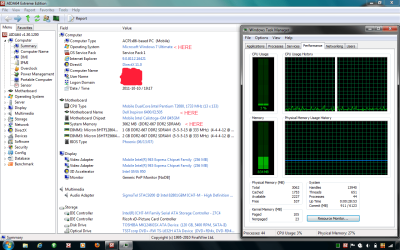
So its now got 3gb ram and windows 7 32bit, it's used for general laptop tasks and runs just fine. Decided to stay with 32bit to limit driver issues, also this laptop has no dell "bloatware" installed.

Sorry forgot to say hope this helps! and suppose the only way to be sure is get hold of a stick and try!


Attachments

  • I6400.png
    I6400.png
    70.5 KB · Views: 54
Last edited:

My Computer My Computer

Computer Manufacturer/Model Number
Homebrew/DELL Inspiron e1505/6400
OS
Win 7 64bit Desktop/Win 7 32bit Laptop
CPU
Intel i7 3770k @ 4.2ghz
Motherboard
Asus P8Z77 V/Intel GMi945gm
Memory
4x4Gb 1600Mhz Excelram/3GB ddr2 667
Graphics Card(s)
MSI GTX970 Gaming 4GB/Intel GMA950
Sound Card
Asus Xonar DGX/Sigmatel 9200
Monitor(s) Displays
Samsung 245B 24"/15.4"
Screen Resolution
1920x1200/1280x800
Hard Drives
256Gb Crucial M4 SSD
2x1TB Samsung F3
1x1TB Hitachi External
Laptop 64GB Kingston SSD
PSU
Cosair HX750
Case
Cooler Master Stacker STC-T01
Cooling
Watercooled cpu 360 rad
Keyboard
Logitech G19
Mouse
Razer DeathAdder
Internet Speed
16 meg ish :(
Antivirus
Panda Cloud
Hi,

I also searched internet to find Dell say "NO" and some user's say "NO", however I also found some user said "YES" :sarc:
I suppose it depends on your chipset and the Dell BIOS they used!

Now it just so happens that i had a family member bring me a laptop to sort out some issues, now being the inquisitive type ;) I started to check out the components in this laptop. Yes you guessed it, it had the same spec ram as mine, only this baby had a 2gb stick in it :D.
Well it had to be done :p, moments later ram swapped over and my i6400 is booting and the dell bios is complaining that ram spec has changed "PRESS F1 TO ENTER BIOS", so enter bios new ram amount showing :p escape bios reboot laptop and boots to windows just fine :D.
So its now got 3gb ram and windows 7 32bit, it's used for general laptop tasks and runs just fine. Decided to stay with 32bit to limit driver issues, also this laptop has no dell "bloatware" installed.

Sorry forgot to say hope this helps! and suppose the only way to be sure is get hold of a stick and try!

I do have personal experience with the 1505, which is why I posted and told the OP that it doesn't support more than 2GB.
 

My Computer My Computer

Computer Manufacturer/Model Number
Dell XPS 15 L502x
OS
Windows 7 Ultimate x64 SP1
CPU
Core i7-2670QM
Memory
8GB DDR3 PC3-10600
Graphics Card(s)
Intel HD Graphics 3000 + GeForce GT 540M
Screen Resolution
1920x1080
Hard Drives
1TB 5400RPM Seagate
Back
Top