Dell Inspiron N4010- issues

Pavithran

New member
Local time
6:25 PM
Messages
7
Hi,

I have been using a Dell Inspiron N4010 since last 6 months. I have windows 7 home basic installed (64 bit) I have come across some problems for which i need ur help

1. Bluetooth doesn't work. I have tried uninstalling the driver and reinstalling. it fails again. The system tray doesnot show th icon at all.

2. My windows explorer keeps crashing. I really don't know why.

3.The right click and open with command at times does not work. I keep getting a message telling that "there are no programs associated with this file" Is this really an error?

4. It takes very long time for the system to shut down.


Thanks

Please help, i am no comp expert.
 

My Computer My Computer

Computer Manufacturer/Model Number
DELL
OS
Windows 7 Home basic 64 bit
CPU
Intel I3

My Computer My Computer

Computer Manufacturer/Model Number
HP Pavilion dv6-2020ev
OS
Ubuntu 12.10
CPU
Intel Core i7 720QM
Motherboard
Its a HP secret...
Memory
4GB RAM
Graphics Card(s)
NVIDIA GeForce 230M
Sound Card
IDT
Screen Resolution
1366x768
Hard Drives
500 GB
Mouse
HP
Internet Speed
4 Mbps
Hi, Thanks for the reply. i scanned the system with Malwarebytes Anti-Malware- didn't find any thing. I re installed the blue tooth software- worked for awhile, then as usual disappeared. Windows explorer is still crashing, please help.
 

My Computer My Computer

Computer Manufacturer/Model Number
DELL
OS
Windows 7 Home basic 64 bit
CPU
Intel I3

My Computer My Computer

Computer Manufacturer/Model Number
HP Pavilion dv6-2020ev
OS
Ubuntu 12.10
CPU
Intel Core i7 720QM
Motherboard
Its a HP secret...
Memory
4GB RAM
Graphics Card(s)
NVIDIA GeForce 230M
Sound Card
IDT
Screen Resolution
1366x768
Hard Drives
500 GB
Mouse
HP
Internet Speed
4 Mbps
Hi,

I tried that also, nothing turned up. I am thinking of re installing the whole thing


Thanks
 

My Computer My Computer

Computer Manufacturer/Model Number
DELL
OS
Windows 7 Home basic 64 bit
CPU
Intel I3
Did you install the Intel chipsets?
 

My Computer My Computer

Computer Manufacturer/Model Number
HP Pavilion dv6-2020ev
OS
Ubuntu 12.10
CPU
Intel Core i7 720QM
Motherboard
Its a HP secret...
Memory
4GB RAM
Graphics Card(s)
NVIDIA GeForce 230M
Sound Card
IDT
Screen Resolution
1366x768
Hard Drives
500 GB
Mouse
HP
Internet Speed
4 Mbps
Hi,

Thanks a lot that really worked (Chip set driver), blue tooth is working fine. The sad part is windows explorer keeps crashing. Another thing is i use a banking software which works on java. It stops working in the middle and at the bottom is a message saying error script. I re-downloaded everything updated Java but nothing, Can u please help

Thanks
 

My Computer My Computer

Computer Manufacturer/Model Number
DELL
OS
Windows 7 Home basic 64 bit
CPU
Intel I3
Run sfc /scannow from an elevated command prompt (Run as Administrator). Please, do not ignore my suggestions and still ask for help like before. It's very rude. Also, tell me how you can reproduce the problem with the Java software?
 

My Computer My Computer

Computer Manufacturer/Model Number
HP Pavilion dv6-2020ev
OS
Ubuntu 12.10
CPU
Intel Core i7 720QM
Motherboard
Its a HP secret...
Memory
4GB RAM
Graphics Card(s)
NVIDIA GeForce 230M
Sound Card
IDT
Screen Resolution
1366x768
Hard Drives
500 GB
Mouse
HP
Internet Speed
4 Mbps
Hi,

Its not that i didnot obey ur suggestions, it so happend that the blue tooth software u had suggested was not able to update the blue tooth on my system. I downloaded the CHIPSET drivers from the link u sent, then after updating that, i had the backup of Bluetooth driver from dell which i used to update. This is what happend.
 

My Computer My Computer

Computer Manufacturer/Model Number
DELL
OS
Windows 7 Home basic 64 bit
CPU
Intel I3
I ran the scan as u mentioned. It came up with the message " Windows resource protection didnot find any integrity violations".

Thanks
 

My Computer My Computer

Computer Manufacturer/Model Number
DELL
OS
Windows 7 Home basic 64 bit
CPU
Intel I3
Can you elaborate on the Java software you use? Also, how often does Windows Explorer crash? And what are you usually doing when it crashes?
 

My Computer My Computer

Computer Manufacturer/Model Number
HP Pavilion dv6-2020ev
OS
Ubuntu 12.10
CPU
Intel Core i7 720QM
Motherboard
Its a HP secret...
Memory
4GB RAM
Graphics Card(s)
NVIDIA GeForce 230M
Sound Card
IDT
Screen Resolution
1366x768
Hard Drives
500 GB
Mouse
HP
Internet Speed
4 Mbps
Windows explorer has crashed almost 23 times in last 4 weeks. Most of the time i am online or preparing PPT presentations and all that.The desktop goes blank and its comes back in a few seconds. This is what usually happens.
The software i use is available here https://www.canarabank.in/cansecure.asp. Its used to connect to te bank server so that the connection is safe. Some times when i i try logging in i get the message that there has been a script error do u want to continue and all that. Please help Even the bank people dont have any idea.
 

My Computer My Computer

Computer Manufacturer/Model Number
DELL
OS
Windows 7 Home basic 64 bit
CPU
Intel I3
I'm going to help you fix the Explorer issue first, the banking thing later. Just one thing though, that banking website does not look legitimate, and has a fake certificate for its website. I seriously think it is some sort of scam...

Method 1:

Please check whether you face the same issue while working in the safe mode.

Step 1. Safe Mode

1. Restart your computer.
2. When the computer starts you will see your computer's hardware being listed. When you see this information start to gently tap the F8 key on your keyboard repeatedly until you are presented with the Windows 7 Advanced Boot Options screen.
3. Using the arrow keys, select the Safe Mode option you want.
4. Then press the enter key on your keyboard to boot into Windows 7 Safe Mode.
5. When Windows starts you will be at a typical logon screen. Logon to your computer and Windows 7 will enter Safe mode.
6. Do whatever tasks you require, and when you are done, reboot to go back into normal mode.

Steps 2. Clean Boot

If the issue existed in Safe Mode perform Clean Boot troubleshooting to find the root cause of the issue:

Clean Boot Troubleshooting:
1. Click Start, type msconfig in the Start Search box, and then press ENTER.
User Account Control permission.
If you are prompted for an administrator password or for a confirmation, type the
password, Or click Continue.
2. On the General tab, click Selective Startup.
3. Under Selective Startup, click to clear the Load Startup items check box.
4. Click the Services tab, click to select the Hide All Microsoft Services check box, and then click Disable All.
5. Click OK.
6. When you are prompted, click Restart.
7. After the computer starts, check whether the problem is resolved.

Come back after trying these, and report if you get Explorer crashing problems or not.

Slasher
 

My Computer My Computer

Computer Manufacturer/Model Number
HP Pavilion dv6-2020ev
OS
Ubuntu 12.10
CPU
Intel Core i7 720QM
Motherboard
Its a HP secret...
Memory
4GB RAM
Graphics Card(s)
NVIDIA GeForce 230M
Sound Card
IDT
Screen Resolution
1366x768
Hard Drives
500 GB
Mouse
HP
Internet Speed
4 Mbps
Hard Drive replacement

I have a question. I have a Dell Inspiron N4010 laptop. It's having problems after a year of having it. It will act like it's starting up but then a black screen will appear saying "check cable connection!... Operating System not found" . So I took my computer to a local computer store to have a system analysis done on it and they said my hard drive was completely shot and that it would cost me $300 to fix. I didn't want to pay that much to get it fixed so I bought a hard drive online, took my computer apart and replaced it and put everything back together. I started it up and the same message is there. Just wondering if anyone had any ideas of what I need to do or if i forgot to do something.
 

My Computer My Computer

OS
Windows 7

My Computer My Computer

Computer Manufacturer/Model Number
HP Pavilion dv6-2020ev
OS
Ubuntu 12.10
CPU
Intel Core i7 720QM
Motherboard
Its a HP secret...
Memory
4GB RAM
Graphics Card(s)
NVIDIA GeForce 230M
Sound Card
IDT
Screen Resolution
1366x768
Hard Drives
500 GB
Mouse
HP
Internet Speed
4 Mbps
I downloaded the Ubuntu and put it in my computer with the new hard drive. It works! I'm guessing that I just need to get Windows 7 back installed in my computer and I'm good to go? Is that correct? I obviously don't want to pay a fortune to get it back. I technically already paid for Windows 7 when I purchased my computer from Best Buy right? I know I have a product key on the back of my computer. How should I go about that?
 

My Computer My Computer

OS
Windows 7
Follow these steps to get a perfect clean reinstall of Win7 factory OEM: Reinstalling Windows 7

What is the licensed version on the COA sticker? 32- or 64-bit? Did Dell provide a Reinstallation DVD? Did you make Recovery Disks?
 
I don't know how to check the version on the COA sticker. Dell did not provide a reinstallation dvd and I did not make a recovery disk.
 

My Computer My Computer

OS
Windows 7
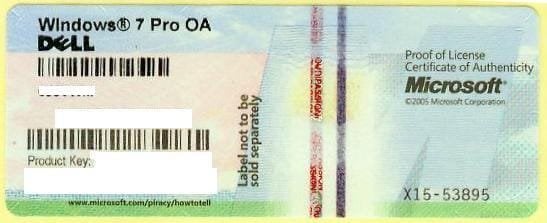
The sticker should be on the bottom of laptop, or on some Dells under the battery - similar to this:
1270558000_86224332_1-Pictures-of--Buying-Windows-7-Prof-COA-Sticker-Only-100pcs-up-Needed.jpg

Backup the key now before it becomes unreadable.

What is the licensed version and is it 32- or 64-bit?
 
Its Windows 7 Home prem OA. I don't know how to check the bit size. But like i said i have no disk for windows 7 and no backup. The hard drive that went bad was so bad that I couldn't even get any data off it so I already know my computer is wiped clean.
 

My Computer My Computer

OS
Windows 7
Back
Top