Solved Dell Inspiron N5110 Bluetooth Problem

hoangnnm

New member
Local time
2:12 PM
Messages
16
Hi all .
I am using Dell Inspiron N5110 , but i can not use the bluetooth.
I downloaded the driver from Dell ( i'm sure the driver is correct because i downloaded using my service tag ) , but whenever i try to install , it say "Activate bluetooth using wireless switch" althought i have already turn the wireless on ( Fn + F2) .

Here is the driver i downloaded :

dell.JPG

And here is the message i received when i install the driver :
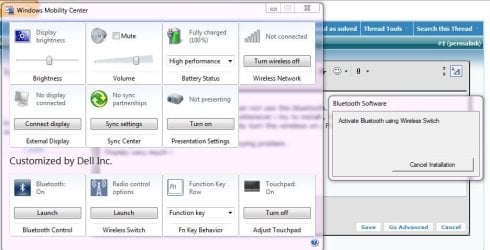
Capture.JPG

I tried to let windows install the driver it self but there is always an error called Code 43 : Windows has stopped this device because it has reported problems.

After i uninstall the driver, on the device manager the bluetooth device is shown as unknow device .

So i use a software called : Driver Identifier and download a software call BlueSoleil , after installing this, everything seemed to be fine :
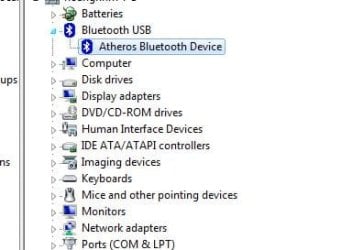
atheros.JPG

But it is just for look , nothing changed , i can not start the bluetooth device, and in the control panel it does not recognize any bluetooth device :
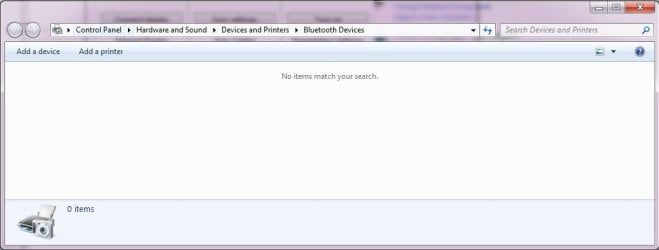
nodevice.JPG

My device hardware ids is :
USB\VID_0CF3&PID_3002&REV_0001
USB\VID_0CF3&PID_3002
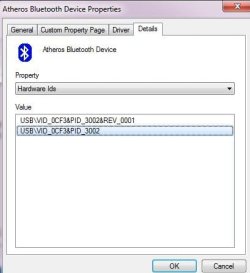
hardwareIds.JPG


Please guide me how to solve this annoying problem .
Thanks very much !
 

My Computer My Computer

OS
Windows 7 Ultimate x64
Hi there , please tell me if i'm posting in the wrong sub-forum so i will move my thread to Hardware and device forum

Thanks very much !
 

My Computer My Computer

OS
Windows 7 Ultimate x64
Hi there, thanks for your attention .
Problem solved .

My OS crashed for no reason, so i had to reinstall Win7 and the bluetooth works now .
 

My Computer My Computer

OS
Windows 7 Ultimate x64
i have the same laptop...win 7 professional x32.....but my wireless adapter driver isnt being installed...please help
 

My Computer My Computer

Computer Manufacturer/Model Number
Dell Inspirion n5110
OS
windows 7 professional x32
CPU
Intel Core I5 2430M, 2.4 GHz
Memory
4Gb
Graphics Card(s)
Nvidia Geforce Gt 525M
Screen Resolution
1366x768
Hard Drives
500Gb
Did you install the driver for your wireless device from dell.com ?
If you did not, visit dell.com for lastest driver .

And please provide more details as i do in the first post of this thread if you still have any trouble !
 

My Computer My Computer

OS
Windows 7 Ultimate x64
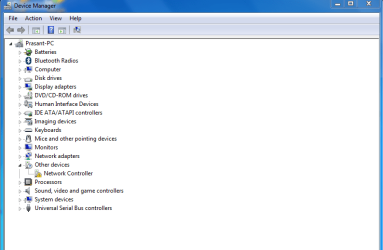
yes i searched everywhere....the bluetooth installs perfectly but the wireless doesnt....heres a screen shot of the device manager attached with this
 

Attachments

  • Untitled.png
    Untitled.png
    17.1 KB · Views: 635

My Computer My Computer

Computer Manufacturer/Model Number
Dell Inspirion n5110
OS
windows 7 professional x32
CPU
Intel Core I5 2430M, 2.4 GHz
Memory
4Gb
Graphics Card(s)
Nvidia Geforce Gt 525M
Screen Resolution
1366x768
Hard Drives
500Gb
when i install the driver it just says driver for network controller not found though theres a check box for dell wlan as well as for bluetooth....the dell site said there has to be something to do with the order of driver installation....i even tried that but didnt work :(
 

My Computer My Computer

Computer Manufacturer/Model Number
Dell Inspirion n5110
OS
windows 7 professional x32
CPU
Intel Core I5 2430M, 2.4 GHz
Memory
4Gb
Graphics Card(s)
Nvidia Geforce Gt 525M
Screen Resolution
1366x768
Hard Drives
500Gb
when i install the driver it just says driver for network controller not found though theres a check box for dell wlan as well as for bluetooth....the dell site said there has to be something to do with the order of driver installation....i even tried that but didnt work :(

Ok, my advice is you should post a new thread about this so people can pay more attention to your case becasuse this thread is a solved one .

P/s : In my case, the reason that i could not install the bluetooth is program conflicting, so i think you should reinstall your OS, install all the drivers first then other programs, and make a backup or ghost at well :) .

Good luck !
 

My Computer My Computer

OS
Windows 7 Ultimate x64
thnx for the advice......already posted a thread....hoping for some answers.....it had worked perfectly in the 64 bit OS i used before but not now.....if theres no option then i might have to reinstall my OS i guess.....thnx for the quick response :)
 

My Computer My Computer

Computer Manufacturer/Model Number
Dell Inspirion n5110
OS
windows 7 professional x32
CPU
Intel Core I5 2430M, 2.4 GHz
Memory
4Gb
Graphics Card(s)
Nvidia Geforce Gt 525M
Screen Resolution
1366x768
Hard Drives
500Gb
I purchased my Dell Inspiron Core i5 N5110 a week ago. If once you get done installing your driver by choosing the wrong one, or not in proper order, you will have to reinstall your operating system because the Bluetooth driver once installed will not be uninstalled properly if you selected and installed the wrong driver. I installed my OS thrice then I came to know how should I install the OS and Drivers to make this machine 100% functional.

It might not be beneficial for someone but might be a complete solution for anyone, just try, my Wireless Driver problem, Bluetooth problem, PCI Simple Communication Controller error and mic problem were resolved by following the order of installation. There are almost approx 15 drivers that needs a restart of your machine, either asked or not, you should restart every time.

(All this is for Windows 7 x64 - Go to the Dell website and follow the order of the headings and the numbered order of the drivers - The procedure WORKED 100% FOR ME, there is no guarantee for the others)

1. Install OS with Service Pack 1

CHIPSET
2. HM67 Express Chipset Family
3. USB 3.0 Host Controller
4. Management Engine Interface
5. RTS5138 Card Reader

SERIAL ATI
6. Rapid Storage Technology

SYSTEM UTILITIES
7. Dell System Software

DRIVERS FOR OS DEPLOYMENT
8. S2230MX Monitor (Copy the extracted files to the system 32 folder)

NETWORK
9. RTL8105E-VB 10/100 Ehternet Controller
10. Wireless 1702 802.11 b/g/n, BT 3.0+HS - September 9, 2011 - Version 9.2.0.412, A03 (Do not install any other bluetooth driver otherwise, it would be conflicted and will not be uninstalled if not worked and the OS will need to be reinstalled and all the above procedure will be repeated)

AUDIO
11. Dell Driver

VIDEO
12. HD Graphics, HD Graphics 3000
13 nVidia GeForce GT 525M (I have the one built in, select as per your specs)

INPUT
14. ALPS TouchPad

APPLICATION
15. QuickSet
16. Dell Digital Delivery

CPU
17. Turbo Boost Technology Monitor

I hope I am not missing any driver and the above will definitely resolve the problem.

Thanks,

Sarfraz
 

My Computer My Computer

OS
Windows 7 x64
I purchased my Dell Inspiron Core i5 N5110 a week ago. If once you get done installing your driver by choosing the wrong one, or not in proper order, you will have to reinstall your operating system because the Bluetooth driver once installed will not be uninstalled properly if you selected and installed the wrong driver. I installed my OS thrice then I came to know how should I install the OS and Drivers to make this machine 100% functional.

It might not be beneficial for someone but might be a complete solution for anyone, just try, my Wireless Driver problem, Bluetooth problem, PCI Simple Communication Controller error and mic problem were resolved by following the order of installation. There are almost approx 15 drivers that needs a restart of your machine, either asked or not, you should restart every time.

(All this is for Windows 7 x64 - Go to the Dell website and follow the order of the headings and the numbered order of the drivers - The procedure WORKED 100% FOR ME, there is no guarantee for the others)

1. Install OS with Service Pack 1

CHIPSET
2. HM67 Express Chipset Family
3. USB 3.0 Host Controller
4. Management Engine Interface
5. RTS5138 Card Reader

SERIAL ATI
6. Rapid Storage Technology

SYSTEM UTILITIES
7. Dell System Software

DRIVERS FOR OS DEPLOYMENT
8. S2230MX Monitor (Copy the extracted files to the system 32 folder)

NETWORK
9. RTL8105E-VB 10/100 Ehternet Controller
10. Wireless 1702 802.11 b/g/n, BT 3.0+HS - September 9, 2011 - Version 9.2.0.412, A03 (Do not install any other bluetooth driver otherwise, it would be conflicted and will not be uninstalled if not worked and the OS will need to be reinstalled and all the above procedure will be repeated)

AUDIO
11. Dell Driver

VIDEO
12. HD Graphics, HD Graphics 3000
13 nVidia GeForce GT 525M (I have the one built in, select as per your specs)

INPUT
14. ALPS TouchPad

APPLICATION
15. QuickSet
16. Dell Digital Delivery

CPU
17. Turbo Boost Technology Monitor

I hope I am not missing any driver and the above will definitely resolve the problem.

Thanks,

Sarfraz

Wow, thanks Sarfraz. What a useful and detailed information !
 

My Computer My Computer

OS
Windows 7 Ultimate x64
I'm having the same bluetooth problem. It is like the radio adapter for it is not there. With error code 43, I'm just asking that if I would reinstall my os with ur guidance given, will it solve the error? I really want to fix this problem as I hate the pop outs from the system tray saying usb not functioning error 43..
 

My Computer My Computer

OS
Windows 7 Home Premium 64 bit
I did reinstall my os, followed the drivers installation, but still, my bluetooth radio is not working. Its adapter is still not visible at device manager. I think its impossible to fix for I tried all ways.
 

My Computer My Computer

OS
Windows 7 Home Premium 64 bit
I purchased my Dell Inspiron Core i5 N5110 a week ago. If once you get done installing your driver by choosing the wrong one, or not in proper order, you will have to reinstall your operating system because the Bluetooth driver once installed will not be uninstalled properly if you selected and installed the wrong driver. I installed my OS thrice then I came to know how should I install the OS and Drivers to make this machine 100% functional.

It might not be beneficial for someone but might be a complete solution for anyone, just try, my Wireless Driver problem, Bluetooth problem, PCI Simple Communication Controller error and mic problem were resolved by following the order of installation. There are almost approx 15 drivers that needs a restart of your machine, either asked or not, you should restart every time.

(All this is for Windows 7 x64 - Go to the Dell website and follow the order of the headings and the numbered order of the drivers - The procedure WORKED 100% FOR ME, there is no guarantee for the others)

1. Install OS with Service Pack 1

CHIPSET
2. HM67 Express Chipset Family
3. USB 3.0 Host Controller
4. Management Engine Interface
5. RTS5138 Card Reader

SERIAL ATI
6. Rapid Storage Technology

SYSTEM UTILITIES
7. Dell System Software

DRIVERS FOR OS DEPLOYMENT
8. S2230MX Monitor (Copy the extracted files to the system 32 folder)

NETWORK
9. RTL8105E-VB 10/100 Ehternet Controller
10. Wireless 1702 802.11 b/g/n, BT 3.0+HS - September 9, 2011 - Version 9.2.0.412, A03 (Do not install any other bluetooth driver otherwise, it would be conflicted and will not be uninstalled if not worked and the OS will need to be reinstalled and all the above procedure will be repeated)

AUDIO
11. Dell Driver

VIDEO
12. HD Graphics, HD Graphics 3000
13 nVidia GeForce GT 525M (I have the one built in, select as per your specs)

INPUT
14. ALPS TouchPad

APPLICATION
15. QuickSet
16. Dell Digital Delivery

CPU
17. Turbo Boost Technology Monitor

I hope I am not missing any driver and the above will definitely resolve the problem.

Thanks,

Sarfraz

For me it didn't worked with worked with nr 10 wireless adapter driver you sugested, but, after many attempts and OS installation all over, finally worked with R 299167 from dell.com, found as a previous version. So, if your wireless adapter doesn't install the right driver, don't despair, try a diferent driver, if you have time and no money to spend :)
Good luck
 

My Computer My Computer

Computer type
Laptop
Computer Manufacturer/Model Number
dell inspiron i5
OS
windows 7 ultimate
Memory
4g
It seems like this might be drivers, but do check your not using USB 3.0 devices that are close to your Bluetooth transmitter as this is known to cause interference. I couldn't believe this when I first heard about it but its true and does happen. I found a site about it, Bluetooth and USB 3.0 - A guide to resolving your Bluetooth woes which had some tips and in my case i resolved similar symptoms by extending the distance between my Bluetooth adapter and the usb3 devices i need to use occasionally.
 

My Computer My Computer

Computer type
PC/Desktop
OS
Windows 8 64bit
Back
Top