Dell M1330 boot fail

cs3110

New member
Local time
4:00 PM
Messages
5
Hi all,

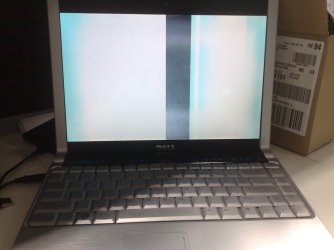
I have very recently installed W7 7100 64bit with little success. I can use the M1330 for about 20 minutes and then bam..... the lappy will turn off and when I try to turn it back on I get nothing but a weird white screen. Not even the dell boot screen will appear.

When I first installed W7 it found all drivers but due to this issue I have sought to change a few key drivers. Such as, the nVidia 8400 drivers and I have updated the SATA drivers to R154198

My specs are:
- 4 GB of RAM
- 2.4 CPU
- 200GB HD; 7200RPM
- nVidia 8400 Video card

I have heavily searched the net with no joy. please help.
 

My Computer

Computer Manufacturer/Model Number
Dell XPS M1330
OS
Windows 7 64bit 7100
CPU
Intel Core 2 Duo T7700 / 2.4 GHz
Memory
4GB
Graphics Card(s)
NVIDIA GeForce 8400M
Sound Card
Standard
Monitor(s) Displays
None
Screen Resolution
1280 X 800
Hard Drives
200GB 7200RPM
Case
Standard
Cooling
Standard
Keyboard
Standard
Mouse
Microsoft Arc mouse
Internet Speed
14MPS
Hi all,

I have very recently installed W7 7100 64bit with little success. I can use the M1330 for about 20 minutes and then bam..... the lappy will turn off and when I try to turn it back on I get nothing but a weird white screen. Not even the dell boot screen will appear.

When I first installed W7 it found all drivers but due to this issue I have sought to change a few key drivers. Such as, the nVidia 8400 drivers and I have updated the SATA drivers to R154198

My specs are:
- 4 GB of RAM
- 2.4 CPU
- 200GB HD; 7200RPM
- nVidia 8400 Video card

I have heavily searched the net with no joy. please help.

cs3130

FIRST hi and welcome to SF. we need a ton more info in order to narrow it down. Was it a clean install, 32 bit or 64, etc. We could help you much more quickly if you filled in your "my system specs" in user CP. If you search you can find instructions if you need them.
Do you have sleep or hibernate turned on, or maybe a screen saver.

Again welcome
Waiting on much more info

Ken
 

My Computer

Computer Manufacturer/Model Number
HP Pavillion dv-7 1005 Tx
OS
Win 8 Release candidate 8400
CPU
[email protected]
Memory
4 gigs
Graphics Card(s)
Nvidia 9600M
Sound Card
HD built-in
Monitor(s) Displays
17" Wxga
Screen Resolution
1440x900
Cooling
none
Internet Speed
45Mb down 5Mb up
Hey Ken,

Thanks for the warm welcome.

Yeah it was a Clean install of W7 7100 64 bit. I did not have a screen saver on but I did have a hibernate feature turned on but I don't believe that it ever too effect as the laptop was in use.

I actually installed a 32 bit version of W7 7100 first and it had the exact same issue so I upgraded to the 64 bit version.

I have updated my Laptop details to my best recollection as I am unable to turn on the laptop to get any more info.

I have also uploaded a picture of the white screen that i get on boot up. Does any of this info help?

Thanks again
 

Attachments

  • 11062009115.jpg
    11062009115.jpg
    301.9 KB · Views: 144
Last edited:

My Computer

Computer Manufacturer/Model Number
Dell XPS M1330
OS
Windows 7 64bit 7100
CPU
Intel Core 2 Duo T7700 / 2.4 GHz
Memory
4GB
Graphics Card(s)
NVIDIA GeForce 8400M
Sound Card
Standard
Monitor(s) Displays
None
Screen Resolution
1280 X 800
Hard Drives
200GB 7200RPM
Case
Standard
Cooling
Standard
Keyboard
Standard
Mouse
Microsoft Arc mouse
Internet Speed
14MPS
Are you dual booting or did you replace your previous o/s ( Vista?)

Anything come up if you try Safe Mode ( tap F8 repeatedly during POST)
 

My Computers

System One System Two

  • Computer type
    PC/Desktop
    OS
    7 X64
    CPU
    i5 8400
    Motherboard
    gigabyte b365m ds3h
    Memory
    2x8gb 3200mhz
    Hard Drives
    various
    PSU
    pure power 11 400w cm
    Case
    Coolermaster
    Cooling
    cryorig m9i
  • Computer type
    PC/Desktop
    OS
    7x64
    CPU
    g5400
    Motherboard
    ga b365m ds3h
    Memory
    8gb ddr4 2400
    PSU
    xfx pro 450w
No i didn't set it up for duel mode. I just totally replaced Vista.

its very hit and miss. It actually turns on and works great every now and then. BUT..... when it fails (and it fails most times) I dont get any options at all just that weird white screen straight from turn on.
 

My Computer

Computer Manufacturer/Model Number
Dell XPS M1330
OS
Windows 7 64bit 7100
CPU
Intel Core 2 Duo T7700 / 2.4 GHz
Memory
4GB
Graphics Card(s)
NVIDIA GeForce 8400M
Sound Card
Standard
Monitor(s) Displays
None
Screen Resolution
1280 X 800
Hard Drives
200GB 7200RPM
Case
Standard
Cooling
Standard
Keyboard
Standard
Mouse
Microsoft Arc mouse
Internet Speed
14MPS
Actually, do you think that W7 could have fried my video card??
 

My Computer

Computer Manufacturer/Model Number
Dell XPS M1330
OS
Windows 7 64bit 7100
CPU
Intel Core 2 Duo T7700 / 2.4 GHz
Memory
4GB
Graphics Card(s)
NVIDIA GeForce 8400M
Sound Card
Standard
Monitor(s) Displays
None
Screen Resolution
1280 X 800
Hard Drives
200GB 7200RPM
Case
Standard
Cooling
Standard
Keyboard
Standard
Mouse
Microsoft Arc mouse
Internet Speed
14MPS
Actually, do you think that W7 could have fried my video card??

I really doubt it. it would be the first time i have seen it.

ken
 

My Computer

Computer Manufacturer/Model Number
HP Pavillion dv-7 1005 Tx
OS
Win 8 Release candidate 8400
CPU
[email protected]
Memory
4 gigs
Graphics Card(s)
Nvidia 9600M
Sound Card
HD built-in
Monitor(s) Displays
17" Wxga
Screen Resolution
1440x900
Cooling
none
Internet Speed
45Mb down 5Mb up
Well, I have just got off the phone from dell and it looks like the Video card is dead. Looks like the install of W7 was the final straw for this old lappy.

Video card is getting replaed free as it is a known problem with the M1330.

Thanks again for all your help guys
 

My Computer

Computer Manufacturer/Model Number
Dell XPS M1330
OS
Windows 7 64bit 7100
CPU
Intel Core 2 Duo T7700 / 2.4 GHz
Memory
4GB
Graphics Card(s)
NVIDIA GeForce 8400M
Sound Card
Standard
Monitor(s) Displays
None
Screen Resolution
1280 X 800
Hard Drives
200GB 7200RPM
Case
Standard
Cooling
Standard
Keyboard
Standard
Mouse
Microsoft Arc mouse
Internet Speed
14MPS
hi man...
i got the exactly same system as urs and installed with Windows 7 recently... and i had come to the same problem as you...

even worse... cause my m1330 just falling out of warranty 2 months ago.
:(
this windows 7 really fried up the system? :(
 

My Computer

Computer Manufacturer/Model Number
Dell
OS
Windows 7
CPU
Centrino
I also got the same issue this morning - Looks like mine is also dead, bought mine in Feb 2008 :(
 

My Computer

Computer Manufacturer/Model Number
Dell XPS M1330
OS
windows7
CPU
CORE 2 DUO T7250 2.00GHz,800,2M
Memory
Memory Dual-Channel 2048MB (2x1024) 667MHz DDR2 SDRAM
Graphics Card(s)
128 MB NVIDIA GeForce 8400M GS
Monitor(s) Displays
13.3" WXGA (1280x800) White-LED Display with TrueLife¿
Hard Drives
160GB (7200RPM) SATA Hard Drive

My Computer

Computer Manufacturer/Model Number
Dell XPS M1330
OS
windows7
CPU
CORE 2 DUO T7250 2.00GHz,800,2M
Memory
Memory Dual-Channel 2048MB (2x1024) 667MHz DDR2 SDRAM
Graphics Card(s)
128 MB NVIDIA GeForce 8400M GS
Monitor(s) Displays
13.3" WXGA (1280x800) White-LED Display with TrueLife¿
Hard Drives
160GB (7200RPM) SATA Hard Drive
Dell XPS M1330 Windows 7

I've had the same issue. Spent hours and hours reformating, x32 and now x64, researching online, and then on phone with microsoft and Dell to resolve the issue. Found out through my research that XPS M1330 has overheating issue that will fry your video card, motherboard, etc. :cry: Apparently when installing Win 7, my PC was on for an extended period of time which speeded up the failure. Dell is sending out a tech to replace the fried parts. I have an extended 4 year warranty which is great, but if you don't, call Dell and inform them of your findings and they will reluctantly extend your warranty by 12 months and send out a tech. It is their issue due to their faulty design. Don't get me wrong, I love this powerfull, very pricey laptop. Good Luck!!! :)
 

My Computer

OS
Win 7 x 64
Back
Top