Dell Optiplex 980 Desktop Internal Speaker plays & External Speakers

kleis

New member
Local time
12:20 PM
Messages
32
Dell Optiplex 980 Desktop Internal Speaker plays & External Speakers

I have a Optiplex 980 desktop Intel 5 w/SSD and windows 7 Pro OS.
Strange thing about this computer's internal speaker that plays even with and while there are attached 2.1 speakers.
I use the Desktop's speaker icon in the sys tray at bottom right pocket of screen to adjust its volume control and then hand remote volume control on the Creative speakers.
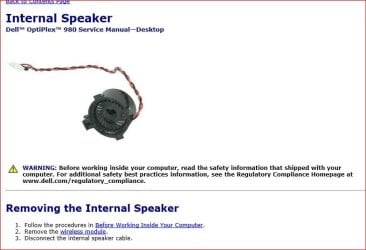
Any ideas or recommends to rectify this problem would be appreciated. (I can go back to shop where i purchased the computer, and plan to do so, unless i find strategic fix in the meantime). But it's out of Warranty as far as online Dell's site tech recommended going in and physically removing the cable to the attached speaker from the motherboard. While that's not too difficult from the diagram she used, I didn't really feel eager to try that since it is new as far as from where i purhcased and my friend's Microsoft Certified. I desired Windows 7 and he installed that, removed Windows 10 but retail doesn't do that same courtesy which is why i chose to go to him when i needed new computer after my other desktop (TMI) was "rained on" through a leaky ceiling. There went solar keyboard too, it looked kind of funny with water in the panels. Just a little info. there that's not necessary. Sorry.
Thanks for any helpful info. if so.
BTW the computer's onboard audio's Realtek High Def. (driver).
 

My Computer My Computer

At a glance

Win 7 Pro 64 bit Ultimate SP1 (2009)ADM Phenom 9650 Quad core 2.30 Ghz6 GBIntegrated
Computer type
PC/Desktop
Computer Manufacturer/Model Number
Custom
OS
Win 7 Pro 64 bit Ultimate SP1 (2009)
CPU
ADM Phenom 9650 Quad core 2.30 Ghz
Motherboard
Biostar
Memory
6 GB
Graphics Card(s)
Integrated
Monitor(s) Displays
Dell
Antivirus
Microsoft Essentials
Browser
IE11
The internal speaker is on a small 5 pin connector. All you have to do is open the case (with the PC powered off) and disconnect that 5 pin connector.
 

Attachments

  • Capture.JPG
    Capture.JPG
    43.5 KB · Views: 3

My Computer My Computer

At a glance

Windows 10 64 bitIntel i7 6700K16GB Corsair DominatorIntel CPU Graphics
Computer type
PC/Desktop
Computer Manufacturer/Model Number
My Own Build
OS
Windows 10 64 bit
CPU
Intel i7 6700K
Motherboard
ASUS ROG Maximus VIII Hero
Memory
16GB Corsair Dominator
Graphics Card(s)
Intel CPU Graphics
Sound Card
RealTek
Monitor(s) Displays
27" Dell S2719dgf
Screen Resolution
2560X1440
Hard Drives
1 TB Samsung 850 EVO SSD for Win 10 Pro
500GB Samsung 850 EVO SSD for Win 10 Insider
2 TB drive for backup
PSU
EVGA Supernova 750G2
Case
BeQuiet Silent Base 600
Cooling
Deepcool Captain 120EX
Keyboard
Microsoft Wireless 2000
Mouse
Microsoft wireless
Internet Speed
100 MB/sec (Cable)
Antivirus
Microsoft Defender and Malwarebytes
Browser
Edge/Firefox
Other Info
Cakewalk (Sonar) by BandLab and Studio One 4.1 Pro recording studio software. MOTU 896Mk3 Hybrid recording interface, Frontier Tranzport wireless control unit, Behringer X-Touch Control Surface.
Five USB connected optical drives for CD Audio production using Nero BurningROM
firebred, Thank ya for your input.
Your method is identical or the same 'fix' that Dell website's tech gave for dis-engaging cable from the mobo of the internal speaker.
I guess that is the only solution, as I've projected this same topic in a couple other forums and 1 response came w/same as yours, Dell's and so it is. I don't mind the int. spkr. for the start up and shutdown sounds as far as that is and i kind of got used to adjusting both volume controls and sort of balance it out by having all 3 play.
What's a little strange about this computer's not a lot of online input or information about it like i would expect as far as straight search from Start Page (or that is, Google).

Thanks again*


kleis
 

My Computer My Computer

At a glance

Win 7 Pro 64 bit Ultimate SP1 (2009)ADM Phenom 9650 Quad core 2.30 Ghz6 GBIntegrated
Computer type
PC/Desktop
Computer Manufacturer/Model Number
Custom
OS
Win 7 Pro 64 bit Ultimate SP1 (2009)
CPU
ADM Phenom 9650 Quad core 2.30 Ghz
Motherboard
Biostar
Memory
6 GB
Graphics Card(s)
Integrated
Monitor(s) Displays
Dell
Antivirus
Microsoft Essentials
Browser
IE11
The OptiPlex line are "business" computers. Thus not the info available that consumer/home computers would get. Many PC's used in offices do not have external speakers connected, thus the small internal is all that is used.
 

My Computer My Computer

At a glance

Windows 10 64 bitIntel i7 6700K16GB Corsair DominatorIntel CPU Graphics
Computer type
PC/Desktop
Computer Manufacturer/Model Number
My Own Build
OS
Windows 10 64 bit
CPU
Intel i7 6700K
Motherboard
ASUS ROG Maximus VIII Hero
Memory
16GB Corsair Dominator
Graphics Card(s)
Intel CPU Graphics
Sound Card
RealTek
Monitor(s) Displays
27" Dell S2719dgf
Screen Resolution
2560X1440
Hard Drives
1 TB Samsung 850 EVO SSD for Win 10 Pro
500GB Samsung 850 EVO SSD for Win 10 Insider
2 TB drive for backup
PSU
EVGA Supernova 750G2
Case
BeQuiet Silent Base 600
Cooling
Deepcool Captain 120EX
Keyboard
Microsoft Wireless 2000
Mouse
Microsoft wireless
Internet Speed
100 MB/sec (Cable)
Antivirus
Microsoft Defender and Malwarebytes
Browser
Edge/Firefox
Other Info
Cakewalk (Sonar) by BandLab and Studio One 4.1 Pro recording studio software. MOTU 896Mk3 Hybrid recording interface, Frontier Tranzport wireless control unit, Behringer X-Touch Control Surface.
Five USB connected optical drives for CD Audio production using Nero BurningROM
I'd have a look at the BIOS options. Also have a look in Device manager under Sound video and game controllers. You might get lucky and see it listed. Go to the View tab and enable show hidden devices. If it is listed disable it. Disabling it in Windows it should still work on the POST and be quiet in Windows.

Just found this might help. http://www.computerhope.com/issues/ch000725.htm
 

My Computer My Computer

At a glance

Windows 10 Education 64 bitAMD Phenom II X4 980 Black Edition Deneb 3.7GHz8GB 4GBx2 Kingston PC10600 DDR3 1333 MemoryZotac NVIDIA Geforce GT640 2 Gig DDR3 PCIe
Computer type
PC/Desktop
Computer Manufacturer/Model Number
Home Built
OS
Windows 10 Education 64 bit
CPU
AMD Phenom II X4 980 Black Edition Deneb 3.7GHz
Motherboard
Asus M4N68T-M V2 µATX Motherboard
Memory
8GB 4GBx2 Kingston PC10600 DDR3 1333 Memory
Graphics Card(s)
Zotac NVIDIA Geforce GT640 2 Gig DDR3 PCIe
Sound Card
VIA VT1708s High Definition Audio 8-channel Onboard
Monitor(s) Displays
22" LG E2242 1080p and 2 19" I-INC AG191D
Screen Resolution
1280x1024 - 1920x1080 - 1280x1024
Hard Drives
Crucial M100 256 GB SSD and 500 GB WD Blue SATA
PSU
Thermaltake TR 620
Case
Power Up Black ATX Mid-Tower Case
Cooling
Stock heatsink and fan
Keyboard
Logitech Wireless K350 Wave
Mouse
Logitech Wireless M570 Trackman Wheel
Internet Speed
80 Mbps Down 30 Mbps Up
Antivirus
Windows Defender
Browser
Internet Explorer 11
Other Info
HP DVD1040e Lightscribe - External USB2
Thanks for the time in taking to look at my topic and provide your ideas and i've seen this article too. You know when it comes to Bios, it's really not like my other computer's Bios, well, i mean they are all about the same but it's not like "onboard audio"s coming out anywhere. Something firebred has said echos loudly now, this is particular business computer-fied and i wasn't so aware of that when i purchased it. Mine got damaged from rain (leaky celing) and i mean it got showered. So did the solar keyboard Logitech i had and these 2 solar panels on it (it is a neat keyboard or was) the two panels when i picked it up looked or reminded me of an aqarium of ... well, there was water in both panels like not full but enough that if i took my finger alongside the panel or like when you were little and maybe on a frosted window...oh well TMI the idea was the water would run seemingly move alongside my finger as i pressed on the panel and then when i removed fingers from panel it would jump back into the little corners of the panels. :| i wasn't too happy that night. Well, anyway, a week later or the next weekend after not having a computer at all....i went to a friend's shop and we discussed what he had and i text him this issue i am having and didn't hear back. He's not like avoiding me and would gladly see me if i take computer over but i wanted to delve into Dell and find out on my own and what i can do. Now i wonder if its.... can i add a sound card to enhance or turn this into a normal computer? because some article i read, was about the corporations or people who bought this particular model/make was happy with the internal speaker as functioning loud enough for business.. well, but i need some loud music and videos....after hours. or after corporate 5 o'clock. I mean it doesn't sound too bad or for the most part, it's normal. Someone advised someone else on forum to go into Bios and disengage the ... oh what's the abbreviated.... CITES...or something like that it has to do with (i believe for gamers...gamers bought this too...hmm) but it's helped them i guess to overclock it or enable it and someone said that sound was muffled and that's when they advised about unticking those particulars in Bios and i found it alright but i kind of drifted the thought of doing that or it's not something i'm ready to go exploring right now, and if anything, i can talk to the shop guy where i bought it.
Thanks again Man!
 

My Computer My Computer

At a glance

Win 7 Pro 64 bit Ultimate SP1 (2009)ADM Phenom 9650 Quad core 2.30 Ghz6 GBIntegrated
Computer type
PC/Desktop
Computer Manufacturer/Model Number
Custom
OS
Win 7 Pro 64 bit Ultimate SP1 (2009)
CPU
ADM Phenom 9650 Quad core 2.30 Ghz
Motherboard
Biostar
Memory
6 GB
Graphics Card(s)
Integrated
Monitor(s) Displays
Dell
Antivirus
Microsoft Essentials
Browser
IE11
firebird,
You are right on about the business computer line of this particular model, i just told my input about that in alphanumeric's reply to mine and i'm wondering if it is compatible for installling sound card (?) or would that make noticeable difference, etc...(?)
 

My Computer My Computer

At a glance

Win 7 Pro 64 bit Ultimate SP1 (2009)ADM Phenom 9650 Quad core 2.30 Ghz6 GBIntegrated
Computer type
PC/Desktop
Computer Manufacturer/Model Number
Custom
OS
Win 7 Pro 64 bit Ultimate SP1 (2009)
CPU
ADM Phenom 9650 Quad core 2.30 Ghz
Motherboard
Biostar
Memory
6 GB
Graphics Card(s)
Integrated
Monitor(s) Displays
Dell
Antivirus
Microsoft Essentials
Browser
IE11
In the early days of computing a PC speaker was actually a PC speaker. It was a small speaker usually mounted in the case. It plugged into the motherboard with a 4 pin header. All sound went through it. Even game sounds. A plug in real sound card was optional.
These days its still called a PC speaker but more often than not it just a little piezo electric buzzer. Often soldered right to the motherboard. All its meant for is BOS beep codes, over temp alarms etc. On my motherboards that's all it does, is beep. You can't play any other sounds through it. You wouldn't want to anyway as they would sound terrible. All other sounds go through the onboard sound card that isn't connected to the buzzer.
If it was me I'd want real stereo speakers, and to stop anything but beeps from going to the other one. If that wasn't possible I'd just unplug it.
 

My Computer My Computer

At a glance

Windows 10 Education 64 bitAMD Phenom II X4 980 Black Edition Deneb 3.7GHz8GB 4GBx2 Kingston PC10600 DDR3 1333 MemoryZotac NVIDIA Geforce GT640 2 Gig DDR3 PCIe
Computer type
PC/Desktop
Computer Manufacturer/Model Number
Home Built
OS
Windows 10 Education 64 bit
CPU
AMD Phenom II X4 980 Black Edition Deneb 3.7GHz
Motherboard
Asus M4N68T-M V2 µATX Motherboard
Memory
8GB 4GBx2 Kingston PC10600 DDR3 1333 Memory
Graphics Card(s)
Zotac NVIDIA Geforce GT640 2 Gig DDR3 PCIe
Sound Card
VIA VT1708s High Definition Audio 8-channel Onboard
Monitor(s) Displays
22" LG E2242 1080p and 2 19" I-INC AG191D
Screen Resolution
1280x1024 - 1920x1080 - 1280x1024
Hard Drives
Crucial M100 256 GB SSD and 500 GB WD Blue SATA
PSU
Thermaltake TR 620
Case
Power Up Black ATX Mid-Tower Case
Cooling
Stock heatsink and fan
Keyboard
Logitech Wireless K350 Wave
Mouse
Logitech Wireless M570 Trackman Wheel
Internet Speed
80 Mbps Down 30 Mbps Up
Antivirus
Windows Defender
Browser
Internet Explorer 11
Other Info
HP DVD1040e Lightscribe - External USB2
Back
Top