Internal Speaker Dell 980 Optiplex SFF

kleis

New member
Local time
12:20 AM
Messages
32
If i disassemble or take out the internal speaker on a Dell Optiplex 980 SFF so that i can finally default my computer speakers, will i necessarily have sound or the sound will automatically go the speaker port of the computer speakers? Because as it is and was since I bought this Dell SFF 980 (this year) at local shop, the internal speaker takes full charge and it has to be where the computer speakers will only work or play if i handle the volume on the internal speaker and the computer speakers are the old Creative 2.1 that has its own volume control separately so they co-exist.

So my question is that, to take out the internal speaker which was Dell's forum site's tech that advised and showed a diagram of how to do it, the only thing is that's what i wondered if losing the internal speaker since it seems to carry so much weight and i can't handle the on and on of having to turn the volume down after it defaults to full blast at every time i either log off or go to play a video. I would have never purchased this ....computer had i known it just wasn't made for sounds or video and music as much as it was for corporate environment. But i was hurried to buy computer and a friend has a local shop that i could take it back and ask that they do it but i'd rather not. So if any recommendations or if to answer that question, thanks a lot!
 

My Computer My Computer

Computer type
PC/Desktop
Computer Manufacturer/Model Number
Custom
OS
Win 7 Pro 64 bit Ultimate SP1 (2009)
CPU
ADM Phenom 9650 Quad core 2.30 Ghz
Motherboard
Biostar
Memory
6 GB
Graphics Card(s)
Integrated
Monitor(s) Displays
Dell
Antivirus
Microsoft Essentials
Browser
IE11
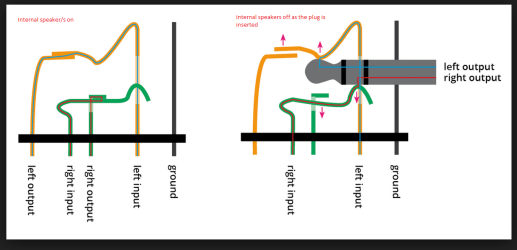
So I have it right what you are saying is that the machine defaults to full volume on the onboard audio and you have to turn it down even when the external system is plugged in. Now I ask because if you keep the external system plugged in it should automatically cut off the internal speaker/s because the socket you plug the external system into has a cut out switch for the internal speaker/s if that doesn't happen then something is really quite wrong with that socket.
Now some of the older machines sockets you can see those contacts exposed and if so you will see what happens when you insert the plug for the external system and you should see a small contacy move out of the way as the plug is inserted. see pic
 

Attachments

  • SWITCH.PNG
    SWITCH.PNG
    37.6 KB · Views: 0

My Computer My Computer

Computer type
PC/Desktop
Computer Manufacturer/Model Number
Own build (new) Desk1 / Asus ROG Win 7 / Desk2 1st build
OS
Desk1 7 Home Prem / Desk2 10 Pro / Main lap Asus ROG 10 Pro 2 laptop Toshiba 7 Pro Asus P2520 7 & 10
CPU
Desk1 i5 3750K / Laptop i7 GTX 860M / Desk2 i5 2500
Motherboard
Desk1 Asus P877-V / Desk2 Gigabyte H67 UD3H / Laptop ?
Memory
Desk1 8GB (1866) / Desk2 16GB (1333) / Laptop 8Gb DDR3
Graphics Card(s)
Desk 1& 2NVidia GTX 650 & Laptops on board Intel
Sound Card
Desk 1 & 2 -XONAR DG Realtek High Def audio Laptop
Monitor(s) Displays
Desk 1 Benq HD 2450 / Desk2 Philips 24" / Laptop 17.5"
Screen Resolution
1920x1080 D1 & D2 & Laptop 1
Hard Drives
Desk1 Samsung 120GB 830 SSD
Asus ROG 256GB 850 Pro SSD
Desk2 Samsung 840 256 SSD
Toshiba 120GB EVO
PSU
Desk 1 Corsair HX 1050/ Laptop ? / Desk 2 Corsair HX 650
Case
Desk 1 Cooler HAF XM ? Toshiba laptop / Desk2 Coolermaster
Cooling
Fans on all Desk1 -2 Desk2 - all Coolermasters 5 Laptop ?
Keyboard
Desk 1 MS Sidewinder X6 Desk 2 MS Sidewinder X 4
Mouse
Desk 1&2 - Gigabyte MS 900 gamer - laptop - Logitec wireless
Internet Speed
ADSL2+
Other Info
One other Desktop (tester) and spare Toshba laptop both with SSD's
Running Kaspersky 2016 ISS on all machines config'd identically
Logitec audio stereo systems on each machine (x3)
Canon MG5250MFC
Router/modem TP-Link running WPA2SK
I think I see what you mean by your diagram and thanks for sharing. Yes, I'm not really sure how this computer's set up and the idea that came in by Dell's (forum) tech, was just to undo the internal speaker and take it out. That would, of course, stop the activity but that's where i wanted to be sure i would be able to have sound from my computer speakers (then) because as it is, i can't operate the volume control on the external 2.1 speakers I have unless or until i have the computer's volume to the internal speaker adjusted. And like I say, they both have to be playing in order for any sound, which sounds pretty messed up to say the least. And it was new computer i bought from local friend's shop but i didn't want to go back and talk to him about even though, i'm sure he could fix or the like...Anyway, that's the gist of it and because it's a small form factor computer, it's the mini tower and there's only the speaker and the mic sockets or ports to plug into and so, it looks like that much is correct or as far as using the speaker port.
 

My Computer My Computer

Computer type
PC/Desktop
Computer Manufacturer/Model Number
Custom
OS
Win 7 Pro 64 bit Ultimate SP1 (2009)
CPU
ADM Phenom 9650 Quad core 2.30 Ghz
Motherboard
Biostar
Memory
6 GB
Graphics Card(s)
Integrated
Monitor(s) Displays
Dell
Antivirus
Microsoft Essentials
Browser
IE11
Ok I too can see what you mean ie if you remove the internal speaker the external will always be at full throttle when the machine is powered up because of the lack of a volume control on them.

Now of course a simple remedy would be to get an external system that comes with some form of amplifier built in and it's own dedicated volume control, and to be honest if it were me I would do just that and cut out the grief by taking out or disconnecting the internal speaker.

Now it is your choice and budget but I can thoroughly recommend Logitec systems ass they are cheap enough depending on what level of performance you need so check these out.

Logitech Z506 Speakers - Newegg.com
Logitech Speaker System Z313 - LOG980000382 - Newegg.com
Logitech Z200 Multimedia 2.0 Stereo Speakers - LOG980000800 - Newegg.com

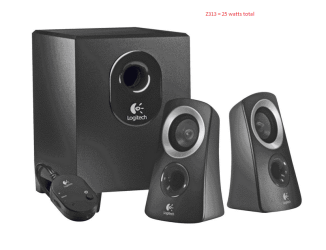
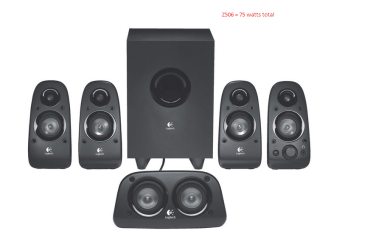
Now the first and second systems systems I have both on my machines the most expensive - Z506 will blow you away the Z313 is more than powerful enough for an average user the Z200 I don't know much about but at 5watts a channel I would suspect be plenty for you and like I said save you the grief.
Personally I think you would be more than happy with the Z313 system

See what you think
 

My Computer My Computer

Computer type
PC/Desktop
Computer Manufacturer/Model Number
Own build (new) Desk1 / Asus ROG Win 7 / Desk2 1st build
OS
Desk1 7 Home Prem / Desk2 10 Pro / Main lap Asus ROG 10 Pro 2 laptop Toshiba 7 Pro Asus P2520 7 & 10
CPU
Desk1 i5 3750K / Laptop i7 GTX 860M / Desk2 i5 2500
Motherboard
Desk1 Asus P877-V / Desk2 Gigabyte H67 UD3H / Laptop ?
Memory
Desk1 8GB (1866) / Desk2 16GB (1333) / Laptop 8Gb DDR3
Graphics Card(s)
Desk 1& 2NVidia GTX 650 & Laptops on board Intel
Sound Card
Desk 1 & 2 -XONAR DG Realtek High Def audio Laptop
Monitor(s) Displays
Desk 1 Benq HD 2450 / Desk2 Philips 24" / Laptop 17.5"
Screen Resolution
1920x1080 D1 & D2 & Laptop 1
Hard Drives
Desk1 Samsung 120GB 830 SSD
Asus ROG 256GB 850 Pro SSD
Desk2 Samsung 840 256 SSD
Toshiba 120GB EVO
PSU
Desk 1 Corsair HX 1050/ Laptop ? / Desk 2 Corsair HX 650
Case
Desk 1 Cooler HAF XM ? Toshiba laptop / Desk2 Coolermaster
Cooling
Fans on all Desk1 -2 Desk2 - all Coolermasters 5 Laptop ?
Keyboard
Desk 1 MS Sidewinder X6 Desk 2 MS Sidewinder X 4
Mouse
Desk 1&2 - Gigabyte MS 900 gamer - laptop - Logitec wireless
Internet Speed
ADSL2+
Other Info
One other Desktop (tester) and spare Toshba laptop both with SSD's
Running Kaspersky 2016 ISS on all machines config'd identically
Logitec audio stereo systems on each machine (x3)
Canon MG5250MFC
Router/modem TP-Link running WPA2SK
I'll check these out Buddy and Thanks a lot for your input. The external sound cards i was looking at, of course, Creative has some nice looking ones but I will definitely give this whole set up a solidified change soon and will be happier i'm sure to anchor this down in a better setup and one of the Klipish (spelling ..(?)) 2.1 pro media speakers was what i admired and thought about for real as far as getting a new speakers system since getting a new computer.
I have not looked as i type this (yet) and will take a good one tomorrow at these hints.
Meanwhile, again, thanks for your helpful hints. The idea of external plays probably a lot better because of the small form mini tower of this computer and it is pretty good!!

I'll start up with what you are giving off of Z313 system to being hot and as you said, removing the internal (and as Dell suggested) should be the first thing to do, upon that is, checking out and hopefully establishing a new speaker set.
So, i'll be in touch if it's cool to sort of show or tell what's the outcome. So it sounds like you have a couple different machines. The sounds that i'm used to or have been better in the past due to the other computer that i had but was lost during a ceiling leak after it rained finally out here (LA area) or as i said once it was 'allowed' to rain it did and it showered my poor Biostar mobo to the point of it looked like almost a checker or black and white sort of chess/checker or that kind of colored speckle like or whatever but the onboard audio was great and this one on Dell or from the Bios in looking at it, there is no audio even listed or at least from my understanding and that's kind of weird stuff too, but then again, if it's only the internal speaker wouldn't that just be about right that nothing elablorate or that's ... hardware class or subject that may be too deep right now and i'll just keep this more related to the surface of taking care of getting a hold of better quality sound and control and then talk about all that maybe in another ... Seven time :)

Thanks again and catch ya later, Take Care
 

My Computer My Computer

Computer type
PC/Desktop
Computer Manufacturer/Model Number
Custom
OS
Win 7 Pro 64 bit Ultimate SP1 (2009)
CPU
ADM Phenom 9650 Quad core 2.30 Ghz
Motherboard
Biostar
Memory
6 GB
Graphics Card(s)
Integrated
Monitor(s) Displays
Dell
Antivirus
Microsoft Essentials
Browser
IE11
Ok I think it might well be on the way to being resolved and personally I prefer the Logitec I have noticed from previous issues that Creative support is the best but it is you budget and choice.

Now if it were me I would also consider if there is room inside the machine adding a sound card I like the Asus Xonar DSX not expensive and the GUI is just fantastic but again the choice is yours. THis would solve a lot of problems full stop because adding card switches off the on board audio see the specs on this
ASUS Xonar DSX Audio Card - Newegg.com
 

My Computer My Computer

Computer type
PC/Desktop
Computer Manufacturer/Model Number
Own build (new) Desk1 / Asus ROG Win 7 / Desk2 1st build
OS
Desk1 7 Home Prem / Desk2 10 Pro / Main lap Asus ROG 10 Pro 2 laptop Toshiba 7 Pro Asus P2520 7 & 10
CPU
Desk1 i5 3750K / Laptop i7 GTX 860M / Desk2 i5 2500
Motherboard
Desk1 Asus P877-V / Desk2 Gigabyte H67 UD3H / Laptop ?
Memory
Desk1 8GB (1866) / Desk2 16GB (1333) / Laptop 8Gb DDR3
Graphics Card(s)
Desk 1& 2NVidia GTX 650 & Laptops on board Intel
Sound Card
Desk 1 & 2 -XONAR DG Realtek High Def audio Laptop
Monitor(s) Displays
Desk 1 Benq HD 2450 / Desk2 Philips 24" / Laptop 17.5"
Screen Resolution
1920x1080 D1 & D2 & Laptop 1
Hard Drives
Desk1 Samsung 120GB 830 SSD
Asus ROG 256GB 850 Pro SSD
Desk2 Samsung 840 256 SSD
Toshiba 120GB EVO
PSU
Desk 1 Corsair HX 1050/ Laptop ? / Desk 2 Corsair HX 650
Case
Desk 1 Cooler HAF XM ? Toshiba laptop / Desk2 Coolermaster
Cooling
Fans on all Desk1 -2 Desk2 - all Coolermasters 5 Laptop ?
Keyboard
Desk 1 MS Sidewinder X6 Desk 2 MS Sidewinder X 4
Mouse
Desk 1&2 - Gigabyte MS 900 gamer - laptop - Logitec wireless
Internet Speed
ADSL2+
Other Info
One other Desktop (tester) and spare Toshba laptop both with SSD's
Running Kaspersky 2016 ISS on all machines config'd identically
Logitec audio stereo systems on each machine (x3)
Canon MG5250MFC
Router/modem TP-Link running WPA2SK
I like the idea and from a thread on this on another site when i first found this problem it was intro'd of a link to the same Asus Xonar sound card and there is room i believe and if i do decide on that, i'd go for the 99-dollar one because of the upgrade altogether i bet would be a good topper to this computer's sound. Also, i like the Logitech speakers and from the specs of this computer i believe it is the PCI-E x16 is the description that I have. And there's (as I understand it) generally a PCI express and just PCI (slot(s)) and mine must be the 'e' or the PCI e because of the size that can accommodate that Asus Sound card.
I have to tell ya though, those Klipisch pro media 2.1 speakers for a little over 100 well ya and a half that is, but those really do appear to be (still) the prize of the pick if i get to get that far.
Meanwhile, the sound card sounds most appealing if it works. I had bought a creative sound card to add to my old computer and to tell ya the truth, it was better onboard audio already (that i had / Biostar motherboard) and i scratched that idea. But in this case, there's not the onboard rich audio featured and therefore, as you know or can see that that is where i'm just putting together these good ideas!
 

My Computer My Computer

Computer type
PC/Desktop
Computer Manufacturer/Model Number
Custom
OS
Win 7 Pro 64 bit Ultimate SP1 (2009)
CPU
ADM Phenom 9650 Quad core 2.30 Ghz
Motherboard
Biostar
Memory
6 GB
Graphics Card(s)
Integrated
Monitor(s) Displays
Dell
Antivirus
Microsoft Essentials
Browser
IE11
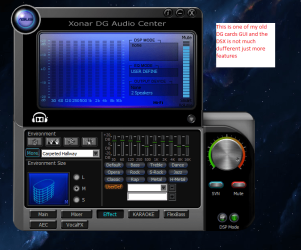
Well again personally if space is not an issue I would be hooking up the Logitec Z506 - it can be a 7:1 system for just a bit more and heaps of sound to the Asus sound card because the interface for it has a brilliant control panel that you can have on screen to produce effects, mix sound, control frequencies, and is generally a really quality sound and I am VERY fussy when it comes to audio.
Now the Z313 is good don't get me wrong but you are limited to two side speakers and one "sub" woofer where the Z506 has 2x left speakers 2x right speakers a sub woofer and a central twin speaker set. see pics

The sound card only needs one of the smaller PCI slots too so can be mounted away form the GPU etc .
 

Attachments

  • LOGITEC 313.PNG
    LOGITEC 313.PNG
    89.5 KB · Views: 0
  • LOGITEC 506.PNG
    LOGITEC 506.PNG
    58 KB · Views: 0

My Computer My Computer

Computer type
PC/Desktop
Computer Manufacturer/Model Number
Own build (new) Desk1 / Asus ROG Win 7 / Desk2 1st build
OS
Desk1 7 Home Prem / Desk2 10 Pro / Main lap Asus ROG 10 Pro 2 laptop Toshiba 7 Pro Asus P2520 7 & 10
CPU
Desk1 i5 3750K / Laptop i7 GTX 860M / Desk2 i5 2500
Motherboard
Desk1 Asus P877-V / Desk2 Gigabyte H67 UD3H / Laptop ?
Memory
Desk1 8GB (1866) / Desk2 16GB (1333) / Laptop 8Gb DDR3
Graphics Card(s)
Desk 1& 2NVidia GTX 650 & Laptops on board Intel
Sound Card
Desk 1 & 2 -XONAR DG Realtek High Def audio Laptop
Monitor(s) Displays
Desk 1 Benq HD 2450 / Desk2 Philips 24" / Laptop 17.5"
Screen Resolution
1920x1080 D1 & D2 & Laptop 1
Hard Drives
Desk1 Samsung 120GB 830 SSD
Asus ROG 256GB 850 Pro SSD
Desk2 Samsung 840 256 SSD
Toshiba 120GB EVO
PSU
Desk 1 Corsair HX 1050/ Laptop ? / Desk 2 Corsair HX 650
Case
Desk 1 Cooler HAF XM ? Toshiba laptop / Desk2 Coolermaster
Cooling
Fans on all Desk1 -2 Desk2 - all Coolermasters 5 Laptop ?
Keyboard
Desk 1 MS Sidewinder X6 Desk 2 MS Sidewinder X 4
Mouse
Desk 1&2 - Gigabyte MS 900 gamer - laptop - Logitec wireless
Internet Speed
ADSL2+
Other Info
One other Desktop (tester) and spare Toshba laptop both with SSD's
Running Kaspersky 2016 ISS on all machines config'd identically
Logitec audio stereo systems on each machine (x3)
Canon MG5250MFC
Router/modem TP-Link running WPA2SK
Hi
Hey i have to say that when you say it like that how you are picky when it comes to sounds, it may be worthwhile to check out the Logitec speaker system and i don't know about the Z506 because i have small space, but if to start with the Asus sound card and if it's what you say it is, and sounds cool to have the dash board-like to play around with the various audio sound feats, that does sound like the way to go! And i bet with the right system, this motherboard could kick it up to get the sound blasting out of this model of computer.
 

My Computer My Computer

Computer type
PC/Desktop
Computer Manufacturer/Model Number
Custom
OS
Win 7 Pro 64 bit Ultimate SP1 (2009)
CPU
ADM Phenom 9650 Quad core 2.30 Ghz
Motherboard
Biostar
Memory
6 GB
Graphics Card(s)
Integrated
Monitor(s) Displays
Dell
Antivirus
Microsoft Essentials
Browser
IE11
Hiyya kleis mate a pic of my older DG GUI it is the same in the DSX only it has more features and as you can see there are loads of functions for virtually moving speakers around etc so it is a shame you cannot get the Z506.

This is one of my favourite setting but there are heaps to choose from and make up yourself
 

Attachments

  • XONAR.PNG
    XONAR.PNG
    102.6 KB · Views: 5

My Computer My Computer

Computer type
PC/Desktop
Computer Manufacturer/Model Number
Own build (new) Desk1 / Asus ROG Win 7 / Desk2 1st build
OS
Desk1 7 Home Prem / Desk2 10 Pro / Main lap Asus ROG 10 Pro 2 laptop Toshiba 7 Pro Asus P2520 7 & 10
CPU
Desk1 i5 3750K / Laptop i7 GTX 860M / Desk2 i5 2500
Motherboard
Desk1 Asus P877-V / Desk2 Gigabyte H67 UD3H / Laptop ?
Memory
Desk1 8GB (1866) / Desk2 16GB (1333) / Laptop 8Gb DDR3
Graphics Card(s)
Desk 1& 2NVidia GTX 650 & Laptops on board Intel
Sound Card
Desk 1 & 2 -XONAR DG Realtek High Def audio Laptop
Monitor(s) Displays
Desk 1 Benq HD 2450 / Desk2 Philips 24" / Laptop 17.5"
Screen Resolution
1920x1080 D1 & D2 & Laptop 1
Hard Drives
Desk1 Samsung 120GB 830 SSD
Asus ROG 256GB 850 Pro SSD
Desk2 Samsung 840 256 SSD
Toshiba 120GB EVO
PSU
Desk 1 Corsair HX 1050/ Laptop ? / Desk 2 Corsair HX 650
Case
Desk 1 Cooler HAF XM ? Toshiba laptop / Desk2 Coolermaster
Cooling
Fans on all Desk1 -2 Desk2 - all Coolermasters 5 Laptop ?
Keyboard
Desk 1 MS Sidewinder X6 Desk 2 MS Sidewinder X 4
Mouse
Desk 1&2 - Gigabyte MS 900 gamer - laptop - Logitec wireless
Internet Speed
ADSL2+
Other Info
One other Desktop (tester) and spare Toshba laptop both with SSD's
Running Kaspersky 2016 ISS on all machines config'd identically
Logitec audio stereo systems on each machine (x3)
Canon MG5250MFC
Router/modem TP-Link running WPA2SK
X cellent! I can get the bigger line up if there's cables to go around the room i have and probably plop a couple speakers toward the upper ceiling/wall corners too. It's a 1-room self contained little place. I could hear Beatport and Sound Cloud richer too, i bet!
 

My Computer My Computer

Computer type
PC/Desktop
Computer Manufacturer/Model Number
Custom
OS
Win 7 Pro 64 bit Ultimate SP1 (2009)
CPU
ADM Phenom 9650 Quad core 2.30 Ghz
Motherboard
Biostar
Memory
6 GB
Graphics Card(s)
Integrated
Monitor(s) Displays
Dell
Antivirus
Microsoft Essentials
Browser
IE11
Well why settle for the 313 if the 506 will or can be fitted you wil fin the connection cables a reasonable length too, If my memory serves me right there wasn't that much difference in the prices either although that Newegg site seems to have several different pricings and I have no idea what it is all about to be honest
logitec z506 - Newegg.com

logitec z313 - Newegg.com

Now I know that site does sell new and refurbished and I would urge you you to steer clear of anything that has been refurbed.
 

My Computer My Computer

Computer type
PC/Desktop
Computer Manufacturer/Model Number
Own build (new) Desk1 / Asus ROG Win 7 / Desk2 1st build
OS
Desk1 7 Home Prem / Desk2 10 Pro / Main lap Asus ROG 10 Pro 2 laptop Toshiba 7 Pro Asus P2520 7 & 10
CPU
Desk1 i5 3750K / Laptop i7 GTX 860M / Desk2 i5 2500
Motherboard
Desk1 Asus P877-V / Desk2 Gigabyte H67 UD3H / Laptop ?
Memory
Desk1 8GB (1866) / Desk2 16GB (1333) / Laptop 8Gb DDR3
Graphics Card(s)
Desk 1& 2NVidia GTX 650 & Laptops on board Intel
Sound Card
Desk 1 & 2 -XONAR DG Realtek High Def audio Laptop
Monitor(s) Displays
Desk 1 Benq HD 2450 / Desk2 Philips 24" / Laptop 17.5"
Screen Resolution
1920x1080 D1 & D2 & Laptop 1
Hard Drives
Desk1 Samsung 120GB 830 SSD
Asus ROG 256GB 850 Pro SSD
Desk2 Samsung 840 256 SSD
Toshiba 120GB EVO
PSU
Desk 1 Corsair HX 1050/ Laptop ? / Desk 2 Corsair HX 650
Case
Desk 1 Cooler HAF XM ? Toshiba laptop / Desk2 Coolermaster
Cooling
Fans on all Desk1 -2 Desk2 - all Coolermasters 5 Laptop ?
Keyboard
Desk 1 MS Sidewinder X6 Desk 2 MS Sidewinder X 4
Mouse
Desk 1&2 - Gigabyte MS 900 gamer - laptop - Logitec wireless
Internet Speed
ADSL2+
Other Info
One other Desktop (tester) and spare Toshba laptop both with SSD's
Running Kaspersky 2016 ISS on all machines config'd identically
Logitec audio stereo systems on each machine (x3)
Canon MG5250MFC
Router/modem TP-Link running WPA2SK
Back
Top