Dell Printer Scan Driver Not Installing

lisa74

New member
Local time
8:15 PM
Messages
1
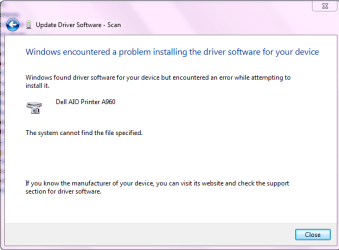
I recently bought a Dell AIO A960 at a garage sale and it didn't have a driver disc, but I thought nothing of it as I would just download them online. I downloaded them from Dell Support and saw that there were no Windows 7 drivers, just vista x32. I tried them anyway and while my computer says that it can print on it, the scan driver refuses to install. I found the directory where the scan driver is located in the install folder, and the installer says that it installed successfully, but then Windows says I need to troubleshoot and it tells me there is no Scan driver. I tried forcing Device Manager to use the directory where the driver was located to install it, but it just told me "Cannot Find File". I don't know any other ways for it to install. Anyone know how to fix this? Thanks,
-Lisa

Edit: I attached a screenshot of the message when I point Device Manager at the driver.
 

Attachments
  • DellA960.PNG
    DellA960.PNG
    15.5 KB · Views: 4

My Computer

OS
Windows 7 Home Premium x64
Lisa74, welcome to the windows 7 forum.

One problem with scanners is that they are wierd beasts and are very particular in the software to make them work correctly. It looks to me that your vista32 drivers won't work correctly with your 64 bit version of windows 7.

Me thinks your out of luck. Sorry to be the bearer of bad tidings :(
Rich
 

My Computer

Computer type
Laptop
Computer Manufacturer/Model Number
Toshiba Laptop Qosimo X870
OS
Windows 7 Pro x64 SP1
CPU
Intel Core I7
Motherboard
Toshiba Qosmio
Memory
16 Gigs
Graphics Card(s)
NVIDIA GeForce GTX 670M
Monitor(s) Displays
17.7" laptop
Screen Resolution
1600 x 900
Hard Drives
256 Gig SanDisk SSD for C
256 Gig Intel SSD for D
Internet Speed
50/25 FIOS
Antivirus
Vipre (all you can eat for 10 machines)
Browser
IE and FF
Other Info
I have dos 6.22, wfwg 3.11, win98, 2000 and xp VHD's available for testing. MS's Virtual PC works great.

My Computer

Computer type
PC/Desktop
Computer Manufacturer/Model Number
Home made Desktop
OS
Windows 10 Pro. 64/ version 1709 Windows 7 Pro/64
CPU
Intel i7-6800K @ 4.3
Motherboard
ASUS X-99 Deluxe II
Memory
Corsair Platinum 16 gig @2400
Graphics Card(s)
EVGA GTX 1070 OC
Monitor(s) Displays
Asus 27" LED LCD/VE278Q
Screen Resolution
1920-1080 or 1280-720 HDMI
Hard Drives
INTEL SSD 730-240 Gb Sata 3.0/
PSU
EVGA Platium 1200W
Case
Phanteks Luxe Tempered Glass 8 fans/ one radiator
Cooling
XSPC/ Water Cooled CPU
Keyboard
Das 4 Professional
Mouse
Logitech M705/MX Anywhere 2-S
Internet Speed
100 mbits
Antivirus
Microsoft Security Essentials/ Malwarebytes Premium 3.0/ SAS
Browser
I.E. 11 default/Firefox/ ISP Time Warner Cable/Spectrum
Other Info
LG BluRay Burner/
Sound system-KLipsch-THX/
Icy Dock ssd Hot Swap bays.
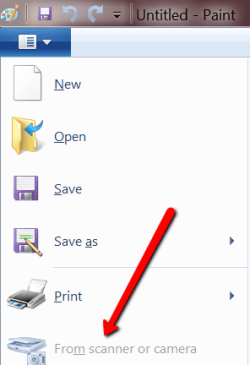
Try the Paint program. Maybe it works on a generic driver.
 

Attachments

  • 2012-10-13_2230.png
    2012-10-13_2230.png
    11.8 KB · Views: 3

My Computer

Computer Manufacturer/Model Number
HP, Dell, Gateway, Toshiba - 4 laptops and 2 desktops
OS
Vista, Windows7, Mint Mate, Zorin, Windows 8
CPU
from 1.6GHz Duo to i7
Monitor(s) Displays
2x HP w2207
Hard Drives
5x HDD, 7x SSD, 12x Externals
Keyboard
with trackball - no mices
Mouse
Trackball mice
Internet Speed
DSL 6000
Back
Top