Dell Studio laptop BSOD caused by ATI Radeon driver - what to use?

ortho85

New member
Local time
9:01 PM
Messages
17
4 year old Dell Studio XPS, running Windows 7 Professional.

Today, after no obvious changes (except a reboot) my Dell Studio XPS started blue-screening, with the error "Attempt to reset the display driver and recover from timeout failed". On reboot there were odd characters across the screen, Windows started to load, then BSOD again.

After much head-banging and time-wasting I read the BSOD message! I was able to boot into Safe Mode.

Uninstalling the driver for my ATI Mobility Radeon HD 4670 allows me to boot normally, but obviously with crap graphics.

I have tried reinstalling the drivers from the Dell site, and those from the AMD site, but both cause the same BSOD.

Are there other drivers I can use?
 

My Computer My Computer

At a glance

Windows 7 Professional 64 bitIntel i5 M5408gb
Computer Manufacturer/Model Number
Dell Studio XPS 1647
OS
Windows 7 Professional 64 bit
CPU
Intel i5 M540
Memory
8gb

My Computer My Computer

At a glance

Windows 7 Ultimate x64 SP1AMD Phenom 2 1090T2x8GB Kingston HyperX Fury Black 1600Mhz Unga...MSI GTX 970 Gaming 4G
Computer type
PC/Desktop
Computer Manufacturer/Model Number
Custom Build
OS
Windows 7 Ultimate x64 SP1
CPU
AMD Phenom 2 1090T
Motherboard
Gigabyte GA-890FXA-UD5
Memory
2x8GB Kingston HyperX Fury Black 1600Mhz Unganged
Graphics Card(s)
MSI GTX 970 Gaming 4G
Sound Card
Realtek On-Board HD 7.1 Audio / Logitech G35
Monitor(s) Displays
3xAcer GD245HQ
Screen Resolution
1920x1080
Hard Drives
Samsung 850 Pro 512GB SSD - OS /
WD Caviar Black SATA 3 - 1 TBx2 - Dynamic RAID 0 /
WD Caviar Green SATA 2 - 640GBx2 - Dynamic RAID 0 /
WD Caviar Green SATA 2 - 640GB - Internal Backup /
Seagate Barracude SATA 3 - 3TB - External Backup/ Sync
PSU
HighPower 1000W
Case
Cooler Master HAF 932
Cooling
Noctua NH-D14
Keyboard
Logitech G19
Mouse
Logitech G500
Internet Speed
100/4 Mbit Cable (100GB quota)
Antivirus
ZoneAlarm Extreme Security / MBAM Pro / MBAE Free / SAS Free
Browser
IE 11 - Firefox - Chrome
Other Info
Logitech F710/ G27/ G940/ Z5500 // TrackIR 5 // Nvidia 3D Surround Vision
Thanks, but I should have said that I have done that twice. First to 2 days back, then to 5 days back.

Both came to the BSOD again.

I'm thinking of restoring an image from last year to see if that helps, unless anyone has a better idea?

Cheers,

BK
 

My Computer My Computer

At a glance

Windows 7 Professional 64 bitIntel i5 M5408gb
Computer Manufacturer/Model Number
Dell Studio XPS 1647
OS
Windows 7 Professional 64 bit
CPU
Intel i5 M540
Memory
8gb
Try loading defaults in BIOS.

Clean the insides of your case, remove the GPU and reseat it. Check cables and whatnot.

Also:
Follow http://www.sevenforums.com/bsod-help-support/96879-blue-screen-death-bsod-posting-instructions.html
Make sure the zip file includes the dmp file/s. If not, configure a small memory dump - http://www.sevenforums.com/tutorials/174459-dump-files-configure-windows-create-bsod.html and wait/trigger another BSOD. then re-run the "Dm log collector" and attach the new report.

Get the report in Safe Mode if normal mode BSOD you.
 

My Computer My Computer

At a glance

Windows 7 Ultimate x64 SP1AMD Phenom 2 1090T2x8GB Kingston HyperX Fury Black 1600Mhz Unga...MSI GTX 970 Gaming 4G
Computer type
PC/Desktop
Computer Manufacturer/Model Number
Custom Build
OS
Windows 7 Ultimate x64 SP1
CPU
AMD Phenom 2 1090T
Motherboard
Gigabyte GA-890FXA-UD5
Memory
2x8GB Kingston HyperX Fury Black 1600Mhz Unganged
Graphics Card(s)
MSI GTX 970 Gaming 4G
Sound Card
Realtek On-Board HD 7.1 Audio / Logitech G35
Monitor(s) Displays
3xAcer GD245HQ
Screen Resolution
1920x1080
Hard Drives
Samsung 850 Pro 512GB SSD - OS /
WD Caviar Black SATA 3 - 1 TBx2 - Dynamic RAID 0 /
WD Caviar Green SATA 2 - 640GBx2 - Dynamic RAID 0 /
WD Caviar Green SATA 2 - 640GB - Internal Backup /
Seagate Barracude SATA 3 - 3TB - External Backup/ Sync
PSU
HighPower 1000W
Case
Cooler Master HAF 932
Cooling
Noctua NH-D14
Keyboard
Logitech G19
Mouse
Logitech G500
Internet Speed
100/4 Mbit Cable (100GB quota)
Antivirus
ZoneAlarm Extreme Security / MBAM Pro / MBAE Free / SAS Free
Browser
IE 11 - Firefox - Chrome
Other Info
Logitech F710/ G27/ G940/ Z5500 // TrackIR 5 // Nvidia 3D Surround Vision
Clean the insides of your case, remove the GPU and reseat it. Check cables and whatnot.
Kinda hard to do with a Notebook/Laptop, requires major disassembly to accomplish all that. [I have an XPS 17/1747.]
 

My Computer My Computer

At a glance

Windows 7 Ultimate 64-bit, Windows 8.1 64-bit...
Computer type
PC/Desktop
Computer Manufacturer/Model Number
Customs, Dell, Gateway, HP, Toshiba, Acer, ASUS
OS
Windows 7 Ultimate 64-bit, Windows 8.1 64-bit, Mac OS X 10.10, Linux Mint 17, Windows 10 Pro TP
Keyboard
Microsoft
Mouse
Microsoft

My Computer My Computer

At a glance

Windows 7 Ultimate x64 SP1AMD Phenom 2 1090T2x8GB Kingston HyperX Fury Black 1600Mhz Unga...MSI GTX 970 Gaming 4G
Computer type
PC/Desktop
Computer Manufacturer/Model Number
Custom Build
OS
Windows 7 Ultimate x64 SP1
CPU
AMD Phenom 2 1090T
Motherboard
Gigabyte GA-890FXA-UD5
Memory
2x8GB Kingston HyperX Fury Black 1600Mhz Unganged
Graphics Card(s)
MSI GTX 970 Gaming 4G
Sound Card
Realtek On-Board HD 7.1 Audio / Logitech G35
Monitor(s) Displays
3xAcer GD245HQ
Screen Resolution
1920x1080
Hard Drives
Samsung 850 Pro 512GB SSD - OS /
WD Caviar Black SATA 3 - 1 TBx2 - Dynamic RAID 0 /
WD Caviar Green SATA 2 - 640GBx2 - Dynamic RAID 0 /
WD Caviar Green SATA 2 - 640GB - Internal Backup /
Seagate Barracude SATA 3 - 3TB - External Backup/ Sync
PSU
HighPower 1000W
Case
Cooler Master HAF 932
Cooling
Noctua NH-D14
Keyboard
Logitech G19
Mouse
Logitech G500
Internet Speed
100/4 Mbit Cable (100GB quota)
Antivirus
ZoneAlarm Extreme Security / MBAM Pro / MBAE Free / SAS Free
Browser
IE 11 - Firefox - Chrome
Other Info
Logitech F710/ G27/ G940/ Z5500 // TrackIR 5 // Nvidia 3D Surround Vision
Hello ortho I understand you need to clean the laptop without having to disassemble it. Very occasionally one finds a laptop that the fan can be removed without disturbing the case but I have only ever come across a few.

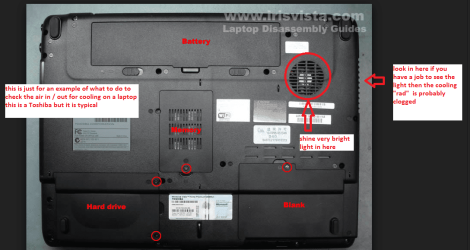
Here is a little ditty of mine please follow the instructions especially the ones in RED

CLEANING A LAPTOP FAN & COOLER RAD

The thing you do is toturn over the laptop (remove the battery) and shine a very bright light intothe air intake aperture (you will see the fan there) and then while doing thatlook at the outlet vent on the end of the laptop you should see the light quiteclearly shining through the cooling " radiator" - if not it willbe partially or completely clogged and will need cleaning as will probably thefan opening and the fan blades.

You can clean the fan andradiator by blowing it out using a compressed air can in short burstsfrom the fan aperture and if the clogging is really bad or quite visible youcan loosen it GENTLY by inserting some chinelle craft wires ( they look likepipe cleaners) .
If you like you can buy one of those really cheap HOGS HAIR artists brushes to loosen the crud on the fan while it is stationary.

BUT ONE WORD OF WARNING DONOT blow the air into the fan opening without inserting say a plastic rod orlarge cable tie to stop the fan from spinning as the air blast will spin thefan at a very high speed that it is not designed to take and may wreck thebearing!!
My pics are for anexample only and of a Toshiba but laptops are usually set up the same way
 

Attachments

  • LAPTOP VENTING.PNG
    LAPTOP VENTING.PNG
    171.1 KB · Views: 0
  • LAPBOARD.PNG
    LAPBOARD.PNG
    372.4 KB · Views: 0
  • CHINELLE.PNG
    CHINELLE.PNG
    450.3 KB · Views: 0

My Computer My Computer

At a glance

Desk1 7 Home Prem / Desk2 10 Pro / Main lap A...Desk1 i5 3750K / Laptop i7 GTX 860M / Desk2 i...Desk1 8GB (1866) / Desk2 16GB (1333) / Laptop...Desk 1& 2NVidia GTX 650 & Laptops on board Intel
Computer type
PC/Desktop
Computer Manufacturer/Model Number
Own build (new) Desk1 / Asus ROG Win 7 / Desk2 1st build
OS
Desk1 7 Home Prem / Desk2 10 Pro / Main lap Asus ROG 10 Pro 2 laptop Toshiba 7 Pro Asus P2520 7 & 10
CPU
Desk1 i5 3750K / Laptop i7 GTX 860M / Desk2 i5 2500
Motherboard
Desk1 Asus P877-V / Desk2 Gigabyte H67 UD3H / Laptop ?
Memory
Desk1 8GB (1866) / Desk2 16GB (1333) / Laptop 8Gb DDR3
Graphics Card(s)
Desk 1& 2NVidia GTX 650 & Laptops on board Intel
Sound Card
Desk 1 & 2 -XONAR DG Realtek High Def audio Laptop
Monitor(s) Displays
Desk 1 Benq HD 2450 / Desk2 Philips 24" / Laptop 17.5"
Screen Resolution
1920x1080 D1 & D2 & Laptop 1
Hard Drives
Desk1 Samsung 120GB 830 SSD
Asus ROG 256GB 850 Pro SSD
Desk2 Samsung 840 256 SSD
Toshiba 120GB EVO
PSU
Desk 1 Corsair HX 1050/ Laptop ? / Desk 2 Corsair HX 650
Case
Desk 1 Cooler HAF XM ? Toshiba laptop / Desk2 Coolermaster
Cooling
Fans on all Desk1 -2 Desk2 - all Coolermasters 5 Laptop ?
Keyboard
Desk 1 MS Sidewinder X6 Desk 2 MS Sidewinder X 4
Mouse
Desk 1&2 - Gigabyte MS 900 gamer - laptop - Logitec wireless
Internet Speed
ADSL2+
Other Info
One other Desktop (tester) and spare Toshba laptop both with SSD's
Running Kaspersky 2016 ISS on all machines config'd identically
Logitec audio stereo systems on each machine (x3)
Canon MG5250MFC
Router/modem TP-Link running WPA2SK
Back
Top