DELL win7 Upgrade

zacdolski

New member
Local time
5:04 AM
Messages
5
Hi all,

I have my upgrade disk from dell recently as my sis brought a new lappy. But the problem is she is not interested in upgrading. Can i upgrade my other com instead of the dell one? And my com is running win xp. Can i change the OS and upgrade it?

When dell send the disk it comes with a "UPGRADE ASSISTANT" DVD!!!
My com is DIY type, so can i still use it?

Thanks in advance for answering!
 

My Computer

Computer Manufacturer/Model Number
DIY
OS
XP
Motherboard
AMD Phenom(tm) ll X3 720
Memory
784 MHz, 3.25GB of RAM
Graphics Card(s)
NVIDIA Geforce GTX 260
Screen Resolution
1440 x 900
Hi all,

I have my upgrade disk from dell recently as my sis brought a new lappy. But the problem is she is not interested in upgrading. Can i upgrade my other com instead of the dell one? And my com is running win xp. Can i change the OS and upgrade it?

When dell send the disk it comes with a "UPGRADE ASSISTANT" DVD!!!

Hi and welcome

we need more info on the computer you want to upgrade. Please fill in your system specs in the box lower left corner of your post. See pic

thanks

Ken
 
Last edited:

My Computer

Computer Manufacturer/Model Number
HP Pavillion dv-7 1005 Tx
OS
Win 8 Release candidate 8400
CPU
[email protected]
Memory
4 gigs
Graphics Card(s)
Nvidia 9600M
Sound Card
HD built-in
Monitor(s) Displays
17" Wxga
Screen Resolution
1440x900
Cooling
none
Internet Speed
45Mb down 5Mb up
You can't "upgrade" from XP to Windows 7, even with a retail Windows 7 disc. You would have to do a clean install.

At one time, I think Dell upgrade discs were linked to the BIOS of the PC and so would expect to see a particular BIOS on the machine to be upgraded--a Dell BIOS of some type.

I would guess you are out of luck, but no harm in trying. Make sure you can recover. You would also face the activation issue, which might be a problem in this case.
 

My Computer

Computer type
PC/Desktop
Computer Manufacturer/Model Number
Ignatz Special; 4 speed manual gearbox; factory air conditioning; one of one
OS
Windows 7 Home Premium SP1, 64-bit
CPU
Intel Skylake i5-6600K, not overclocked
Motherboard
AsRock Z170M Extreme 4, micro ATX
Memory
8 GB HyperX DDR4-2666 (2 x 4 GB)
Graphics Card(s)
none; graphics are integrated on CPU
Sound Card
onboard: Realtek ALC1150; external: USB Behringer UF0-202
Monitor(s) Displays
Dell S2340M 23 inch IPS
Screen Resolution
1600 x 900
Hard Drives
System: Crucial MX100 series SSD, 128 GB;
Data: Samsung Spinpoint 103SJ, 1 TB;
Backup: WD Caviar Green WD30EZRX-00D8PB0, 3 TB
PSU
Rosewill SilentNight 500 watt fanless, semi-modular
Case
Antec Solo II
Cooling
Noctua NH-U12S; Noctua F12 intake, Noctua S12A exhaust
Keyboard
Microsoft 200 6JH-00001 USB
Mouse
Dell or Microsoft optical wired; USB
Antivirus
Microsoft Security Essentials and Malwarebytes Premium
Browser
Pale Moon
Other Info
All fans PWM; speeds at idle: CPU circa 500 rpm; intake circa 600 rpm; exhaust circa 600 rpm; CPU temps 27 idle and 47 C load in a warm room (27 C/81 F) when running Intel Extreme Tuning Utility stress test.
I strongly doubt MS would allow Upgrade Kit keys to be useable on any other than the hardware which it is intended to Upgrade.

They can however be used for formatted clean installs from boot as repeatedly confirmed.

If they aren't able to lock the key to the specific machine in advance since it isn't installed yet and hasn't a hardware signature, then they must have locked it to the Vista key somehow.

If not and it's an OEM key that activates on any hardware it will then be locked to that hardware for life.

If it is retail Upgrade version, then it's quite a giveaway since it can migrate for life.
 
Last edited:
I requested a disc from Dell for my laptop, but ended up using it to install Win7 on the computer that I built. Worked like a charm. I did a clean install, though.
You only need the DVD that has the operating system on it. Install it like you would install any other copy of Windows.
 

My Computer

OS
Windows 7 Home Premium x64
CPU
AMD Phenom II X4 955 BE @ 3.8 GHz
Motherboard
Gigabyte GA-890FXA-UD5
Memory
G.Skill Pi 2x2GB DDR3-1600 @ 6-7-6-20-1T
Graphics Card(s)
Gigabyte NVIDIA GeForce GTX 470
Sound Card
SB Audigy 2 and Realtek on-board
Monitor(s) Displays
LG 21.5" W2253TQ
Screen Resolution
1920x1080
Hard Drives
OCZ Vertex 2 120GB --
Seagate 7200.12 500GB --
Seagate 7200.7 120GB
PSU
Thermaltake 750W W0229RU
Case
Cooler Master Storm Sniper Black Edition
Cooling
Tuniq Tower 120 Extreme
Keyboard
Logitech G110
Mouse
Logitech G500
I requested a disc from Dell for my laptop, but ended up using it to install Win7 on the computer that I built. Worked like a charm. I did a clean install, though.
You only need the DVD that has the operating system on it. Install it like you would install any other copy of Windows.


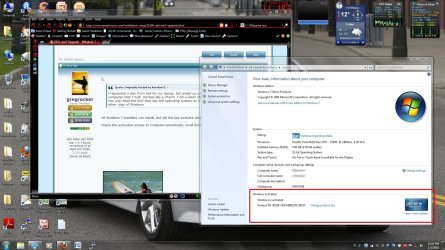
All Win7 installers can install, but did the key activate when you inserted it on different hardware?

Check the activation status at Computer>Downloads, scroll down.
 

Attachments

  • screenshot.01-01-2010 23.10.20.jpg
    screenshot.01-01-2010 23.10.20.jpg
    253.1 KB · Views: 200

My Computer

OS
Windows 7 Home Premium x64
CPU
AMD Phenom II X4 955 BE @ 3.8 GHz
Motherboard
Gigabyte GA-890FXA-UD5
Memory
G.Skill Pi 2x2GB DDR3-1600 @ 6-7-6-20-1T
Graphics Card(s)
Gigabyte NVIDIA GeForce GTX 470
Sound Card
SB Audigy 2 and Realtek on-board
Monitor(s) Displays
LG 21.5" W2253TQ
Screen Resolution
1920x1080
Hard Drives
OCZ Vertex 2 120GB --
Seagate 7200.12 500GB --
Seagate 7200.7 120GB
PSU
Thermaltake 750W W0229RU
Case
Cooler Master Storm Sniper Black Edition
Cooling
Tuniq Tower 120 Extreme
Keyboard
Logitech G110
Mouse
Logitech G500
Korn bro,

Do you mind advicing me on the way to install it? Can i use it as i am using win XP now? Or do i need to install a Win Vista first before upgrading it? What is a clean install. Pardon me for asking so much, i am not good with computer or such. Thanks in advance!
 

My Computer

Computer Manufacturer/Model Number
DIY
OS
XP
Motherboard
AMD Phenom(tm) ll X3 720
Memory
784 MHz, 3.25GB of RAM
Graphics Card(s)
NVIDIA Geforce GTX 260
Screen Resolution
1440 x 900
Thanks alot gre!

Ur help is much appreciated. Now i have to find my way to get hold of a win Vista installation disc first before i do the clean install!
 

My Computer

Computer Manufacturer/Model Number
DIY
OS
XP
Motherboard
AMD Phenom(tm) ll X3 720
Memory
784 MHz, 3.25GB of RAM
Graphics Card(s)
NVIDIA Geforce GTX 260
Screen Resolution
1440 x 900
Thanks alot gre!

Ur help is much appreciated. Now i have to find my way to get hold of a win Vista installation disc first before i do the clean install!

Remember you don't have to install Vista as there is a workaround in the tutorial to avoid that.

You just need to have a XP/Vista license on hand to qualify for Upgrade. MS uses the honor system.
 
So u mean i just need to get a Vista/XP license on hand to qualify for that upgrade. I doesnt need to install it to do the clean installation for the win7?
 

My Computer

Computer Manufacturer/Model Number
DIY
OS
XP
Motherboard
AMD Phenom(tm) ll X3 720
Memory
784 MHz, 3.25GB of RAM
Graphics Card(s)
NVIDIA Geforce GTX 260
Screen Resolution
1440 x 900
Back
Top