Dell Windows 7 Boot Disk will not function (0xc0000001)

bbowring

New member
Local time
3:10 AM
Messages
9
Location
Melbourne, Victoria, Australia
Hi All,

I'm running into a significant amount of trouble trying to re-install my copy of Windows 7 Professional (x64). I recieved my new Dell Studio 1557 yesterday, and was installing all my new software etc only to be met with a various and (pretty much) unsolvable blue screen error about 12 hours into the process.

Anyway, after an agonising few hours on the phone with Dell Customer Support, they suggested that I do a clean/manual install of the O/S from the Boot Disk I was provided.

I have attempted to do this several times now, selecting F12 as the computer restarts and choosing to boot from CD/DVD drive. However, each time I am met with this error:

0xc0000001

FILE: \windows\system32\boot\winload.exe

"The selected entry could not be loaded..."
Would copying the boot CD contents to a USB HDD, then booting from there help?

If anyone is able to help me out with this, that would be fantastic. It's so frustrating that I just bought a new system, and already it's died!!!!

Cheers,

Ben.
 

My Computer

Computer Manufacturer/Model Number
Dell Studio 1557
OS
Windows 7 Professional (64 bit)

My Computer

Computer Manufacturer/Model Number
Custom
OS
Windows 7 Professional x64
CPU
Intel i7 2600K OC'd @ 4620 MHz
Motherboard
Asus P8Z68-V Pro
Memory
16GB GSkill Sniper 2133 Mhz (4x4GB)
Graphics Card(s)
EVGA GeForce GTX 480 SuperClocked+
Sound Card
Realtek High Definition Audio
Monitor(s) Displays
2x Acer S273HLbmii 27"
Screen Resolution
2 x 1920x1080
Hard Drives
64GB Crucial M4 SSD

Storage: Hitachi 1TB 5400RPM, Samsung 1.5TB 5400RPM
PSU
Corsair HW Series 750w (modular)
Case
Cooler Master HAF 932 Advanced Blue Edition
Cooling
CM Hyper 212+ CPU cooler, 3x 230mm + 1x 140mm case fans
Keyboard
Logitech MK320 (wireless)
Mouse
Logitech MK320 (wireless)
Internet Speed
30 Mb/s : 2 Mb/s
Thanks for the quick reply Jonathan!

I will try and give that a go, although I'm going to have to go out and buy a new USB for the job as the largest I have is 4GB :(

Just a quick question about the disk potentially being a dud. I just inserted the disk into my girlfriend's working laptop (running Windows Vista) and I can view the disk's contents with no problems using Windows Explorer. Does this give me any indication as to whether the disk is corrupt or not?

Cheers,

Ben.

UPDATE: I just succesfully booted from the CD to the Windows 7 setup menu on my girlfirend's computer, so clearly the problem is isolated to my Studio 1557. Does this help narrow down what the problem might be?
 
Last edited:

My Computer

Computer Manufacturer/Model Number
Dell Studio 1557
OS
Windows 7 Professional (64 bit)
I made my first install USB on a 4gb USB Flash drive.
 

My Computer

Computer type
PC/Desktop
Computer Manufacturer/Model Number
Built them myself, Science Experiments !
OS
Win7 Enterprise, Win7 x86 (Ult 7600), Win7 x64 Ult 7600, TechNet RTM on AMD x64 (2.8Ghz)
CPU
AMD fx8350 4ghz, AMD-32 2400mhz, AMD-64 3200mhz, AMDx64 2.8G
Motherboard
SIS 755, ECS-K8M890M-M (Ult 7600), GigaByte & others
Memory
2gb, 4gb on the Ult 7600, 4gb on Technet RTM, 32gb on FX8350
Graphics Card(s)
Draw my own Graphics, several nVidia cards
Sound Card
on motherboard
Monitor(s) Displays
19" flat scr, 28" I-Inc widescr,22" Emprex Widescr, 23" Acer
Screen Resolution
1280 x 1024, 1440 x 900, 1920 x 1080
Hard Drives
6 pata Ide HD's & 2 Sata HD's
added 80gb external on Ult 7600 computer,
numerous extra 1tb, 2TB, 3Tb SATA HD's
A collection of ext HD Docks w/ HDs
PSU
430w, 550w, 600w, 700, 800, etc
Case
All Generic Full Towers
Cooling
Open Air & a few fans, some w/ colored LEDs
Keyboard
Compaq & Dell recycled from GoodWill
Mouse
Made in China Optical Wired Mouse
Internet Speed
Fast Cable InterNet
Antivirus
AVG Free on 24 different Desktops, NO Problems!
Browser
IE 8 is preferred, but use FireFox sometimes
Other Info
Linksys Routers, switches, & Hubs
Too Many USB Flash Drives to count, Biggest is 64GB !
Eight computers in my home network.
Sixteen computers at my business network.
Linked via TeamViewer !
Lots of old used spare computer parts everywhere!
DocBrown,

How large was the .iso file that you used? Currently, the one I am creating for Win7 Pro is set to be just under 5.9GB. As my USB key is only 4GB, I'm assuming it won't fit?

Is there any way that I can compress the .iso image, so that it is below 4GB? or, alternatively, is there any way to spread the data across 2 x 4GB usb drives?

Cheers,

Ben
 

My Computer

Computer Manufacturer/Model Number
Dell Studio 1557
OS
Windows 7 Professional (64 bit)
Use Method 2 of the tutorial. An official copy should not be more than about 3.5 GB. My imagex'd 32 and 64 bit versions is only 3.82 GB.
 

My Computer

Computer Manufacturer/Model Number
Custom
OS
Windows 7 Professional x64
CPU
Intel i7 2600K OC'd @ 4620 MHz
Motherboard
Asus P8Z68-V Pro
Memory
16GB GSkill Sniper 2133 Mhz (4x4GB)
Graphics Card(s)
EVGA GeForce GTX 480 SuperClocked+
Sound Card
Realtek High Definition Audio
Monitor(s) Displays
2x Acer S273HLbmii 27"
Screen Resolution
2 x 1920x1080
Hard Drives
64GB Crucial M4 SSD

Storage: Hitachi 1TB 5400RPM, Samsung 1.5TB 5400RPM
PSU
Corsair HW Series 750w (modular)
Case
Cooler Master HAF 932 Advanced Blue Edition
Cooling
CM Hyper 212+ CPU cooler, 3x 230mm + 1x 140mm case fans
Keyboard
Logitech MK320 (wireless)
Mouse
Logitech MK320 (wireless)
Internet Speed
30 Mb/s : 2 Mb/s
Your's must be loaded with Dell Bloatware, etc. That's why it is bigger that the 4gb.

My win7 ultimate from TechNet was 3.149gb. NO Bloatware :rolleyes:
 

My Computer

Computer type
PC/Desktop
Computer Manufacturer/Model Number
Built them myself, Science Experiments !
OS
Win7 Enterprise, Win7 x86 (Ult 7600), Win7 x64 Ult 7600, TechNet RTM on AMD x64 (2.8Ghz)
CPU
AMD fx8350 4ghz, AMD-32 2400mhz, AMD-64 3200mhz, AMDx64 2.8G
Motherboard
SIS 755, ECS-K8M890M-M (Ult 7600), GigaByte & others
Memory
2gb, 4gb on the Ult 7600, 4gb on Technet RTM, 32gb on FX8350
Graphics Card(s)
Draw my own Graphics, several nVidia cards
Sound Card
on motherboard
Monitor(s) Displays
19" flat scr, 28" I-Inc widescr,22" Emprex Widescr, 23" Acer
Screen Resolution
1280 x 1024, 1440 x 900, 1920 x 1080
Hard Drives
6 pata Ide HD's & 2 Sata HD's
added 80gb external on Ult 7600 computer,
numerous extra 1tb, 2TB, 3Tb SATA HD's
A collection of ext HD Docks w/ HDs
PSU
430w, 550w, 600w, 700, 800, etc
Case
All Generic Full Towers
Cooling
Open Air & a few fans, some w/ colored LEDs
Keyboard
Compaq & Dell recycled from GoodWill
Mouse
Made in China Optical Wired Mouse
Internet Speed
Fast Cable InterNet
Antivirus
AVG Free on 24 different Desktops, NO Problems!
Browser
IE 8 is preferred, but use FireFox sometimes
Other Info
Linksys Routers, switches, & Hubs
Too Many USB Flash Drives to count, Biggest is 64GB !
Eight computers in my home network.
Sixteen computers at my business network.
Linked via TeamViewer !
Lots of old used spare computer parts everywhere!
You may be able to delete some of the bloatware. If you aren't 100% sure you know the files/programs are bloatware, don't delete them.

It may be a good idea to create a backup of the installation files first, in case you accidentally delete a necessary file.
 

My Computer

Computer Manufacturer/Model Number
Custom
OS
Windows 7 Professional x64
CPU
Intel i7 2600K OC'd @ 4620 MHz
Motherboard
Asus P8Z68-V Pro
Memory
16GB GSkill Sniper 2133 Mhz (4x4GB)
Graphics Card(s)
EVGA GeForce GTX 480 SuperClocked+
Sound Card
Realtek High Definition Audio
Monitor(s) Displays
2x Acer S273HLbmii 27"
Screen Resolution
2 x 1920x1080
Hard Drives
64GB Crucial M4 SSD

Storage: Hitachi 1TB 5400RPM, Samsung 1.5TB 5400RPM
PSU
Corsair HW Series 750w (modular)
Case
Cooler Master HAF 932 Advanced Blue Edition
Cooling
CM Hyper 212+ CPU cooler, 3x 230mm + 1x 140mm case fans
Keyboard
Logitech MK320 (wireless)
Mouse
Logitech MK320 (wireless)
Internet Speed
30 Mb/s : 2 Mb/s
Thanks for all the replies everyone,

I just had a look through all the folders, and there doesn't appear to be any obvious bloatware. All of the computer's drivers, software etc came on seperate disks, so I think this one is just the O/S.

The main problem is that the install.wim file is over 4GB by itself!

Is there any way around this, or will I have to buy a new USB key?

Cheers,
Ben
 

My Computer

Computer Manufacturer/Model Number
Dell Studio 1557
OS
Windows 7 Professional (64 bit)
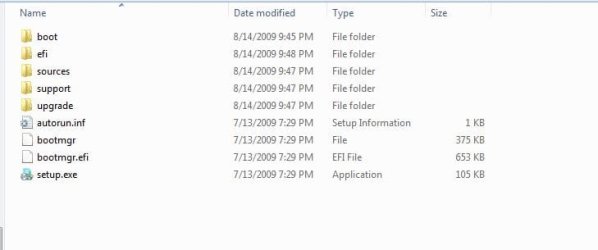
Here are the files & folders on my win7 ult x64


Have you tried setting your Bios to boot from CD/DVD First ?
 

Attachments

  • win7_ult_x64_Files.JPG
    win7_ult_x64_Files.JPG
    24.2 KB · Views: 140

My Computer

Computer type
PC/Desktop
Computer Manufacturer/Model Number
Built them myself, Science Experiments !
OS
Win7 Enterprise, Win7 x86 (Ult 7600), Win7 x64 Ult 7600, TechNet RTM on AMD x64 (2.8Ghz)
CPU
AMD fx8350 4ghz, AMD-32 2400mhz, AMD-64 3200mhz, AMDx64 2.8G
Motherboard
SIS 755, ECS-K8M890M-M (Ult 7600), GigaByte & others
Memory
2gb, 4gb on the Ult 7600, 4gb on Technet RTM, 32gb on FX8350
Graphics Card(s)
Draw my own Graphics, several nVidia cards
Sound Card
on motherboard
Monitor(s) Displays
19" flat scr, 28" I-Inc widescr,22" Emprex Widescr, 23" Acer
Screen Resolution
1280 x 1024, 1440 x 900, 1920 x 1080
Hard Drives
6 pata Ide HD's & 2 Sata HD's
added 80gb external on Ult 7600 computer,
numerous extra 1tb, 2TB, 3Tb SATA HD's
A collection of ext HD Docks w/ HDs
PSU
430w, 550w, 600w, 700, 800, etc
Case
All Generic Full Towers
Cooling
Open Air & a few fans, some w/ colored LEDs
Keyboard
Compaq & Dell recycled from GoodWill
Mouse
Made in China Optical Wired Mouse
Internet Speed
Fast Cable InterNet
Antivirus
AVG Free on 24 different Desktops, NO Problems!
Browser
IE 8 is preferred, but use FireFox sometimes
Other Info
Linksys Routers, switches, & Hubs
Too Many USB Flash Drives to count, Biggest is 64GB !
Eight computers in my home network.
Sixteen computers at my business network.
Linked via TeamViewer !
Lots of old used spare computer parts everywhere!
Thanks for that DocBrown,

My folder structure is exactly the same as that, except for a folder called "langpacks". That was about 1.3GB and contained all the non-english translations (which I don't need) so I deleted it.

That still leaves me with around 4.5GB though.

My "sources" folder (which contains the majority of the large files) is 4.27GB. Here are the largest files in that folder:

Windows%207%20file%20list.JPG


Also, yes I've made sure I'm booting from the CD/DVD drive when trying to use the CD directly. The computer appears to get to the "booting" stage OK (it asks me whether I want to boot from CD/DVD, then moves to a "Windows is Loading Files" page, but crashes after that).
 

My Computer

Computer Manufacturer/Model Number
Dell Studio 1557
OS
Windows 7 Professional (64 bit)
Well I don't think you should go out and buy an 8GB thumb drive (around $15) just for the purpose of installing Windows 7. Unless you have another need for that drive, of course.

I would contact Dell and ask for new installation discs. They sent me the XP CDs for a machine 5 years old, and they didn't even charge shipping. I put in the service tag, and I was good to go.
 

My Computer

Computer Manufacturer/Model Number
Custom
OS
Windows 7 Professional x64
CPU
Intel i7 2600K OC'd @ 4620 MHz
Motherboard
Asus P8Z68-V Pro
Memory
16GB GSkill Sniper 2133 Mhz (4x4GB)
Graphics Card(s)
EVGA GeForce GTX 480 SuperClocked+
Sound Card
Realtek High Definition Audio
Monitor(s) Displays
2x Acer S273HLbmii 27"
Screen Resolution
2 x 1920x1080
Hard Drives
64GB Crucial M4 SSD

Storage: Hitachi 1TB 5400RPM, Samsung 1.5TB 5400RPM
PSU
Corsair HW Series 750w (modular)
Case
Cooler Master HAF 932 Advanced Blue Edition
Cooling
CM Hyper 212+ CPU cooler, 3x 230mm + 1x 140mm case fans
Keyboard
Logitech MK320 (wireless)
Mouse
Logitech MK320 (wireless)
Internet Speed
30 Mb/s : 2 Mb/s
Do you think it's a problem with the disc though? As I said in an earlier post, I was able to succesfully boot the installation CD in my girlfriend's Dell Inspiron Laptop, running Vista. This leads me to believe that it is probably a problem on specific laptop, rather than the disk itself (hopefully a problem with the CD drive, so a USB key will work!)

Also, to be frank, I'm thoroughly sick of dealing with Dell. I had an awful time getting the thing delivered, and they haven't been very helpful at all in helping me with this issue.

I think I might go out and pick up a USB key this afternoon. Despite the cost, I actually think it will be easier.
 

My Computer

Computer Manufacturer/Model Number
Dell Studio 1557
OS
Windows 7 Professional (64 bit)
Since you can get to the install screen on your girlfriend's computer, it might not be the DVD.. Do you have any extra things connected ? USB ? printers, ext HD's ? second monitor or TV ? Are you trying with just the bare basic computer ?
 

My Computer

Computer type
PC/Desktop
Computer Manufacturer/Model Number
Built them myself, Science Experiments !
OS
Win7 Enterprise, Win7 x86 (Ult 7600), Win7 x64 Ult 7600, TechNet RTM on AMD x64 (2.8Ghz)
CPU
AMD fx8350 4ghz, AMD-32 2400mhz, AMD-64 3200mhz, AMDx64 2.8G
Motherboard
SIS 755, ECS-K8M890M-M (Ult 7600), GigaByte & others
Memory
2gb, 4gb on the Ult 7600, 4gb on Technet RTM, 32gb on FX8350
Graphics Card(s)
Draw my own Graphics, several nVidia cards
Sound Card
on motherboard
Monitor(s) Displays
19" flat scr, 28" I-Inc widescr,22" Emprex Widescr, 23" Acer
Screen Resolution
1280 x 1024, 1440 x 900, 1920 x 1080
Hard Drives
6 pata Ide HD's & 2 Sata HD's
added 80gb external on Ult 7600 computer,
numerous extra 1tb, 2TB, 3Tb SATA HD's
A collection of ext HD Docks w/ HDs
PSU
430w, 550w, 600w, 700, 800, etc
Case
All Generic Full Towers
Cooling
Open Air & a few fans, some w/ colored LEDs
Keyboard
Compaq & Dell recycled from GoodWill
Mouse
Made in China Optical Wired Mouse
Internet Speed
Fast Cable InterNet
Antivirus
AVG Free on 24 different Desktops, NO Problems!
Browser
IE 8 is preferred, but use FireFox sometimes
Other Info
Linksys Routers, switches, & Hubs
Too Many USB Flash Drives to count, Biggest is 64GB !
Eight computers in my home network.
Sixteen computers at my business network.
Linked via TeamViewer !
Lots of old used spare computer parts everywhere!
Yeah, I've got absolutely nothing else connected externally except the A/C Adaptor. Also, I ran a full diagnostic test of the hardware earlier yesterday, and everything passed, so I don't think there are any internal hardware problems.
 

My Computer

Computer Manufacturer/Model Number
Dell Studio 1557
OS
Windows 7 Professional (64 bit)
Ben, this has me slightly puzzled. We must be missing some little detail.

How much memory (ram) does it have ? How many ram sticks ? size per stick ?
 

Attachments

  • Surprised.JPG
    Surprised.JPG
    21.6 KB · Views: 5

My Computer

Computer type
PC/Desktop
Computer Manufacturer/Model Number
Built them myself, Science Experiments !
OS
Win7 Enterprise, Win7 x86 (Ult 7600), Win7 x64 Ult 7600, TechNet RTM on AMD x64 (2.8Ghz)
CPU
AMD fx8350 4ghz, AMD-32 2400mhz, AMD-64 3200mhz, AMDx64 2.8G
Motherboard
SIS 755, ECS-K8M890M-M (Ult 7600), GigaByte & others
Memory
2gb, 4gb on the Ult 7600, 4gb on Technet RTM, 32gb on FX8350
Graphics Card(s)
Draw my own Graphics, several nVidia cards
Sound Card
on motherboard
Monitor(s) Displays
19" flat scr, 28" I-Inc widescr,22" Emprex Widescr, 23" Acer
Screen Resolution
1280 x 1024, 1440 x 900, 1920 x 1080
Hard Drives
6 pata Ide HD's & 2 Sata HD's
added 80gb external on Ult 7600 computer,
numerous extra 1tb, 2TB, 3Tb SATA HD's
A collection of ext HD Docks w/ HDs
PSU
430w, 550w, 600w, 700, 800, etc
Case
All Generic Full Towers
Cooling
Open Air & a few fans, some w/ colored LEDs
Keyboard
Compaq & Dell recycled from GoodWill
Mouse
Made in China Optical Wired Mouse
Internet Speed
Fast Cable InterNet
Antivirus
AVG Free on 24 different Desktops, NO Problems!
Browser
IE 8 is preferred, but use FireFox sometimes
Other Info
Linksys Routers, switches, & Hubs
Too Many USB Flash Drives to count, Biggest is 64GB !
Eight computers in my home network.
Sixteen computers at my business network.
Linked via TeamViewer !
Lots of old used spare computer parts everywhere!
RAM is: 4GB Dual-channel 1333MHz DDR3 SDRAM (2 x 2GB)

and yea, you're not the only one who is stumped! Me, you, and about 5 Dell technical support staff don't have ANY idea what's going on! :rolleyes:
 
Last edited:

My Computer

Computer Manufacturer/Model Number
Dell Studio 1557
OS
Windows 7 Professional (64 bit)
The Win7 ISO 32 bit is 2.43 gb.

Try extracting the files to the HD, then run Setup. Custom Install over current OS drive. Post back any errors.

If you can figure out which are the bloatware add-ons and remove, then boot installer from USB so you can wipe the HD and format before install. http://www.sevenforums.com/tutorials/2432-usb-windows-7-installation-key-drive-create.html

When you've had enough, you are entitled to RMA or refund from Dell. (My Dad got a lemon from them.) Let us know how they handle it.
 
Hey Guys,

I had another chat with a phone-tech guy from Dell yesterday evening, and I've now got a technician coming round to replace the hard drive in a few days. Seems like a pretty drastic measure, but hopefully a fresh HD will solve my problems! :huh:
 

My Computer

Computer Manufacturer/Model Number
Dell Studio 1557
OS
Windows 7 Professional (64 bit)
WoW,

Hard to believe they are coming to you, instead of saying ship it to Dell :shock:
 

My Computer

Computer type
PC/Desktop
Computer Manufacturer/Model Number
Built them myself, Science Experiments !
OS
Win7 Enterprise, Win7 x86 (Ult 7600), Win7 x64 Ult 7600, TechNet RTM on AMD x64 (2.8Ghz)
CPU
AMD fx8350 4ghz, AMD-32 2400mhz, AMD-64 3200mhz, AMDx64 2.8G
Motherboard
SIS 755, ECS-K8M890M-M (Ult 7600), GigaByte & others
Memory
2gb, 4gb on the Ult 7600, 4gb on Technet RTM, 32gb on FX8350
Graphics Card(s)
Draw my own Graphics, several nVidia cards
Sound Card
on motherboard
Monitor(s) Displays
19" flat scr, 28" I-Inc widescr,22" Emprex Widescr, 23" Acer
Screen Resolution
1280 x 1024, 1440 x 900, 1920 x 1080
Hard Drives
6 pata Ide HD's & 2 Sata HD's
added 80gb external on Ult 7600 computer,
numerous extra 1tb, 2TB, 3Tb SATA HD's
A collection of ext HD Docks w/ HDs
PSU
430w, 550w, 600w, 700, 800, etc
Case
All Generic Full Towers
Cooling
Open Air & a few fans, some w/ colored LEDs
Keyboard
Compaq & Dell recycled from GoodWill
Mouse
Made in China Optical Wired Mouse
Internet Speed
Fast Cable InterNet
Antivirus
AVG Free on 24 different Desktops, NO Problems!
Browser
IE 8 is preferred, but use FireFox sometimes
Other Info
Linksys Routers, switches, & Hubs
Too Many USB Flash Drives to count, Biggest is 64GB !
Eight computers in my home network.
Sixteen computers at my business network.
Linked via TeamViewer !
Lots of old used spare computer parts everywhere!
Back
Top